1. Einleitung
This manual provides essential information for the safe and efficient operation of your AUXUS iRis AX32LSP01-SM 32-inch Smart Android LED TV. Please read these instructions thoroughly before using the product and retain them for future reference.
The AUXUS iRis AX32LSP01-SM features a 32-inch HD Ready LED display, integrated Android operating system for smart functionality, wireless display capabilities, and multiple connectivity options. It is designed to provide an immersive viewing and interactive experience.

Abbildung 1.1: Vorderseite view of the AUXUS iRis 32-inch Smart Android LED TV, showcasing seine Anzeige.
2. Sicherheitshinweise
Beachten Sie die folgenden Sicherheitsvorkehrungen, um Schäden am Fernseher zu vermeiden und Ihre persönliche Sicherheit zu gewährleisten:
- Um Brände oder Stromschläge zu vermeiden, setzen Sie das Fernsehgerät weder Regen noch Feuchtigkeit aus.
- Öffnen Sie nicht den Fernseher.asing. Alle Wartungsarbeiten sind qualifiziertem Personal zu überlassen.
- Sorgen Sie für ausreichende Belüftung. Blockieren Sie keine Belüftungsöffnungen.
- Stellen Sie den Fernseher auf eine stabile, ebene Fläche, um zu verhindern, dass er herunterfällt.
- Schützen Sie das Netzkabel vor Beschädigungen durch Treten oder Einklemmen.
- Ziehen Sie bei Gewittern oder längerer Nichtbenutzung den Netzstecker des Fernsehers.
3. Packungsinhalt
Überprüfen Sie, ob alle Artikel im Paket vorhanden sind:
- 1 x AUXUS iRis 32-inch LED TV
- 1 x Tischständer (Set)
- 1 x Benutzerhandbuch (dieses Dokument)
- 1 x Garantiekarte
- 1 x Fernbedienung
4. Einrichtung
4.1 Auspacken
Carefully remove the TV and all accessories from the packaging. Retain the packaging materials for future transport or servicing.
4.2 Standinstallation
If using the table-top stand, attach the stand bases to the bottom of the TV using the provided screws. Ensure the stand is securely fastened before placing the TV on a flat, stable surface.
4.3 Wandmontage
The TV supports VESA-compatible wall mounts (not included). Consult a professional for wall mounting to ensure proper installation and safety.
4.4 Anschließen von Peripheriegeräten
Refer to the back panel diagram for port locations. Ensure the TV is powered off before making any connections.
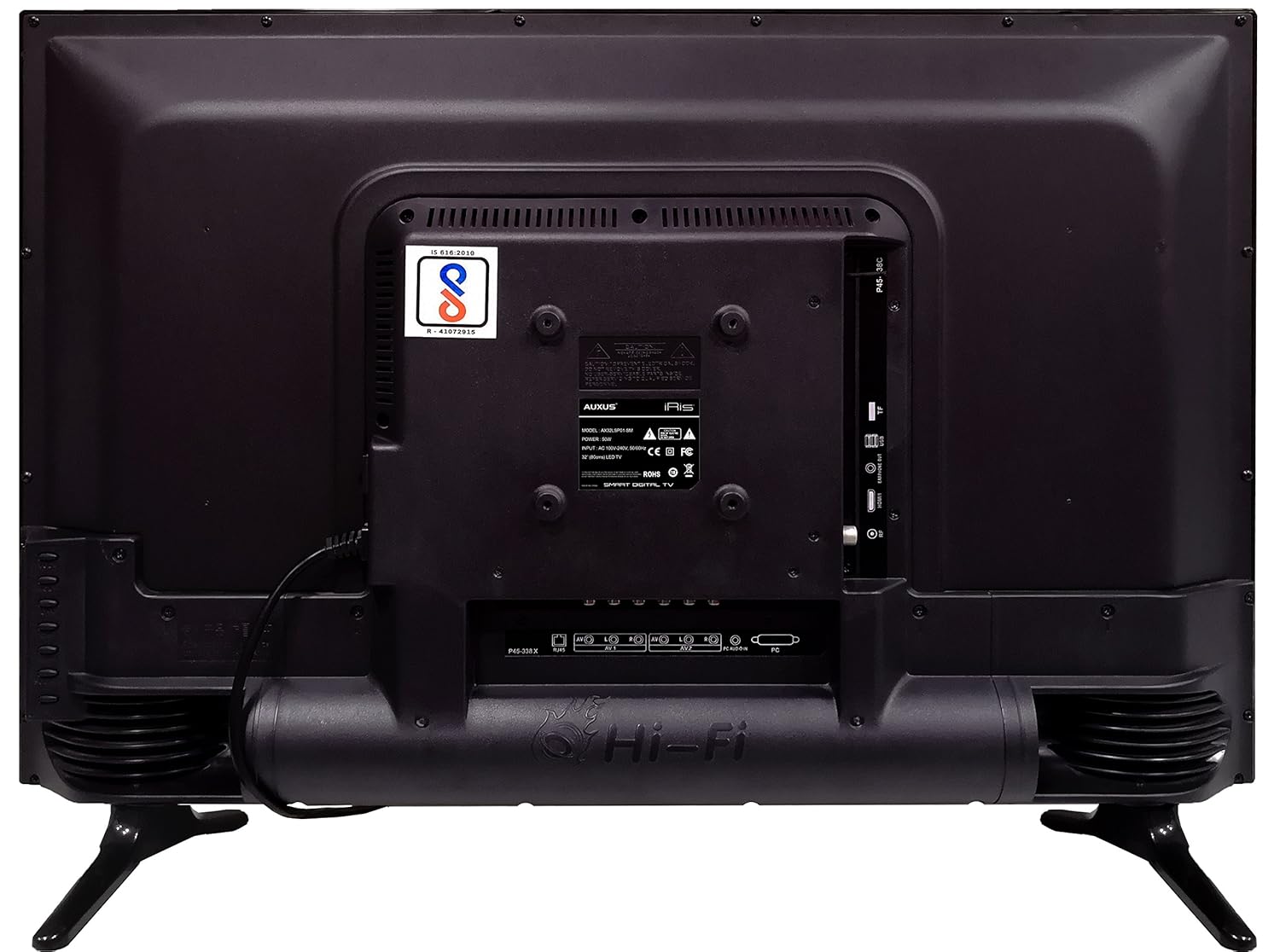
Abbildung 4.1: Rückseite des Fernsehers mit verschiedenen Eingangs-/Ausgangsanschlüssen.

Abbildung 4.2: Ausführlich view of the bottom interface ports.

Figure 4.3: Icons representing multiple connectivity options.
- Leistung: Schließen Sie das Netzkabel an den Fernseher und anschließend an eine Wandsteckdose an.
- Antenne/Kabel: Connect an antenna or cable TV signal to the RF port.
- USB: Insert USB drives for media playback or software updates into the USB ports. The TV has 2 USB ports.
- Ethernet (RJ45): Schließen Sie ein Ethernet-Kabel für eine kabelgebundene Internetverbindung an.
- AV (Audio/Video): Use RCA cables for older devices. The TV has AV1 and AV2 inputs.
- PC IN (VGA): Connect a computer using a VGA cable for video and a 3.5mm audio cable for sound (PC AUDIO IN).
- Kopfhörer: Schließen Sie Kopfhörer an die 3.5-mm-Klinkenbuchse an, um ungestört Musik hören zu können.
5. Bedienung des Fernsehers
5.1 Ersteinrichtung
- After connecting the power, press the Power button on the remote control or TV.
- Folgen Sie den Anweisungen auf dem Bildschirm, um Ihre Sprache, Ihr Land und Ihre Zeitzone auszuwählen.
- Connect to your network: Choose Wi-Fi and enter your password, or ensure an Ethernet cable is connected.
- Complete the channel scan if connecting an antenna/cable.
5.2-Fernbedienung
The remote control allows you to navigate menus, adjust volume, change channels, and access smart features. Familiarize yourself with its buttons for optimal use.
5.3 Smart-TV-Funktionen (Android-Betriebssystem)
Your TV runs on the Android operating system, providing access to a variety of applications and internet services.

Figure 5.1: TV displaying a smart interface, such as Netflix.
- Navigation: Use the directional pad and 'OK' button on the remote to browse the Android interface.
- Kabellose Anzeige: Utilize the built-in wireless display feature to mirror content from compatible smartphones or tablets to your TV.
- Internet Browsing & Apps: Connect to the internet to browse websites or download and use applications from the app store.
- Spielen: The Android platform supports various games, offering an adrenaline-pumping gaming experience.
5.4 Bild- und Toneinstellungen
Rufen Sie das Einstellungsmenü des Fernsehers auf, um Bild- und Toneinstellungen anzupassen.
- Bild: Passen Sie Helligkeit, Kontrast, Farbe und Schärfe an und wählen Sie Bildmodi (z. B. Standard, Dynamisch, Film).
- Klang: Optimize audio with settings for volume, balance, equalizer, and sound modes. The TV features 'Boomr Speakers' for enhanced audio output.
5.5 Auswahl der Eingangsquelle
Press the 'Source' or 'Input' button on your remote to switch between connected devices (HDMI 1, HDMI 2, AV 1, AV 2, PC, TV).
6. Wartung
6.1 Reinigung des Fernsehers
- Vor der Reinigung immer den Netzstecker des Fernsehers ziehen.
- Use a soft, dry cloth to wipe the screen and TV casing.
- For stubborn marks on the screen, use a screen cleaner specifically designed for LED displays, applied to the cloth, not directly to the screen.
- Vermeiden Sie die Verwendung von Scheuermitteln, Wachsen oder Lösungsmitteln.
6.2 Softwareaktualisierungen
Um eine optimale Leistung und den Zugriff auf die neuesten Funktionen zu gewährleisten, sollten Sie regelmäßig über das Einstellungsmenü Ihres Fernsehers auf Software-Updates prüfen.
7. Fehlerbehebung
Sollten Sie Probleme mit Ihrem Fernseher haben, beachten Sie bitte die folgenden häufigen Probleme und Lösungen:
| Problem | Mögliche Lösung |
|---|---|
| Kein Strom | Check if the power cord is securely connected and the power outlet is working. |
| Kein Bild, aber Ton ist vorhanden | Stellen Sie sicher, dass die richtige Eingangsquelle ausgewählt ist. Überprüfen Sie die Kabelverbindungen zu externen Geräten. |
| Kein Ton, aber ein Bild ist vorhanden. | Überprüfen Sie die Lautstärke und den Stummschaltungsstatus. Prüfen Sie die Audiokabelverbindungen. |
| Fernbedienung funktioniert nicht | Batterien austauschen. Sicherstellen, dass sich keine Hindernisse zwischen Fernbedienung und Fernseher befinden. |
| Android system hangs or is slow | Restart the TV by unplugging it for a few minutes. Close unused applications. |
| Netzwerkverbindungsprobleme | Check Wi-Fi password or Ethernet cable connection. Restart your router. |
8. Spezifikationen
| Besonderheit | Spezifikation |
|---|---|
| Marke | Zusatz |
| Modellname | AX32LSP01-SM |
| Bildschirmgröße | 32 Zoll (82 cm) |
| Display-Technologie | LED, IPS Panel |
| Auflösung | HD-fähig (1366 x 768p) |
| Viewing-Winkel | 178 Grad |
| Betriebssystem | Android |
| Digitale Speicherkapazität | 8 GB |
| RAM | 1 GB |
| Audioausgabemodus | Surround (Boomr Speakers) |
| HDMI-Anschlüsse | Mehrere |
| USB-Anschlüsse | 2 |
| Konnektivitätstechnologie | Ethernet, Wi-Fi (Wireless Display) |
| Andere Häfen | AV (RCA), PC IN (VGA), PC Audio In, Headphone (3.5mm), RF (Antenna) |
| Montagetyp | Wall Mount / Table Top Stand |
| Produktabmessungen (L x B x H) | 84 x 13 x 59 cm |
| Artikelgewicht | 6.5 kg |
9. Garantie und Support
Your AUXUS iRis AX32LSP01-SM TV comes with a warranty. Please refer to the included Warranty Card for specific terms, conditions, and duration of the warranty coverage.
For technical support, service requests, or further inquiries, please contact AUXUS customer service. Contact details can typically be found on the warranty card or the official AUXUS webWebsite.


