Einführung
Vielen Dank für Ihren Einkauf.asing the VONYX SPX-PA9210 Portable PA System. This manual provides essential information for the safe and efficient operation of your device. Please read it thoroughly before use and retain it for future reference.
Sicherheitshinweise
- Lesen Sie alle Anweisungen sorgfältig durch, bevor Sie das Gerät in Betrieb nehmen.
- Das Gerät sollte vor Wasser, Feuchtigkeit und extremen Temperaturen geschützt werden.
- Öffnen Sie nicht das casing; alle Wartungsarbeiten sind qualifiziertem Personal zu überlassen.
- Verwenden Sie zum Laden ausschließlich das angegebene Netzteil.
- Sorgen Sie für ausreichende Belüftung, um eine Überhitzung zu vermeiden.
- Um Gehörschäden vorzubeugen, vermeiden Sie eine längere Einwirkung hoher Lautstärken.
Packungsinhalt
Überprüfen Sie, ob alle Artikel im Paket vorhanden sind:
- VONYX SPX-PA9210 Portable PA System Unit
- 2 x UHF-Funkmikrofone
- Netzteil/Ladekabel
- Benutzerhandbuch (dieses Dokument)
Produkt überview
The VONYX SPX-PA9210 is a portable PA system designed for various audio applications. It features integrated speakers, media playback options, and wireless microphones for versatile use.
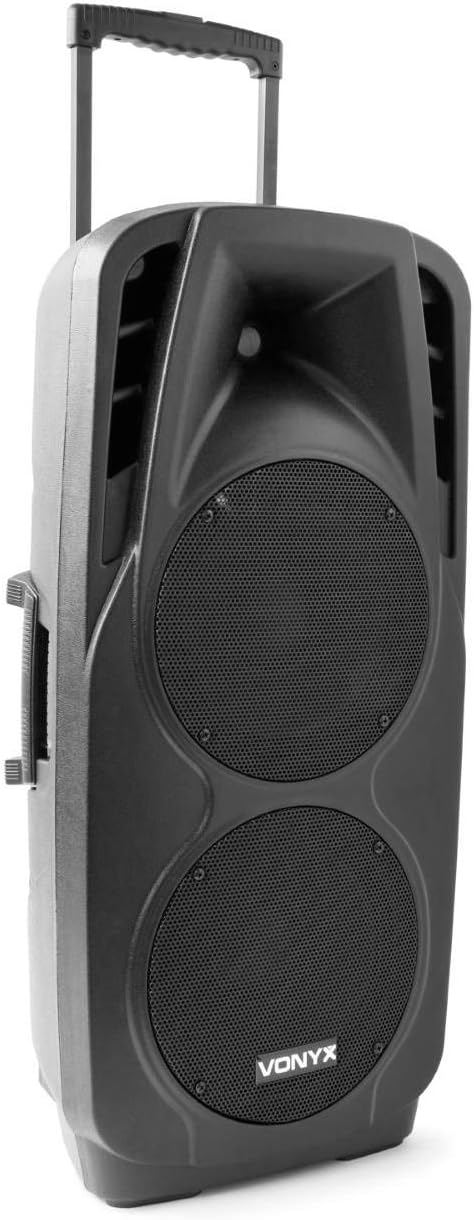
An image showing the VONYX SPX-PA9210 portable PA system. It features a black casing, two large speaker grilles on the front, and a retractable handle at the top for easy transport. A side handle is also visible.
Hauptmerkmale:
- Integrated 2x 10-inch speakers with titanium tweeter controller.
- Built-in media player with USB and SD/MMC card slots.
- Bluetooth-Verbindung für drahtloses Audiostreaming.
- High-performance 12V/7A rechargeable battery for 4-6 hours of autonomy.
- Two UHF wireless microphones with up to 50m range.
- Integrated trolley with telescopic handle and wheels for portability.
- LCD screen for media information display.
Aufstellen
1. Erstes Aufladen
Before first use, fully charge the internal 12V/7A battery. Connect the provided power adapter to the charging port on the PA system and then to a suitable power outlet. The charging indicator will show the charging status. A full charge typically provides 4-6 hours of operation.
2. Ein-/Ausschalten
- To power on the unit, locate the power switch (usually on the rear or control panel) and set it to the "ON" position.
- To power off, set the switch to the "OFF" position.
3. Mikrofon-Setup
- Insert fresh batteries into the two UHF wireless microphones.
- Turn on the microphones. They should automatically connect to the PA system.
- Adjust the microphone volume on the PA system's control panel. The wireless range is up to 50 meters.
Bedienungsanleitung
1. Medienwiedergabe (USB/SD/MMC)
- Insert a USB flash drive or an SD/MMC card into the corresponding slot on the control panel.
- The system will automatically detect the media and begin playback, or you may need to select the input source using the "Mode" button.
- Use the playback controls (Play/Pause, Next, Previous) on the control panel to manage your music.
- The LCD screen will display track information.
2. Bluetooth-Kopplung
- Press the "Mode" button on the PA system until "Mode" button on the PA system until "Bluetooth" is selected.
- Aktivieren Sie Bluetooth auf Ihrem Smartphone, Tablet oder einem anderen Bluetooth-fähigen Gerät und suchen Sie nach verfügbaren Geräten.
- Select "VONYX SPX-PA9210" (or similar name) from the list to pair.
- Once paired, you can stream audio wirelessly from your device to the PA system.
3. Lautstärke- und Klangregler
- Adjust the master volume knob to control the overall sound output.
- Separate volume controls are available for microphones and media playback.
- Use the bass and treble controls (if available) to adjust the tone of the audio.
Wartung
1. Reinigung
Wipe the exterior of the unit with a soft, dry cloth. Do not use abrasive cleaners or solvents. Ensure no liquids enter the device.
2. Batteriepflege
- Um die Lebensdauer des Akkus zu verlängern, vermeiden Sie häufiges vollständiges Entladen des Akkus.
- Laden Sie das Gerät regelmäßig auf, auch wenn es nicht benutzt wird, um die Batterieleistung zu erhalten.
- Bewahren Sie das Gerät an einem kühlen, trockenen Ort auf, wenn es längere Zeit nicht benutzt wird.
Fehlerbehebung
- Kein Strom: Ensure the unit is charged or connected to a power source, and the power switch is in the "ON" position.
- Kein Ton: Check all volume controls (master, microphone, media player). Ensure the correct input source is selected. Verify microphone batteries.
- Bluetooth stellt keine Verbindung her: Ensure the PA system is in Bluetooth mode and discoverable. Turn off and on Bluetooth on your device and try pairing again. Move closer to the PA system.
- Verzerrter Klang: Reduce the volume. Check audio cables if using wired inputs. Ensure microphones are not too close to the speakers (feedback).
Technische Daten
| Marke | VONYX |
| Modellnummer | Sky-170.082 (SPX-PA9210) |
| Abmessungen (L x B x H) | 27 x 38.5 x 81 cm |
| Gewicht | 16.25 kg |
| Konnektivitätstechnologie | Bluetooth, USB |
| Empfohlene Produktverwendung | Smartphones oder Tablets |
| Besondere Merkmale | Bluetooth, USB Port, Portable, LCD Screen |
| Stromquelle | Wireless (Internal Battery) |
| Batterie | 12V/7A, 4-6 hours autonomy |
| Material | Acrylnitril-Butadien-Styrol (ABS) |
| Anzahl der Kanäle | 5 |
| Lautsprecher | 2x 10-inch woofers, Titanium tweeter controller |
| Mikrofone | 2x UHF Wireless Microphones (up to 50m range) |
Garantie und Support
For warranty information and technical support, please refer to the documentation provided with your purchase or contact VONYX customer service directly.
Ersatzteilverfügbarkeit: Informationen zur Verfügbarkeit von Ersatzteilen für dieses Produkt sind derzeit nicht verfügbar.
Software-Updates: Information regarding guaranteed software updates for this product is currently unavailable.


