Einführung
This manual provides detailed instructions for the TECWARE Phantom 87 Key RGB Mechanical Gaming Keyboard. Please read this manual thoroughly before using the product to ensure proper operation and to maximize your experience.
Sicherheitshinweise
- Setzen Sie die Tastatur keinen Flüssigkeiten oder übermäßiger Feuchtigkeit aus.
- Vermeiden Sie extreme Temperaturen.
- Versuchen Sie nicht, die Tastatur zu zerlegen oder zu verändern. Dadurch kann Ihre Garantie erlöschen.
- Außerhalb der Reichweite von Kindern aufbewahren.
- Nur mit kompatiblen Geräten und Stromquellen verwenden.
Packungsinhalt
Überprüfen Sie, ob alle Artikel in Ihrem Paket vorhanden sind:
- TECWARE Phantom 87 Key RGB Mechanical Gaming Keyboard
- 4x Spare Mechanical Switches (Outemu Red)
- 1x Schalterabzieher
- 1x Tastenkappenabzieher
- 1x Benutzerhandbuch

Figure 1: TECWARE Phantom 87 Key RGB Mechanical Gaming Keyboard with key features such as low latency, 16.8M RGB colors, gaming-oriented design, full N-key rollover, and durable fiberglass PCB.
Aufstellen
1. Anschließen der Tastatur
- Locate the USB-A cable attached to your TECWARE Phantom keyboard.
- Plug the USB-A connector into an available USB port on your computer.
- The keyboard will automatically be detected and drivers will install (Windows/macOS).
2. Softwareinstallation (optional)
For advanced customization, including per-key RGB lighting, macro recording, and user profiles, download the TECWARE software from the official TECWARE webFolgen Sie den Anweisungen auf dem Bildschirm zur Installation.

Figure 2: The TECWARE software allows for custom per-key RGB lighting, 18 lighting effects control, macro recording and assignment, and up to 3 user profiles, along with brightness and speed adjustments.
Bedienungsanleitung
Grundfunktionen
- Tippen: The keyboard features Outemu Red linear switches for a smooth and quiet typing experience.
- N-Key-Rollover: All key presses are registered simultaneously, preventing ghosting during rapid input.
- Windows-Sperre: Use the dedicated Windows Lock key (often Fn + Win key) to disable the Windows key during gaming to prevent accidental interruptions.
RGB-Beleuchtungssteuerung
The Phantom keyboard offers 16.8 million RGB colors and 18 pre-set lighting effects. These can be controlled directly on the keyboard or through the TECWARE software.
- Beleuchtungsmodi ändern: Use the Fn key combined with specific function keys (refer to your keyboard's keycaps for symbols) to cycle through the 18 pre-set lighting modes.
- Helligkeit/Geschwindigkeit anpassen: Use Fn + Arrow keys (or other designated keys) to adjust the brightness and speed of the lighting effects.
- Anpassung: For per-key lighting and advanced effects, use the TECWARE software.
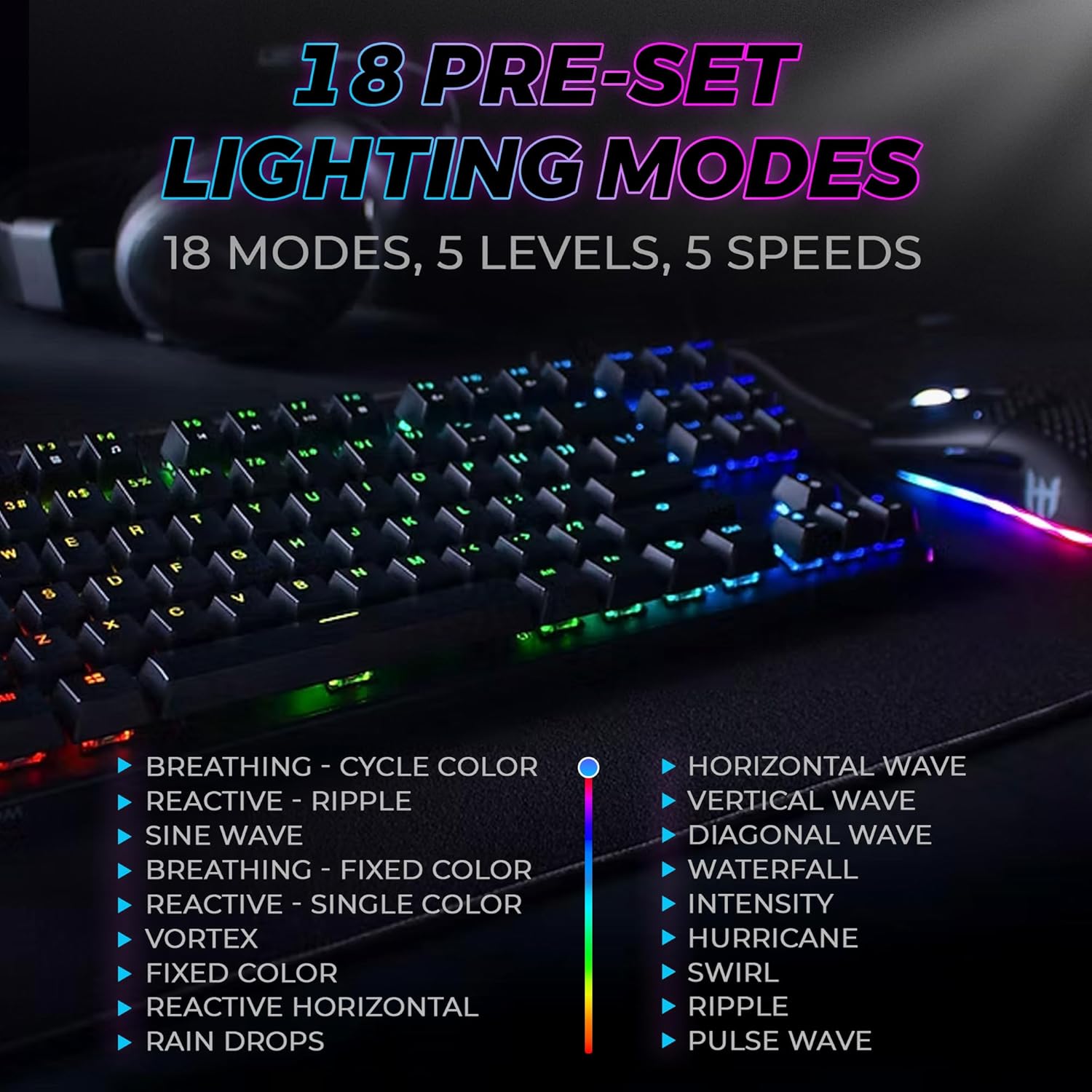
Figure 3: The keyboard features 18 pre-set lighting modes with 5 levels of brightness and 5 levels of speed, including effects like Breathing, Ripple, Sine Wave, Vortex, Waterfall, and Pulse Wave.
Multimedia-Schlüssel
Access multimedia controls by pressing the Fn key in combination with the F-keys (F1-F12). The specific functions are typically indicated by icons on the keycaps.
- Exampauf: Fn + F7 (Play/Pause), Fn + F8 (Stop), Fn + F9 (Mute).
Video 1: Official TECWARE branded video showcasing various products, including the Phantom keyboard, highlighting its features and design philosophy.
Wartung
Reinigung
- Trennen Sie die Tastatur vor der Reinigung vom Computer.
- Verwenden Sie ein weiches, trockenes Tuch, um die Tastenkappen und das Gehäuse abzuwischen.
- For deeper cleaning, use the provided keycap puller to remove keycaps and compressed air to clear debris from under the keys.
Austausch des Schalters
The TECWARE Phantom keyboard features hot-swappable Outemu mechanical switches, allowing for easy replacement without soldering.
- Mit dem mitgelieferten Tastenkappenabzieher die gewünschte Tastenkappe vorsichtig entfernen.
- Use the provided switch puller to carefully grip the switch and pull it straight up to remove it.
- Richten Sie die Pins des neuen Schalters an den Löchern auf der Leiterplatte aus.
- Drücken Sie den neuen Schalter vorsichtig ein, bis er hörbar einrastet.
- Bringen Sie die Tastenkappe wieder an.
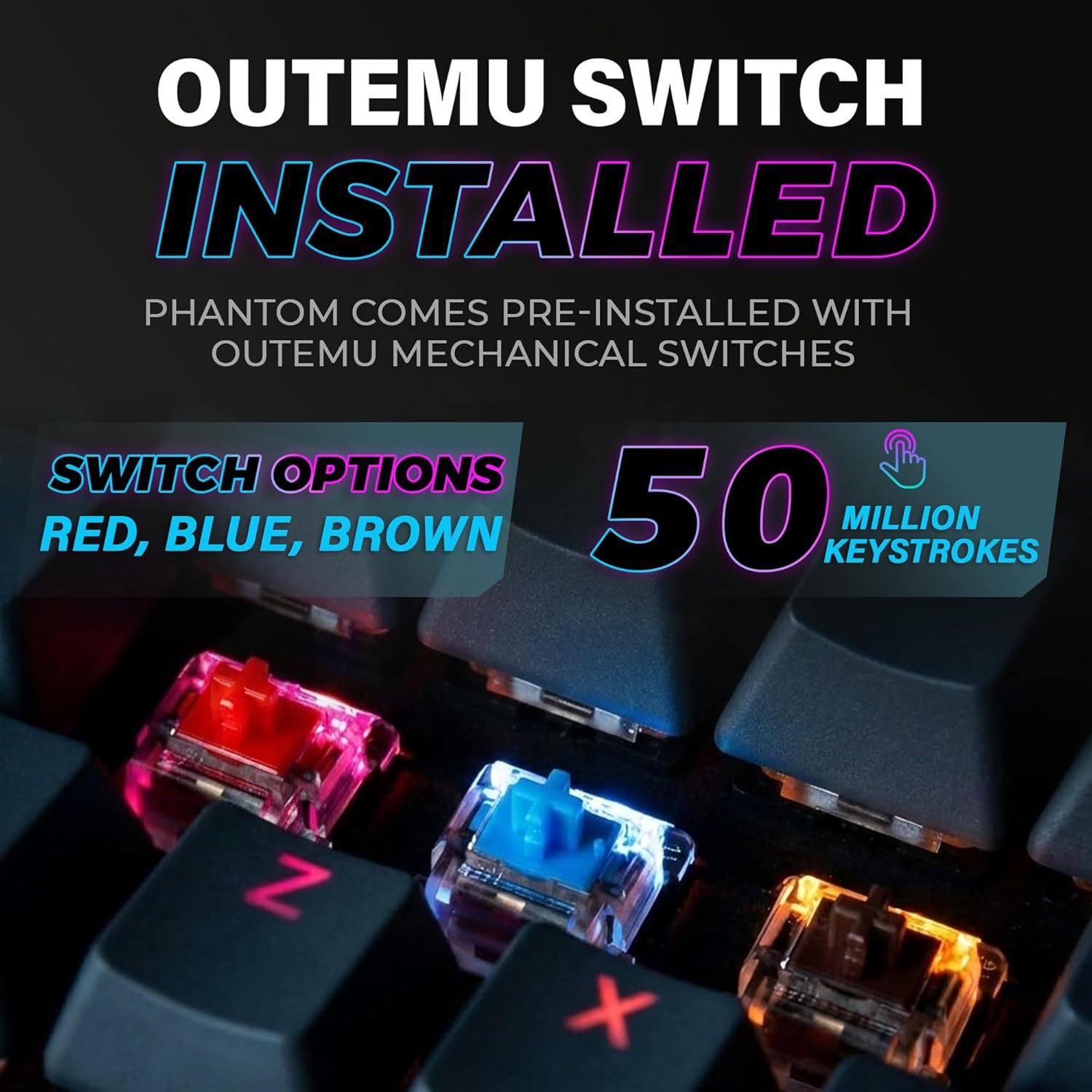
Figure 4: The keyboard comes with pre-installed Outemu switches, available in Red, Blue, and Brown options, rated for 50 million keystrokes.

Figure 5: An Outemu Red linear switch, detailing its pre-travel of 2.00mm, operating force of 45 gf/CN, and total travel of 4.00mm.
Fehlerbehebung
| Ausgabe | Mögliche Lösung |
|---|---|
| Tastatur reagiert nicht | Ensure the USB cable is securely connected to both the keyboard and the computer. Try a different USB port or computer. |
| RGB-Beleuchtung funktioniert nicht | Check if the lighting is turned off or set to minimum brightness using the Fn key combinations. Reinstall the TECWARE software if using custom profiles. |
| Bestimmte Tasten funktionieren nicht | If you have hot-swappable switches, try replacing the faulty switch with one of the spare switches provided. Ensure the switch is properly seated. |
| Keys feel inconsistent | Ensure keycaps are fully pressed down. Clean under the keycaps for any debris. |
Video 2: Official TECWARE Phantom video demonstrating various features and functionalities of the keyboard.
Technische Daten
| Besonderheit | Detail |
|---|---|
| Modellnummer | TWKB-P87ZORD |
| Schaltertyp | Outemu Red Mechanical (Linear) |
| Anzahl der Schlüssel | 87 Tasten |
| RGB-Beleuchtung | 16.8 Million Colors, 18 Pre-set Modes |
| Abfragerate | 1000 Hz |
| N-Key-Rollover | Vollständiges N-Key-Rollover |
| Konnektivität | Kabelgebundenes USB-A |
| Leiterplatte | Dual-layer Fiberglass PCB |
| Abmessungen (L x B x H) | 14.21 x 5.24 x 1.61 Zoll |
| Gewicht | 2.53 Pfund |
Garantie und Support
TECWARE products are designed for durability and performance. For warranty information, technical support, or to download the latest software and drivers, please visit the official TECWARE webBesuchen Sie die Website oder kontaktieren Sie den Kundenservice. Bewahren Sie Ihren Kaufbeleg als Kaufnachweis für Garantieansprüche auf.
Online-Ressourcen:
- Official TECWARE WebWebsite: www.tecware.co
- Produkt-Supportseite: TECWARE Amazon Store


