1. Einleitung
The UNI-T UT315A is a portable LCD Vibration Tester designed for measuring acceleration, velocity, and displacement. It features a long and short external probe for versatile applications, USB connectivity for data transfer, a Max mode for peak value capture, and PC software for advanced analysis. This manual provides detailed instructions for the safe and effective use of your UT315A device.
2. Sicherheitshinweise
Please read and understand all safety warnings and operating instructions before using this instrument. Failure to follow these instructions may result in injury or damage to the device.
- Do not operate the device in explosive atmospheres or in the presence of flammable gases or vapors.
- Ensure the probe is securely connected before taking measurements.
- Avoid dropping the instrument or subjecting it to severe impact.
- Do not attempt to open or modify the device; refer all servicing to qualified personnel.
- Entsorgen Sie Batterien gemäß den örtlichen Vorschriften.
3. Produktüberschreitungview
The UT315A Vibration Tester consists of a main unit with an LCD display and control buttons, and an external vibration probe connected via a cable. The device is powered by batteries and includes a USB interface for PC communication.
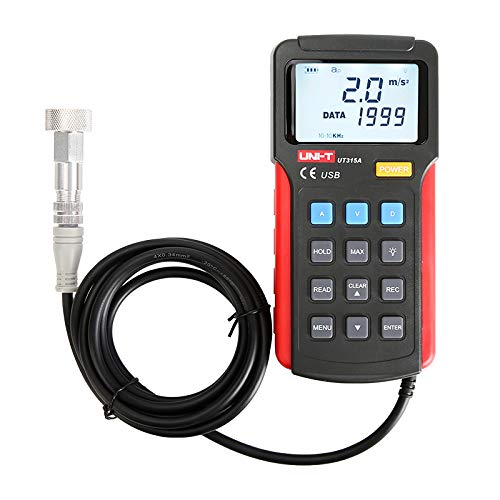
Abbildung 1: Vorderseite view of the UNI-T UT315A Vibration Tester with its external probe and cable. The LCD screen displays '2.0 m/s²' and 'DATA 1999'. Buttons for A, V, D, HOLD, MAX, READ, CLEAR, REC, MENU, and ENTER are visible.
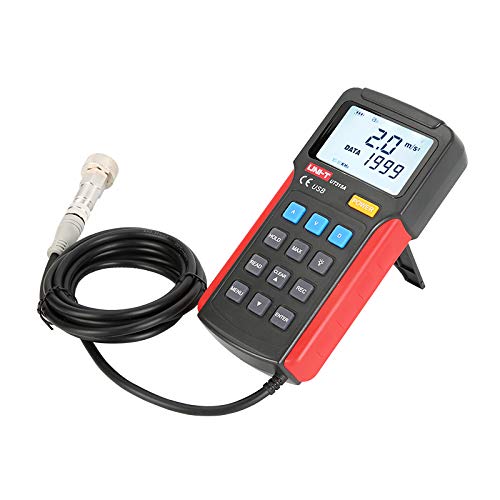
Abbildung 2: Seite view of the UNI-T UT315A Vibration Tester, showing the integrated kickstand extended for desktop use. The external probe and cable are also visible.
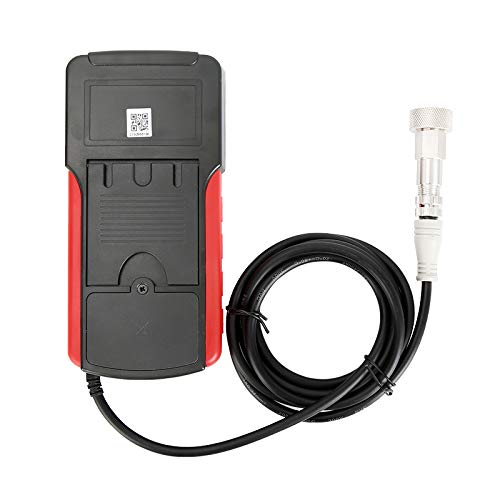
Abbildung 3: Zurück view of the UNI-T UT315A Vibration Tester, showing the battery compartment cover and a QR code. The external probe cable is connected to the top of the unit.
4. Einrichtung
4.1 Auspacken
Carefully unpack the UNI-T UT315A Vibration Tester and check for any damage. The package should contain:
- UNI-T UT315A Main Unit
- External Vibration Probe (long and short options)
- USB-Kabel
- PC Software CD (or download link)
- Bedienungsanleitung
4.2 Einlegen der Batterie
The UT315A is battery-powered. To install or replace batteries:
- Suchen Sie das Batteriefach auf der Rückseite des Geräts (siehe Abbildung 3).
- Öffnen Sie die Abdeckung des Batteriefachs.
- Legen Sie die benötigten Batterien ein und achten Sie dabei auf die richtige Polarität (+/-).
- Schließen Sie den Batteriefachdeckel fest.
4.3 Sondenanschluss
Connect the external vibration probe to the designated port on the top of the main unit. Ensure the connection is firm and secure to prevent inaccurate readings.
4.4 Ein-/Ausschalten
Drücken Sie die LEISTUNG button located on the front panel to turn the device on or off.
5. Bedienungsanleitung
5.1 Auswahl des Messmodus
The UT315A can measure acceleration, velocity, and displacement. Use the dedicated buttons to switch between modes:
- Drücken A for Acceleration (m/s²).
- Drücken V for Velocity (cm/s).
- Drücken D for Displacement (mm).
5.2 Messung durchführen
- Ensure the device is powered on and the probe is connected.
- Select the desired measurement mode (Acceleration, Velocity, or Displacement).
- Carefully place the tip of the external probe firmly against the surface of the object whose vibration you wish to measure.
- Lesen Sie den auf dem LCD-Bildschirm angezeigten Messwert ab.
5.3 HOLD-Funktion
Um den aktuellen Messwert auf dem Display einzufrieren, drücken Sie die Taste HALTEN button. Press it again to release and resume live measurements.
5.4 MAX Mode
To capture the maximum vibration value during a measurement period, press the MAX button. The display will show the peak value detected. Press again to exit MAX mode.
5.5 Data Recording (REC)
The UT315A allows for data recording. Refer to the detailed instructions in the full user manual for specific steps on initiating, stopping, and reviewing recorded data using the AUFNAHME button and navigation keys.
5.6 PC Software and USB Connection
To transfer data to a computer or perform advanced analysis:
- Install the provided PC software from the CD or download it from the UNI-T webWebsite.
- Connect the UT315A to your computer using the supplied USB cable.
- Launch the PC software and follow its instructions to establish communication with the device and manage data.
6. Wartung
6.1 Reinigung
Wischen Sie das Gerät mit einem weichen, damp Mit einem Tuch abwischen. Keine Scheuermittel oder Lösungsmittel verwenden. Sicherstellen, dass keine Flüssigkeit in das Gerät eindringt.
6.2 Speicherung
Bei längerer Nichtbenutzung sollten die Batterien entfernt werden, um ein Auslaufen zu verhindern. Das Gerät sollte an einem kühlen, trockenen Ort, vor direkter Sonneneinstrahlung und extremen Temperaturen geschützt aufbewahrt werden.
6.3 Kalibrierung
For optimal accuracy, periodic calibration by a qualified service center is recommended. Refer to UNI-T's official support for calibration services.
7. Fehlerbehebung
- Das Gerät lässt sich nicht einschalten: Überprüfen Sie den Batterieeinbau und stellen Sie sicher, dass die Batterien nicht entladen sind. Tauschen Sie sie gegebenenfalls aus.
- Ungenaue Messwerte: Ensure the probe is firmly in contact with the surface. Check for any damage to the probe or cable.
- Probleme mit der USB-Verbindung: Verify the USB cable is correctly connected to both the device and the PC. Ensure PC software drivers are installed correctly.
- Display shows 'OL' or 'OVER': The measurement value exceeds the device's range for the selected mode.
If problems persist, contact UNI-T customer support.
8. Spezifikationen
| Parameter | Wert |
|---|---|
| Modellnummer | UT315A |
| Acceleration Measurement Range | 0.1 ~ 199.9 m/s² |
| Geschwindigkeitsmessbereich | 0.01 ~ 19.99 cm/s |
| Displacement Measurement Range | 0.001 ~ 1.999 mm |
| Stromquelle | Batteriebetrieben |
| Artikelgewicht | 3.31 Pfund |
| Hersteller | EINHEIT |
| UPC | 666354108580 |
9. Garantie und Support
For warranty information, technical support, or service inquiries, please contact UNI-T directly or refer to their official webBewahren Sie Ihren Kaufbeleg als Kaufnachweis auf.
Hersteller: UNI-T
Weitere Unterstützung finden Sie unter UNI-T Store auf Amazon.


