1. Einleitung
This document provides comprehensive instructions for the setup, operation, and maintenance of your Raspberry Pi 3 Model B+ Motherboard. The Raspberry Pi 3 Model B+ is a versatile single-board computer designed for a wide range of applications, from educational projects to home automation and server tasks.
Please read this manual thoroughly before using your device to ensure optimal performance and longevity.
2. Produktüberschreitungview
The Raspberry Pi 3 Model B+ features enhanced processing power and connectivity options compared to previous models. Key features include:
- Prozessor: 1.4GHz 64-bit quad-core ARMv8 CPU (Broadcom BCM2837B0)
- RAM: 1 GB LPDDR2 SDRAM
- Kabellose Verbindung: Dual-band 2.4GHz and 5GHz IEEE 802.11.b/g/n/ac Wireless LAN, Bluetooth 4.2/BLE
- Ethernet: Faster Gigabit Ethernet (via USB 2.0 bridge, max 300 Mbps)
- Power-over-Ethernet (PoE): Capability via a separate PoE HAT (Power over Ethernet Hardware Attached on Top)
- GPIO: 40-pin GPIO header for interfacing with external hardware
- Video & Audio: Full-size HDMI port, DSI display port, 3.5mm audio/video jack, CSI camera port
- USB: 4 USB 2.0-Anschlüsse
- Lagerung: Micro SD card slot for operating system and data storage
- Leistungsaufnahme: Micro USB power input (5.1V / 2.5A recommended)
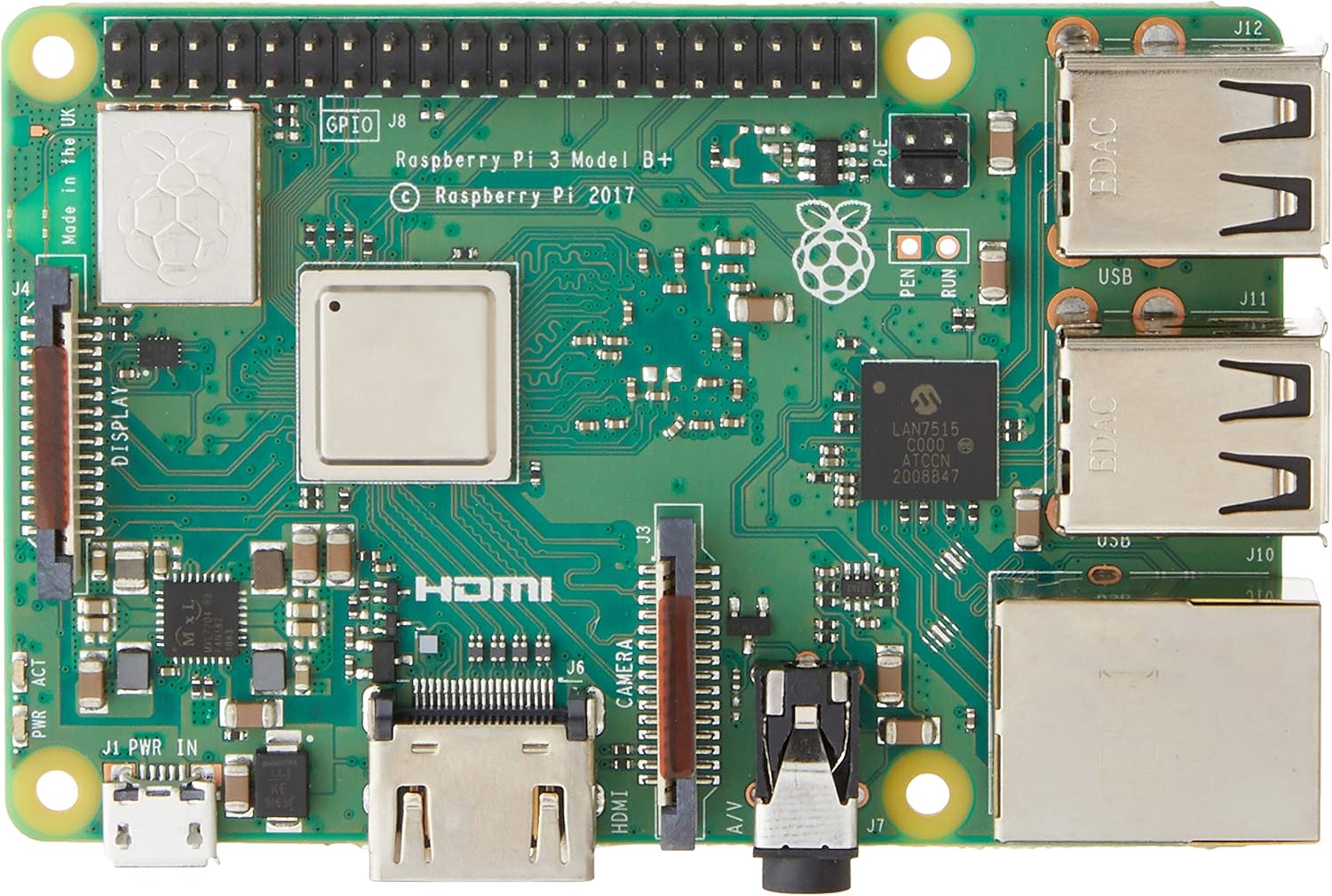
Abbildung 2.1: Oben view of the Raspberry Pi 3 Model B+ Motherboard, showing the processor, RAM, GPIO pins, HDMI, USB ports, and Ethernet port.

Abbildung 2.2: Unten view of the Raspberry Pi 3 Model B+ Motherboard, highlighting the Micro SD card slot and various components.

Abbildung 2.3: Seite view of the Raspberry Pi 3 Model B+ Motherboard, detailing the Ethernet port and four USB ports.

Abbildung 2.4: Schräg view of the Raspberry Pi 3 Model B+ Motherboard, showcasing the various input/output ports including HDMI, Micro USB, and audio jack.
3. Einrichtung
3.1 Erforderliche Komponenten (nicht im Lieferumfang enthalten)
- Stromversorgung: 2.5A Micro USB Power Supply (recommended for stable operation).
- Lagerung: Class 10 Micro SD Card (minimum 8GB, pre-loaded with Pi 3 B+ compatible software).
- Eingabegeräte (optional): USB or Bluetooth keyboard/mouse.
- Anzeige (optional): HDMI or DSI compatible display.
3.2 Erste Einrichtungsschritte
- Micro-SD-Karte vorbereiten: Download a compatible operating system image (e.g., Raspberry Pi OS) from the official Raspberry Pi website. Use an imaging tool (like Raspberry Pi Imager) to write the OS image to your Class 10 Micro SD card.
- Micro-SD-Karte einlegen: Gently insert the prepared Micro SD card into the card slot on the underside of the Raspberry Pi board.
- Peripheriegeräte anschließen:
- Connect your HDMI display to the HDMI port on the Raspberry Pi.
- Schließen Sie Ihre USB-Tastatur und -Maus an die verfügbaren USB-Anschlüsse an.
- (Optional) Connect an Ethernet cable to the Ethernet port for wired network access.
- Kraft anwenden: Connect the 2.5A Micro USB power supply to the Micro USB power port on the Raspberry Pi. The device will automatically power on and begin booting.
- Erster Start: Follow the on-screen instructions to complete the initial setup of the operating system, including setting up Wi-Fi, language, and user accounts.
4. Betrieb
4.1 Grundlegende Bedienung
Once the operating system is installed and configured, your Raspberry Pi is ready for use. You can interact with it via the connected keyboard, mouse, and display, similar to a traditional desktop computer. The Raspberry Pi OS provides a graphical user interface (GUI) for ease of use.
4.2 Softwareinstallation und -aktualisierungen
Software can be installed via the graphical "Add/Remove Software" utility or through the command line using `apt` commands (e.g., `sudo apt update`, `sudo apt install [package_name]`). Regular updates are recommended to ensure system stability and security.
4.3 GPIO Usage
The 40-pin GPIO header allows for advanced projects involving physical computing. You can connect various sensors, actuators, and other electronic components to control them programmatically using languages like Python.
Refer to the official Raspberry Pi documentation for detailed guides on GPIO programming and hardware interfacing.
5. Wartung
- Software-Updates: Regularly update your operating system and installed software packages to receive the latest features, bug fixes, and security patches. This can typically be done via the terminal using `sudo apt update` followed by `sudo apt upgrade`.
- Energieverwaltung: Always use a stable and sufficient power supply (5.1V / 2.5A) to prevent unexpected shutdowns or data corruption. Avoid disconnecting power without properly shutting down the operating system first.
- Pflege der SD-Karte: Micro SD cards can wear out over time. Regularly back up your data and consider using high-quality, durable cards. Avoid frequent power cuts to minimize the risk of SD card corruption.
- Physische Umgebung: Keep the Raspberry Pi in a cool, dry, and well-ventilated area. Avoid exposing it to extreme temperatures, humidity, or dust. Consider using a protective case.
6. Fehlerbehebung
- Kein Strom/Start:
- Ensure the power supply is correctly connected and meets the 5.1V / 2.5A specification.
- Check the Micro SD card for proper insertion and ensure it has a valid operating system image.
- Look for the red power LED (PWR) to be steadily lit and the green activity LED (ACT) to flash during boot.
- Anzeigeprobleme:
- Verify the HDMI cable is securely connected to both the Raspberry Pi and the display.
- Stellen Sie sicher, dass Ihr Display auf die richtige Eingangsquelle eingestellt ist.
- Netzwerkverbindungsprobleme:
- For wired Ethernet, check the cable connection and router status.
- For Wi-Fi, ensure the correct network name (SSID) and password are entered in the OS settings.
- Restart your router and the Raspberry Pi.
- Periphere Geräte reagieren nicht:
- Try connecting USB devices to different USB ports.
- For Bluetooth devices, ensure they are in pairing mode and correctly configured in the OS.
7. Spezifikationen
| Besonderheit | Spezifikation |
|---|---|
| Prozessor | 1.4 GHz Broadcom BCM2837B0, Cortex-A53 (ARMv8) 64-bit SoC |
| RAM | 1GB LPDDR2 SDRAM |
| WLAN | Dual-band 2.4GHz and 5GHz IEEE 802.11.b/g/n/ac |
| Bluetooth | Bluetooth 4.2, Bluetooth Low Energy (BLE) |
| Ethernet | Gigabit-Ethernet (über USB 2.0, max. 300 Mbit/s) |
| USB-Anschlüsse | 4 x USB 2.0-Anschlüsse |
| GPIO | 40-polige GPIO-Stiftleiste |
| Videoausgang | Full-size HDMI, DSI display port |
| Kamera-Schnittstelle | CSI camera port |
| Audioausgang | 3.5mm 4-pole stereo audio and composite video port |
| Lagerung | Micro-SD-Anschluss zum Laden des Betriebssystems und zur Datenspeicherung |
| Leistungsaufnahme | 5.1V / 2.5A DC via Micro USB connector |
| Maße | 4.33 x 2.76 x 1.18 Zoll |
| Gewicht | 2.82 Unzen |
| Betriebssystem | Linux (e.g., Raspberry Pi OS) |
8. Garantie und Support
For warranty information and technical support, please refer to the official Raspberry Pi webBesuchen Sie unsere Website oder kontaktieren Sie Ihren Händler. Bewahren Sie Ihren Kaufbeleg für eventuelle Garantieansprüche auf.
Offizieller Raspberry Pi WebWebsite: www.raspberrypi.org


