NueMedics TENS 24 Pulse Massager User Manual
Modell: BD16356
NueMedics - Ease Your Tension
1. Einleitung
The NueMedics TENS 24 Pulse Massager is a versatile muscle stimulator designed for effective pain relief. Utilizing Transcutaneous Electrical Nerve Stimulation (TENS) technology, it delivers low-voltage pulses to stimulate nerve fibers, helping to block pain signals and increase natural endorphins. With 24 pre-programmed massage modes and a rechargeable internal lithium battery, this device offers a convenient and drug-free method for managing various types of body pain and discomfort.
This manual provides detailed instructions for the safe and effective use of your NueMedics TENS 24 device.
2. Lieferumfang
Your NueMedics TENS 24 package includes the following components:
- 1x NueMedics TENS 24 Controller
- 6 Large Electrodes (Pads)
- 2 Electrode Cables
- Benutzerhandbuch
- 1x TYPE-C Charger Cable
- 1x Wandladegerät
- 1x Pad and Wire Holder
- 1x Treatment Points Chart
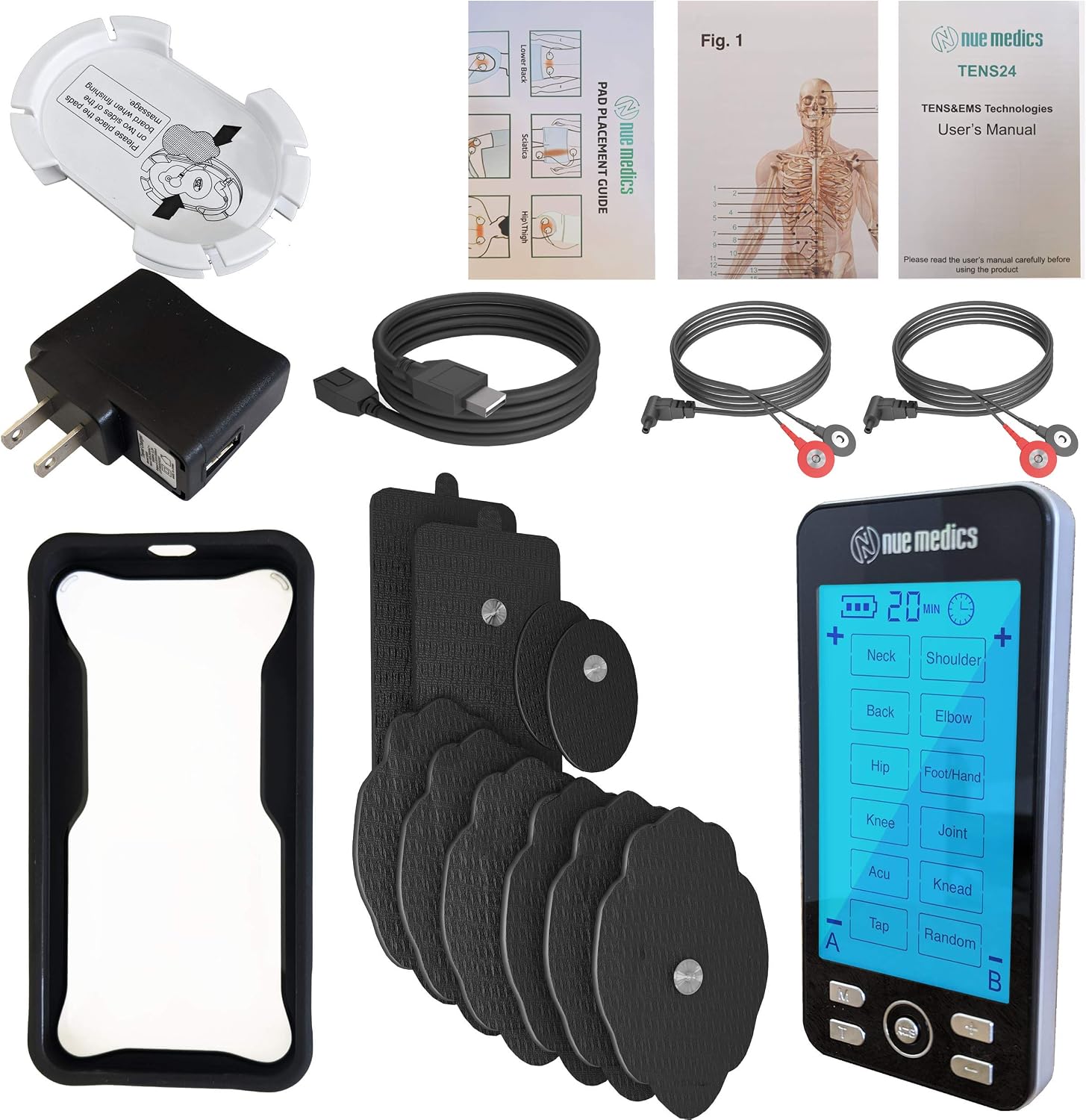
Figure 2.1: All components included with the NueMedics TENS 24 Pulse Massager.
3. Sicherheitshinweise
Bitte lesen und verstehen Sie alle Sicherheitsvorkehrungen, bevor Sie das Gerät benutzen.
- Always follow the manufacturer's instructions for use.
- Ensure all pads are securely placed on the skin before operating the device.
- As a safety feature, the intensity button will remain locked until all pads are securely placed on the skin. Please be sure that all wires attached to the device and all pads placed well before you turn on the device.
- If you experience any discomfort, stop using the device immediately and consult a healthcare professional.
- Aussagen zu Nahrungsergänzungsmitteln wurden von der FDA nicht geprüft und sind nicht zur Diagnose, Behandlung, Heilung oder Vorbeugung von Krankheiten oder Gesundheitszuständen bestimmt.
4. Einrichtung
- Laden Sie das Gerät auf: Before first use, fully charge the NueMedics TENS 24 unit using the provided TYPE-C charger cable and wall charger. The battery indicator on the LCD screen will show charging progress.
- Elektroden anschließen: Connect the electrode cables to the electrode pads. Ensure a secure connection.
- Attach Pads to Skin: Peel off the protective film from the electrode pads. Apply the pads firmly to clean, dry skin in the desired treatment area. For optimal results, place pads on either side of the area of discomfort, ensuring they do not touch each other. Refer to the included Treatment Points Chart for recommended placements.
- Connect Cables to Device: Insert the other end of the electrode cables into the A and/or B output ports located at the top of the NueMedics TENS 24 controller.

Figure 4.1: The NueMedics TENS 24 device connected to electrode pads.

Abbildung 4.2: Bspample pad placement guide for various body areas.
5. Bedienungsanleitung
- Ein-/Ausschalten: Slide the ON/OFF switch located on the side of the device to turn it on or off.
- Auswahlmodus: Press the 'M' (Mode) button to cycle through the 24 available massage modes. The selected mode will be displayed on the LCD screen. Modes include: Neck, Shoulder, Back, Elbow, Hip, Foot/Hand, Knee, Joint, Acu, Knead, Tap, and Random.
- Intensität anpassen: Use the '+' and '-' buttons to increase or decrease the intensity level for each channel (A and B). Start with a low intensity and gradually increase until you feel a comfortable, stimulating sensation.
- Timer einstellen: Press the 'T' (Time) button to adjust the treatment duration. The default duration is 20 minutes, which can be increased or decreased.
- Kanal auswählen (A/B): If using two sets of pads, press the 'A/B' button to switch between controlling the intensity for Channel A or Channel B independently.
- Beginnen Sie mit der Behandlung: Once settings are configured, the device will begin the selected treatment.
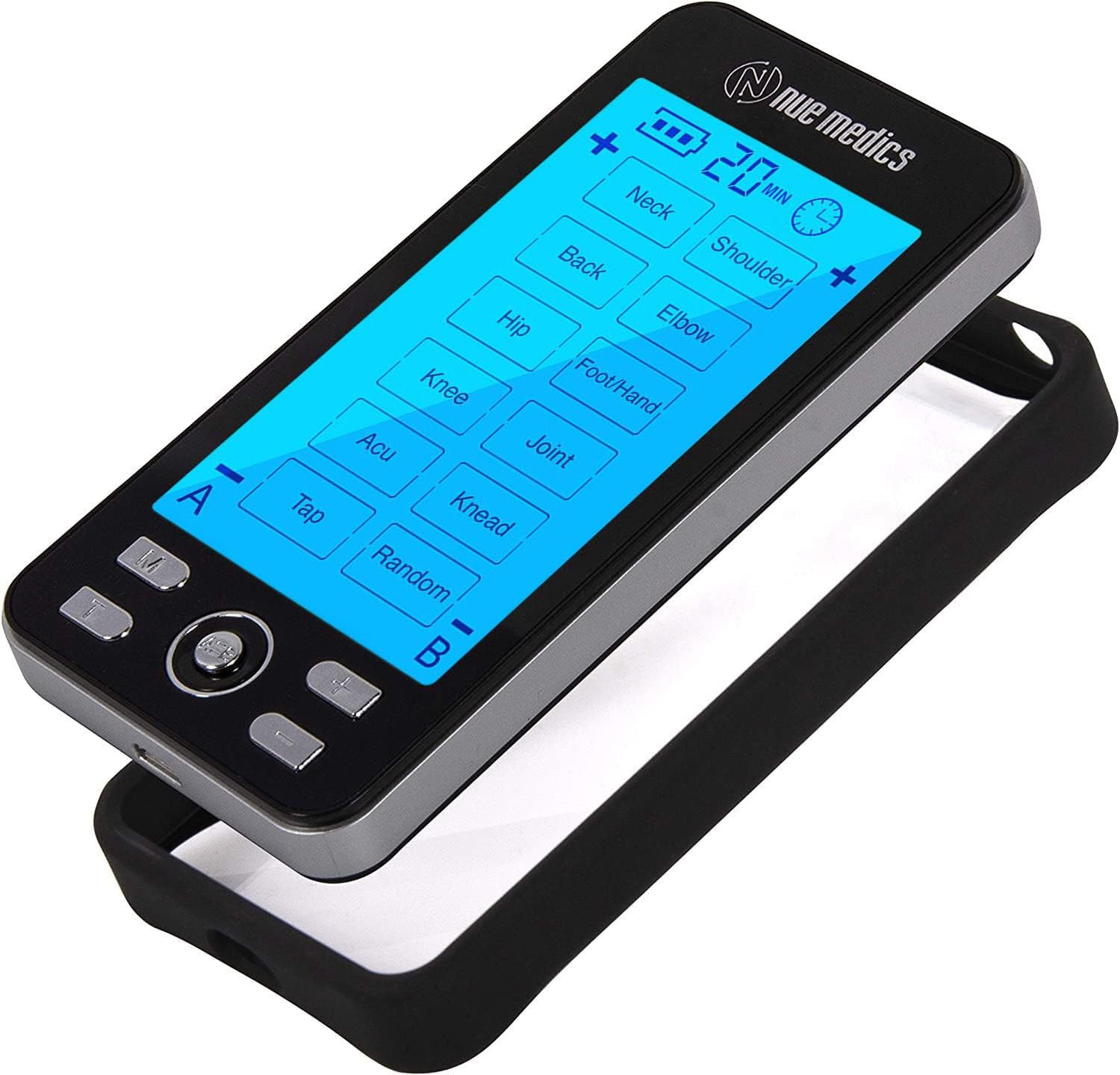
Abbildung 5.1: Überview of the NueMedics TENS 24 device controls.

Figure 5.2: The device offers modes for various pain points across the body.
6. Wartung
- Reinigung: After each use, gently wipe the electrode pads with a damp cloth to remove any residue. Ensure the device itself is clean and dry.
- Lagerung: Store the device and pads in a cool, dry place away from direct sunlight. Use the provided pad and wire holder to keep the pads clean and extend their lifespan. The device also comes with a protective cover case for safe storage and transport.
- Aufladen: Recharge the internal lithium battery as needed. The device provides up to 20 hours of continuous use on a full charge.

Figure 6.1: The device includes a protective cover case for storage.
7. Fehlerbehebung
If you encounter issues with your NueMedics TENS 24 device, please refer to the following common solutions:
- Gerät lässt sich nicht einschalten: Ensure the device is fully charged. Connect it to the charger and allow sufficient time for charging.
- Keine Empfindung/Schwache Empfindung:
- Check that the electrode pads are firmly attached to clean, dry skin.
- Verify that all electrode cables are securely connected to both the pads and the device.
- Increase the intensity level gradually using the '+' button. Remember, the intensity button will remain locked until all pads are securely placed on the skin.
- Ensure the pads are not worn out. Replace them if they no longer stick well.
- Klebepads haften nicht: Clean the skin thoroughly before application. If pads are old or have lost their adhesiveness, replace them with new ones.
- Beschwerden während des Gebrauchs: Reduce the intensity level. Reposition the electrode pads. If discomfort persists, discontinue use and consult a healthcare professional.
Für weitere Unterstützung wenden Sie sich bitte an den Kundendienst.
8. Spezifikationen
| Besonderheit | Detail |
|---|---|
| Marke | NueMedics |
| Modellnummer | BD16356 |
| Artikelgewicht | 15.84 Unzen |
| Material | Plastik |
| Stromquelle | Batteriebetrieben |
| Akku-Typ | 1 Lithium-Polymer-Akku erforderlich |
| Verpackungsabmessungen | 5.75 x 3.6 x 3.07 Zoll |
| Datum der ersten Verfügbarkeit | 31. Januar 2018 |
| Hersteller | NueMedics |
9. Garantie und Support
Your NueMedics TENS 24 Pulse Massager comes with a LEBENSLANGE GARANTIE.
Um Ihre eingeschränkte lebenslange Garantie zu aktivieren, besuchen Sie bitte: www.nuemedics.com/24warranty
For any questions or concerns, you may contact NueMedics support:
- E-Mail: support@nuemedics.com
- Gebührenfreie Nummer: (888) 434-6866