1. Einleitung
This manual provides comprehensive instructions for the safe and effective operation, setup, and maintenance of the OWON B41T+ Digital Multimeter. The B41T+ is a versatile 3-in-1 device, functioning as a datalogger, a multimeter, and a temperature meter. It incorporates True RMS measurement capabilities and a clear backlight for enhanced readability in various environments.
2. Sicherheitshinweise
To ensure safe operation and prevent personal injury or damage to the device, please observe the following safety precautions:
- Always disconnect test leads from the circuit before changing functions or ranges.
- Do not exceed the maximum input limits specified for each function. Refer to the specifications section for details.
- Bei Arbeiten an unter Spannung stehenden Stromkreisen ist äußerste Vorsicht geboten. Hohe SpannungtagEs kann gefährlich sein.
- Ensure the correct fuse rating is used when replacing fuses. Incorrect fuses can lead to damage or fire.
- Inspect test leads for damage before each use. Do not use damaged leads.
- Das Multimeter darf nicht bedient werden, wenn es beschädigt erscheint oder nicht ordnungsgemäß funktioniert.
- Halten Sie das Gerät trocken. Vermeiden Sie den Kontakt mit Feuchtigkeit und extremen Temperaturen.
3. Packungsinhalt
Prüfen Sie nach dem Öffnen der Verpackung, ob alle folgenden Artikel enthalten sind:
- 1x OWON B41T+ Multimeter
- 1x Multimeter Lead Set (Red and Black)
- 1x K-Type Thermocouple
- 1x Alligator Clip Set
- 1x Multi-function Test Bench
- 1x Benutzerhandbuch (Englisch)
- 1x Tragetasche

4. Produktüberschreitungview
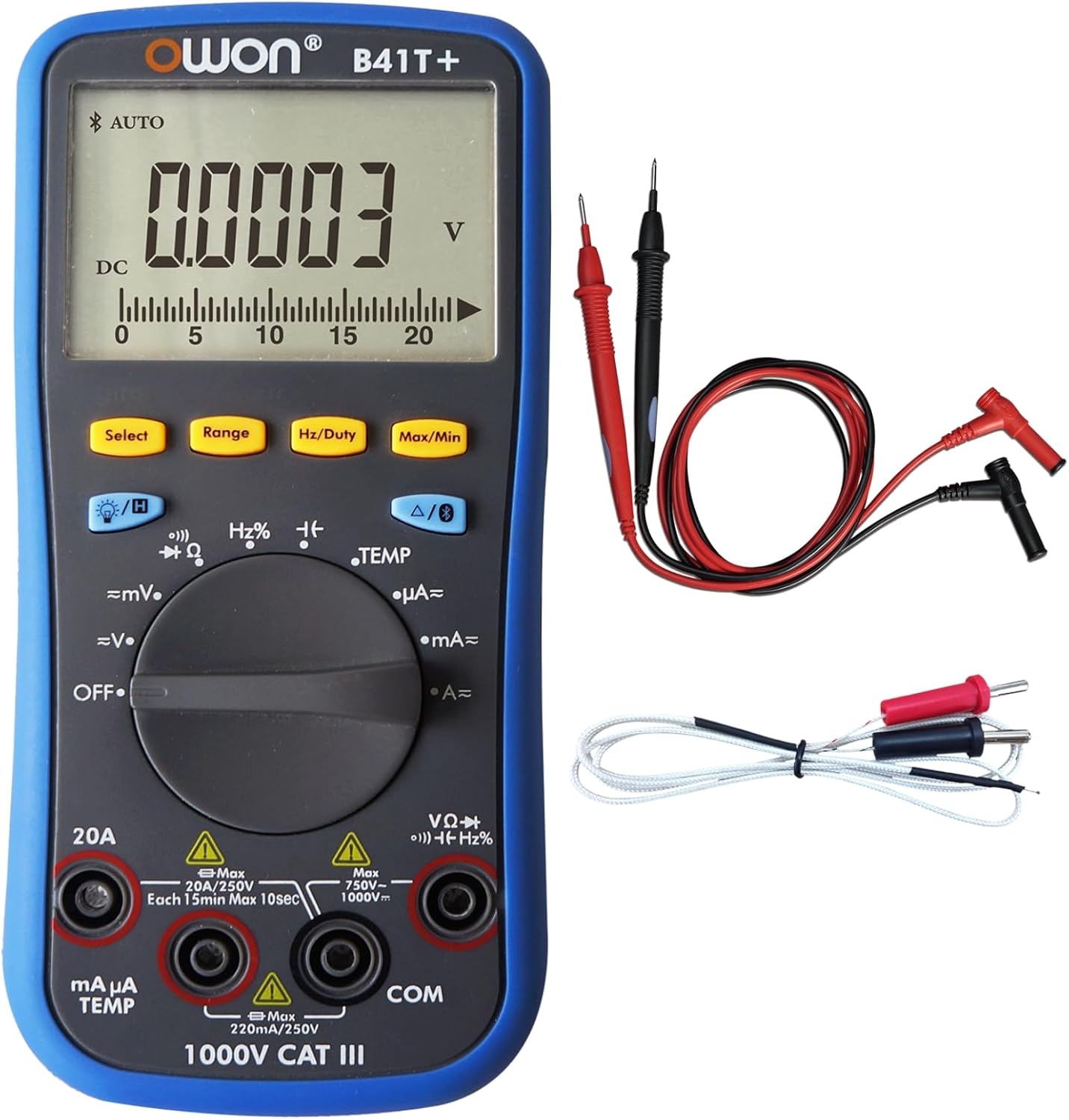
The OWON B41T+ Digital Multimeter features a robust design with a clear digital display, a central rotary function dial, and various input terminals for different measurement types.
4.1. Schlüsselkomponenten
- Anzeige: 4(1/2)-digit LCD with backlight, capable of showing 21999 counts.
- Funktionsrad: Drehschalter zur Auswahl der Messmodi (z. B. Vol.)tage, Stromstärke, Widerstand, Temperatur).
- Tasten: Include Select, Range, Hz/Duty, Max/Min, Backlight, and Data Hold functions.
- Eingangsbuchsen: Dedicated terminals for test leads, including COM (common), VΩHz, mAµA, and 20A inputs.


5. Einrichtung
5.1. Einlegen der Batterie
The OWON B41T+ requires two 1.5V AA batteries for operation. Batteries are typically included with the device.
- Ensure the multimeter is powered OFF.
- Suchen Sie das Batteriefach auf der Rückseite des Geräts.
- Verwenden Sie einen Schraubendreher, um die Abdeckung des Batteriefachs zu öffnen.
- Legen Sie zwei AA-Batterien ein und achten Sie dabei auf die richtige Polarität (+ und -), wie im Batteriefach angegeben.
- Bringen Sie die Batteriefachabdeckung wieder an und sichern Sie sie mit der Schraube.
5.2. Messleitungen anschließen
Für genaue und sichere Messungen ist der korrekte Anschluss der Messleitungen unerlässlich.
- Verbinden Sie Schwarz Test führte zu COM (gemeinsame) Eingangsbuchse.
- Für die meisten Bändetage, resistance, frequency, diode, and continuity measurements, connect the Rot Test führte zu VΩHz Eingangsbuchse.
- Für Strommessungen (mA/µA) schließen Sie die Rot Test führte zu mAµA TEMP Eingangsbuchse.
- Für Hochstrommessungen (bis zu 20 A) schließen Sie die Rot Test führte zu 20 A Eingangsbuchse.
6. Bedienungsanleitung
6.1. Basic Measurement Procedure
- Schließen Sie die Messleitungen wie in Abschnitt 5.2 beschrieben an.
- Turn the function dial to the desired measurement mode.
- Schließen Sie die Prüfspitzen an den zu prüfenden Stromkreis oder das zu prüfende Bauteil an.
- Lesen Sie den Messwert auf dem Display ab.
6.2. Funktionsauswahl
Use the rotary dial to select the primary measurement function:
- AUS: Schaltet das Gerät aus.
- =mV / =V: DC-Voltage measurement (millivolts/volts).
- ~mV / ~V: AC-Lautstärketage measurement (millivolts/volts).
- Ω: Widerstandsmessung.
- Continuity / Diode: For continuity checks and diode testing.
- Hz%: Frequency and Duty Cycle measurement.
- TEMP: Temperature measurement using the K-type thermocouple.
- µA / mA / A: Current measurement (microamperes/milliamperes/amperes).
6.3. Tastenfunktionen
- Wählen: Toggles between sub-functions within a dial position (e.g., AC/DC, Continuity/Diode).
- Reichweite: Manually selects the measurement range. The device also supports auto-ranging.
- Hz/Einschaltdauer: Activates frequency or duty cycle measurement.
- Max Min: Records and displays the maximum and minimum values measured.
- Hintergrundbeleuchtung: Toggles the display backlight for improved visibility.
- Datenhaltung (H): Friert den aktuellen Messwert auf dem Display ein.
6.4. Data Logging and Bluetooth Connectivity
The OWON B41T+ features Bluetooth connectivity, allowing it to interface with a mobile application for advanced data logging and analysis.
- Multi-connection: The mobile app supports monitoring of more than one device simultaneously, enhancing measurement safety and flexibility.
- Offline-Aufnahme: The device can record up to 10,000 data points over a period of 168 hours (7 days) without being continuously connected to the app. This data can be downloaded later.
- Trendanalyse: The mobile app provides a special chart mode for analyzing measurement trends over time.
- Voice Warning & Reading: The app offers voice warnings for measurement safety and smart voice-reading of measurements.
Refer to the specific mobile application's instructions for detailed guidance on pairing and using these advanced features.
7. Wartung
7.1. Reinigung
Um die Leistungsfähigkeit und das Aussehen des Geräts zu erhalten:
- Wischen Sie das casing mit einem weichen, damp Tuch.
- Do not use abrasive cleaners, solvents, or harsh chemicals, as these can damage the plastic components.
- Ensure the device is powered off and disconnected from any circuits before cleaning.
7.2. Batteriewechsel
When the low-battery indicator appears on the display, replace the batteries promptly to ensure accurate readings.
- Power off the multimeter and disconnect all test leads.
- Open the battery compartment cover on the rear of the device (refer to Section 5.1).
- Entfernen Sie die alten AA-Batterien.
- Insert new 1.5V AA batteries, ensuring correct polarity.
- Schließen Sie den Batteriefachdeckel sicher.
7.3. Sicherungswechsel
If the current measurement functions cease to work, the internal fuse may need replacement. Refer to the device's internal markings or the full technical manual for specific fuse ratings and replacement procedures. Always use a fuse with the correct voltage und aktuelle Bewertung.
7.4. Speicherung
For long-term storage, remove the batteries to prevent leakage and store the multimeter in its carry bag in a cool, dry place, away from direct sunlight and extreme temperatures.

8. Fehlerbehebung
This section addresses common issues you might encounter with your OWON B41T+ Multimeter.
- Keine oder nur schwache Anzeige:
Überprüfen Sie den Batterieeinbau und stellen Sie sicher, dass die Batterien nicht entladen sind. Tauschen Sie die Batterien gegebenenfalls aus. - Falsche Messwerte:
Verify that the function dial is set to the correct measurement mode. Ensure test leads are properly connected to the correct input jacks. Check for damaged test leads. - Strommessung funktioniert nicht:
The internal fuse for current measurement may be blown. Refer to Section 7.3 for fuse replacement guidance. - Probleme mit der Bluetooth-Konnektivität:
Ensure Bluetooth is enabled on your mobile device. Confirm the OWON B41T+ is powered on and within range. Restart both the multimeter and the mobile application. - Device Powers Off Unexpectedly:
The multimeter has a smart power-off feature to conserve battery life. If it powers off too frequently, check battery level. This feature can often be configured or disabled via the mobile app or specific button combinations (refer to the full manual).
9. Spezifikationen
| Besonderheit | Spezifikation |
|---|---|
| Marke | OWON |
| Modell | B41T+ |
| Anzeige | 21999 Counts, 4(1/2)-digit |
| Echter Effektivwert | Ja |
| Auto-scale | Ja |
| Max / Min Value | Ja |
| Offline Recording Function | Ja |
| Record Period | 168 Stunden (7 Tage) |
| Datensatzlänge | 10,000 Punkte |
| LCD-Hintergrundbeleuchtung | Ja |
| Diodentest | Ja |
| Continuity Test (Audion Test) | Ja |
| Daten halten | Ja |
| Eingangsschutz | Ja |
| Automatischer Test | Ja |
| Anzeige für schwache Batterie | Ja |
| Eingangsimpedanz | 10 MΩ |
| Relative Messung | Ja |
| Frequenzgang | (40 - 10000) Hz |
| Shift Rate | 3 Zeiten / s |
| Simulate Chart Shift Rate | 30 Zeiten / s |
| Batterie | 3V (1.5V x 2) AA |
| Abmessungen (BxHxT) | 85 mm x 185 mm x 30 mm (ca. 3.35 x 7.28 x 1.18 Zoll) |
| Gerätegewicht | 0.32 kg (approx. 11.3 ounces) |
| Farbe | Schwarz, Blau |
| Stromquelle | Batteriebetrieben |
| Messtyp | Multimeter |
| Mindest. Betriebsvoltage | 3 Volt |
| UPC | 884473045276, 695087763636 |
10. Garantie und Support
For detailed warranty information, technical support, or service inquiries regarding your OWON B41T+ Digital Multimeter, please refer to the official OWON webBesuchen Sie die Website oder kontaktieren Sie den Kundendienst. Bewahren Sie Ihren Kaufbeleg als Kaufnachweis für Garantieansprüche auf.


