Einführung
This manual provides essential information for the safe and efficient operation of your Behringer EUROPORT MPA200BT portable PA system. Please read these instructions thoroughly before using the device to ensure proper setup, usage, and maintenance. Retain this manual for future reference.
The Behringer EUROPORT MPA200BT is an all-in-one portable PA system designed for various applications, featuring 200 watts of power, Bluetooth connectivity for audio streaming, and a wireless microphone for vocal performances or presentations. Its battery operation allows for use in locations without direct power access.
Wichtige Sicherheitshinweise
Befolgen Sie bei der Verwendung elektrischer Geräte stets die folgenden grundlegenden Sicherheitsvorkehrungen:
- Lesen Sie alle Anweisungen, bevor Sie das Produkt in Betrieb nehmen.
- Do not use this product near water or in wet environments.
- Nur mit trockenem Tuch reinigen.
- Die Lüftungsöffnungen dürfen nicht blockiert werden. Die Installation muss gemäß den Anweisungen des Herstellers erfolgen.
- Installieren Sie das Gerät nicht in der Nähe von Wärmequellen wie Heizkörpern, Heizregistern, Öfen oder anderen Geräten (einschließlich ampKonverter (Lüfter), die Wärme erzeugen.
- Machen Sie den Sicherheitszweck des polarisierten oder geerdeten Steckers nicht zunichte. Ein polarisierter Stecker hat zwei Stifte, von denen einer breiter als der andere ist. Ein geerdeter Stecker hat zwei Stifte und einen dritten Erdungsstift. Der breite Stift oder der dritte Stift dienen Ihrer Sicherheit. Wenn der mitgelieferte Stecker nicht in Ihre Steckdose passt, wenden Sie sich an einen Elektriker, um die veraltete Steckdose auszutauschen.
- Schützen Sie das Netzkabel vor Beschädigungen oder Beschädigungen durch Fußgänger, insbesondere an den Steckern, Steckdosen und an der Stelle, an der es aus dem Gerät austritt.
- Verwenden Sie nur vom Hersteller angegebene Zusatzgeräte/Zubehör.
- Trennen Sie das Gerät bei Gewitter oder längerer Nichtbenutzung vom Stromnetz.
- Überlassen Sie alle Wartungsarbeiten qualifiziertem Servicepersonal. Eine Wartung ist erforderlich, wenn das Gerät auf irgendeine Weise beschädigt wurde, z. B. wenn das Netzkabel oder der Stecker beschädigt sind, Flüssigkeit in das Gerät verschüttet wurde oder Gegenstände hineingefallen sind, das Gerät Regen oder Feuchtigkeit ausgesetzt war, nicht normal funktioniert oder fallengelassen wurde.
Packungsinhalt
Upon unpacking your Behringer EUROPORT MPA200BT, please verify that all components are present and in good condition:
- Behringer EUROPORT MPA200BT Portable PA System
- Wireless Microphone (ULM300M)
- USB Receiver for Wireless Microphone (ULM300USB)
- Stromkabel
- Benutzerhandbuch (dieses Dokument)

Image: The Behringer EUROPORT MPA200BT portable PA system shown with its accompanying wireless microphone.
Produkt überview: Bedienelemente und Anschlüsse
Familiarize yourself with the various controls and connection points on your MPA200BT unit.

Image: Rear panel of the MPA200BT, highlighting the main control interface, inputs, and outputs.

Bild: Detailliert view of the MPA200BT's control panel, including display, rotary encoder, and buttons.
Funktionen der Systemsteuerung:
- Bildschirm: Shows current settings, input levels, and Bluetooth status.
- Drehcodierer: Used to navigate menus and adjust parameters. Press to confirm selections.
- PROCESS Button: Activates or deactivates sound processing effects.
- SETUP-Taste: Ruft das System-Setup-Menü auf.
- EXIT-Taste: Verlässt das aktuelle Menü oder die aktuelle Einstellung.
- ENTER-Taste: Bestätigt die Auswahl in Menüs.
- Bluetooth-Taste: Aktiviert den Bluetooth-Kopplungsmodus.
Ein-/Ausgangsanschlüsse:
- INPUT 1 & 2 (XLR/TRS Combo Jacks): For connecting microphones or line-level instruments.
- WIRELESS SYSTEM (USB Port): For connecting the ULM300USB wireless microphone receiver.
- MP3 Input (3.5mm Stereo Jack): For connecting external audio players.
- MIX OUTPUT (XLR): For sending the mixed audio signal to another PA system or recording device.
- Wechselstromeingang: Zum Anschluss des Netzkabels.
Aufstellen
- Stromanschluss:
Connect the supplied power cable to the AC Power Inlet on the rear of the MPA200BT and then to a suitable power outlet. The unit can also operate on its internal battery.
- Erstes Einschalten:
Press the power switch to turn on the unit. The display will illuminate.
- Positionierung:
Place the MPA200BT on a stable, flat surface or mount it on a speaker stand (sold separately). Ensure proper ventilation around the unit.
- Eingänge anschließen:
- Wired Microphones/Instruments: Connect to INPUT 1 or INPUT 2 using XLR or 1/4" TRS cables.
- Externe Audioplayer: Connect to the MP3 Input using a 3.5mm stereo cable.
Bedienungsanleitung
Bluetooth-Audiostreaming

Image: The Bluetooth logo, representing wireless audio streaming capability.
- Ensure the MPA200BT is powered on.
- Drücken Sie die Bluetooth button on the control panel. The Bluetooth icon on the display will flash, indicating pairing mode.
- On your smartphone or Bluetooth-enabled device, navigate to the Bluetooth settings and select "BEHRINGER MPA200BT" from the list of available devices.
- Once paired, the Bluetooth icon on the MPA200BT display will stop flashing and remain solid.
- You can now stream audio from your device to the MPA200BT. Adjust the volume using your device's controls and the MPA200BT's master volume.
Wireless Microphone Usage (ULM300M/ULM300USB)
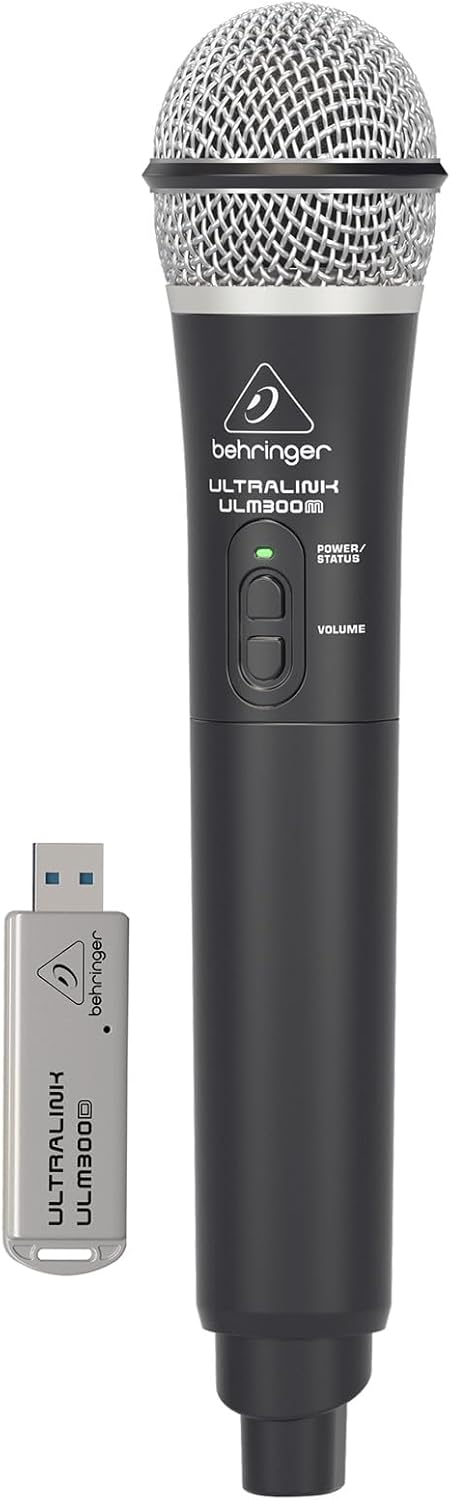
Image: The Behringer ULM300M wireless microphone shown with its USB receiver, the ULM300USB.
- Insert the ULM300USB receiver into the DRAHTLOSES SYSTEM USB port on the MPA200BT.
- Ensure the ULM300M wireless microphone has fresh batteries installed.
- Power on the wireless microphone. The status LED on both the microphone and the receiver should indicate a successful connection (usually a solid green light).
- Adjust the microphone's volume using the controls on the microphone itself and the MPA200BT's input gain settings.
Remote Control via Smartphone App

Image: A smartphone screen showing the graphical user interface of the Behringer remote control application, used to manage the PA system settings.
The MPA200BT can be controlled remotely using a dedicated smartphone application. This allows for adjustments to volume, EQ, and effects from a distance.
- Download the official Behringer MPA200BT control app from your device's app store (iOS/Android).
- Ensure your smartphone is connected to the MPA200BT via Bluetooth (as described in the "Bluetooth Audio Streaming" section).
- Open the app. It should automatically detect and connect to your MPA200BT unit.
- Use the app's interface to control various parameters of the PA system.
Batteriebetrieb
The MPA200BT features an internal rechargeable battery for portable use.
- The battery charges automatically when the unit is connected to AC power.
- A battery level indicator on the display shows the remaining charge.
- For optimal battery life, fully charge the unit before its first use and periodically when not in use for extended periods.
Wartung
- Reinigung: Reinigen Sie die Außenseite des Geräts mit einem weichen, trockenen Tuch. Verwenden Sie keine Scheuermittel oder Lösungsmittel.
- Lagerung: When not in use, store the MPA200BT in a cool, dry place, away from direct sunlight and extreme temperatures.
- Batteriepflege: Bei längerer Lagerung sollte darauf geachtet werden, dass die Batterie nur teilweise (etwa 50 %) geladen ist und alle paar Monate wieder aufgeladen wird, um eine Tiefentladung zu vermeiden.
- Belüftung: Ensure that the ventilation openings are not obstructed during operation to prevent overheating.
Fehlerbehebung
| Problem | Mögliche Ursache | Lösung |
|---|---|---|
| Kein Strom | Power cable not connected; unit not switched on; battery depleted. | Check power cable connection; ensure power switch is ON; charge battery. |
| Keine Tonausgabe | Volume too low; input source not connected or selected; faulty cable; microphone off. | Increase master volume and input gain; check input connections; test cables; ensure microphone is powered on and paired. |
| Die Bluetooth-Kopplung schlägt fehl | MPA200BT not in pairing mode; device too far; interference. | Press Bluetooth button to enter pairing mode; move device closer; restart both devices. |
| Das drahtlose Mikrofon funktioniert nicht. | USB receiver not connected; microphone off; depleted batteries in microphone; interference. | Ensure ULM300USB is fully inserted; power on microphone; replace microphone batteries; ensure clear line of sight. |
| Squealing/Feedback | Microphone too close to speaker; microphone gain too high. | Move microphone further from speaker; reduce microphone input gain. |
Technische Daten
| Besonderheit | Detail |
|---|---|
| Modell | EUROPORT MPA200BT |
| Ausgang Wattage | 200 Watt |
| Stromquelle | Battery Powered / AC Power |
| Konnektivitätstechnologie | Bluetooth |
| Anzahl der Kanäle | 2 |
| Artikelgewicht | 12.1 kg |
| Produktabmessungen (L x B x H) | 11.02 x 10.11 x 16.53 Zoll |
| Montagetyp | Tischplatte |
| Kompatible Geräte | Smartphone |
| Hersteller | Music Tribe US |
Garantie und Support
Detaillierte Garantieinformationen und technischen Support finden Sie auf der offiziellen Behringer-Website. webBesuchen Sie die Website oder kontaktieren Sie den Kundenservice. Bewahren Sie Ihren Kaufbeleg als Kaufnachweis auf.
Online-Ressourcen: www.behringer.com
Hersteller: Music Tribe US
Offizielle Produktvideos
No relevant official product videos from the seller were found in the provided data for embedding.


