Produkt überview
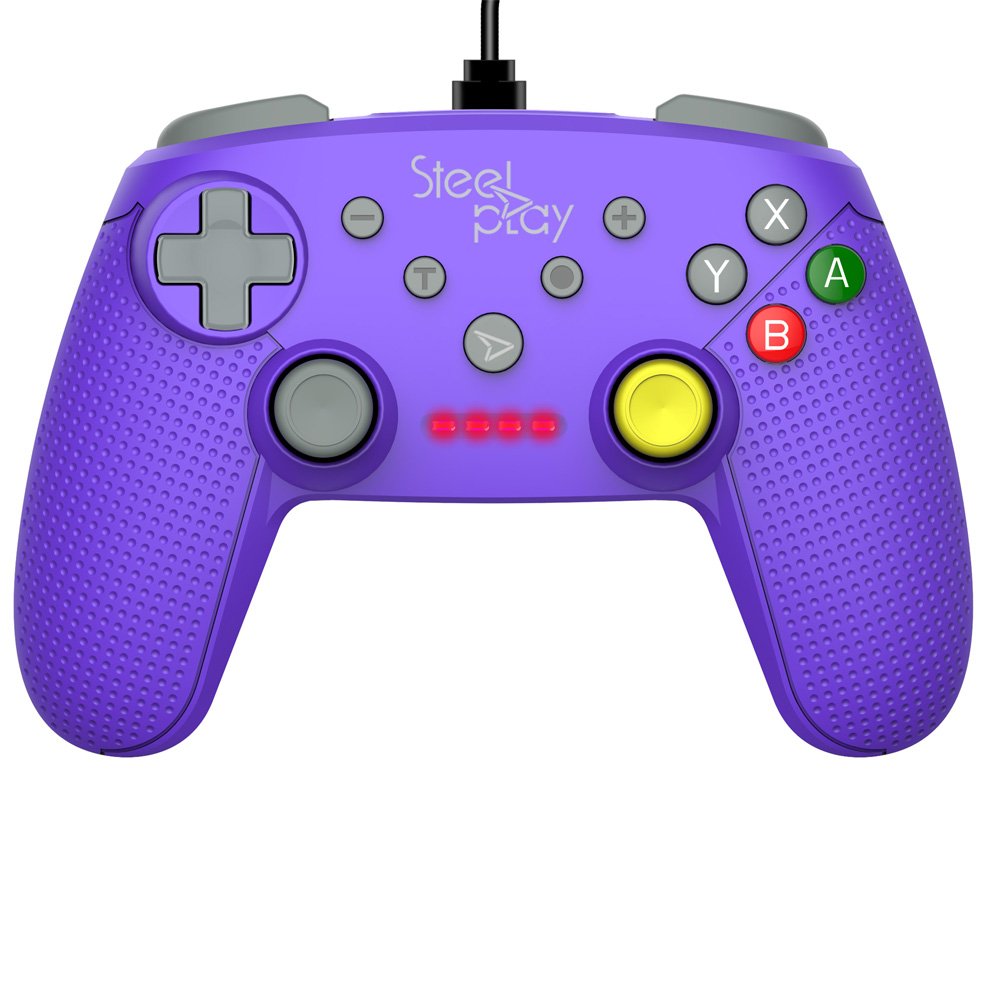
The Steelplay Wired Controller GCUBE (model ECO0622) is designed for use with the Nintendo Switch console, providing a reliable wired connection for uninterrupted gameplay. This controller features a comfortable ergonomic grip, a 2.5-meter USB cable, and includes advanced functionalities such as a gyro sensor, dual vibration feedback, and a turbo function button.
Installationsanweisungen
- Schließen Sie den Controller an: Insert the USB connector of the Steelplay Wired Controller GCUBE into an available USB port on your Nintendo Switch dock.
- Konsole einschalten: Ensure your Nintendo Switch console is powered on and connected to your TV or in handheld mode with the dock.
- Automatische Erkennung: The console should automatically detect the controller. The player indicator lights on the controller will illuminate to show its assigned player number.
- Begin Gameplay: You can now use your Steelplay Wired Controller GCUBE for gaming.
Bedienung des Controllers
The Steelplay Wired Controller GCUBE features a standard layout for intuitive gameplay.
Tastenfunktionen:
- Linker/Rechter Analogstick: Zur Bewegungs- und Kamerasteuerung.
- D-Pad (Richtungspad): Für präzise Richtungseingaben.
- A/B/X/Y-Tasten: Action buttons, typically used for jumping, attacking, interacting, etc.
- L/R Buttons (Shoulder Buttons): Often used for quick actions or menu navigation.
- ZL/ZR Buttons (Trigger Buttons): Analog or digital triggers for specific in-game actions.
- Minus (-) Taste: Typically opens in-game menus or performs specific actions.
- Plus (+)-Taste: Typically pauses the game or opens system menus.
- Home "Button: Kehrt zum HOME-Menü der Nintendo Switch zurück.
- CaptureButton: Takes screenshots of your gameplay.
Besondere Merkmale:
- Gyro-Funktion: The controller includes a built-in gyro sensor for motion control in compatible games. This allows for intuitive aiming or steering by tilting the controller.
- Doppelte Vibrationsrückmeldung: Experience enhanced immersion with haptic feedback that responds to in-game events.
- Turbofunktion: The turbo function allows for rapid, repeated input of a button press. To activate, press and hold the Turbo button, then press the desired action button (e.g., A, B, X, Y, L, R, ZL, ZR). To deactivate, repeat the process.
Wartung
Proper care ensures the longevity and optimal performance of your controller.
- Reinigung: Verwenden Sie ein weiches, trockenes Tuch, um den Controller abzuwischen. Bei hartnäckigem Schmutz leicht andrücken.ampBefeuchten Sie das Tuch mit Wasser. Vermeiden Sie die Verwendung von scharfen Chemikalien, Lösungsmitteln oder Scheuermitteln.
- Lagerung: Bewahren Sie den Controller an einem kühlen, trockenen Ort fern von direkter Sonneneinstrahlung und extremen Temperaturen auf.
- Kabelpflege: Avoid bending or twisting the USB cable excessively. Do not pull the cable to disconnect the controller; always grasp the plug.
- Vermeiden Sie Flüssigkeiten: Um interne Schäden zu vermeiden, sollte der Controller nicht mit Flüssigkeiten in Berührung kommen.
Fehlerbehebung
- Controller reagiert nicht:
- Stellen Sie sicher, dass das USB-Kabel sowohl mit dem Controller als auch mit der Nintendo Switch-Dockingstation fest verbunden ist.
- Versuchen Sie, den Controller an einen anderen USB-Anschluss der Dockingstation anzuschließen.
- Starten Sie Ihre Nintendo Switch-Konsole neu.
- Tasten oder Joysticks funktionieren nicht richtig:
- Prüfen Sie, ob sich um die Knöpfe oder Joysticks herum physische Hindernisse oder Ablagerungen befinden.
- Ensure the controller's firmware is up to date. Firmware updates may be necessary and typically require connection to a PC. Refer to the Steelplay official website for specific instructions and update tools.
- Vibration funktioniert nicht:
- Verify that vibration is enabled in your Nintendo Switch system settings and within the game you are playing.
- Stellen Sie sicher, dass der Controller ordnungsgemäß angeschlossen ist.
Technische Daten
| Besonderheit | Detail |
|---|---|
| Modellnummer | ECO0622 |
| Kompatibilität | Nintendo-Schalter |
| Konnektivität | Kabelgebunden (USB) |
| Kabellänge | 2.5 Meter |
| Maße | 17.2 x 7 x 20.3 cm |
| Gewicht | 360 g |
| Besondere Merkmale | Gyro Function, Dual Vibration Feedback, Turbo Function Button, Rubberized Grip Surface, Ergonomic Grip |
Garantieinformationen
For detailed warranty information regarding your Steelplay Wired Controller GCUBE, please refer to the warranty card included with your product or visit the official Steelplay webDie Garantiebedingungen können je nach Region und Händler variieren.
Kundenservice
If you encounter any issues or have questions not covered in this manual, please contact Steelplay customer support. Contact information can typically be found on the official Steelplay webauf der Website oder auf der Produktverpackung.


