1. Produktüberschreitungview
The Suptek Tilt TV Wall Mount MT4204 is designed to securely hold most 26-60 inch LED, LCD, and Plasma televisions. It supports a maximum weight capacity of 99 lbs and VESA mounting patterns up to 400x400mm. This low-profile mount keeps your TV close to the wall for a sleek appearance and offers a tilt adjustment feature to optimize viewwinkeln.
2. Bevor Sie beginnen
Before proceeding with installation, it is crucial to verify the compatibility of your television and wall. Carefully review die folgende:
- TV Size and Weight: Ensure your TV is between 26 and 60 inches and weighs no more than 99 lbs.
- VESA-Kompatibilität: Check the VESA mounting pattern on the back of your TV. This mount supports patterns from minimum 100x100mm to maximum 400x400mm.
- Wandtyp: This mount is suitable for installation on wood studs (up to 16 inches apart) or solid concrete walls. Do not mount on drywall alone.
- Kabelzugang: Confirm that the mount will not block any essential inputs or outlets on your TV once installed.

This image provides a crucial checklist before installation, covering VESA compatibility (minimum 100x100mm, maximum 400x400mm), potential cable blockage, TV weight (max 99lbs) and size (26-60 inches), and suitable wall types (wood studs up to 16 inches apart, or concrete walls).
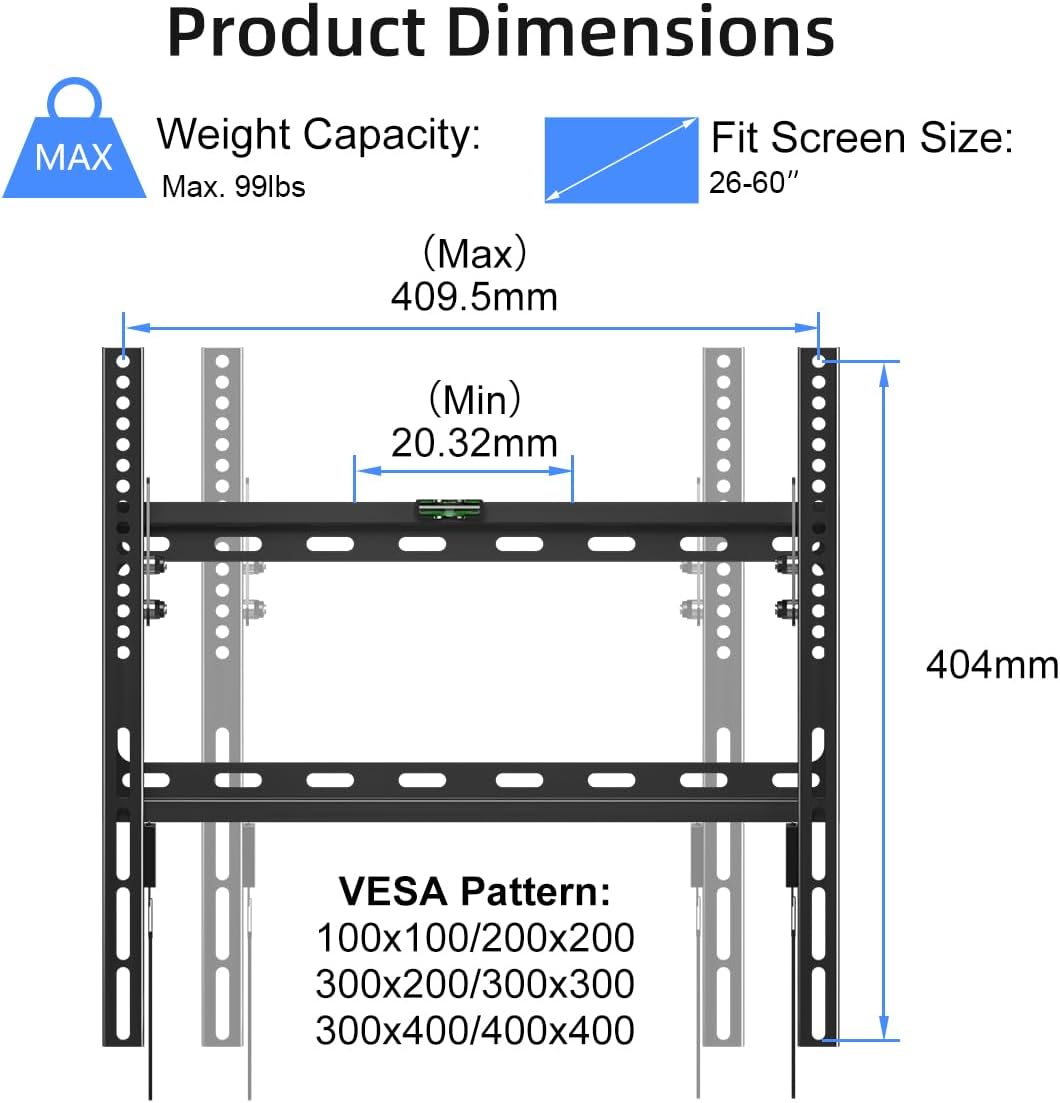
This diagram illustrates the physical dimensions of the wall mount, its maximum weight capacity of 99 lbs, and compatibility with TV screen sizes from 26 to 60 inches. It also details the supported VESA mounting patterns, including 100x100mm, 200x200mm, 300x200mm, 300x300mm, 300x400mm, and 400x400mm.
3. Packungsinhalt
The Suptek Tilt TV Wall Mount MT4204 package includes the following items:
- 1 x TV Wall Mount (Wall Plate)
- 2 x TV Brackets
- 1 x Mounting Hardware Kit (various screws, washers, spacers, concrete anchors)
- 1 x Benutzerhandbuch

This image displays all components included in the package: the main wall plate, two TV brackets, an assortment of mounting hardware (screws, washers, spacers), concrete anchors, and the user manual for installation guidance.
4. Installationsanweisungen
Follow these steps for a safe and secure installation of your Suptek Tilt TV Wall Mount MT4204. It is recommended to have a second person assist during the TV hanging process.
- Befestigen Sie die TV-Halterungen am Fernseher: Secure the two TV brackets to the back of your television using the appropriate screws and washers from the hardware kit. Ensure the brackets are aligned with the VESA mounting holes and are tightened securely.
- Mark Wall Plate Position: Hold the wall plate against the wall at your desired viewing height. Use a level to ensure it is perfectly horizontal. Mark the drilling points through the holes on the wall plate.
- Pilotlöcher bohren: Drill pilot holes at the marked locations. For wood studs, use a smaller drill bit than the lag bolts. For concrete walls, use a masonry drill bit and insert the concrete anchors.
- Wandplatte an der Wand befestigen: Secure the wall plate to the wall using the provided lag bolts (for wood studs) or concrete anchors and bolts (for concrete walls). Tighten all fasteners firmly.
- Fernseher aufhängen: Carefully lift the TV with the attached brackets and hook the brackets onto the top edge of the installed wall plate. Ensure both brackets are securely seated.
- Fernseher sicher an der Wandplatte befestigen: Locate the locking screws or pull-down straps at the bottom of the TV brackets. Tighten the locking screws or engage the straps to secure the TV to the wall plate, preventing accidental dislodgement.
This video provides a step-by-step guide on how to install the Suptek Tilt TV Wall Mount MT4204, demonstrating the process of attaching the wall plate and hanging the TV securely.

This diagram illustrates the two primary installation methods: mounting on wood studs up to 16 inches apart using self-tapping screws, and mounting on concrete walls using concrete anchors. It emphasizes that the mount should not be installed on drywall alone.
5. Bedienung
The Suptek Tilt TV Wall Mount MT4204 features a tilt adjustment to enhance your viewErfahrung.
- Neigungseinstellung: The mount allows you to tilt your TV forward by up to 10 degrees. This feature is useful for reducing glare from lights or windows and achieving an optimal viewing angle, especially if the TV is mounted higher than eye level. To adjust the tilt, loosen the tilt adjustment bolts on the TV brackets, set the desired angle, and then re-tighten the bolts to secure the TV in place.
This video demonstrates the functionality and appearance of the Suptek Tilt TV Wall Mount MT4204 once installed, showcasing ist sein niedriges Profilfile and tilt capabilities.

This image demonstrates the tilt adjustment feature of the wall mount, allowing the TV to tilt forward by up to 10 degrees to reduce glare and optimize viewWinkel aus der Sitzposition messen.
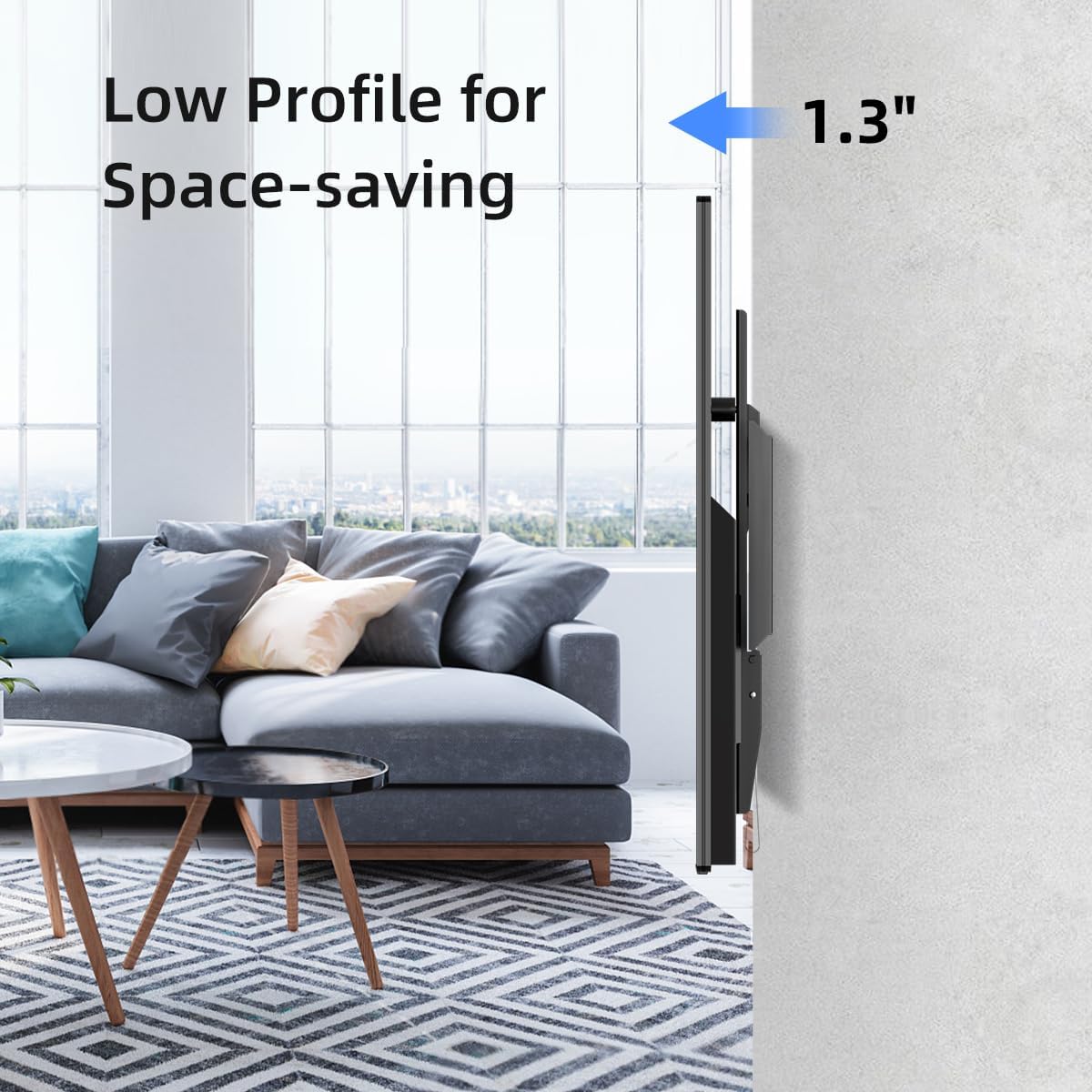
Eine Seite view of the mounted TV highlights the low-profile design, keeping the television just 1.3 inches from the wall. This design saves space and provides a sleek, integrated appearance.
6. Hauptmerkmale
The Suptek Tilt TV Wall Mount MT4204 is designed with user convenience and TV security in mind:
- Sturdy Hooks: Ensures a reliable and strong connection between the TV brackets and the wall plate.
- Easy Locking Clips: Provides a simple yet secure mechanism to lock the TV onto the wall plate, preventing accidental lifting.
- Anti-slip Edge: Enhances stability and prevents the TV from shifting once mounted.
- Clip-in Bubble Level: A convenient tool included for accurate and level installation of the wall plate.

This image showcases several key features of the mount: a convenient clip-in bubble level for accurate positioning, sturdy hooks for reliable TV support, easy locking clips to prevent accidental dislodgement, and anti-slip edges to ensure the TV remains stable.
7. Spezifikationen
| Besonderheit | Detail |
|---|---|
| Modellnummer | MT4204 |
| Kompatible TV-Größen | 26 - 60 Zoll |
| Gewichtskapazität | Maximal 99 lbs (45 kg) |
| VESA-Kompatibilität | Mindestens 100 x 100 mm, maximal 400 x 400 mm |
| Neigungswinkel | 0° to -10° (forward) |
| Profile von der Wand | 1.3 Zoll (3.3 cm) |
| Material | Legierter Stahl |
| Farbe | Schwarz |
| Technische Daten | 17.44 x 8.82 x 1.18 Zoll |
| Artikelgewicht | 2.88 Pfund |
This video highlights the key specifications and features of the Suptek Tilt TV Wall Mount MT4204, providing a visual overview of its capabilities and design.
8. Wartung
To ensure the longevity and proper function of your TV wall mount, follow these maintenance guidelines:
- Regelmäßige Inspektion: Periodically check all screws and bolts to ensure they remain tight. Over time, vibrations or movement can cause fasteners to loosen.
- Reinigung: Wischen Sie die Halterung mit einem weichen, trockenen Tuch ab, um Staub zu entfernen. Vermeiden Sie die Verwendung von Scheuermitteln oder Lösungsmitteln, da diese die Oberfläche beschädigen können.
- Gewichtsbeschränkungen: Never exceed the maximum weight capacity of 99 lbs.
9. Fehlerbehebung
Sollten Sie während oder nach der Installation auf Probleme stoßen, ziehen Sie die folgenden gängigen Lösungsansätze in Betracht:
- TV-Niveau nicht: Ensure the wall plate was installed perfectly level. If not, minor adjustments can sometimes be made by slightly loosening and re-tightening the wall plate screws. The TV brackets also offer some vertical adjustment.
- TV Not Secure: Double-check that the TV brackets are fully engaged with the wall plate and that the locking screws or straps at the bottom of the brackets are tightened/secured.
- Schwierigkeitsgrad Neigung: Ensure the tilt adjustment bolts on the TV brackets are sufficiently loosened before attempting to adjust the tilt. Re-tighten them once the desired angle is achieved.
- Blockierte Ports: If TV ports are blocked, ensure the TV brackets were installed correctly and consider using right-angle adapters for cables if space is limited.
10. Garantie und Support
Suptek provides a limited warranty for this product. For specific warranty details, claims, or technical support, please refer to the contact information provided in your product packaging or visit the official Suptek webWebsite.
For any questions or assistance, please contact Suptek customer service.


