Einführung
Dieses Handbuch enthält wichtige Informationen für die Einrichtung, den Betrieb und die Wartung Ihres DirecTV H25-100 HD-Receivers. Bitte lesen Sie es vor der Inbetriebnahme des Geräts sorgfältig durch, um eine einwandfreie Funktion zu gewährleisten und Ihren Nutzen zu maximieren. viewErfahrung.
Hauptmerkmale
- Ausschließlich für SWiM-Netzwerke (Single Wire Multiswitch) konzipiert.
- Videoausgabe in hoher Auflösung (HD).
- Kompaktes Design.
- 12V Gleichstromeingang, geeignet für verschiedene Stromversorgungskonfigurationen.
- Mehrere Ausgangsoptionen: 2x HDMI, 1x Composite, 1x Component, 1x Optischer Audioausgang.
- Keine DVR-Funktion.
Lieferumfang
- DirecTV H25-100 HD-Receiver
- Netzteil

Bild: Oben view des DirecTV H25-100 HD-Receivers, showcasing sein kompaktes schwarzes Design.
Aufstellen
Auspacken
Nehmen Sie den Empfänger und sämtliches Zubehör vorsichtig aus der Verpackung. Bewahren Sie die Verpackung für späteren Transport oder Lagerung auf.
Anschlüsse
Der Receiver H25-100 bietet verschiedene Anschlüsse für Ihren Fernseher und Ihre Satellitenschüssel. Stellen Sie sicher, dass alle Verbindungen fest sitzen, bevor Sie das Gerät einschalten.
- Satelliteneingang: Verbinden Sie das Koaxialkabel Ihrer SWiM-fähigen Satellitenschüssel mit dem Anschluss „SAT IN“ auf der Rückseite des Receivers.
- HDMI-Ausgänge: Verwenden Sie ein HDMI-Kabel, um einen der HDMI-Anschlüsse am Receiver mit einem HDMI-Eingang Ihres Fernsehers zu verbinden und so hochauflösende Video- und Audiosignale zu empfangen.
- Zusammengesetzter Ausgang: Verbinden Sie für Standard-Definition-Video die gelben (Video), weißen (linker Audiokanal) und roten (rechter Audiokanal) RCA-Kabel von den Anschlüssen „VIDEO OUT“ und „AUDIO OUT“ des Receivers mit den entsprechenden Eingängen Ihres Fernsehers.
- Komponentenausgang: Für hochauflösendes analoges Video verbinden Sie die grünen (Y), blauen (Pb) und roten (Pr) Komponentenvideokabel von den „COMPONENT OUT“-Anschlüssen des Receivers mit Ihrem Fernseher. Verbinden Sie die weißen und roten Cinch-Kabel für die Audioübertragung.
- Optischer Audioausgang: Für digitale Audioausgabe verbinden Sie ein optisches Audiokabel vom Anschluss „OPTICAL AUDIO“ mit einem kompatiblen Audio-Empfänger oder Soundsystem.
- Leistung: Schließen Sie den mitgelieferten Netzadapter an den Anschluss „POWER IN 12V“ des Receivers an und stecken Sie den Adapter anschließend in eine Wandsteckdose.

Abbildung: Vorder- und Rückseite viewAbbildung des DirecTV H25-100 HD-Receivers, auf der alle Eingangs- und Ausgangsanschlüsse hervorgehoben sind.
Erstes Einschalten
Nachdem alle Verbindungen hergestellt sind, drücken Sie die Taste „POWER“ an der Vorderseite des Receivers oder auf Ihrer DirecTV-Fernbedienung. Folgen Sie den Anweisungen auf dem Bildschirm für die Ersteinrichtung, z. B. zur Sprachauswahl und zum Satellitensignalempfang.
Bedienungsanleitung
Bedienelemente auf der Vorderseite
Die Frontplatte des Empfängers H25-100 bietet grundlegende Bedienelemente:
- LEISTUNG: Schaltet den Receiver ein oder aus.
- SPEISEKARTE: Öffnet das Hauptmenü für Einstellungen und Optionen.
- WÄHLEN: Bestätigt die Auswahl in Menüs.
- FÜHRUNG: Zeigt den Programmführer an.
- RES (Auflösung): Durchläuft die verfügbaren Videoauflösungen.
- Navigationspfeile (Hoch/Runter/Links/Rechts): Dient zur Navigation durch Menüs und zum Umschalten von Kanälen.
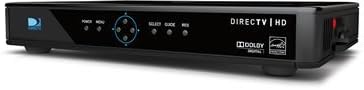
Abbildung: Seite view des DirecTV H25-100 HD-Receivers, wobei die Tasten auf der Vorderseite für Ein/Aus, Menü, Auswahl, Programmführer und Auflösung deutlich zu sehen sind.
Grundlegende Bedienung
Sobald das Gerät eingeschaltet und konfiguriert ist, können Sie mit Ihrer DirecTV-Fernbedienung (nicht im Lieferumfang dieses Receivers enthalten) durch die Kanäle navigieren, auf den Programmführer zugreifen, Einstellungen anpassen und Ihren DirecTV-Service genießen.
- Kanäle wechseln: Verwenden Sie die Tasten CH+/CH- oder geben Sie die Kanalnummern direkt auf Ihrer Fernbedienung ein.
- Zugangsleitfaden: Drücken Sie die Taste „GUIDE“, um view Programmübersicht.
- Menüführung: Über die Schaltfläche „MENÜ“ gelangen Sie zu den Systemeinstellungen, der Kindersicherung und anderen Funktionen.
Wartung
Reinigung
Um das Aussehen und die Leistung Ihres Receivers zu erhalten, reinigen Sie ihn regelmäßig. Verwenden Sie ein weiches, trockenes Tuch, um Staub abzuwischen. Bei hartnäckigen Flecken wischen Sie diese vorsichtig ab.ampBefeuchten Sie das Tuch mit Wasser. Verwenden Sie keine scharfen Chemikalien, Scheuermittel oder Lösungsmittel, da diese die Oberfläche beschädigen können.
Software-Updates
Der DirecTV H25-100 Receiver kann automatische Software-Updates per Satellit empfangen. Stellen Sie sicher, dass der Receiver an die Stromversorgung und die Satellitenschüssel angeschlossen bleibt, damit diese Updates durchgeführt werden können. Dadurch werden die Leistung verbessert und neue Funktionen hinzugefügt.
Fehlerbehebung
Sollten Sie Probleme mit Ihrem DirecTV H25-100 Receiver haben, finden Sie in der folgenden Tabelle häufig auftretende Probleme und deren Lösungen.
| Problem | Mögliche Ursache | Lösung |
|---|---|---|
| Kein Strom | Stromkabel lose oder nicht angeschlossen; Steckdose defekt. | Überprüfen Sie den Anschluss des Stromkabels; versuchen Sie eine andere Steckdose; stellen Sie sicher, dass das Netzteil funktioniert. |
| Kein Signal / Suche nach Satellit | Satellitenkabel locker oder nicht angeschlossen; Problem mit der Satellitenausrichtung; schlechtes Wetter. | Prüfen Sie die Verbindung des 'SAT IN'-Kabels; stellen Sie eine freie Sichtlinie zur Satellitenschüssel sicher; warten Sie, bis sich das Wetter bessert. |
| Kein Bild / Schwarzer Bildschirm | Falscher TV-Eingang ausgewählt; Videokabel locker oder defekt; Receiver nicht eingeschaltet. | Wählen Sie den richtigen HDMI/AV-Eingang am Fernseher; überprüfen Sie die Videokabelverbindungen; schalten Sie den Receiver aus und wieder ein. |
| Kein Ton | Audiokabel locker oder defekt; TV-/Audiosystem stummgeschaltet oder Lautstärke zu niedrig; falsche Audioausgabeeinstellung. | Überprüfen Sie die Audiokabelverbindungen; schalten Sie den Fernseher/das Audiosystem stumm und erhöhen Sie die Lautstärke; überprüfen Sie die Audioeinstellungen am Receiver. |
Technische Daten
Detaillierte technische Spezifikationen für den DirecTV H25-100 HD-Receiver:
| Besonderheit | Beschreibung |
|---|---|
| Modell | H25-100 |
| Marke | DIRECTV |
| Farbe | Schwarz |
| Konnektivitätstechnologie | HDMI, Composite, Component, Optischer Audioeingang |
| Satelliteneingang | 1 (Nur SWM-System) |
| HDMI-Ausgänge | 2 |
| Composite-Video-Ausgang | 1 |
| Component-Video-Ausgang | 1 |
| Optischer Audioausgang | 1 |
| Leistungsaufnahme | 12 V Gleichstrom |
| ASIN | B07DB2YP79 |
| Datum der ersten Verfügbarkeit | 7. August 2018 |
Garantie und Support
Informationen zur Produktgarantie, zum technischen Support oder zum Kundendienst finden Sie in der von DirecTV beim Kauf bereitgestellten Dokumentation oder auf der offiziellen DirecTV-Supportseite. webBewahren Sie Ihren Kaufbeleg als Kaufnachweis für Garantieansprüche auf.