1. Einleitung
The NETGEAR GS116PP Unmanaged Power over Ethernet (PoE) Switch is designed for desktop or rackmount installations. It features 16 Gigabit Ethernet ports, including 16 PoE+ ports with a total power budget of 183 watts. This switch offers simple plug-and-play functionality without requiring software installation or complex configuration, making it suitable for various networking environments.
2. Packungsinhalt
Überprüfen Sie, ob Ihr Paket die folgenden Artikel enthält:
- 16-port Gigabit Ethernet PoE+ Unmanaged Switch (GS116PP)
- Power adapter (External 200W)
- Kurzanleitung zur Installation
- Rack-Montagesatz
- Wandmontage-Kit
3. Körperliche Übergriffeview
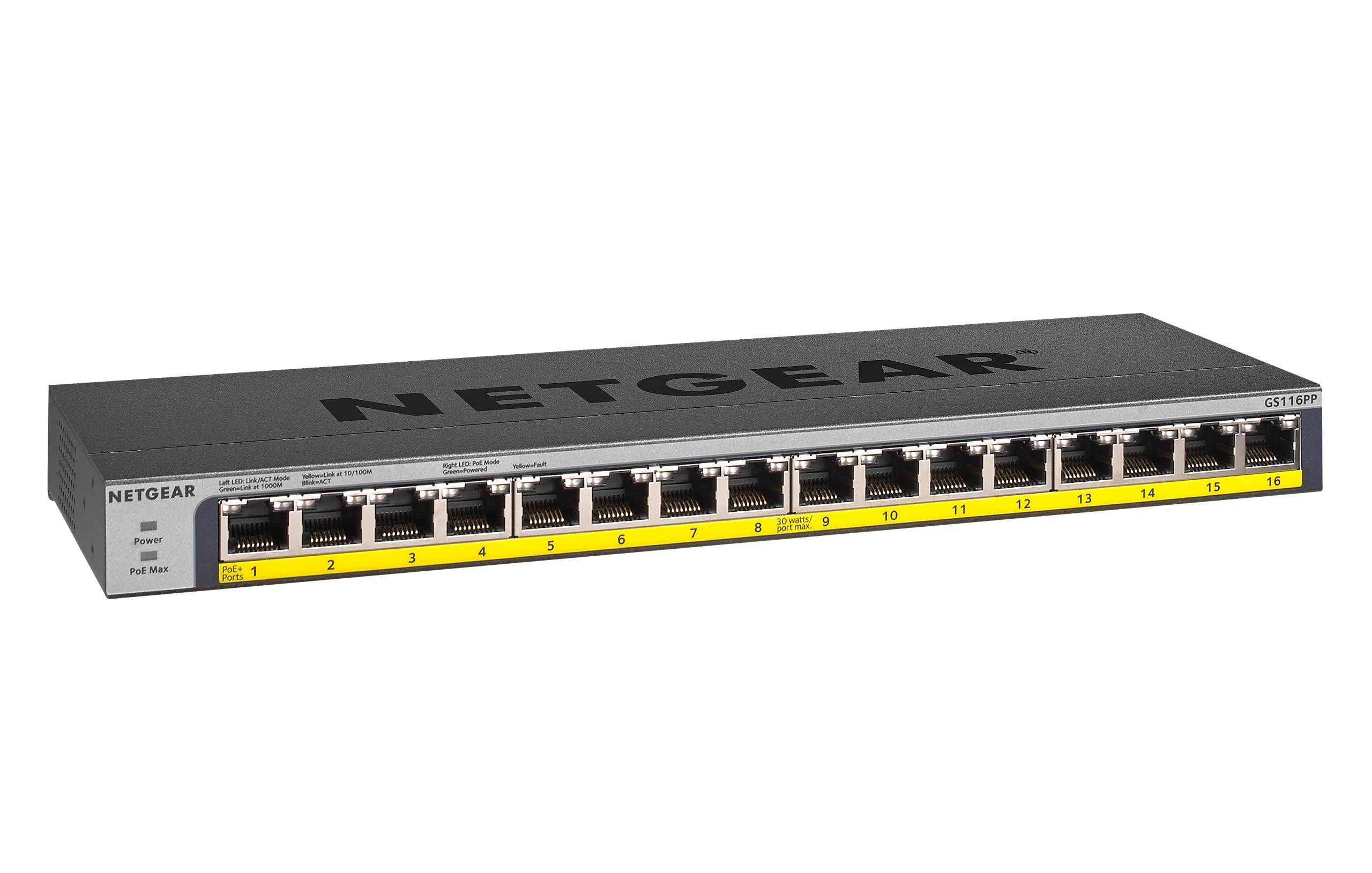
Abbildung 1: Front view of the NETGEAR GS116PP Switch.

Abbildung 2: Close-up of the front panel with 16 Gigabit Ethernet PoE+ ports.

Abbildung 3: Hinteren view of the NETGEAR GS116PP Switch, showing the power input and ventilation.

Abbildung 4: Dimensions of the NETGEAR GS116PP Switch (11.3"L x 4"W x 1.1"H).
4. Einrichtung
4.1 Auspacken und Aufstellen
Carefully remove the switch and all accessories from the packaging. The GS116PP supports desktop, wall-mount, or rack-mount placement. Ensure adequate ventilation around the device and avoid placing it near heat sources or in enclosed spaces.
4.2 Stromanschluss
- Connect the provided external 200W power adapter to the power input port on the rear of the switch.
- Plug the power adapter into a standard electrical outlet. The power LED on the front panel will illuminate, indicating the switch is powered on.
4.3 Netzwerkverbindung
The GS116PP is an unmanaged switch, offering simple plug-and-play connectivity. No software installation or configuration is required.
- Connect your network router or main network device to any of the 16 Gigabit Ethernet ports on the switch using a standard Ethernet cable.
- Connect your network devices (computers, IP cameras, VoIP phones, wireless access points, etc.) to the remaining ports.
- For PoE-powered devices, simply connect them to any of the 16 PoE+ ports. The switch will automatically detect and provide power to compatible devices.
Video 1: Ein Überview of Power over Ethernet (PoE) switching concepts and applications.
5. Bedienung des Schalters
5.1 Grundlegende Bedienung
The NETGEAR GS116PP operates as a standard unmanaged network switch. It automatically detects the speed and duplex mode of connected devices and adjusts accordingly. Data is forwarded efficiently between connected devices at Gigabit speeds.
5.2 Power over Ethernet (PoE+)-Funktionalität
All 16 ports on the GS116PP support PoE+ (802.3at) and standard PoE (802.3af). This allows you to power compatible devices directly through the Ethernet cable, eliminating the need for separate power adapters and simplifying cable management.
- Gesamtleistungsbudget: The switch provides a total power budget of 183W across all 16 PoE+ ports.
- Per-Port Power: Each PoE+ port can deliver up to 30W of power to a connected device.
- Automatische Erkennung: The switch automatically detects if a connected device is PoE-compatible and supplies the necessary power. Non-PoE devices can also be connected safely, as the switch will not supply power to them.
Video 2: A brief demonstration of the NETGEAR 16-Port Gigabit Ethernet Unmanaged PoE Switch (GS116PP) and its PoE capabilities.
6. Funktionen
- 16 Gigabit-Ethernet-Ports: Provides high-speed wired connections for all your network devices.
- 16 PoE+ Ports with 183W Budget: Powers compatible devices like IP cameras, VoIP phones, and wireless access points directly through the Ethernet cable.
- Plug-and-Play-Setup: No software to install or configuration needed for immediate use.
- Flexible Montagemöglichkeiten: Supports desktop, wall-mount, or rack-mount placement with included hardware.
- Energieeffizientes Design: Entspricht IEEE802.3az für reduzierten Stromverbrauch.
- Leiser Betrieb: Fanless design makes it ideal for noise-sensitive environments.
- Regionale Kompatibilität: Made for use in U.S. & CA only.
7. Spezifikationen
| Besonderheit | Spezifikation |
|---|---|
| Modellnummer | GS116PP-100NAS |
| Anzahl der Ports | 16 Gigabit-Ethernet-Ports |
| PoE+-Anschlüsse | 16 (IEEE 802.3at/af) |
| Gesamtes PoE-Strombudget | 183 W |
| Datenübertragungsrate | 1 Gigabit pro Sekunde |
| Produktabmessungen (L x B x H) | 11.3" x 4" x 1.1" (28.7 cm x 10.16 cm x 2.79 cm) |
| Artikelgewicht | 1.94 Pfund (0.88 kg) |
| Gehäusematerial | Metall |
| Bandtage | 240 Volt |
| Betriebstemperatur | Bis zu 130 Grad Fahrenheit (54.4 °C) |
8. Wartung
To ensure optimal performance and longevity of your NETGEAR GS116PP switch, follow these maintenance guidelines:
- Sauber halten: Reinigen Sie die Außenseite des Schalters regelmäßig mit einem weichen, trockenen Tuch. Vermeiden Sie die Verwendung von flüssigen oder Aerosolreinigern.
- Sorgen Sie für Belüftung: Do not block the ventilation openings on the switch. Proper airflow prevents overheating.
- Kabelmanagement: Um eine Signalverschlechterung zu vermeiden, sollten Netzwerkkabel ordentlich verlegt und frei von Knicken oder übermäßigen Biegungen gehalten werden.
- Neustart (falls erforderlich): If the switch or connected devices are experiencing issues, a simple power cycle (unplugging and replugging the power adapter) can often resolve minor problems.
9. Fehlerbehebung
If you encounter issues with your GS116PP switch, consider the following troubleshooting steps:
- Kein Strom:
- Stellen Sie sicher, dass der Netzadapter sowohl mit dem Schalter als auch mit einer funktionierenden Steckdose fest verbunden ist.
- Prüfen Sie die Betriebsanzeige-LED an der Vorderseite; sie sollte leuchten.
- Keine Netzwerkverbindung:
- Verify that Ethernet cables are securely plugged into both the switch and the connected devices.
- Check the link/activity LEDs on the switch ports; they should be lit or blinking for active connections.
- Ensure your router or upstream network device is functioning correctly.
- PoE-Gerät schaltet sich nicht ein:
- Confirm that the connected device is PoE-compatible (IEEE 802.3af or 802.3at).
- Check the PoE status LED for the specific port; it should indicate power delivery.
- Ensure the total power consumption of all connected PoE devices does not exceed the 183W budget. If the budget is exceeded, the switch may prioritize power to certain ports or disable power to others.
- Try connecting the PoE device to a different port.
- Langsame Netzwerkgeschwindigkeit:
- Stellen Sie sicher, dass alle angeschlossenen Geräte und Kabel Gigabit-Ethernet unterstützen, um eine optimale Leistung zu gewährleisten.
- Check for faulty cables by testing with known good cables.
- Avoid network loops by ensuring cables are not connected in a way that creates a circular path.
10. Garantie und Support
The NETGEAR GS116PP Switch comes with a Lifetime Limited Hardware Warranty. This includes Next Business Day Replacement for eligible hardware failures.
For technical assistance and support, NETGEAR offers 24/7 chat support with a NETGEAR expert. Please refer to the official NETGEAR website or the quick install guide for detailed support contact information and warranty terms.


