1. Einleitung
The Sena SF1 Bluetooth Communication System is designed to provide essential communication features for motorcycle riders. This system facilitates 2-way intercom communication with a passenger, allowing for clear conversations up to 100 meters (110 yards) in open terrain. It also enables seamless connectivity with your mobile device for streaming music, managing phone calls, and receiving turn-by-turn GPS directions. Key features include VOX Phone commands, Audio Overlay, Quick Charging, and microphone mute options, enhancing your riding experience with convenience and safety.
2. Packungsinhalt
The Sena SF1 package includes the following components:
- Sena SF1 Main Unit
- Helm Clamp Bausatz
- Lautsprecher
- Kabelgebundenes Boom-Mikrofon
- Kabelgebundenes Mikrofon
- USB Power & Data Cable (USB-C type)
- Klettpads für Lautsprecher
- Velcro Pad for Wired Boom Microphone
- Velcro Pad for Wired Microphone
- Lautsprecherpads (dick)
- Innensechskantschlüssel
Note: The specific component "Sena 843-01297" refers to the main unit or a specific part number within the kit.
3. Produktüberschreitungview
The Sena SF1 unit features a sleek, low-profile design with intuitive controls for easy operation while riding.

Abbildung 3.1: Oben View of Sena SF1 Main Unit. This image displays the top of the Sena SF1 communication system, highlighting the central control button and the plus (+) and minus (-) buttons for volume and navigation. A blue indicator light is visible at the top center.

Abbildung 3.2: Schräg View of Sena SF1 Main Unit. An angled perspective of the SF1 unit, showing its compact form factor and the arrangement of its primary control buttons. The blue indicator light is also visible.
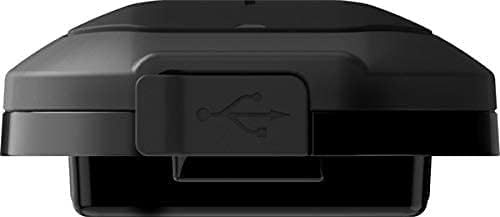
Figure 3.3: Sena SF1 USB Charging Port. This image focuses on the USB charging port, typically located on the side or bottom of the unit, protected by a rubber flap to ensure water resistance.

Figure 3.4: Sena SF1 Side View with Helmet Clamp. Eine Seite view of the SF1 unit attached to a helmet clamp, illustrating how the unit integrates with the helmet and the connection points for speakers and microphone cables.
3.1 Bedienelemente und Anzeigen
- Mittlere Taste: Multi-functional button for power, pairing, and call management.
- (+)-Taste: Increases volume, navigates forward through menus or tracks.
- (-) Taste: Decreases volume, navigates backward through menus or tracks.
- LED-Anzeige: Displays device status (power, charging, Bluetooth connection).
4. Installation
Proper installation ensures optimal performance and comfort. The SF1 is designed to fit on almost any helmet.
4.1 Montage der Haupteinheit
- Choose a suitable location on the left side of your helmet for the clamp Einheit.
- Lösen Sie die Schrauben am Helmverschluss.amp and slide it between the outer shell and the inner padding of the helmet. Tighten the screws securely.
- Alternatively, use the adhesive mount if the clamp unit is not suitable for your helmet type. Ensure the surface is clean and dry before applying.
- Slide the SF1 main unit onto the mounted clamp bis es einrastet.
4.2 Installation von Lautsprechern und Mikrofon
- Attach the speakers to the Velcro pads inside the helmet's ear pockets. Use the thick speaker pads if needed for better fit and audio quality.
- Connect the speaker cables to the main unit.
- For full-face helmets, attach the wired microphone to the inside of the chin bar using the Velcro pad. Position it close to your mouth.
- For open-face or modular helmets, attach the wired boom microphone to the inside of the helmet, ensuring it is positioned correctly for clear voice pickup.
- Route all cables neatly under the helmet padding to avoid interference and ensure comfort.
5. Einrichtung
5.1 Ein-/Ausschalten
- Einschalten: Halten Sie die Mitteltaste und die (+)-Taste für 1 Sekunde.
- Ausschalten: Halten Sie die Mitteltaste und die (+)-Taste für 5 Sekunden.
5.2 Bluetooth-Kopplung mit Mobiltelefon
- With the SF1 powered off, press and hold the Mitteltaste Warten Sie 5 Sekunden, bis die LED abwechselnd rot und blau blinkt und damit den Kopplungsmodus anzeigt.
- Aktivieren Sie auf Ihrem Mobiltelefon Bluetooth und suchen Sie nach Geräten.
- Select "Sena SF1" from the list of detected devices.
- If prompted, enter PIN "0000". The LED will turn blue when pairing is successful.
5.3 Intercom Pairing (2-Way)
- Stellen Sie sicher, dass beide SF1-Einheiten eingeschaltet sind.
- Bei einem Gerät die Taste gedrückt halten Mitteltaste für 5 Sekunden, bis die LED rot blinkt.
- Drücken und halten Sie beim zweiten Gerät die Taste Mitteltaste für 5 Sekunden, bis die LED rot blinkt.
- The units will automatically pair and connect. The LED on both units will turn blue.
5.4 Sena Utility-App
For advanced configuration and firmware updates, download the Sena Utility App from your smartphone's app store. The app allows you to customize settings, manage speed dial presets, and access a quick guide.
6. Bedienungsanleitung
6.1 Lautstärkeregelung
- Lautstärke erhöhen: Tippen Sie auf das (+)-Taste.
- Lautstärke verringern: Tippen Sie auf das (-) Taste.
6.2 Musikfunktionen
- Musik abspielen/pausieren: Drücken Sie die Mitteltaste für 1 Sekunde.
- Nächster Titel: Drücken Sie die (+)-Taste für 1 Sekunde.
- Vorheriges Lied: Drücken Sie die (-) Taste für 1 Sekunde.
6.3 Phone Call Functions
- Anruf annehmen: Tippen Sie auf das Mitteltaste.
- Anruf beenden: Drücken Sie die Mitteltaste für 2 Sekunden.
- Anruf ablehnen: Drücken Sie die Mitteltaste for 2 seconds when a call is incoming.
- Voice Dial (VOX Phone): Drücken Sie die Mitteltaste für 3 Sekunden.
- Mikrofonstummschaltung: Drücken Sie die (+)-Taste Und (-) Taste simultaneously for 1 second during a call.
6.4 Gegensprechanlagenkommunikation
- Intercom starten/beenden: Tippen Sie auf das Mitteltaste.
- Audio Overlay: The SF1 supports Audio Overlay, allowing you to listen to music or GPS instructions while engaged in intercom conversation. The audio levels will adjust automatically.
6.5 GPS-Navigation
Once paired with your smartphone, turn-by-turn GPS directions from your navigation app will be transmitted directly to your SF1 speakers. Audio Overlay ensures that navigation prompts are heard even during other audio activities.
7. Wartung
7.1 Laden des Akkus
- Connect the SF1 to a USB power source using the provided USB Power & Data Cable.
- Die LED-Anzeige leuchtet während des Ladevorgangs rot und blau, wenn der Akku vollständig geladen ist.
- Eine vollständige Aufladung dauert in der Regel ungefähr 1.5 Stunden.
- The SF1 offers a talk time of up to 13 Stunden bei voller Ladung.
- The Quick Charging feature allows for faster charging when time is limited.
7.2 Reinigung und Lagerung
- Wischen Sie das Gerät mit einem weichen, damp Tuch. Verwenden Sie keine aggressiven Chemikalien oder Lösungsmittel.
- Um die Wasserdichtigkeit zu gewährleisten, stellen Sie sicher, dass die Abdeckung des USB-Anschlusses fest verschlossen ist.
- Store the SF1 in a cool, dry place when not in use.
8. Fehlerbehebung
8.1 Werksreset
If the SF1 is not functioning correctly, a factory reset may resolve the issue. To perform a factory reset, press and hold the Mitteltaste for 12 seconds until the LED flashes red rapidly. Then, tap the Mitteltaste to confirm. The unit will power off and reset to default settings.
8.2 Häufige Probleme
- Kein Strom: Stellen Sie sicher, dass der Akku geladen ist. Schließen Sie ihn an ein Ladegerät an und überprüfen Sie die LED-Anzeige.
- Kein Ton: Check speaker connections. Ensure volume is not at minimum. Re-pair with your device.
- Intercom-Verbindung unterbrochen: Ensure both units are within range (100 meters in open terrain) and re-initiate intercom connection.
- Probleme mit der Bluetooth-Kopplung: Ensure the SF1 is in pairing mode (red and blue flashing LED) and your phone's Bluetooth is enabled. Try restarting both devices.
9. Spezifikationen
| Besonderheit | Detail |
|---|---|
| Modellname | SF1 |
| Bluetooth-Version | 4.1 |
| Bluetooth-Reichweite | Bis zu 100 Meter (110 Yards) im offenen Gelände |
| Gegensprechanlage | 2-Wege |
| Gesprächszeit | Bis zu 13 Stunden |
| Ladezeit | 1.5 Stunden |
| Lärmschutz | Fortschrittliche Geräuschunterdrückung |
| Wasserbeständigkeit | Wasserfest |
| Gewicht | 3.52 Unzen (0.1 Kilogramm) |
| Abmessungen (L x B x H) | 3.94 x 1.57 x 2.36 Zoll |
| Material | Plastik |
| Kontrollmethode | Berühren |
| Akku-Typ | Lithium-Polymer (im Lieferumfang enthalten) |
| Kompatible Geräte | Electronic devices with Bluetooth capabilities |
10. Garantie und Support
10.1 Garantieinformationen
Sena products are covered by a limited warranty against manufacturing defects. The EU Spare Part Availability Duration is 2 years. For specific warranty terms and conditions, please refer to the official Sena webBesuchen Sie die Website oder kontaktieren Sie den Kundendienst. Bewahren Sie Ihren Kaufbeleg für Garantieansprüche auf.
10.2 Kundendienst
For technical assistance, troubleshooting, or general inquiries, please visit the official Sena website for support resources, FAQs, and contact information. You can also utilize the Sena Utility App for quick access to support and product information.


