Einführung
This manual provides essential information for the safe and effective operation of your Altec Lansing IMW478s Mini LifeJacket-3 Bluetooth Speaker. The Mini LifeJacket-3 is a rugged, compact, and waterproof portable speaker designed for various environments. It features Bluetooth wireless connectivity, True Wireless Stereo Plus pairing, an onboard microphone for hands-free communication, and a built-in power bank.
Please read this manual thoroughly before using the speaker and retain it for future reference.
Packungsinhalt
- Altec Lansing IMW478s Mini LifeJacket-3 Bluetooth Speaker
- USB-Ladekabel
- Hilfskabel (AUX).
- Montagehalterung
- Kurzanleitung (nicht in diesem Handbuch enthalten)
Produkt überview
Lautsprecheranordnung

Abbildung 1: Vorderseite view of the Altec Lansing IMW478s Mini LifeJacket-3 Bluetooth Speaker, showcasing its rugged design and speaker grilles.
Bedienelemente und Anzeigen

Abbildung 2: Oben view of the speaker, illustrating the control buttons. These typically include Power, Bluetooth Pairing, Volume Up/Next Track, Volume Down/Previous Track, and Play/Pause/Call Answer buttons.
- Netzschalter: Press and hold to turn the speaker On or Off.
- Bluetooth-Taste: Drücken Sie, um in den Bluetooth-Kopplungsmodus zu wechseln.
- Lautstärke erhöhen (+)/Nächster Titel: Press to increase volume; press and hold to skip to the next track.
- Lautstärke verringern (-)/Vorheriger Titel-Taste: Press to decrease volume; press and hold to go to the previous track.
- Wiedergabe-/Pause-/Anruftaste: Press to play or pause audio; press to answer or end a call.
- LED-Anzeige: Zeigt den Betriebszustand, den Ladestatus und den Bluetooth-Kopplungsstatus an.
Häfen
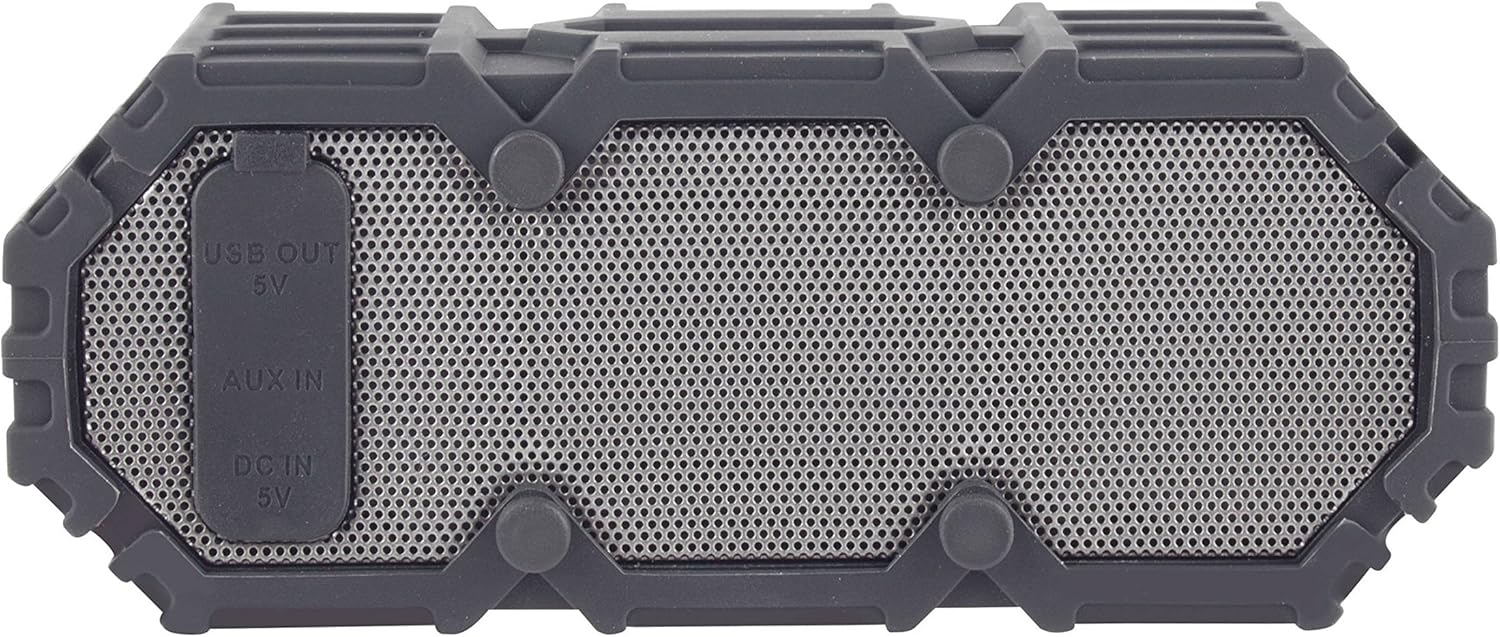
Abbildung 3: Seite view of the speaker revealing the protective flap covering the USB OUT (5V), AUX IN, and DC IN (5V) ports.
- DC IN (5V) Port: Zum Aufladen des Lautsprechers mit dem mitgelieferten USB-Kabel.
- AUX-IN-Anschluss: Zum Anschluss externer Audiogeräte über ein 3.5-mm-Aux-Kabel.
- USB OUT (5V) Port: Functions as a power bank to charge other portable devices.
Aufstellen
Erstladung
- Vor dem ersten Gebrauch muss der Lautsprecher vollständig aufgeladen werden.
- Öffnen Sie die Schutzklappe an der Seite des Lautsprechers.
- Connect the small end of the USB charging cable to the DC IN (5V) port on the speaker.
- Verbinden Sie das breite Ende des USB-Kabels mit einem USB-Netzteil (nicht im Lieferumfang enthalten) oder einem USB-Anschluss Ihres Computers.
- The LED indicator will show charging status (e.g., solid red while charging, off when fully charged). Charging typically takes a few hours.
- Once fully charged, disconnect the cable and securely close the protective flap to maintain waterproofing.
Ein-/Ausschalten
- To power on: Press and hold the Power button until the LED indicator lights up and you hear an audible prompt.
- To power off: Press and hold the Power button until the LED indicator turns off and you hear an audible prompt.
Bedienungsanleitung
Bluetooth-Kopplung
- Ensure the speaker is powered on and within 30 feet (10 meters) of your Bluetooth device.
- The speaker will automatically enter Bluetooth pairing mode when powered on for the first time, or if no device is connected. The LED indicator will flash blue. If already connected, press the Bluetooth button to enter pairing mode.
- Aktivieren Sie Bluetooth auf Ihrem Gerät (Smartphone, Tablet, Computer).
- Suchen nach "Mini LifeJacket 3" in your device's Bluetooth settings.
- Select "Mini LifeJacket 3" to connect. Once paired, the LED indicator will turn solid blue, and you will hear a confirmation tone.
- Falls die Kopplung fehlschlägt, schalten Sie den Lautsprecher und die Bluetooth-Funktion Ihres Geräts aus und wiederholen Sie die Schritte.
Audiowiedergabe
- Abspielen/Pause: Drücken Sie die Wiedergabe/Pause-Taste.
- Lautstärkeregelung: Drücken Sie die Lautstärketaste + (+) oder die Lautstärketaste - (-).
- Nächster Titel: Die Lauter-Taste (+) gedrückt halten.
- Vorheriges Lied: Halten Sie die Leiser-Taste (-) gedrückt.
Anruf-Management
- Anruf annehmen/beenden: Press the Play/Pause/Call button.
- Anruf ablehnen: Press and hold the Play/Pause/Call button.
True Wireless Stereo Plus Pairing (TWS)
The Mini LifeJacket-3 supports TWS pairing, allowing you to connect two Mini LifeJacket-3 speakers for a stereo audio experience.
- Ensure both Mini LifeJacket-3 speakers are powered on and not connected to any Bluetooth device.
- On one speaker (this will be the primary speaker), press and hold the Bluetooth button for 3 seconds until you hear a tone indicating TWS pairing mode.
- Der primäre Sprecher sucht automatisch nach dem zweiten Sprecher.
- Once connected, you will hear a confirmation tone, and the LED indicators on both speakers will show a solid blue light.
- Verbinden Sie nun Ihr Bluetooth-Gerät mit dem Hauptlautsprecher, wie im Abschnitt „Bluetooth-Kopplung“ beschrieben. Der Ton wird über beide Lautsprecher in Stereo wiedergegeben.
Hilfseingang (AUX)
So spielen Sie Audio von einem Gerät ohne Bluetooth-Funktion ab:
- Öffnen Sie die Schutzklappe an der Seite des Lautsprechers.
- Verbinden Sie ein Ende des 3.5-mm-Aux-Kabels mit dem AUX IN-Anschluss des Lautsprechers.
- Verbinden Sie das andere Ende des Kabels mit der Kopfhörerbuchse oder dem Audioausgang Ihres Geräts.
- Der Lautsprecher schaltet automatisch in den AUX-Modus.
- Steuern Sie Wiedergabe und Lautstärke über Ihr angeschlossenes Gerät.
- Remember to close the protective flap when not in use.
Powerbank-Funktion
The Mini LifeJacket-3 can be used to charge other USB-powered devices.
- Öffnen Sie die Schutzklappe an der Seite des Lautsprechers.
- Connect your device's USB charging cable to the USB OUT (5V) port on the speaker.
- Der interne Akku des Lautsprechers beginnt nun, Ihr Gerät aufzuladen.
- Note that using the power bank function will deplete the speaker's battery.
- Remember to close the protective flap when not in use.
Aufladen des Lautsprechers
The Mini LifeJacket-3 provides up to 16 hours of battery life on a full charge. When the battery is low, the LED indicator may flash, or you may hear an audible low battery warning.
To charge the speaker, follow the steps outlined in the "Initial Charging" section under Setup. Ensure the protective flap is securely closed after charging to maintain the speaker's waterproof integrity.
Waterproofing and Care
The Altec Lansing IMW478s Mini LifeJacket-3 is rated IP67 Waterproof, Dustproof, and Shockproof, and it floats. This means it can be submerged in water up to 1 meter (3.3 feet) for up to 30 minutes.

Figure 4: The Mini LifeJacket-3 speaker floating on the surface of water, demonstrating its waterproof and buoyant design.
Important Waterproofing Notes:
- Always ensure the protective flap covering the charging and AUX ports is securely closed before exposing the speaker to water or dust.
- Do not submerge the speaker in water deeper than 1 meter or for longer than 30 minutes.
- Rinse the speaker with fresh water after exposure to saltwater or chlorinated water, then dry thoroughly.
- Vermeiden Sie es, den Lautsprecher extremen Temperaturen auszusetzen.
Wartung
- Reinigung: Verwenden Sie ein weiches,amp Reinigen Sie den Lautsprecher mit einem Tuch. Verwenden Sie keine scharfen Chemikalien oder Scheuermittel.
- Lagerung: Bewahren Sie den Lautsprecher an einem kühlen, trockenen Ort ohne direkte Sonneneinstrahlung und extreme Temperaturen auf. Laden Sie den Akku bei längerer Lagerung regelmäßig auf, um seine Leistungsfähigkeit zu erhalten.
- Portpflege: Ensure the charging and AUX ports are free of debris before connecting cables. Always close the protective flap when not in use.
Fehlerbehebung
| Problem | Mögliche Ursache | Lösung |
|---|---|---|
| Der Lautsprecher lässt sich nicht einschalten. | Batterie ist leer. | Laden Sie den Lautsprecher vollständig auf. |
| Kopplung mit Bluetooth-Gerät nicht möglich. | Der Lautsprecher befindet sich nicht im Kopplungsmodus; die Bluetooth-Verbindung des Geräts ist deaktiviert; der Lautsprecher ist zu weit vom Gerät entfernt. | Ensure speaker is in pairing mode (flashing blue LED). Turn Bluetooth on your device. Move speaker closer to device (within 30 ft/10m). Forget "Mini LifeJacket 3" on your device and try pairing again. |
| Aus dem Lautsprecher kommt kein Ton. | Die Lautstärke ist zu niedrig; der Lautsprecher ist nicht angeschlossen; falscher Eingangsmodus. | Increase volume on both speaker and connected device. Ensure speaker is successfully paired or AUX cable is properly connected. Check if speaker is in the correct mode (Bluetooth or AUX). |
| Der Ton ist verzerrt. | Volume is too high; low battery; interference. | Decrease volume. Charge the speaker. Move speaker away from other electronic devices. |
| Cannot charge external device using power bank. | Der Akku des Lautsprechers ist zu schwach; es liegt ein Kabelproblem vor. | Stellen Sie sicher, dass der Lautsprecher ausreichend geladen ist. Versuchen Sie es mit einem anderen USB-Kabel. |
Technische Daten
| Besonderheit | Detail |
|---|---|
| Marke | Altec Lansing |
| Modell | IMW478s (Mini LifeJacket-3) |
| Konnektivitätstechnologie | Bluetooth |
| Drahtlose Reichweite | Bis zu 30 Fuß (10 Meter) |
| Akkulaufzeit | Bis zu 16 Stunden |
| Wasserdichtigkeit | IP67 (Waterproof, Dustproof, Shockproof, Floats) |
| Audioausgabemodus | Stereo (mit TWS-Kopplung) |
| Stromquelle | Batteriebetrieben |
| Produktabmessungen (T x B x H) | 2.76" x 7.87" x 1.57" (7.01 cm x 19.99 cm x 3.99 cm) |
| Artikelgewicht | 15.8 Unzen (447.9 Gramm) |
| Besondere Merkmale | Built-in Microphone, Power Bank (USB OUT 5V), True Wireless Stereo Plus Pairing |

Figure 5: The Mini LifeJacket-3 speaker mounted on an ATV handlebar, demonstrating its versatility and the use of the included mounting bracket.
Garantie und Support
The Altec Lansing IMW478s Mini LifeJacket-3 Bluetooth Speaker comes with a Limited Warranty. For specific warranty terms and conditions, please refer to the warranty card included with your product or visit the official Altec Lansing webWebsite.
For technical support, troubleshooting assistance, or to inquire about replacement parts, please contact Altec Lansing customer service or visit their official support page. Contact information can typically be found on the product packaging or the manufacturer's webWebsite.
Offiziell WebWebsite: https://alteclansing.com/


