1. Einleitung
This manual provides comprehensive instructions for the installation, operation, and maintenance of the DIGI WR11-M400-DE1-XB Cellular Router. This device is designed to provide reliable 4G LTE cellular connectivity and Ethernet networking for various applications. Please read this manual thoroughly before using the product to ensure proper setup and functionality.
2. Sicherheitshinweise
Beachten Sie die folgenden Sicherheitsvorkehrungen, um Schäden am Gerät oder Verletzungen von Personen zu vermeiden:
- Stellen Sie sicher, dass die Stromversorgungslautstärketage entspricht den Anforderungen des Geräts.
- Das Gerät darf weder Wasser noch übermäßiger Feuchtigkeit ausgesetzt werden.
- Vermeiden Sie, das Gerät in der Nähe von Wärmequellen oder in direktem Sonnenlicht aufzustellen.
- Öffnen Sie das Gerät nicht.asing; alle Wartungsarbeiten sind qualifiziertem Personal zu überlassen.
- Use only approved accessories and antennas with the router.
3. Packungsinhalt
Überprüfen Sie, ob alle Artikel im Paket vorhanden sind:
- DIGI WR11-M400-DE1-XB Cellular Router
- Netzteil (kann je nach Region variieren)
- Kurzanleitung
- Montagezubehör (falls zutreffend)
Note: Antennas are not included with this model and must be purchased separately.
4. Produktüberschreitungview
The DIGI WR11-M400-DE1-XB is a compact and robust cellular router designed for reliable connectivity. Below is an image of the device with key features highlighted.
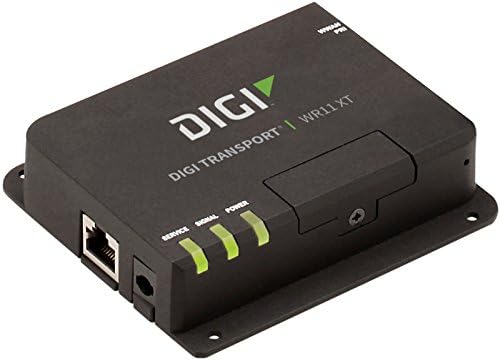
Bild: Vorderseite view of the DIGI WR11-M400-DE1-XB Cellular Router, showing the Ethernet port, power input, and three LED indicators for Service, Signal, and Power. The device is black with the "DIGI TRANSPORT WR11 XT" logo.
Anzeigen auf der Vorderseite
- Service-LED: Indicates cellular service status. (e.g., Solid Green: Connected, Blinking: Attempting connection, Off: No service)
- Signal-LED: Indicates cellular signal strength. (e.g., Green: Strong, Amber: Medium, Red: Weak)
- Betriebs-LED: Indicates power status. (e.g., Solid Green: Power on, Off: Power off)
Anschlüsse und Steckverbinder
- Ethernet-Anschluss (LAN): One RJ45 port for wired network connection.
- Leistungsaufnahme: Connector for the DC power adapter.
- Antennenanschlüsse: (Not visible in image, but typically present on cellular routers for external antennas, though this model states "NO Antenna" in description, implying internal or separate purchase). Note: This model does not include antennas. External antennas must be connected to the appropriate ports (if available) for cellular connectivity.
5. Einrichtung
Ersteinrichtung
- Positionierung: Place the router in a central location, away from obstructions and other electronic devices that may cause interference. Ensure good cellular signal reception.
- Installation der SIM-Karte: If applicable, insert your activated 4G LTE SIM card into the designated SIM card slot. Ensure it is inserted correctly according to the diagram on the device or in the Quick Start Guide.
- Antennenanschluss: If using external antennas (recommended for optimal performance, and necessary for this model as it ships without antennas), connect them securely to the antenna ports.
- Stromanschluss: Connect the power adapter to the router's power input port, then plug the adapter into a power outlet. The Power LED should illuminate.
Netzwerkverbindung
- Kabelverbindung: Connect an Ethernet cable from the router's LAN port to your computer or network switch.
- Konnektivität überprüfen: Once powered on, the router will attempt to establish a cellular connection. Monitor the Service and Signal LEDs. The Service LED should turn solid green, and the Signal LED should indicate good signal strength.
6. Bedienungsanleitung
Grundlegende Bedienung
Once the router is powered on and has established a cellular connection (indicated by the Service and Signal LEDs), devices connected to its Ethernet port will be able to access the internet via the 4G LTE network.
Zugriff auf die Web Schnittstelle
For advanced configuration and monitoring, you can access the router's web-basierte Verwaltungsschnittstelle:
- Ensure your computer is connected to the router via Ethernet.
- Öffnen Sie ein web Browser (z. B. Chrome, Firefox, Edge).
- Geben Sie in der Adressleiste die Standard-IP-Adresse des Routers ein (üblicherweise 1234).
192.168.1.1or192.168.0.1, refer to the Quick Start Guide or device label for the exact address) and press Enter. - Enter the default username and password when prompted (typically
adminfor both, or as specified in the Quick Start Guide). - You can now configure network settings, security, and monitor device status.
7. Wartung
Regelmäßige Wartung trägt dazu bei, die Langlebigkeit und optimale Leistung Ihres Routers zu gewährleisten:
- Reinigung: Reinigen Sie die Außenseite des Routers mit einem weichen, trockenen Tuch. Verwenden Sie keine flüssigen Reiniger oder Sprays.
- Firmware-Updates: Überprüfen Sie regelmäßig die Herstellerangaben. website for firmware updates. Keeping the firmware updated can improve performance, add features, and enhance security.
- Belüftung: Stellen Sie sicher, dass der Router an einem gut belüfteten Ort aufgestellt wird, um eine Überhitzung zu vermeiden. Blockieren Sie keine Lüftungsöffnungen.
- Aus- und Wiedereinschalten: If the router experiences issues, try power cycling it by disconnecting the power adapter for 10 seconds and then reconnecting it.
8. Fehlerbehebung
This section addresses common issues you might encounter with the DIGI WR11-M400-DE1-XB Cellular Router.
| Problem | Mögliche Ursache | Lösung |
|---|---|---|
| Kein Strom (Betriebs-LED aus) | Netzteil nicht angeschlossen oder Steckdose defekt. | Check power connections. Try a different power outlet. Ensure the power adapter is functioning. |
| No Cellular Service (Service LED Off/Blinking) | No SIM card, inactive SIM, poor signal, or network issue. | Ensure SIM card is correctly inserted and activated. Relocate the router for better signal. Contact your cellular provider. |
| Poor Signal Strength (Signal LED Red/Amber) | Router location, external interference, or antenna issue. | Move the router to an area with better cellular reception. Ensure external antennas (if used) are properly connected and positioned. |
| No Internet Access via Ethernet | No cellular connection, incorrect network settings, or faulty Ethernet cable. | Verify cellular connection status (Service LED). Check Ethernet cable connection. Access web interface to verify network settings. |
| Kein Zugriff möglich Web Schnittstelle | Incorrect IP address, network configuration issue, or router not responding. | Verify the router's IP address. Ensure your computer is set to obtain an IP address automatically (DHCP). Try power cycling the router. |
9. Spezifikationen
Key technical specifications for the DIGI WR11-M400-DE1-XB Cellular Router:
| Besonderheit | Detail |
|---|---|
| Modell | WR11-M400-DE1-XB |
| Marke | Digi |
| Konnektivitätstechnologie | Cellular (4G LTE Sprint), Ethernet |
| Anzahl der Ports | 1 (Ethernet) |
| Kompatible Geräte | Personalcomputer |
| Kontrollmethode | Fernbedienung |
| Controllertyp | Schalten |
| Besonderheit | WPS |
| UPC | 665752885062 |
| Erstes verfügbares Datum | 23. Juli 2018 |
10. Garantie und Support
For information regarding product warranty, technical support, or service, please refer to the warranty card included with your product or visit the official Digi International website. Support resources, including FAQs, documentation, and contact information, are typically available online.
Bitte bewahren Sie Ihren Kaufbeleg für Garantieansprüche auf.


