Einführung
Thank you for choosing the 360 Robot Vacuum and Mop Cleaner. This intelligent cleaning device is designed to provide efficient and thorough cleaning for your home, featuring advanced laser navigation, powerful suction, and smart app control. This manual will guide you through the setup, operation, and maintenance of your new robot vacuum to ensure optimal performance and longevity.

The 360 Robot Vacuum and Mop Cleaner, Model S6, shown with its companion mobile application interface.
Sicherheitshinweise
- Lesen Sie alle Anweisungen sorgfältig durch, bevor Sie das Gerät verwenden.
- Kinder dürfen den Saugroboter nicht bedienen. Beaufsichtigen Sie Kinder und Haustiere, wenn der Roboter in Betrieb ist.
- Stellen Sie sicher, dass die Ladestation auf einer ebenen Fläche an einer Wand steht und dass sich um sie herum ausreichend Platz befindet.
- Do not use the robot vacuum in wet environments or near liquids.
- Entfernen Sie vor der Reinigung lose Kabel, kleine Gegenstände oder zerbrechliche Dinge vom Boden, um Verheddern oder Beschädigungen zu vermeiden.
- Do not use the robot vacuum to pick up large debris, sharp objects, or burning/smoking materials.
- Verwenden Sie ausschließlich das vom Hersteller mitgelieferte Original-Ladegerät und den Original-Akku.
- Um einen sicheren und effizienten Betrieb zu gewährleisten, führen Sie die in diesem Handbuch beschriebenen regelmäßigen Wartungsarbeiten durch.
Packungsinhalt
Überprüfen Sie, ob alle Komponenten im Paket vorhanden sind:
- 360 Robot Vacuum and Mop Cleaner (S6)
- Ladestation
- Netzteil
- Wassertank
- Mopptuch
- Seitenbürsten (2 Paar)
- Reinigungswerkzeug
- Bedienungsanleitung
- Batterie (vorinstalliert)
- Filter (vorinstalliert)
Produkt überview
Familiarize yourself with the main components of your 360 Robot Vacuum and Mop Cleaner.

Überview of the robot vacuum's intelligent features including anti-collision, anti-drop sensors, long-lasting battery, LDS laser navigation, and SLAM algorithm for mapping.
Spitze View:
- LDS-Lasernavigationssensor: For accurate mapping and navigation.
- Einschalt-/Reinigungstaste: Press to start/pause cleaning, long press to turn on/off.
- Aufladeknopf: Press to send the robot back to the charging dock.
- Dustbin Compartment: Located under the top cover.
Unten View:
- Hauptbürste: Zur gründlichen Reinigung von Teppichen und Hartböden.
- Seitenbürsten: Um Schmutz von Kanten und Ecken zu entfernen.
- Antriebsräder: Zur Fortbewegung auf verschiedenen Oberflächen.
- Omni-directional Wheel: For steering.
- Ladekontakte: To connect with the charging dock.
- Klippensensoren: To prevent falling down stairs.
- Wall Sensor: To sweep along walls and corners effectively.
Aufstellen
1. Aufladen des Saugroboters
- Place the charging dock on a hard, level surface against a wall. Ensure there is at least 0.5 meters (1.6 feet) of clear space on both sides and 1.5 meters (4.9 feet) in front of the dock.
- Connect the power adapter to the charging dock and plug the other end into a power outlet.
- Place the robot vacuum onto the charging dock, ensuring the charging contacts align. The robot will announce that it is charging. For first use, fully charge the robot before operation.
2. Connecting to the 360 Robot App
- Download the "360 Robot" app from the App Store (iOS) or Google Play Store (Android).
- Öffnen Sie die App und erstellen Sie ein Konto oder melden Sie sich an.
- Follow the in-app instructions to add your device. This typically involves selecting your robot model, connecting to its Wi-Fi hotspot, and then connecting the robot to your home Wi-Fi network (2.4GHz only).
- Sobald die Verbindung hergestellt ist, können Sie den Roboter steuern. view cleaning maps, set schedules, and access advanced features through the app.
Betrieb
Starten eines Reinigungszyklus
- Über den Roboterknopf: Press the Power/Clean button on the robot once to start a cleaning cycle. Press again to pause.
- Per App: Open the 360 Robot app and tap the "Clean" button. You can also select specific cleaning modes (e.g., Spot cleaning, Proximity cleaning) or set schedules.
- Via Voice Command (Alexa): If integrated with Alexa, you can use voice commands like "Alexa, ask 360 Robot to start cleaning."
Reinigungsmodi

The robot vacuum is capable of both sweeping (vacuuming) and mopping, utilizing its main brush, side brushes, and mop cloth.
- Automatische Reinigung: The robot intelligently maps your home and cleans systematically. It identifies carpet and automatically switches to Max Mode with 1800Pa suction power for deep cleaning.
- Fleckenreinigung: Weist den Roboter an, einen bestimmten kleinen Bereich intensiv zu reinigen.
- Proximity Cleaning: Cleans a designated area around the robot.
- Wischmodus: Befestigen Sie den Wassertank mit dem Adamp mop cloth. The robot will mop hard floors. Note: The mopping function is designed for light mopping and not for heavy stains.
Erweiterte App-Funktionen
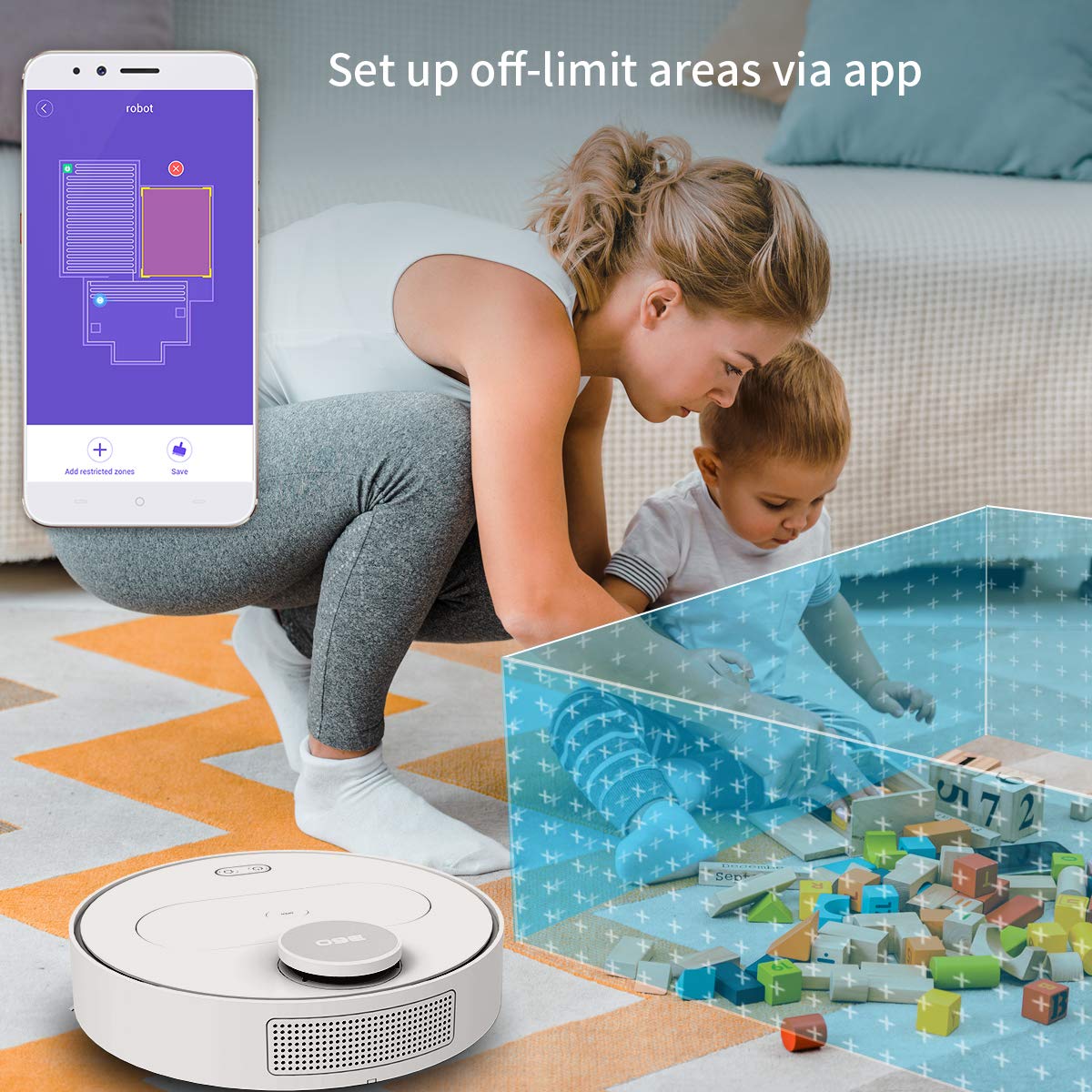
The 360 Robot app allows users to define and set up off-limit areas on the cleaning map, preventing the robot from entering specific zones.
- Multi-map Management: Save and manage multiple floor plans for different levels of your home.
- Off-limit Area: Draw virtual boundaries or no-go zones on the map to prevent the robot from entering specific areas.
- Terminplanung: Legen Sie bestimmte Zeiten fest, zu denen der Roboter automatisch mit der Reinigung beginnen soll.
- Fernbedienung: Manually control the robot's movement using the app.
- Gleisreinigung: Monitor the robot's real-time cleaning path and progress on the map.
- Saugstufen: Adjust suction power (Quiet, Normal, Powerful, Max) according to your cleaning needs.
Automatic Recharge and Breakpoint Resume
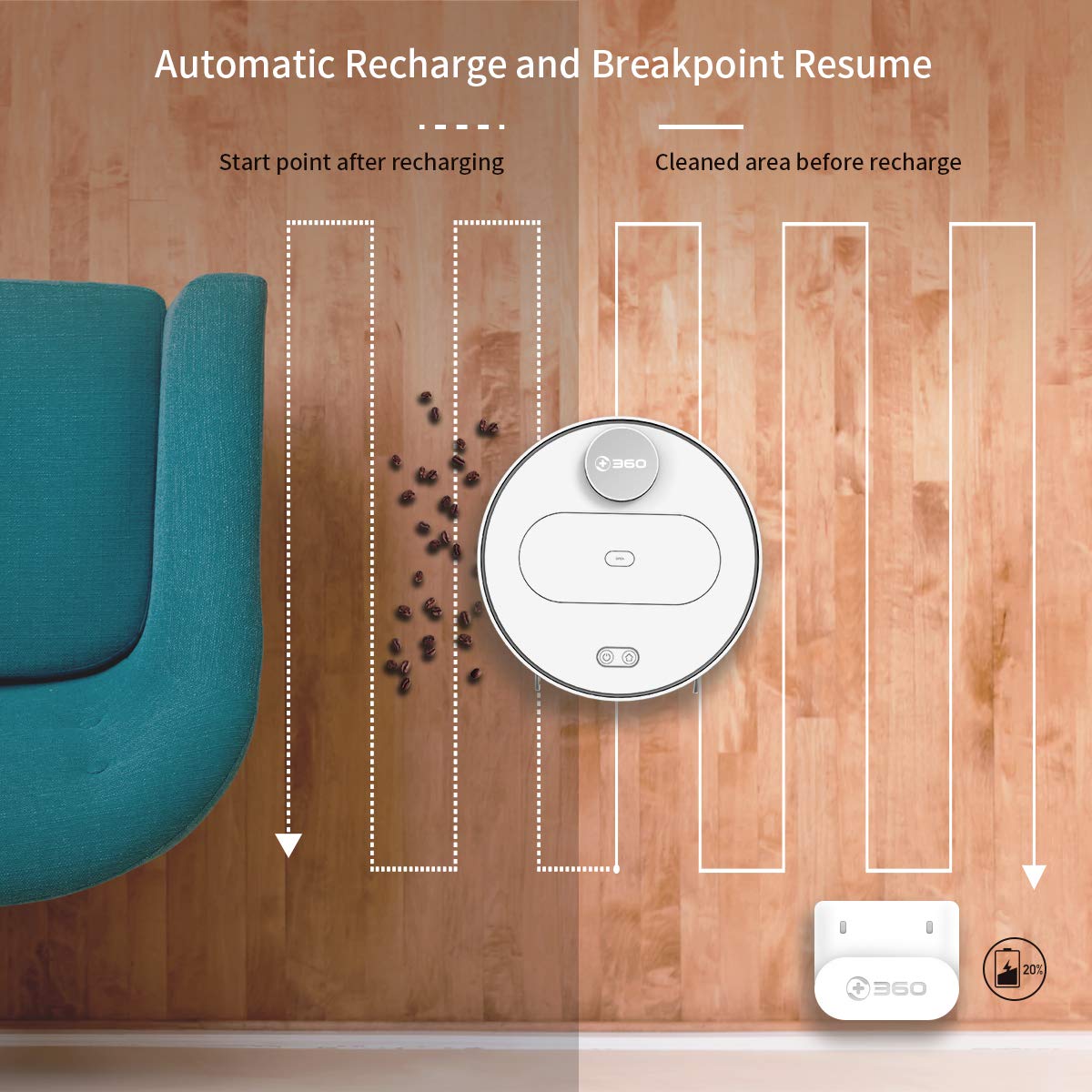
The robot automatically returns to its charging dock when the battery is low and resumes cleaning from the last uncleaned spot after recharging.
When the battery level is low during a cleaning cycle, the robot will automatically return to its charging dock. Once fully recharged, it will resume cleaning from where it left off, ensuring complete coverage of your home.
Wartung
Regelmäßige Wartung ist entscheidend für die optimale Leistung und Langlebigkeit Ihres Saugroboters.
1. Entleeren des Mülleimers
- Öffnen Sie die obere Abdeckung des Roboters und entfernen Sie den Mülleimer.
- Öffnen Sie den Deckel des Abfalleimers und leeren Sie den Inhalt in einen Mülleimer.
- Es wird empfohlen, den Staubbehälter nach jedem Reinigungszyklus zu leeren.
2. Reinigung des Filters

The 360 Robot Vacuum features a washable HEPA filter, which helps maintain high filtration efficiency and contributes to cleaner indoor air.
- Nehmen Sie den Filter aus dem Abfalleimer.
- Klopfen Sie den Filter leicht ab, um losen Schmutz zu entfernen.
- Rinse the filter under running water. Ensure it is completely dry before reinserting it into the dustbin. Do not use a brush or other tools to clean the filter, as this may damage it.
- It is recommended to clean the filter weekly and replace it every 3-6 months, depending on usage.
3. Reinigungsbürsten
- Hauptbürste: Remove the main brush cover and then the main brush. Use the provided cleaning tool to remove hair and debris tangled around the brush. Reinstall the brush and cover. Clean weekly.
- Seitenbürsten: Check side brushes for tangled hair or debris. If necessary, remove them (they can be pulled off) and clean. Reinstall, ensuring they click into place. Replace if worn or damaged. Clean monthly.
4. Reinigung der Sensoren und Ladekontakte
- Wipe the cliff sensors (on the bottom of the robot), wall sensor (on the side), and charging contacts (on the robot and charging dock) with a clean, dry cloth. This ensures proper navigation and charging. Clean monthly.
5. Wartung des Wassertanks und des Wischmopps
- Nach dem Wischen den Wassertank entnehmen und das restliche Wasser ausleeren.
- Remove the mop cloth and wash it thoroughly. Allow it to air dry completely before reattaching or storing.
- Do not leave water in the tank when the robot is not in use for extended periods.
Fehlerbehebung
| Problem | Mögliche Ursache | Lösung |
|---|---|---|
| Roboter lässt sich nicht einschalten. | Der Akku ist schwach oder leer. | Stellen Sie den Roboter auf die Ladestation und vergewissern Sie sich, dass er geladen wird. |
| Der Roboter kann keine Verbindung zum WLAN herstellen. | Falsches WLAN-Passwort; 5-GHz-Netzwerk; Roboter zu weit vom Router entfernt. | Stellen Sie sicher, dass das WLAN-Passwort für 2.4 GHz korrekt ist. Bringen Sie den Roboter näher an den Router heran. Starten Sie Roboter und Router neu. |
| Der Roboter bleibt häufig stecken. | Obstacles on the floor; narrow spaces. | Clear obstacles. Use the app to set off-limit areas for problematic zones. |
| Mangelhafte Reinigungsleistung. | Mülleimer voll; Filter verstopft; Bürsten verheddert. | Leeren Sie den Abfallbehälter. Reinigen oder ersetzen Sie den Filter. Reinigen Sie die Haupt- und Seitenbürsten. |
| Der Roboter kehrt nicht zur Ladestation zurück. | Charging dock obstructed; charging contacts dirty. | Ensure clear space around the dock. Clean charging contacts on both robot and dock. |
Technische Daten
| Besonderheit | Detail |
|---|---|
| Marke | 360 |
| Modellname | S6 |
| Besondere Merkmale | Anti-Collision, Anti-Fall, Washable Filter |
| Farbe | Mehrfarbig |
| Filtertyp | Tuch |
| Akkulaufzeit | 110 Minuten |
| Stromquelle | Batteriebetrieben |
| Kontrollmethode | App |
| Kompatible Geräte | Alexa |
| Artikelgewicht | 3 kg 490 g |
| Artikelabmessungen (LxBxH) | 35 x 35 x 10 Zentimeter |
Garantie und Support
For warranty information and technical support, please refer to the warranty card included in your product packaging or visit the official 360 SmartAI website. You can also contact customer service through the 360 Robot app for assistance.
Weitere Informationen und häufig gestellte Fragen finden Sie unter: 360 Store on Amazon.


