1. Einleitung
This manual provides detailed instructions for the setup, operation, and maintenance of your Mitel ShoreTel IP 480 Telephone. The Mitel IP 480 is a Voice over IP (VoIP) phone designed for business communication, featuring a large backlit display, eight line appearances, and dedicated function keys for efficient call handling. Please read this manual thoroughly to ensure proper use and to maximize the functionality of your device.
2. Packungsinhalt
Verify that all items are present in your package. If any items are missing or damaged, please contact your vendor immediately.
- Mitel ShoreTel IP 480 Telephone Unit (5 units)
- Handset (5 units)
- Handset Cord (5 units)
- Ethernet-Kabel (5 Stück)
- Desk Stand (5 units)

Bild 2.1: Überview of the Mitel ShoreTel IP 480 Telephone. This image displays one of the five IP 480 telephone units, including the main phone body, handset, and desk stand, as typically found in the multi-pack.
3. Produktüberschreitungview
The Mitel ShoreTel IP 480 is designed for intuitive communication. Key features include:
- Anzeige: A large, backlit graphical display for clear visibility of call information, menus, and directories.
- Line Appearances: Eight programmable line appearances for managing multiple calls or lines.
- Feste Funktionsschlüssel: Dedicated buttons for common functions such as Transfer, Conference, Hold, Call History, Voicemail, and Directory.
- Weiche Tasten: Five context-sensitive soft keys located below the display, whose functions change based on the phone's current state.
- Navigationscluster: A four-way navigation pad with a select button for menu navigation.
- Lautstärkeregelung: Dedicated buttons for adjusting handset, headset, and speakerphone volume.

Bild 3.1: Nahaufnahme view of the Mitel ShoreTel IP 480's keypad and display. This image highlights the backlit display, the fixed feature keys (such as Transfer, Conference, Hold), the numeric keypad, and the context-sensitive soft keys.
4. Einrichtung
Follow these steps to set up your Mitel ShoreTel IP 480 Telephone:
- Bringen Sie den Tischständer an: Align the desk stand with the slots on the back of the phone unit and snap it into place.
- Anschließen des Mobilteils: Plug one end of the coiled handset cord into the handset and the other end into the handset port on the side of the phone unit.
- Schließen Sie das Ethernet-Kabel an: Plug one end of the provided Ethernet cable into the LAN port on the back of the phone. Connect the other end to an active network port (e.g., a wall jack or network switch) that provides Power over Ethernet (PoE) or is connected to a power adapter (not included if PoE is used).
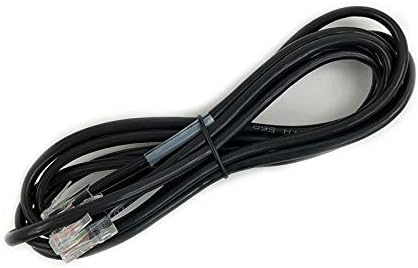
Bild 4.1: Standard Ethernet cable. This cable is used to connect the Mitel IP 480 phone to your network, providing both data connectivity and power if Power over Ethernet (PoE) is available.
- Einschalten: The phone will automatically power on once connected to a PoE-enabled network port or an external power adapter. The display will illuminate, and the phone will begin its boot-up sequence.
- Anfangskonfiguration: The phone will attempt to connect to your network and register with your IP PBX system. Follow any on-screen prompts or consult your system administrator for specific network settings if required.
5. Bedienungsanleitung
5.1 Anrufe tätigen und entgegennehmen
- Anrufen: Lift the handset, press a line appearance button, or press the Speaker button. Dial the desired number using the keypad.
- So beantworten Sie einen Anruf: Lift the handset, press the flashing line appearance button, or press the Speaker button.
- So beenden Sie einen Anruf: Replace the handset or press the Speaker button again if using speakerphone.
5.2 Using Fixed Feature Keys
- Übertragung: Drücken Sie während eines aktiven Anrufs die Überweisen Taste drücken, die neue Nummer wählen und dann drücken Überweisen noch einmal zum Abschluss.
- Konferenz: Drücken Sie während eines aktiven Anrufs die Konferenz button, dial the number of the third party, and then press Konferenz erneut allen Parteien beizutreten.
- Halten: Drücken Sie die Halten button to place an active call on hold. Press the flashing line button to retrieve the call.
- Voicemail: Drücken Sie die Voicemail Taste zum Abrufen Ihrer Voicemail-Nachrichten.
- Verzeichnis: Drücken Sie die Verzeichnis button to access your personal or corporate directory.
- Anrufsverlauf: Drücken Sie die Anrufliste Taste, um view a list of missed, received, and dialed calls.
5.3 Using Soft Keys
The five soft keys below the display provide context-sensitive options. Their labels will change depending on the phone's current state (e.g., idle, on a call, in a menu). Press the corresponding soft key to activate the displayed function.
5.4 Lautstärke anpassen
Verwenden Sie die Volumen buttons (up/down arrows) located below the keypad to adjust the volume of the handset, speakerphone, or ringer, depending on the phone's current state.
6. Wartung
Proper care ensures the longevity and optimal performance of your Mitel ShoreTel IP 480 Telephone.
- Reinigung: Verwenden Sie ein weiches,amp cloth to clean the phone's surface. Avoid abrasive cleaners, solvents, or harsh chemicals, as these can damage the plastic and display.
- Umfeld: Keep the phone away from direct sunlight, excessive heat, moisture, and dust. Ensure adequate ventilation around the device.
- Kabel: Periodically check all cords for signs of wear or damage. Replace any damaged cords immediately.
7. Fehlerbehebung
If you encounter issues with your Mitel ShoreTel IP 480 Telephone, try the following troubleshooting steps:
- Kein Wählton/Anrufe können nicht getätigt werden:
- Check that the Ethernet cable is securely connected to both the phone and the network port.
- Ensure the network port is active and providing PoE (if applicable).
- Restart the phone by disconnecting and reconnecting the Ethernet cable.
- Contact your system administrator to verify network connectivity and phone registration status.
- Display is Blank/Not Working:
- Verify the phone is receiving power (check Ethernet cable connection or power adapter).
- Starten Sie das Telefon neu.
- Schlechte Audioqualität:
- Check handset and handset cord connections.
- Passen Sie die Lautstärke mit den Lautstärketasten an.
- Stellen Sie sicher, dass keine Störungen durch andere elektronische Geräte auftreten.
- Contact your system administrator to check network quality.
- Schaltflächen reagieren nicht:
- Starten Sie das Telefon neu.
- Achten Sie darauf, dass sich keine Fremdkörper unter den Knöpfen befinden.
If these steps do not resolve the issue, please contact your IT department or Mitel support for further assistance.
8. Spezifikationen
The following are technical specifications for the Mitel ShoreTel IP 480 Telephone:
| Besonderheit | Spezifikation |
|---|---|
| Produktabmessungen (L x B x H) | 10.3 x 6.7 x 4.7 Zoll |
| Artikelgewicht | 2.59 Pfund |
| Material | Plastik |
| Stromquelle | Corded Electric (typically Power over Ethernet) |
| Dialer-Typ | Einzelne Tastatur |
| Typ des Anrufbeantworters | Digital (via connected PBX system) |
| Konferenzschaltungsfunktion | 3-Wege |
| Anruferidentifizierung | Ja |
9. Garantie und Support
The Mitel ShoreTel IP 480 Telephone is manufactured by Mitel. For information regarding warranty coverage, technical support, or service, please refer to the official Mitel website or contact your authorized Mitel reseller. Keep your purchase receipt and product serial numbers handy when contacting support.


