Einführung
Vielen Dank für Ihren Einkauf.asing the CAMRY CR 1153 Digital Radio. This manual provides important information regarding the safe operation, setup, and maintenance of your device. Please read these instructions thoroughly before use and retain them for future reference.
The CAMRY CR 1153 is a modern digital radio featuring a classic design with a wooden finish. It includes an alarm clock, thermometer, and calendar functions, making it a versatile addition to any room. It can be powered by mains electricity or batteries for portable use.
Wichtige Sicherheitshinweise
- Lesen Sie alle Anweisungen, bevor Sie das Gerät in Betrieb nehmen.
- Halten Sie das Gerät von Wasser und Feuchtigkeit fern.
- Do not expose to direct sunlight, heat sources, or extreme temperatures.
- Sorgen Sie für ausreichende Belüftung; blockieren Sie keine Belüftungsöffnungen.
- Verwenden Sie ausschließlich das angegebene Netzteil oder die Batterien.
- Versuchen Sie nicht, das Gerät selbst zu zerlegen oder zu reparieren. Überlassen Sie alle Wartungsarbeiten qualifiziertem Fachpersonal.
- Clean the device with a soft, dry cloth. Avoid abrasive cleaners.
- Batterien sind gemäß den örtlichen Vorschriften verantwortungsvoll zu entsorgen.
Produkt überview
Familiarize yourself with the components of your CAMRY CR 1153 Digital Radio.
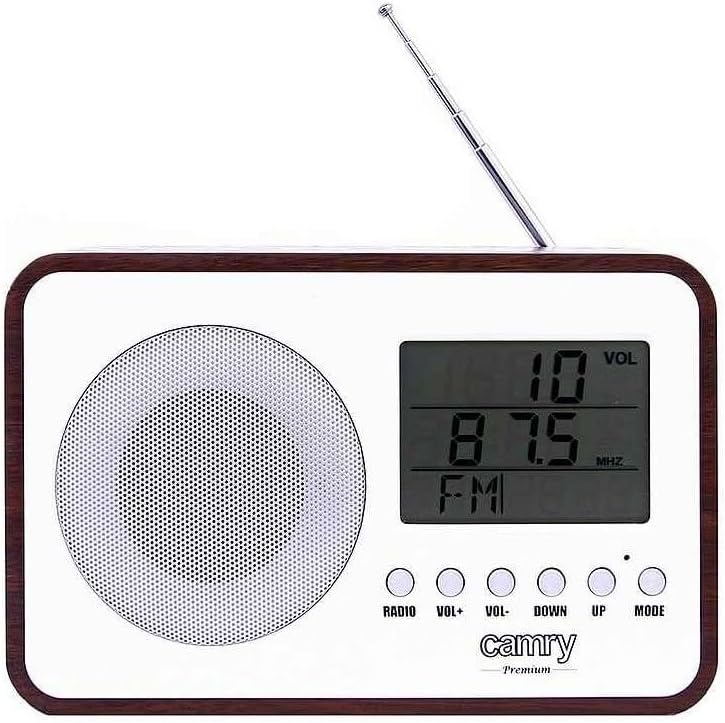
Abbildung 1: Vorderseite View. This image shows the front of the CAMRY CR 1153 Digital Radio, featuring a large LCD display, a circular speaker grille on the left, and five control buttons below the display. The buttons are labeled RADIO, VOL+, VOL-, DOWN, UP, and MODE. A telescopic antenna is visible at the top right.

Figure 2: Display Close-up. Eine detaillierte view of the radio's LCD screen, showing "VOL" at the top right, "89.8 MHz" as the current frequency, and "FM" indicating the band. The control buttons are partially visible below the screen.

Abbildung 3: Rückseite View. This image displays the back of the radio, including the telescopic antenna on the left, a ventilation grille, and an open battery compartment designed for two AA (LR06) batteries. A label with model information (CR 1153, Input: DC 3V, 1A, Battery: 2x AA (LR06), Power: 0.4W) is also visible.

Abbildung 4: Abmessungen. The radio is shown with its approximate measurements: 19 cm in width, 11 cm in height, and 7 cm in depth. The telescopic antenna is extended.
Bedientasten:
- RADIO: Toggles between radio mode and other functions (e.g., clock/alarm).
- VOL+ / VOL-: Regelt die Lautstärke.
- RUNTER / OBEN: Used for tuning radio frequencies, setting time, or navigating menu options.
- MODUS: Selects different operating modes or confirms settings.
Aufstellen
Einschalten des Geräts:
The CAMRY CR 1153 can be powered by either mains electricity or batteries.
- Netzstrom: Connect the provided power adapter to the DC 3V input port on the back of the radio and then plug it into a standard wall outlet.
- Batterieleistung:
- Open the battery compartment cover on the back of the radio (refer to Figure 3).
- Insert two AA (LR06) batteries, ensuring correct polarity (+/-).
- Schließen Sie den Batteriefachdeckel fest.
Note: Batteries are not included. Remove batteries if the device will not be used for an extended period.
Initial Setup (Time and Date):
Upon first power-on or after battery replacement, you may need to set the time and date.
- Drücken Sie die MODUS button repeatedly until the time setting appears on the display.
- Verwenden Sie die UP Und RUNTER Tasten zum Einstellen der Stunde. Drücken MODUS zur Bestätigung.
- Verwenden Sie die UP Und RUNTER Tasten zum Einstellen der Minute. Drücken MODUS zur Bestätigung.
- Follow similar steps to set the year, month, and day.
Bedienungsanleitung
Radio Operation (FM):
- Für optimalen Empfang die Teleskopantenne ausziehen.
- Drücken Sie die RADIO button to switch to FM radio mode. The display will show the frequency.
- Verwenden Sie die UP Und RUNTER buttons to manually tune to your desired FM frequency.
- To automatically scan for stations, press and hold the UP or RUNTER button for a few seconds. The radio will stop at the next strong signal.
- Stellen Sie die Lautstärke mit den Lautstärke+ Und vol- Schaltflächen.
Weckerfunktion:
The radio features an alarm that can wake you with a standard alarm tone or your preferred radio station.
- Drücken Sie die MODUS button repeatedly until the alarm setting appears (e.g., "ALARM SET").
- Verwenden UP Und RUNTER Um die Weckzeit einzustellen, drücken Sie dann MODUS.
- Verwenden UP Und RUNTER to set the alarm minute, then press MODUS.
- Wählen Sie die Alarmquelle (Summer oder FM-Radio) aus mit UP/RUNTERund drücken Sie dann MODUS. If FM Radio is selected, ensure a station is tuned.
- To activate/deactivate the alarm, navigate to the alarm display and use the UP/RUNTER button to toggle it On/Off. An alarm icon will appear on the display when active.
Thermometer and Calendar:
The radio automatically displays the current temperature and date. These functions are typically visible in the default clock display mode or can be cycled through using the MODUS Taste.
Automatische Abschaltfunktion:
The radio includes an automatic shut-off timer. By default, it is set to 10 minutes. This can be adjusted up to 1.5 hours (90 minutes).
- Während das Radio spielt, drücken Sie die Taste MODUS button until the "SLEEP" or "AUTO OFF" setting appears.
- Verwenden Sie die UP Und RUNTER buttons to adjust the desired shut-off time (e.g., 10, 20, 30, 60, 90 minutes, or OFF).
- Das Radio schaltet sich nach der gewählten Zeit automatisch aus.
Wartung
- Reinigung: Wischen Sie die Oberfläche des Radios mit einem weichen, leicht feuchten Tuch ab.amp cloth. The special protective coating helps resist grease and water splashes, making it easy to clean. Do not use harsh chemicals or abrasive materials.
- Batteriewechsel: Replace batteries when the display dims or the radio's performance degrades. Always replace both batteries simultaneously with new ones of the same type (AA LR06).
- Lagerung: Wenn Sie das Radio längere Zeit lagern, entfernen Sie die Batterien, um ein Auslaufen zu verhindern. Lagern Sie es an einem kühlen, trockenen Ort.
Fehlerbehebung
| Problem | Mögliche Ursache | Lösung |
|---|---|---|
| Das Radio lässt sich nicht einschalten. | No power supply; batteries depleted or incorrectly inserted; power adapter not connected. | Check power adapter connection. Replace batteries or ensure correct polarity. |
| Schlechter Radioempfang. | Antenne nicht ausgefahren; schwaches Signal; Störungen durch andere elektronische Geräte. | Fully extend the telescopic antenna. Reposition the radio. Move away from other electronic devices. |
| Der Alarm ertönt nicht. | Alarm not activated; volume too low; incorrect alarm time set. | Ensure alarm is set to ON. Increase volume. Verify alarm time. |
| Das Display ist dunkel oder leer. | Niedriger Batteriestand. | Replace batteries or connect to mains power. |
Technische Daten
- Modell: CR 1153
- Marke: CAMRY
- Stromversorgung: DC 3V, 1A (Mains adapter) or 2 x AA (LR06) batteries
- Energieverbrauch: 0.4 W
- Radiobänder: FM
- Besondere Merkmale: Digital FM Radio, Alarm Clock, Thermometer, Calendar, Automatic Shut-off, Portable
- Konnektivität: Auxiliary (for compatible devices like headphones, MP3 players)
- Maße (ca.): 19 cm (Breite) x 11 cm (Höhe) x 7 cm (Tiefe)
- Hersteller: Adler Itd
- Ursprungsland: Frankreich
Garantie und Support
For warranty information and technical support, please refer to the warranty card included with your product or contact your local CAMRY distributor. Keep your proof of purchase for any warranty claims.


