Einführung
Thank you for choosing the LENRUE A38S Computer Speakers. This manual provides essential information for setting up, operating, and maintaining your speakers to ensure optimal performance. The A38S speakers are designed to deliver clear audio for your desktop, laptop, and tablet, featuring a plug-and-play design with USB power and 3.5mm auxiliary audio input, complemented by dynamic RGB lighting.
Aufstellen
Follow these steps to connect your LENRUE A38S speakers to your device.
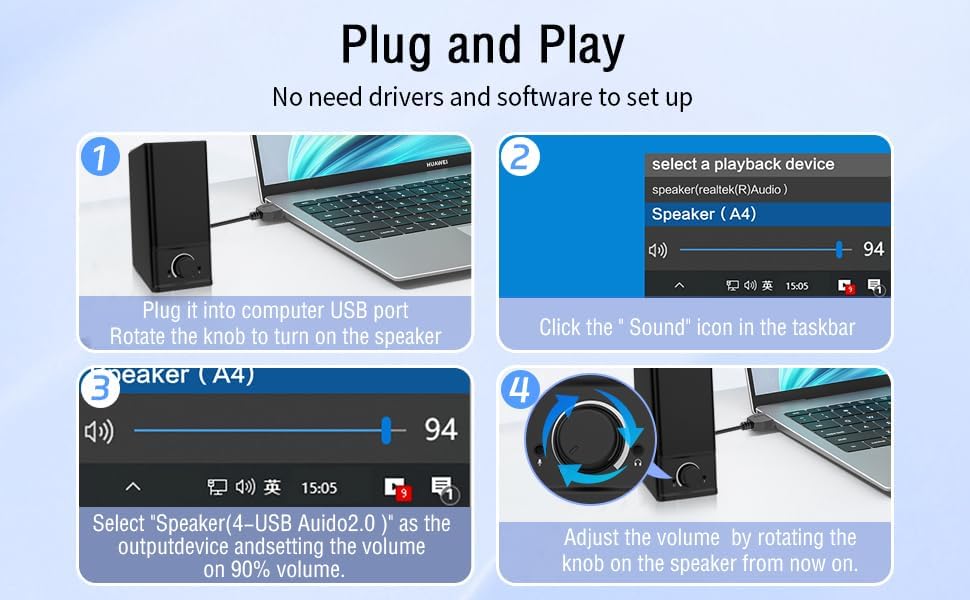
- Strom anschließen: Insert the USB-A plug into an available USB port on your computer or a USB power adapter. If your device has a USB-C port, use the provided USB-A to Type-C adapter. The speakers are powered via USB and contain an internal battery for portable use.
- Audio anschließen: Plug the 3.5mm audio jack into the headphone or audio output port of your computer, laptop, or tablet.
- Einschalten: Rotate the main knob on the speaker clockwise to turn it on. The RGB lights will illuminate.
- Select Playback Device: On your computer, navigate to your sound settings and select "Speaker (4-USB Audio 2.0)" or a similar option as the output device. Adjust the volume to approximately 90% on your computer for optimal control via the speaker knob.
Betrieb
The LENRUE A38S speakers feature a multi-function knob for easy control.
- Ein-/Ausschalten: Rotate the knob clockwise to turn on the speakers. Rotate counter-clockwise until it clicks to turn off.
- Lautstärkeregelung: Durch Drehen des Knopfes im Uhrzeigersinn wird die Lautstärke erhöht, durch Drehen gegen den Uhrzeigersinn verringert.
- RGB-Beleuchtungsmodi: Double-click the knob to cycle through the three dynamic RGB lighting modes.
- Turn Off RGB Lights: Triple-click the knob to turn off all RGB lighting.

Wartung
Proper care ensures the longevity of your speakers.
- Reinigung: Wischen Sie die Oberfläche des Lautsprechers mit einem weichen, trockenen Tuch ab. Verwenden Sie keine flüssigen Reinigungsmittel oder Scheuermittel.
- Lagerung: Lagern Sie die Lautsprecher an einem kühlen, trockenen Ort, geschützt vor direkter Sonneneinstrahlung und extremen Temperaturen.
- Wasserbeständigkeit: The speakers are waterproof. However, avoid prolonged submersion or exposure to high-pressure water jets to prevent damage. Ensure all ports are dry before connecting cables.
Fehlerbehebung
Sollten Probleme auftreten, konsultieren Sie bitte die folgenden gängigen Lösungsansätze:
| Problem | Lösung |
|---|---|
| Kein Ton von den Lautsprechern |
|
| RGB-Lichter funktionieren nicht |
|
| Verzerrter Ton |
|
Technische Daten
Detailed technical specifications for the LENRUE A38S Computer Speakers.
- Modellname: A38S
- Lautsprechertyp: Koaxial
- Audioausgang: Dual 5W drivers (10W RMS total), 18W Max Output
- Konfiguration der Surround-Sound-Kanäle: 2.0 Stereo
- Konnektivität: USB (for power), 3.5mm Aux-in (for audio)
- Energiequelle: USB Powered with internal Lithium Ion Battery
- Kompatible Geräte: Desktops, PCs, Laptops, Mac, Tablets, Phones, Projectors, PS4, MP3 players
- Merkmale: Dynamic RGB Lighting, Plug-n-Play, Waterproof
- Produktabmessungen: 2.1" (T) x 16" (B) x 2.5" (H)
- Artikelgewicht: 286 Gramm (10.1 Unzen)
- Kabellänge: Approximately 47.3 inches (USB and 3.5mm audio)
- Enthaltene Komponenten: LENRUE A38S Speaker Unit, USB-A to Type-C Adapter, USB Power Cable, 3.5mm Audio Cable


Garantie und Support
LENRUE hat sich der Bereitstellung von Qualitätsprodukten und der Kundenzufriedenheit verschrieben.
- Garantie: Your LENRUE A38S speakers come with a 12-month worry-free replacement service from the date of purchase. This limited warranty covers manufacturing defects.
- Kundendienst: We offer lifetime customer service for any questions or issues you may encounter. For support, please refer to the contact information provided with your purchase or visit the official LENRUE webWebsite.


