1. Einleitung
This manual provides essential information for the safe and effective operation of your Vangoa 65W Electric Drum Amplifier. Designed for electronic percussion products, this amplifier delivers 65 watts of power, suitable for various performance and practice environments. It features an 8-inch woofer and a 2-inch tweeter for balanced sound reproduction, along with multiple connectivity options including dual microphone inputs, instrument inputs, headphone output, USB, and wireless input.
2. Hauptmerkmale
- 65 W hohe Ausgangsleistung: Provides sufficient amplification for electronic drum practice, studio rehearsals, street performances, karaoke, and live stage verwenden.
- Rich and Dynamic Tone: Equipped with an 8-inch woofer and a 2-inch tweeter for expressive classic tones and responsive audio. Features 3-band EQ (High, Mid, Low) for sound shaping.
- Vielfältige Konnektivität: Includes dual independent microphone channels, headphone output, USB interface, and wireless input for devices like phones and audio players.
- Multiple Instrument Inputs: Two independent drum input interfaces for connecting electronic drums, electric guitars, keyboards, and other instruments.
- Intuitives Bedienfeld: Simple and practical operating area on the top for easy adjustment of equalizer settings and volume.
3. Produktüberschreitungview

Abbildung 1: Vorderseite view of the Vangoa 65W Electric Drum Amplifier highlighting key features.
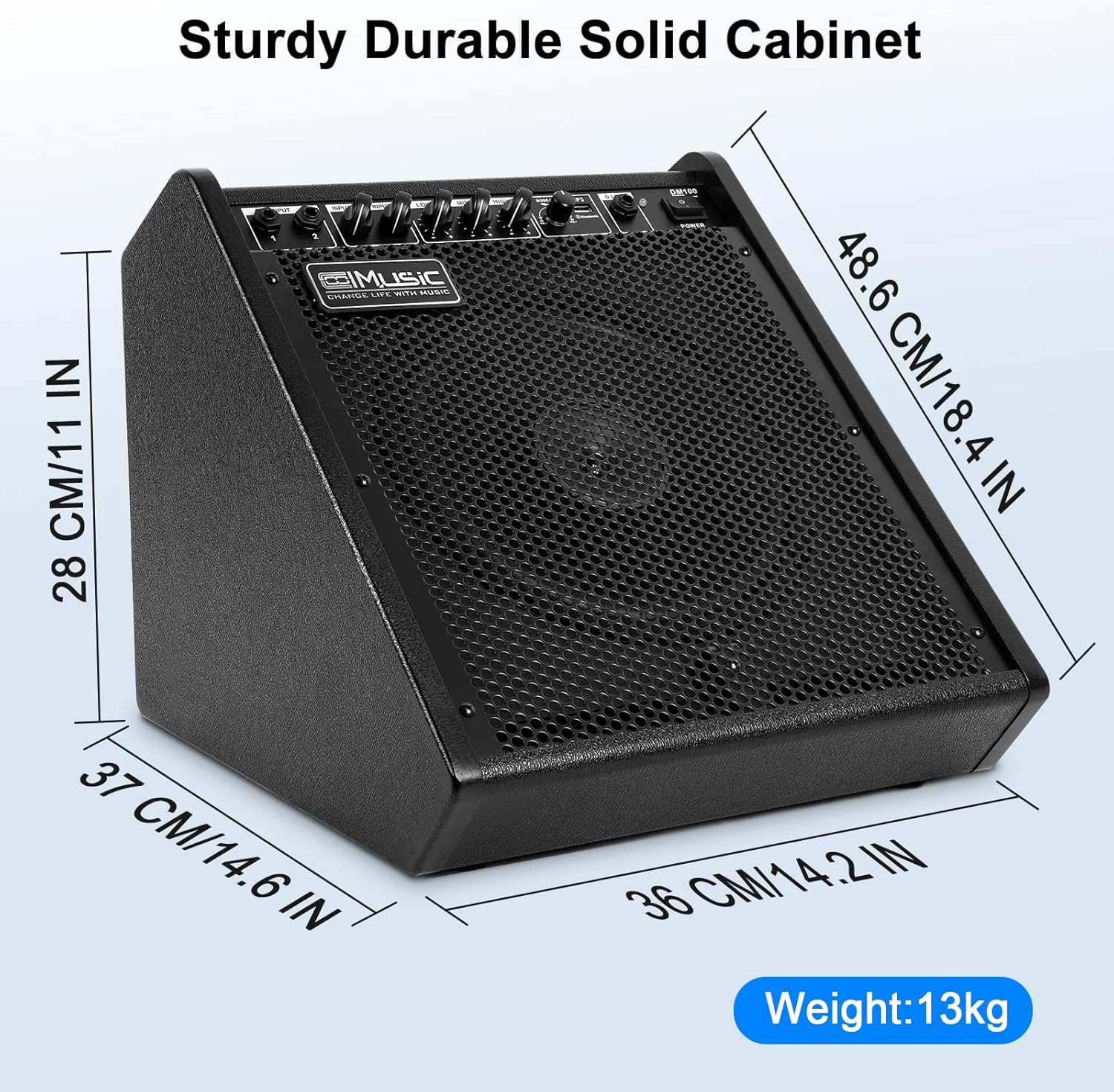
Abbildung 2: Amplifier dimensions (16.14 x 14.17 x 13.39 inches).

Figure 3: Top panel showing diverse connection options and controls.

Figure 4: Illustration of the 8-inch woofer and 2-inch tweeter for professional sound.

Figure 5: USB and Bluetooth connectivity for wide compatibility.

Figure 6: Detailed diagram of inputs for microphones, drums, line-in, and USB/Bluetooth.
Produktvideos
Video 1: Ein kurzer Produktüberblickview demonstrating the ampMerkmale und Design des Verstärkers.
Video 2: Short demonstration of the Vangoa 65W Electric Drum Amp in action, showcasing its powerful sound.
4. Installationsanleitung
- Auspacken: Entfernen Sie vorsichtig die ampVerstärker aus der Verpackung nehmen. Sämtliches Verpackungsmaterial für späteren Transport oder Lagerung aufbewahren.
- Platzierung: Platzieren Sie die amplifier on a stable, flat surface. Ensure adequate ventilation around the unit. The amplifier is designed with an elevation angle for optimal sound projection towards the user.
- Stromanschluss: Schließen Sie das mitgelieferte Netzkabel an das Gerät an. amplifier's power input and then to a suitable electrical outlet. Ensure the power switch is in the 'OFF' position before connecting.
- Erstes Einschalten: Schalten Sie den Netzschalter in die Position „EIN“. Die Betriebsanzeigeleuchte sollte aufleuchten.
- Lautstärkeregelung: Before connecting any instruments, ensure all volume knobs (Master, Drum, Line, Mic) are set to their minimum positions to prevent sudden loud sounds.
5. Bedienungsanleitung
5.1 Anschließen von Instrumenten und Mikrofonen
- Elektronisches Schlagzeug: Connect your electronic drum module's output to the 'DRUM IN' input using a standard instrument cable. Adjust the 'DRUM' volume knob to control the drum sound level.
- Other Instruments (Keyboard, Guitar): Use the 'LINE IN' inputs for connecting other instruments. Adjust the 'LINE' volume knob.
- Mikrofone: Connect microphones to the 'MIC 1' or 'MIC 2' inputs. Each microphone input has an independent volume control ('MIC VOL').
- Kopfhörer: For private practice, connect headphones to the 'PHONES' output. This will mute the main speaker output.
5.2 Equalizer (EQ)-Einstellung
Der amplifier features a 3-band equalizer to shape your sound:
- BASS: Adjusts the low-frequency response. Turn clockwise to boost bass, counter-clockwise to cut.
- MITTE: Adjusts the mid-range frequency response. Turn clockwise to boost mids, counter-clockwise to cut.
- VERDREIFACHEN: Adjusts the high-frequency response. Turn clockwise to boost treble, counter-clockwise to cut.
Experiment with these controls to achieve your desired tone for different instruments and musical styles.
5.3 Wireless and USB Playback
- Drahtlos (Bluetooth): Activate Bluetooth on your external device (e.g., smartphone, tablet). Select the amplifier from the list of available devices to pair. Once connected, you can play audio through the amplifier. Use the 'BT/MP3' volume control on the amplifier and your device's volume control.
- USB-Wiedergabe: Schließen Sie einen USB-Stick mit Audiodateien an. files in den USB-Anschluss. amplifier will automatically detect and begin playing the files. Use the playback controls (play/pause, next/previous track) and the 'BT/MP3' volume control.
5.4 Hauptlautstärke
The 'MASTER' volume knob controls the overall output level of the amplifier. Adjust this after setting individual input volumes to achieve the desired total loudness.
6. Spezifikationen
| Besonderheit | Spezifikation |
|---|---|
| Ausgang Wattage | 65 Watt |
| Lautsprecherkonfiguration | 8-Zoll-Tieftöner, 2-Zoll-Hochtöner |
| Frequenzgang | 45 Hz bis 20 kHz |
| Eingänge | 2x Drum/Line Inputs (6.35mm Jack), 2x Mic Inputs, Aux Input, USB |
| Ausgaben | Kopfhörerausgang |
| Kabellose Konnektivität | Bluetooth |
| Equalizer | 3-Band (Bass, Mid, Treble) |
| Abmessungen (L x B x H) | 16.14 x 14.17 x 13.39 Zoll |
| Artikelgewicht | 17.06 Pfund |
| Material | Metall, Kunststoff |
| Farbe | Schwarz |
7. Wartung
- Reinigung: Reinigen Sie die Außenseite des ampVerstärker. Verwenden Sie keine flüssigen Reiniger oder Lösungsmittel, da diese die Oberfläche oder die internen Bauteile beschädigen können.
- Lagerung: Bei längerer Nichtbenutzung lagern Sie die ampDen Verstärker an einem kühlen, trockenen Ort, fern von direkter Sonneneinstrahlung und extremen Temperaturen aufstellen.
- Belüftung: Stellen Sie sicher, dass die amplifier's ventilation openings are not blocked to prevent overheating.
- Kabelpflege: Überprüfen Sie regelmäßig alle Kabel auf Verschleiß oder Beschädigungen. Ersetzen Sie beschädigte Kabel umgehend, um einen sicheren Betrieb zu gewährleisten.
8. Fehlerbehebung
- Kein Strom:
- Prüfen Sie, ob das Netzkabel fest mit beiden Anschlüssen verbunden ist. amplifier and the electrical outlet.
- Überprüfen Sie, ob die Steckdose funktioniert.
- Stellen Sie sicher, dass der Netzschalter am amplifier is in the 'ON' position.
- Keine Tonausgabe:
- Confirm that all volume knobs (Master, Drum, Line, Mic, BT/MP3) are turned up to an audible level.
- Check all instrument and microphone cables for secure connections and proper functionality.
- If using headphones, ensure they are properly connected and that the main speaker output is not muted unexpectedly.
- If using wireless or USB input, ensure the device is properly paired/connected and playing audio.
- Verzerrter Klang:
- Reduce the volume levels of the input source, individual channels, and the Master volume.
- Adjust the EQ settings (Bass, Mid, Treble) to reduce excessive boosting of certain frequencies.
- Ensure instrument cables are not damaged or faulty.
- Probleme mit der drahtlosen Verbindung:
- Stellen Sie sicher, dass amplifier's wireless function is active.
- Move the external device closer to the ampVerstärker zur Verbesserung der Signalstärke.
- Trennen Sie die Bluetooth-Verbindung und koppeln Sie das Gerät erneut.
9. Garantie und Support
Vangoa products are designed and manufactured to high-quality standards. For warranty information, please refer to the warranty card included with your product or visit the official Vangoa website. For technical support, troubleshooting assistance, or service inquiries, please contact Vangoa customer support through their official channels.
Bitte bewahren Sie Ihren Kaufbeleg für eventuelle Garantieansprüche auf.


