Einführung
Thank you for choosing the Yaheetech Multistore 2002 Computer Desk. This manual provides detailed instructions for assembly, operation, maintenance, and troubleshooting to ensure safe and efficient use of your new desk. Please read this manual thoroughly before beginning assembly or use, and retain it for future reference.
Sicherheitshinweise
- Bewahren Sie alle Teile und Verpackungsmaterialien außerhalb der Reichweite von Kindern auf.
- Um Kratzer zu vermeiden, montieren Sie den Schreibtisch auf einer weichen, sauberen Unterlage.
- Vor Gebrauch sicherstellen, dass alle Schrauben und Befestigungselemente fest angezogen sind. Regelmäßig überprüfen und gegebenenfalls nachziehen.
- Do not overload the desk. Refer to the "Specifications" section for weight capacities.
- Avoid placing hot items directly on the desk surface.
- Use caution when moving the desk, especially on uneven surfaces. Ensure casters are unlocked if moving.
Ersatzteilliste
Prüfen Sie vor der Montage, ob alle unten aufgeführten Komponenten vorhanden und unbeschädigt sind. Sollten Teile fehlen oder beschädigt sein, wenden Sie sich bitte an den Kundendienst.

Abbildung 1: Explodierte view of the desk showing main components and their names. This image highlights the heavy MDF boards, thickened frame, smooth steel ball drawer, open middle shelf, open bottom shelf, and lockable casters.
- A: Top Board (1 pc)
- B: Middle Shelf (1 pc)
- C: Bottom Shelf (1 pc)
- D: Side Frames (2 pcs)
- E: Drawer Front (1 pc)
- F: Drawer Sides (2 pcs)
- G: Drawer Back (1 pc)
- H: Drawer Bottom (1 pc)
- I: Schubladenschienen (2 Sets)
- J: Casters (4 pcs, 2 lockable)
- K: Hardware-Paket (Schrauben, Bolzen, Inbusschlüssel)
Montageanleitung
Befolgen Sie diese Schritte sorgfältig für eine korrekte Montage. Es wird empfohlen, die Montage zu zweit durchzuführen.
- Step 1: Attach Casters to Side Frames.
Carefully attach the four casters (J) to the bottom of the two side frames (D). Ensure the two lockable casters are placed on the front side for easy access. Tighten securely with the provided wrench.

Abbildung 2: Detail of a caster wheel attached to the desk's metal frame. This shows the sturdy connection point and the wheel's design.
- Schritt 2: Montage des Hauptrahmens.
Connect the bottom shelf (C) and middle shelf (B) to the side frames (D) using the appropriate screws from the hardware pack (K). Do not fully tighten screws until all parts are aligned.
- Schritt 3: Die Schublade zusammenbauen.
Assemble the drawer components (E, F, G, H) using the provided screws. Ensure the drawer bottom (H) slides into the grooves correctly. Attach the drawer slides (I) to the sides of the assembled drawer.

Abbildung 3: The desk's pull-out drawer, shown partially open, revealing its interior space. This image demonstrates the drawer's functionality and capacity.
- Step 4: Install Drawer Slides to Desk Frame.
Attach the other part of the drawer slides (I) to the designated points on the desk's main frame, just below where the top board will sit. Ensure they are level and aligned.

Abbildung 4: Eine detaillierte view of the smooth steel ball drawer slide mechanism. This highlights the quality of the sliding components for the drawer.
- Step 5: Attach the Top Board.
Place the top board (A) onto the assembled frame and secure it with screws. Ensure all pre-drilled holes align.
- Step 6: Insert the Drawer.
Carefully slide the assembled drawer into the installed drawer slides until it clicks into place.
- Schritt 7: Endgültiges Festziehen.
Once all components are in place and aligned, fully tighten all screws and fasteners. Do not overtighten.
Bedienungsanleitung
The Yaheetech Multistore 2002 Computer Desk is designed for versatile use in various settings, including home offices, living rooms, or bedrooms.

Abbildung 5: The computer desk positioned next to a sofa in a living room, demonstrating its compact size and suitability for small spaces. A laptop is placed on the top surface.
- Platzierung: Position the desk on a flat, stable surface. If using on carpet, ensure the casters can move freely.
- Mobilität: To move the desk, unlock the two lockable casters by flipping their levers. Push or pull the desk gently to its desired location. Once in place, lock the casters to prevent accidental movement.
- Lagerung:
- The top surface is suitable for laptops, monitors, or writing.
- The pull-out drawer provides enclosed storage for small items like pens, notebooks, or external hard drives.
- The open middle shelf is ideal for books, documents, or small electronic devices.
- The open bottom shelf can accommodate larger items such as a CPU tower, printer, or storage boxes.
- Gewichtskapazität: Adhere to the maximum weight capacities specified in the "Specifications" section to prevent damage.
Wartung
Regular maintenance will help prolong the life and appearance of your Yaheetech Multistore 2002 Computer Desk.
- Reinigung: Wischen Sie Oberflächen mit einem weichen, damp Mit einem Tuch abwischen. Vermeiden Sie die Verwendung von scharfen Chemikalien, Scheuermitteln oder Polituren, die die Oberfläche beschädigen könnten.
- Verschüttungen: Clean up spills immediately to prevent staining or damage to the MDF boards.
- Befestigungsmaterial: Überprüfen Sie regelmäßig alle Schrauben und Befestigungselemente, um sicherzustellen, dass sie fest sitzen. Ziehen Sie sie gegebenenfalls nach, um die Stabilität zu gewährleisten.
- Rollen: Keep casters free of debris (hair, dust, etc.) to ensure smooth movement.
- Sunlight/Heat: Vermeiden Sie längere Einwirkung von direktem Sonnenlicht oder extremer Hitze, da dies zu Ausbleichen oder Verformung führen kann.
Fehlerbehebung
Sollten Sie Probleme mit Ihrem Schreibtisch haben, beachten Sie bitte die folgenden häufig auftretenden Probleme und Lösungen:
| Problem | Mögliche Ursache | Lösung |
|---|---|---|
| Der Schreibtisch wackelt. | Lose Befestigungselemente; unebener Boden. | Ensure all screws are fully tightened. Move desk to a level surface or use shims if necessary. |
| Schublade gleitet nicht reibungslos. | Schubladenschienen nicht richtig ausgerichtet; Schmutz in den Schienen. | Check that drawer slides are correctly installed and aligned. Clean tracks of any dust or debris. |
| Die Rollen rollen nicht frei. | Rollen blockiert; Schmutz in den Rädern. | Unlock casters if they are engaged. Remove any hair or debris from the wheels. |
| Nach dem Auspacken fehlten Teile. | Verpackungsfehler. | Contact Yaheetech customer support with your purchase details and the specific missing parts. |
Technische Daten
Detailed dimensions and material information for the Yaheetech Multistore 2002 Computer Desk.
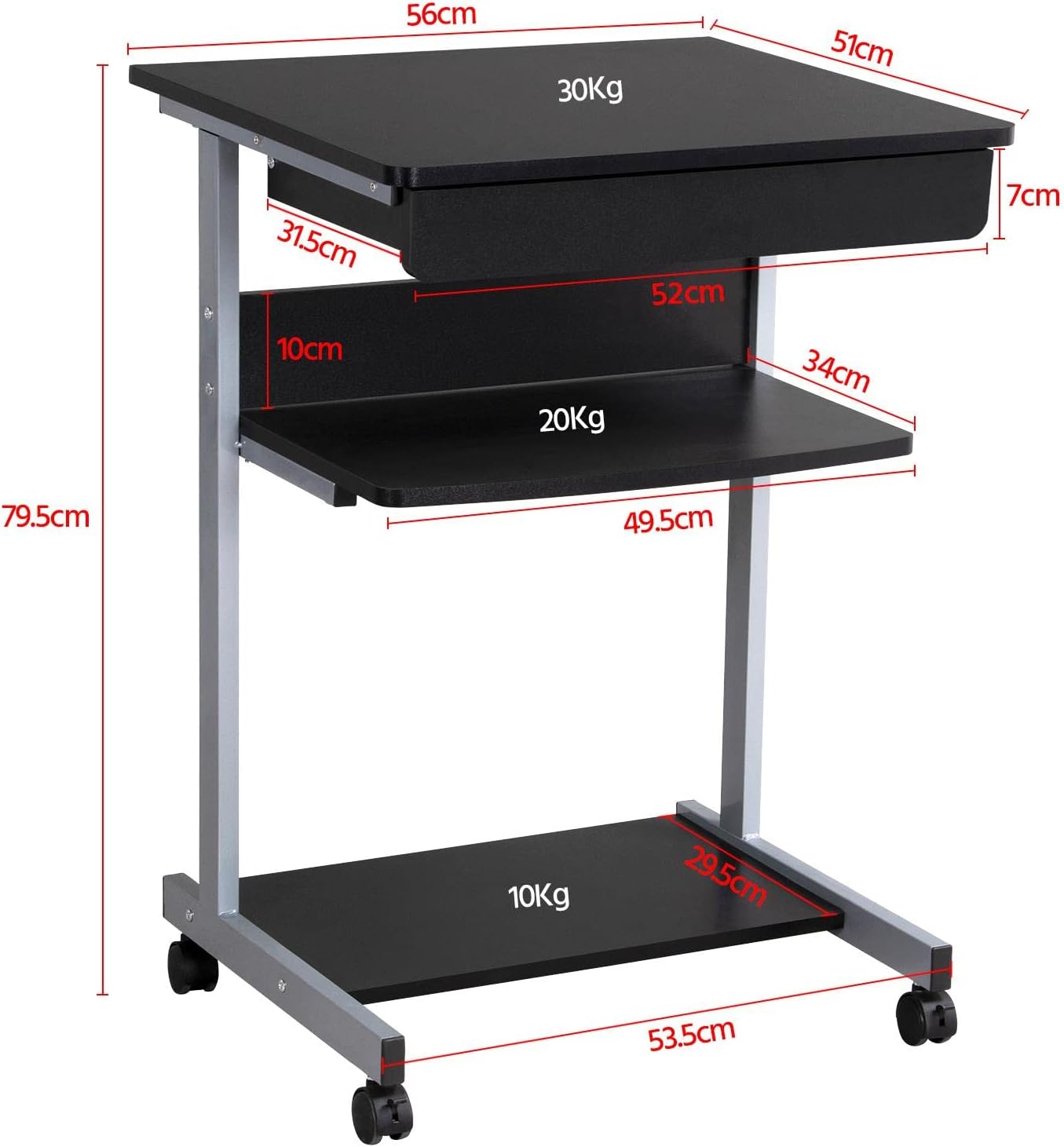
Abbildung 6: Detailed dimensional drawing of the desk, including measurements for overall height, width, depth, and individual shelf and drawer dimensions. Also shows weight capacities for each surface.
| Besonderheit | Detail |
|---|---|
| Modellnummer | YA-00097936 |
| Gesamtabmessungen (L x B x H) | 56 x 51 x 79.5 cm (22 x 20.1 x 31.3 Zoll) |
| Top Board Dimensions | 56 x 51 cm (22 x 20.1 Zoll) |
| Drawer Dimensions (Inner) | 45 x 30 x 6 cm (17.7 x 11.8 x 2.4 Zoll) |
| Abmessungen des mittleren Regals | 50 x 34 cm (19.7 x 13.4 Zoll) |
| Abmessungen der unteren Ablage | 50 x 30.5 cm (19.7 x 12 Zoll) |
| Material | MDF (Medium Density Fiberboard) with Metal Frame |
| Farbe | Schwarz |
| Nettogewicht | Ca. 10.9 kg |
| Max. Load Capacity (Top Board) | 30 kg |
| Maximale Tragfähigkeit (mittleres Fach) | 20 kg |
| Maximale Tragfähigkeit (unterste Ablage) | 10 kg |
| Rollen | 4 (2 with locking mechanism) |
Garantie und Support
Yaheetech products are manufactured to high-quality standards. For specific warranty information, please refer to the warranty card included with your product or visit the official Yaheetech webWebsite. Sollten Sie Fragen haben, Hilfe beim Zusammenbau benötigen oder fehlende/beschädigte Teile melden wollen, wenden Sie sich bitte an unseren Kundendienst:
- WebWebsite: www.yaheetech.com (Bitte prüfen Sie die regionalen Bestimmungen.) webSeiten)
- E-Mail: Refer to your purchase documentation for customer service email.
- Telefon: Refer to your purchase documentation for customer service phone number.
When contacting support, please have your model number (YA-00097936) and purchase date ready.


