1. Einleitung
Vielen Dank für Ihren Einkauf.asing the auna V-20 Vertical Stereo System. This manual provides essential information for the safe and efficient operation of your device. Please read it thoroughly before use and keep it for future reference.
2. Sicherheitshinweise
- Lesen Sie alle Anweisungen sorgfältig durch, bevor Sie das Gerät in Betrieb nehmen.
- Halten Sie das Gerät von Wasser, Feuchtigkeit und extremen Temperaturen fern.
- Blockieren Sie keine Belüftungsöffnungen.
- Verwenden Sie nur vom Hersteller angegebene Anbaugeräte/Zubehör.
- Trennen Sie das Gerät während eines Gewitters oder bei längerer Nichtbenutzung vom Stromnetz.
- Überlassen Sie sämtliche Wartungsarbeiten qualifiziertem Servicepersonal.
- Öffnen Sie nicht das casing; im Inneren befinden sich keine vom Benutzer wartbaren Teile.
3. Packungsinhalt
Bitte überprüfen Sie, ob alle Artikel vorhanden sind:
- 1 x auna V-20 Vertical Stereo System
- 1 x Remote Control (including 2 x 1.5V AAA batteries)
- 1 x Netzteil
- 1 x Removable Stand Base
- 1 x Wire Antenna
- Benutzerhandbuch (Englisch und Deutsch)
4. Produktüberschreitungview
The auna V-20 is a versatile micro stereo system featuring a vertical design. It includes a CD player, DAB+ and FM radio, Bluetooth, NFC, USB, and AUX connectivity. The system can be used with its stand or mounted on a wall.

Figure 4.1: The auna V-20 Vertical Stereo System shown with its remote control in a modern living room environment.
Bedienelemente und Anzeige auf der Vorderseite
The front panel features a sleek design with a motorized CD drive cover and an LED display that shows time and operational information. Control buttons are located on the top edge of the unit.
Anschlüsse auf der Rückseite
The rear panel provides various connection ports for external devices and power.
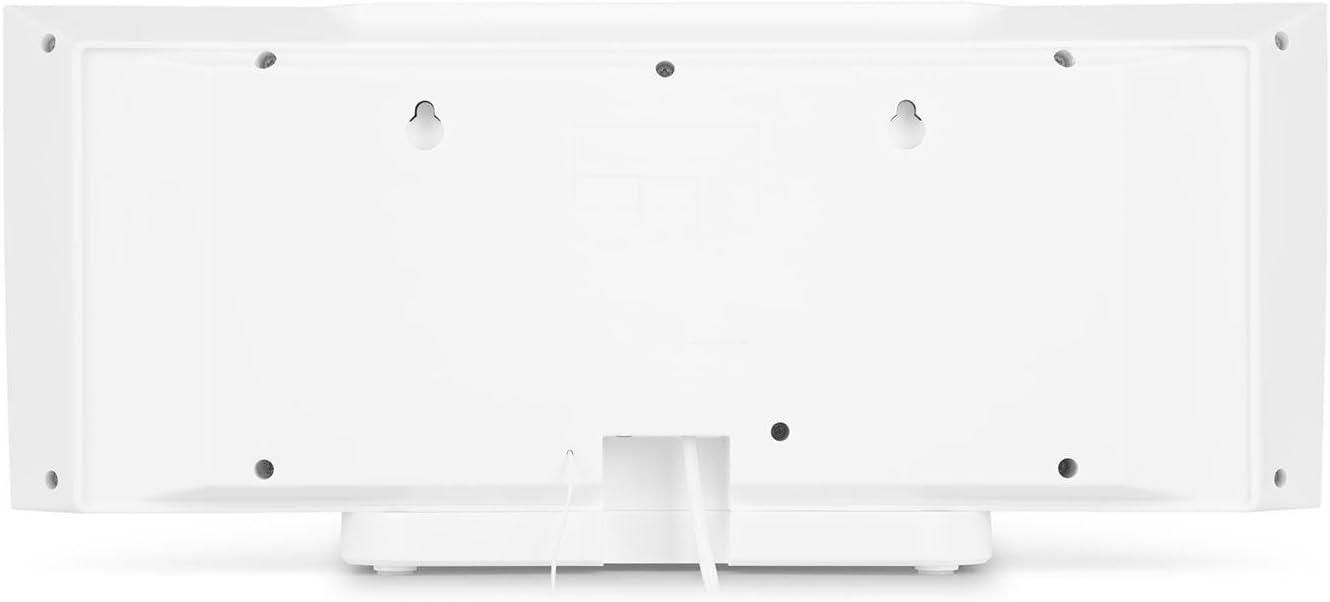
Abbildung 4.2: Rückseite view of the auna V-20, highlighting the USB port and AUX input.
Fernbedienung
The included remote control allows for convenient operation of all functions from a distance.

Abbildung 4.3: Ausführlich view of the remote control for the auna V-20 stereo system.
5. Einrichtung
5.1 Platzierungsoptionen
The auna V-20 offers flexible placement:
- Ständermontage: Attach the removable stand base for desktop or shelf placement. Ensure the unit is stable on a flat surface.
- Wandmontage: The unit can be mounted on a wall to save space. Use appropriate wall mounting hardware (not included) and ensure the wall can support the unit's weight.

Abbildung 5.1: Rückseite view illustrating the wall mounting points and the stand attachment area.
5.2 Stromanschluss
Connect the provided power adapter to the DC IN port on the rear of the unit, then plug it into a standard wall outlet (AC 230V, 50 Hz).
5.3 Antennenanschluss
Extend the wire antenna for optimal DAB+ and FM radio reception. Adjust its position for the best signal quality.
6. Bedienungsanleitung
6.1 Ein-/Ausschalten und Standby
Drücken Sie die IM STANDBY-MODUS button on the unit or remote control to switch the system on or put it into standby mode.
6.2 Modusauswahl
Drücken Sie die FUNKTION button on the unit or the dedicated mode buttons (FM/DAB, USB, CD, AUDIO IN, BLUETOOTH) on the remote control to switch between different audio sources.
6.3 Lautstärkeregelung
Stellen Sie die Lautstärke mit den Lautstärke+ Und vol- buttons on the unit or remote control. The LED display will show the current volume level.
6.4 Equalizer-Einstellungen
The system features a 2-band equalizer and equalizer presets. Use the EQ button on the remote control to cycle through presets or adjust bass/treble. The X-BASS function can be activated for enhanced bass.
7. Bluetooth and NFC Connectivity
7.1 Bluetooth-Kopplung
So streamen Sie Musik drahtlos von Ihrem Smartphone, Tablet oder Laptop:
- Switch the stereo system to Bluetooth mode. The LED display will indicate pairing mode.
- Aktivieren Sie Bluetooth auf Ihrem Mobilgerät und suchen Sie nach verfügbaren Geräten.
- Select "auna V-20" from the list to pair. Once connected, you can play audio from your device.

Figure 7.1: A smartphone being used to connect to the auna V-20 via Bluetooth.
7.2 NFC-Verbindung
For intuitive pairing with NFC-enabled devices:
- Stellen Sie sicher, dass NFC auf Ihrem Mobilgerät aktiviert ist.
- Gently swipe your NFC-enabled device over the NFC sensor on the auna V-20.
- The devices will automatically pair via Bluetooth.

Abbildung 7.2: Nahaufnahme view of the NFC sensor for quick device pairing.
8. Bedienung des CD-Players
The auna V-20 features an MP3-compatible CD player with a motorized drive.

Figure 8.1: The motorized CD player mechanism with a disc inserted.
8.1 Einlegen einer CD
- Drücken Sie die ÖFFNEN/SCHLIESSEN button to open the motorized CD cover.
- Carefully place a CD (CD, CD-R/RW, MP3-CD) onto the spindle with the label side facing you.
- Drücken ÖFFNEN/SCHLIESSEN again to close the cover. The system will automatically switch to CD mode and begin playback.
8.2 Wiedergabesteuerung
- Abspielen/Pause: Drücken WIEDERGABE/PAUSE Wiedergabe starten oder pausieren.
- Tracks überspringen: Verwenden Sie die NACH VORNE SPULEN or RÜCKWÄRTS ÜBERSPRINGEN Tasten zur Navigation zwischen den Titeln.
- Stop: Drücken Sie die STOPPEN Taste zum Beenden der Wiedergabe.
- Wiederholen/Zufällig: Verwenden Sie die WIEDERHOLEN Und ZUFÄLLIG buttons on the remote for playback options.
- Programmierbare Wiedergabe: The system supports programmable title display for custom playlists.
9. Radiobetrieb (DAB+/FM)
The auna V-20 features both DAB+ digital radio and analog FM radio with RDS function.
9.1 Selecting Radio Mode
Drücken Sie die FM/DAB button on the remote control to switch between FM and DAB+ modes.
9.2 Automatischer Stationsscan
In either FM or DAB+ mode, press the SCAN button on the remote control to automatically scan and store available stations. The system can store up to 20 presets per reception type.
9.3 Manual Tuning and Presets
- Manuelle Abstimmung: Verwenden Sie die TUNE +/- buttons on the remote control for fine-tuning.
- Voreinstellungen speichern: Once a station is found, press the VOREINSTELLUNG button, then use the number buttons (0-9, 10+) to assign a preset number. Press EINGEBEN zur Bestätigung.
- Voreinstellungen abrufen: Press the corresponding number button on the remote control to quickly access a saved station.
- Info-Button: Drücken Sie im DAB+-Modus die Taste INFO button to display additional information such as artist, title, album, or news.
10. USB-Wiedergabe
The auna V-20 allows playback of MP3 audio files direkt von einem USB-Stick.
10.1 Anschließen eines USB-Geräts
- Insert your USB stick into the USB port on the rear of the unit.
- Switch the stereo system to USB mode using the USB Taste auf der Fernbedienung.
- Das System erkennt automatisch MP3-Dateien und beginnt mit der Wiedergabe. files.
10.2 USB Playback Controls
Playback controls (Play/Pause, Skip, Stop, Repeat, Random) are similar to CD player operation. Use the FOLDER button on the remote to navigate through folders on the USB device.
11. AUX-Eingang
Connect external audio devices such as MP3 players, CD players, or computers using the AUX input.
11.1 Anschließen eines externen Geräts
- Connect a 3.5mm audio cable (not included) from the headphone jack or audio output of your external device to the AUX IN port on the rear of the auna V-20.
- Switch the stereo system to AUDIO IN mode using the AUDIO IN Taste auf der Fernbedienung.
- Play audio from your external device. The sound will be output through the auna V-20 speakers.
12. Wartung
12.1 Reinigung
- Ziehen Sie vor der Reinigung immer den Stecker aus der Steckdose.
- Verwenden Sie zum Reinigen der Außenflächen ein weiches, trockenes Tuch.
- Verwenden Sie keine Scheuermittel, Wachse oder Lösungsmittel, da diese die Oberfläche beschädigen können.
- For the CD lens, use a specialized CD lens cleaner if necessary.
12.2 Allgemeine Pflege
- Stellen Sie keine schweren Gegenstände auf das Gerät.
- Halten Sie das Gerät von direkter Sonneneinstrahlung und Wärmequellen fern.
- Sorgen Sie für eine ausreichende Belüftung rund um das Gerät, um eine Überhitzung zu vermeiden.
13. Fehlerbehebung
| Problem | Mögliche Ursache | Lösung |
|---|---|---|
| Kein Strom | Stromkabel nicht angeschlossen; Steckdose defekt | Überprüfen Sie den Netzanschluss; versuchen Sie es mit einer anderen Steckdose. |
| Kein Ton | Volume too low; incorrect source selected; mute activated | Increase volume; select correct source; deactivate mute |
| CD wird nicht abgespielt | CD inserted incorrectly; CD dirty/scratched; unsupported format | Reinsert CD correctly; clean or replace CD; ensure CD is compatible (CD, CD-R/RW, MP3-CD) |
| Schlechter Radioempfang | Antenna not extended; weak signal | Extend and adjust antenna position; try moving the unit to a different location |
| Die Bluetooth-Kopplung schlägt fehl | Device too far; Bluetooth not enabled; incorrect pairing procedure | Ensure devices are close; enable Bluetooth on mobile device; follow pairing instructions (Section 7.1) |
14. Spezifikationen
| Besonderheit | Detail |
|---|---|
| Marke | auna |
| Modell | V-20 |
| Teilenummer | AUVZ-1100-ghfr |
| Technische Daten | 51 x 25 x 16 cm |
| Gewicht | 2.6 kg |
| Stromquelle | Elektrisch |
| Wastage | 27 Watt |
| Audioausgabemodus | Stereo |
| Lautsprecherkonfiguration | 2.0 |
| Unterstützte Audioformate | MP3 |
| Medientyp | CD, MP3 |
| Steckertypen | Bluetooth, NFC, USB, AUX |
| Bluetooth-kompatibel | Ja |
| Bluetooth-Version | 2.1+EDR |
| Bluetooth Profile | A2DP |
| Kompatible Geräte | Smartphone, tablet, MP3 player |
| Besondere Merkmale | Einfach zu bedienen |
| Batterien für Fernbedienungen | 2 x 1.5 V AAA (im Lieferumfang enthalten) |
| DAB+ Frequenzbereich | 174 - 240 MHz (Band III) |
15. Garantie und Support
This product is covered by a manufacturer's warranty. For detailed warranty information, please refer to the documentation provided at the time of purchase or contact auna customer support.
If you encounter any issues not covered in the troubleshooting section, or require further assistance, please contact auna customer service through their official webWebsite oder bei Ihrem Händler.


