1. Einleitung
The Optex ORT 8930-HD is a digital terrestrial receiver designed to receive free-to-air digital programs broadcast in MPEG2/MPEG4 format, compatible with DVB-T2 and HEVC/H.265 standards. This device connects to your television via HDMI or SCART. It features a USB input for future software updates, multimedia file playback (photos, music, videos), and direct recording to an external USB storage device (not included).
This manual provides detailed instructions for the proper installation, operation, and maintenance of your Optex ORT 8930-HD receiver. Please read it thoroughly before use to ensure optimal performance and to prevent damage.
2. Sicherheitshinweise
- Sorgen Sie für eine ausreichende Belüftung rund um das Gerät, um eine Überhitzung zu vermeiden.
- Setzen Sie den Empfänger weder Regen, Feuchtigkeit noch extremen Temperaturen aus.
- Vermeiden Sie die Platzierung des Geräts in der Nähe von Wärmequellen wie Heizkörpern oder Öfen.
- Verwenden Sie nur das mit dem Gerät mitgelieferte Netzteil.
- Öffnen Sie nicht das casing; alle Wartungsarbeiten sind qualifiziertem Personal zu überlassen.
- Ziehen Sie bei Gewittern oder längerer Nichtbenutzung den Netzstecker aus der Steckdose.
3. Packungsinhalt
Überprüfen Sie, ob alle Artikel im Paket vorhanden sind:
- 1 x Optex ORT 8930-HD Digital Receiver
- 1 x Fernbedienung
- 1 x Benutzerhandbuch
4. Produktüberschreitungview
4.1 Frontplatte

Bild 1: Front view of the Optex ORT 8930-HD receiver, showing the display, USB port, and control buttons.
The front panel includes a digital display for channel numbers, a USB 2.0 port for external storage, and basic control buttons (CH+, CH-, Power).
4.2 Rückseite
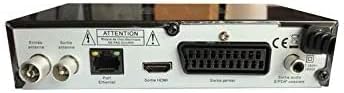
Bild 2: Hinteren view of the Optex ORT 8930-HD receiver, displaying various connectivity ports.
Die Rückseite bietet folgende Anschlüsse:
- Antenna In/Out: IEC 9.52 mm connectors for terrestrial antenna.
- HDMI-Ausgang: For connecting to an HD television.
- SCART Connector: For connecting to older televisions.
- S/PDIF Coaxial Audio: Digitaler Audioausgang.
- Leistungsaufnahme: For the external power adapter.
4.3-Fernbedienung

Bild 3: The remote control unit for the Optex ORT 8930-HD receiver.
The remote control allows full operation of the receiver, including power, channel selection, volume, menu navigation, recording functions, and multimedia playback controls.
5. Einrichtung
5.1 Anschließen der Antenne
- Connect your terrestrial antenna cable to the "Antenna In" port on the rear panel of the receiver.
- If you wish to loop the antenna signal to another device, connect a coaxial cable from the "Antenna Out" port to the input of the next device.
5.2 Anschluss an Ihren Fernseher
Wählen Sie eine der folgenden Verbindungsmethoden:
- HDMI (Empfohlen für HD): Connect an HDMI cable from the "HDMI Output" port on the receiver to an available HDMI input on your television.
- SCART: Connect a SCART cable from the "SCART Connector" on the receiver to the SCART input on your television.
5.3 Stromanschluss
- Connect the power adapter to the power input port on the receiver.
- Stecken Sie das Netzteil in eine geeignete Steckdose.
5.4 Erster Kanalscan
- Turn on your television and select the correct input source (HDMI or SCART) corresponding to your connection.
- Power on the Optex ORT 8930-HD receiver.
- The first-time setup wizard should appear. Follow the on-screen instructions to perform an automatic channel search. This will scan for all available digital terrestrial channels in your area.
- If the wizard does not appear, navigate to the "Menu" > "Installation" > "Automatic Search" using the remote control.
6. Bedienungsanleitung
6.1 Grundlegende Bedienung
- Ein-/Ausschalten: Drücken Sie die LEISTUNG Taste auf der Fernbedienung oder Frontplatte.
- Kanalauswahl: Verwenden Sie die CH+ / CH- Sie können die Tasten verwenden oder die Kanalnummer direkt über das Ziffernfeld eingeben.
- Lautstärkeregelung: Verwenden Sie die Lautstärke+ / vol- Schaltflächen.
- Stumm: Drücken Sie die MUTE Taste zum vorübergehenden Stummschalten des Tons.
6.2 Kanalverwaltung
- Automatische/Manuelle Suche: Zugang durch Speisekarte > Installation to rescan for channels.
- LCN-Funktion: The Logical Channel Numbering (LCN) function automatically sorts channels into a logical order. This can usually be enabled/disabled in the installation menu.
- Favoritenliste: Create personalized lists of your preferred channels for quick access. Refer to the on-screen menu for instructions on adding and managing favorite channels.
6.3 Aufnahme und Wiedergabe
To use recording and multimedia playback features, connect a USB storage device (e.g., USB flash drive or external hard drive) to the USB port on the front panel.
- USB-Aufnahme: Drücken Sie die AUFNAHME button on the remote control to start recording the current program. Press STOPPEN um die Aufnahme zu beenden.
- Timeshift Function: This allows you to pause live TV and resume watching later. Activate Timeshift via the remote control (usually a dedicated button or through the menu).
- Multimedia-Wiedergabe: Access the multimedia player via the Speisekarte. You can browse and play music, photo, and video files stored on your connected USB device.
6.4 Elektronischer Programmführer (EPG)
Drücken Sie die EPG Taste auf der Fernbedienung auf view Der elektronische Programmführer (EPG), der die Programmzeiten für bevorstehende Sendungen anzeigt.
6.5 Kindersicherung
Set up a parental lock to restrict access to certain channels or programs. This feature is typically found in the Speisekarte > Systemeinstellungen > Kindersicherung Abschnitt.
6.6 Timer-Funktion
The timer function allows you to schedule the receiver to turn on/off or record a specific program at a set time. Access this feature through the Speisekarte.
6.7 Software Update via USB
Überprüfen Sie regelmäßig die Herstellerangaben. website for available software updates. Download the update file to a USB drive and follow the instructions in the Speisekarte > Systemeinstellungen > Softwareaktualisierung section to install it.
7. Wartung
- Reinigung: Reinigen Sie die Außenseite des Empfängers mit einem weichen, trockenen Tuch. Verwenden Sie keine flüssigen oder Aerosol-Reinigungsmittel.
- Belüftung: Um eine Überhitzung zu vermeiden, stellen Sie sicher, dass die Lüftungsschlitze des Geräts nicht blockiert sind.
- Software: Keep the receiver's software updated to ensure optimal performance and access to the latest features.
8. Fehlerbehebung
| Problem | Mögliche Ursache | Lösung |
|---|---|---|
| Kein Strom | Stromkabel nicht angeschlossen; Steckdose defekt. | Überprüfen Sie den Netzanschluss; versuchen Sie es mit einer anderen Steckdose. |
| Kein Signal / Keine Kanäle | Antenna not connected; incorrect input source on TV; no channel scan performed. | Check antenna connection; select correct TV input; perform an automatic channel scan. |
| Fernbedienung funktioniert nicht | Batteries depleted; obstruction between remote and receiver. | Replace batteries; ensure clear line of sight to the receiver's IR sensor. |
| USB-Aufnahme funktioniert nicht | USB device not connected or formatted incorrectly; insufficient storage space. | Ensure USB device is properly connected; format USB device (FAT32/NTFS); check available space. |
| Das Gerät friert ein oder reagiert nicht mehr. | Vorübergehender Softwarefehler. | Disconnect power for a few seconds, then reconnect. If problem persists, check for software updates. |
9. Spezifikationen
| Besonderheit | Detail |
|---|---|
| Modell | ORT 8930-HD |
| Marke | Optex |
| Tunertyp | Terrestrisch (DVB-T2) |
| Videodekodierung | HEVC/H.265, MPEG-2.5 |
| Konnektivität | 1x HDMI, 1x SCART, 1x USB 2.0, 1x S/PDIF Coaxial Audio, Antenna In/Out |
| Kanalkapazität | Over 1000 channels |
| Aufnahme | External USB media (PVR function) |
| Multimedia-Wiedergabe | Music, Photos, Videos |
| Besondere Merkmale | Timeshift, EPG, Parental Lock, Favorite List, Multi-language Menu, LCN, 5V Antenna Power, Timer Function, Dolby Digital+ compatible |
| Audioausgabemodus | [SOM] |
| Lautsprecher-Surround-Sound-Konfiguration | 5.1 |
| Leistungsabgabe | 5 Watt |
| Produktgewicht | 600 g |
10. Garantie und Support
Specific warranty information is not provided within this manual. Please refer to the warranty card included with your purchase, contact your retailer, or visit the official Optex webAuf der Webseite finden Sie die detaillierten Garantiebedingungen.
For technical support or service inquiries, please contact your local Optex distributor or the customer service department as indicated on the product packaging or manufacturer's webWebsite.


