Einführung
This manual provides instructions for the proper installation, operation, and maintenance of your Esperanza ERW019 Monitor Desk Mount. Please read this manual thoroughly before installation and retain it for future reference. Ensure all components are present and undamaged before proceeding.
Sicherheitshinweise
WARNUNG: Failure to read, understand, and follow all instructions can result in serious personal injury, property damage, or voiding of the warranty. Improper installation may cause damage to the monitor or desk.
- Überschreiten Sie nicht die maximale Tragfähigkeit von 6 kg (13.2 lbs).
- Ensure the mounting surface (desk) can safely support the combined weight of the mount and the monitor.
- Use only the provided hardware.
- Kleinteile von Kindern fernhalten.
- If you have any doubts about the installation, consult a qualified professional.
Packungsinhalt
Verify that all parts are included in your package. If any parts are missing or damaged, do not attempt to install. Contact customer support for assistance.
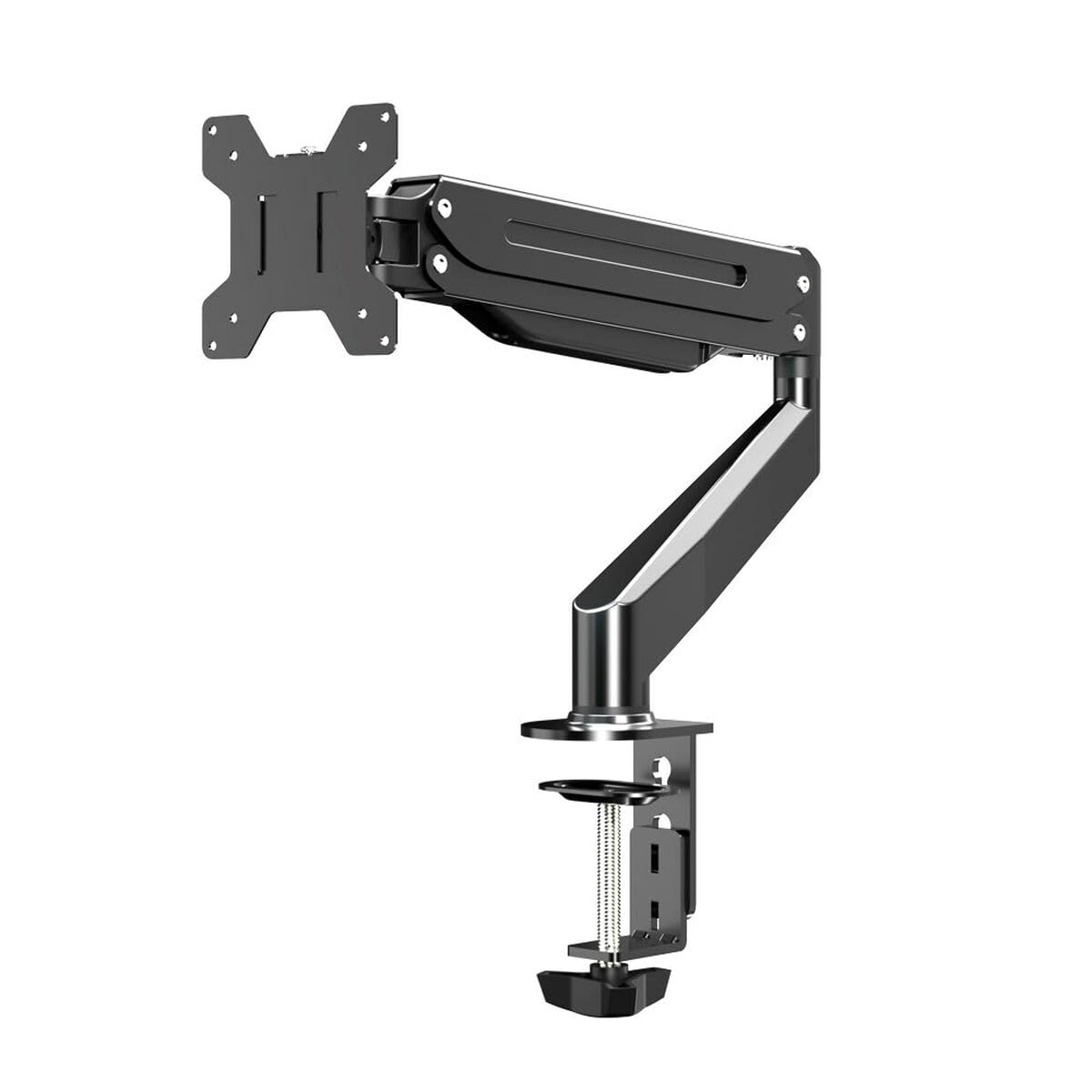
Image: An illustration of the Esperanza ERW019 Monitor Desk Mount and its components.
- Monitor Mount Base
- Arm überwachen
- VESA-Platte
- Montagezubehör (Schrauben, Unterlegscheiben, Abstandshalter)
- Inbusschlüssel
- Bedienungsanleitung
Setup und Installation
Follow these steps carefully to install your monitor desk mount.
Step 1: Attach the Mount Base to the Desk
Place the mount base on the desired position on your desk. Secure it using the integrated clamp mechanism. Tighten the clamp screw until the mount is firmly attached to the desk and does not wobble.
Image: Illustration of securing the desk clamp. Stellen Sie sicher, dass die clamp is fully tightened for stability.
Schritt 2: Befestigen Sie die VESA-Platte an Ihrem Monitor
Locate the VESA mounting holes on the back of your monitor. These are typically 75x75mm or 100x100mm apart. Align the VESA plate with these holes and secure it using the appropriate screws (M4 or M5) and washers provided. Do not overtighten.
Image: The VESA plate being attached to the rear of a monitor using screws.
Step 3: Mount the Monitor to the Arm
Carefully lift the monitor with the attached VESA plate and slide it onto the monitor arm's mounting head. Ensure it clicks into place or is secured with the provided locking mechanism. Double-check that the monitor is securely attached before releasing es.
Image: A monitor being carefully placed onto the desk mount arm.
Operating and Adjusting Your Monitor Mount
The Esperanza ERW019 mount allows for various adjustments to achieve optimal viewwinkeln.
- Höhenverstellung: Loosen the adjustment knob on the arm, move the monitor to the desired height, and then retighten the knob firmly.
- Neigungseinstellung: The monitor can be tilted up or down. Loosen the tilt screw, adjust the angle, and retighten.
- Schwenkeinstellung: The monitor arm can swivel left or right at the base.
- Drehung: The VESA plate allows for 360-degree rotation, enabling portrait or landscape orientation.
Image: Demonstrating the various adjustment capabilities of the monitor mount, including height, tilt, and swivel.
Wartung
Regelmäßige Wartung gewährleistet die Langlebigkeit und den sicheren Betrieb Ihrer Monitorhalterung.
- Überprüfen Sie regelmäßig alle Schrauben und Verbindungen auf festen Sitz. Ziehen Sie sie gegebenenfalls nach.
- Reinigen Sie die Halterung mit einem weichen, fusselfreien Tuch.amp Mit einem Tuch abwischen. Vermeiden Sie scheuernde Reiniger oder Lösungsmittel.
- Schmieren Sie keine Teile der Halterung, es sei denn, dies wird ausdrücklich empfohlen.
Fehlerbehebung
| Problem | Mögliche Ursache | Lösung |
|---|---|---|
| Der Monitor hängt durch oder hält seine Position nicht. | Adjustment screws are loose. | Tighten the relevant adjustment screws (e.g., tilt, height). |
| Die Halterung wirkt instabil. | Schreibtisch klamp ist nicht fest genug. | Stellen Sie sicher, dass der Schreibtisch sauberamp is fully tightened to the desk surface. |
| Monitor cannot be attached. | Falsches VESA-Muster oder falsche Schraubengröße. | Verify your monitor's VESA pattern (75x75mm or 100x100mm) and use the correct screws. |
Technische Daten
- Modell: Esperanza ERW019 (S91103024)
- Typ: Monitor-Schreibtischhalterung
- Material: Metall
- Farbe: Schwarz
- Kompatibilität mit Bildschirmgrößen: 17" - 27"
- VESA-Kompatibilität: 75x75mm, 100x100mm
- Maximale Tragfähigkeit: 6 kg
- Abmessungen (ungefähr): 8.5 x 41 x 24.5 cm (Base and Arm)
Garantie und Support
For warranty information or technical support, please refer to the documentation provided with your purchase or visit the official Esperanza webBewahren Sie Ihren Kaufbeleg für Garantieansprüche auf.
Hersteller: Esperanza


