1. Einleitung
The Ajazz AK50 is a high-performance mechanical keyboard designed for both gaming and general use. It features durable Blue mechanical switches, a 104-key standard layout, and customizable yellow LED backlighting. This manual provides detailed instructions for setting up, operating, maintaining, and troubleshooting your keyboard to ensure optimal performance and longevity.
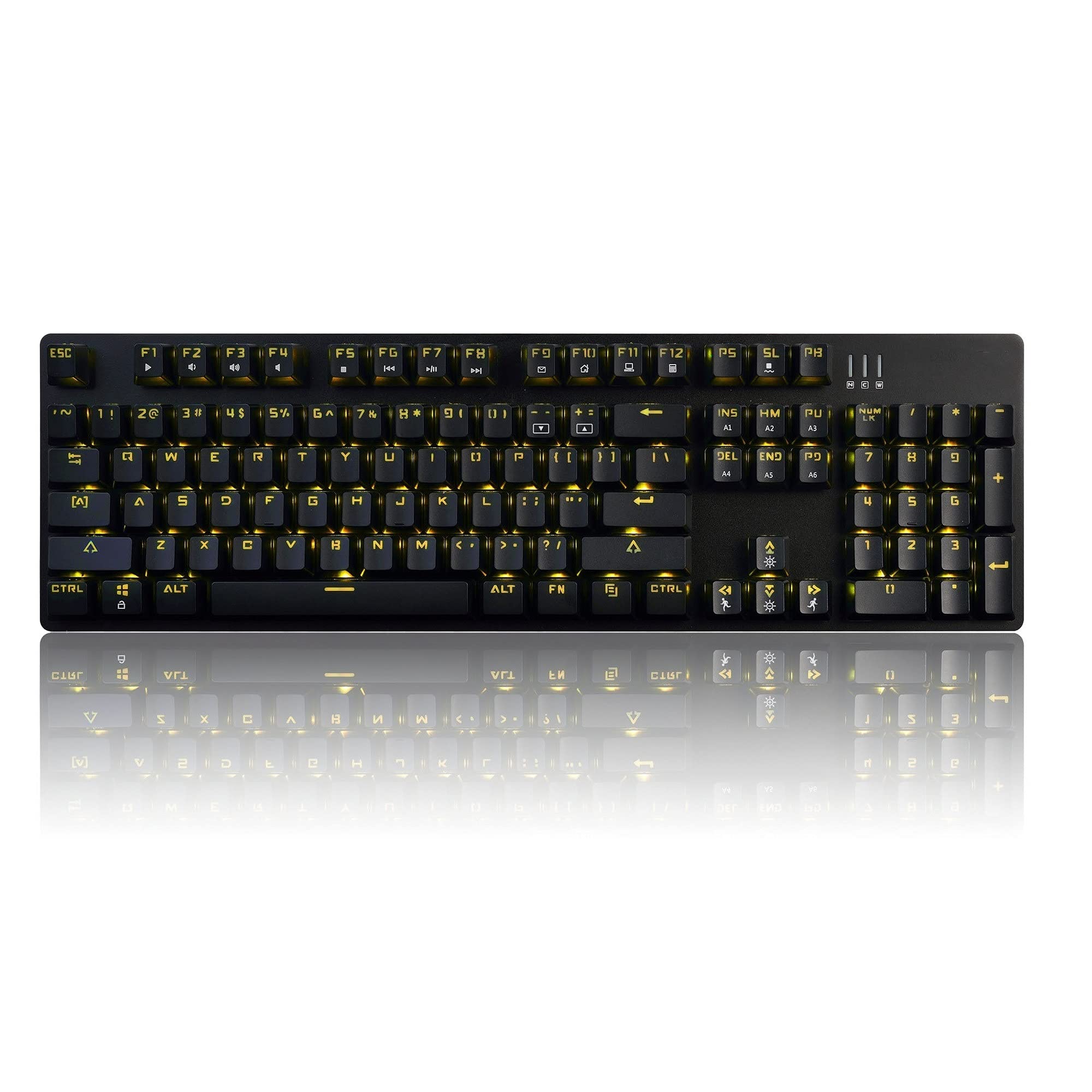
Image 1.1: The Ajazz AK50 Mechanical Keyboard, showcasing its full layout and yellow LED backlighting.
2. Packungsinhalt
Bitte überprüfen Sie, ob alle Artikel in Ihrem Paket vorhanden sind:
- Ajazz AK50 Mechanical Keyboard
- USB-Kabel (fest angeschlossen)
- Benutzerhandbuch (dieses Dokument)
3. Einrichtungsanweisungen
- Schließen Sie die Tastatur an: Locate an available USB 2.0 port on your computer. Insert the USB connector of the keyboard cable into the USB port.

Image 3.1: The Ajazz AK50 keyboard ready for connection to a computer via its USB cable.
- Treiberinstallation: The Ajazz AK50 is a plug-and-play device. Your operating system (Windows 10/8/7 XP Vista, Mac OS, Linux) will automatically detect and install the necessary drivers. No additional software installation is required for basic functionality.
- Platzierung: Position the keyboard comfortably on your desk. The keyboard features adjustable feet on the underside to change the typing angle if desired.
4. Bedienungsanleitung
4.1 Key Features and Layout
The Ajazz AK50 features a 104-key standard layout with Blue mechanical switches, providing tactile feedback and an audible click. The ergonomic R5 key design aims to reduce fatigue during extended use.

Bild 4.1: Schräg view der Tastatur, wobei die Tastenkappe Pro hervorgehoben wirdfile und Layout.
The keyboard supports 100% anti-ghosting across all 104 keys, ensuring that every keystroke is registered accurately, even during rapid input.
4.2 Backlighting Control
The keyboard features yellow LED backlighting with multiple modes and customization options.
- Default Backlight Modes: The keyboard comes with 8 pre-set backlight modes. Use the FN + INS key combination to cycle through these modes.
- Benutzerdefinierte Hintergrundbeleuchtungsmodi: 5 custom backlight modes are available for personalized lighting effects. Refer to the specific key combinations for programming these modes (usually involving FN + a specific key to enter programming mode, then selecting keys to light up, and FN + the same key to save).
- Helligkeitsanpassung: Adjust the backlight brightness using dedicated function keys or combinations (e.g., FN + Pfeiltaste nach oben/unten).
- Geschwindigkeitsanpassung: Adjust the speed of dynamic backlight effects using dedicated function keys or combinations (e.g., FN + Pfeil nach links/rechts).

Bild 4.2: Eine Nahaufnahme view of the keyboard's keys, illustrating the yellow LED backlighting and keycap design.
4.3 Multimedia- und Funktionstasten
The F1-F12 keys, when combined with the FN key, provide access to various multimedia and system functions. Specific functions are typically indicated by icons on the keycaps.
| Tastenkombination | Funktion |
|---|---|
| FN + F1 | Mein Computer |
| FN + F2 | Suche |
| FN + F3 | Kalkulator |
| FN + F4 | Media Player |
| FN + F5 | Vorheriger Titel |
| FN + F6 | Nächster Titel |
| FN + F7 | Abspielen/Pause |
| FN + F8 | Stoppen |
| FN + F9 | Stumm |
| FN + F10 | Lautstärke verringern |
| FN + F11 | Lautstärke erhöhen |
| FN + F12 | Tastatursperre |
| FN + GEWINNEN | Windows-Taste sperren/entsperren |
5. Wartung und Pflege
Proper maintenance ensures the longevity and performance of your Ajazz AK50 keyboard.
- Reinigung der Tastatur:
- Trennen Sie die Tastatur vor der Reinigung vom Computer.
- Mit einem weichen, fusselfreien Tuch leichtampened with water or a mild cleaning solution to wipe the keycaps and frame. Avoid excessive moisture.
- Für Staub und Schmutz zwischen den Tasten verwenden Sie Druckluft.
- The keyboard features a removable bezel cover, which can be detached for easier cleaning of the keyboard base and keycaps. Gently pry it off from the edges.
- Verschütten vermeiden: Um Schäden an den internen Komponenten zu vermeiden, sollten Flüssigkeiten von der Tastatur ferngehalten werden.
- Lagerung: Bei längerer Nichtbenutzung sollte die Tastatur in einer sauberen, trockenen Umgebung aufbewahrt werden.
6. Fehlerbehebung
Sollten Sie Probleme mit Ihrer Ajazz AK50-Tastatur haben, beachten Sie bitte die folgenden gängigen Lösungsansätze:
| Problem | Mögliche Lösung(en) |
|---|---|
| Die Tastatur reagiert nicht. |
|
| Die Hintergrundbeleuchtung funktioniert nicht oder ist defekt. |
|
| Die Tasten werden nicht registriert oder es werden Doppeleingaben ausgeführt. |
|
7. Technische Daten
| Besonderheit | Detail |
|---|---|
| Marke | Ajazz (FIRSTBLOOD ONLY GAME.) |
| Modell | AK50 Blue Switches |
| Tastaturtyp | Mechanische Gaming-Tastatur |
| Schaltertyp | Blue Switches (50 million keystroke lifespan) |
| Tastenbelegung | 104 Standardtasten |
| Anti-Ghosting | 100% Anti-Ghosting |
| Hintergrundbeleuchtung | Yellow LED Backlit (8 default modes, 5 custom modes) |
| Konnektivität | USB 2.0 (Wired, 1.8m braided cable) |
| Betriebssystemkompatibilität | Windows 10/8/7 XP Vista, Mac OS, Linux |
| Abmessungen (LxBxH) | 43.41 x 12.29 x 3.61 cm |
| Gewicht | 780 g |
| Material | Aluminum and ABS Construction |
| Besondere Merkmale | Ergonomic R5 key design, Removable bezel |
8. Garantie und Support
The Ajazz AK50 Mechanical Keyboard comes with a 1 Jahr HerstellergarantieZusätzlich ein 30 Tage Geld-zurück-Garantie wird ab Kaufdatum angeboten.
For technical support, warranty claims, or any product-related inquiries, please contact your retailer or the manufacturer directly through their official support channels. Please retain your proof of purchase for warranty validation.


