Einführung
This manual provides detailed instructions for the installation, operation, and maintenance of the Hanwha Techwin HCV-6070R 2MP Outdoor Vandal-Resistant Dome Camera. This camera is designed for outdoor security surveillance, offering 2-megapixel resolution, a 2.8-12mm manual varifocal lens, and night vision capabilities with a BNC connection.
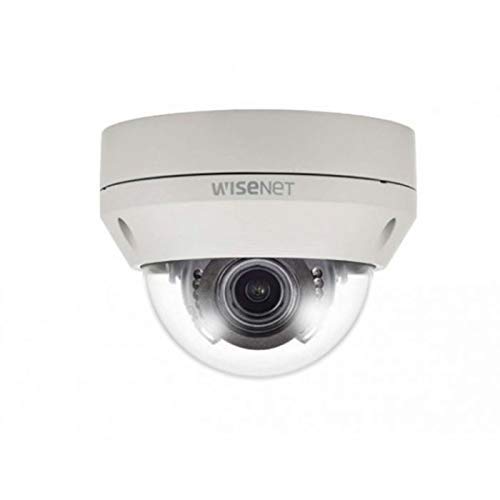
Figure 1: Hanwha Techwin HCV-6070R 2MP Outdoor Vandal-Resistant Dome Camera.
Sicherheitshinweise
Please read all safety instructions carefully before installing or operating the camera. Keep this manual for future reference.
- Ensure the power supply matches the camera's requirements to prevent electrical shock or fire.
- Setzen Sie die Kamera keinen extremen Temperaturen, hoher Luftfeuchtigkeit oder korrosiven Umgebungen aus.
- Die Installation sollte von qualifiziertem Fachpersonal gemäß den örtlichen Elektrovorschriften durchgeführt werden.
- Vermeiden Sie es, die Linse über längere Zeiträume direkt starken Lichtquellen auszusetzen.
- Versuchen Sie nicht, die Kamera zu zerlegen oder zu verändern. Dadurch erlischt die Garantie.
Packungsinhalt
Überprüfen Sie, ob alle Artikel im Paket vorhanden sind:
- Hanwha Techwin HCV-6070R Dome Camera (1 unit)
- Befestigungsschrauben und Anker
- Installationsvorlage
- Kurzanleitung
- Waterproof Cap (if applicable)
Aufstellen
1. Montage der Kamera
The HCV-6070R is designed for wall mounting. Choose a suitable outdoor location that provides the desired surveillance coverage and is protected from direct impact.
- Use the provided installation template to mark the drilling holes on the wall.
- Drill holes according to the template and insert the wall anchors.
- Secure the camera base to the wall using the mounting screws.
- Stellen Sie die Kameraeinstellungen ein viewing angle as needed before tightening all screws.
2. Verkabelung und Anschlüsse
The camera utilizes a BNC connection for video output and requires a separate power supply. Ensure all connections are secure and weatherproof for outdoor use.
- Videoverbindung: Connect a BNC cable from the camera's BNC port to the video input of your DVR (Digital Video Recorder).
- Stromanschluss: Connect a 12V DC power adapter (not included) to the camera's power input. The camera operates at 8 watts.
- Kabellose Verbindung: The camera supports Wi-Fi for remote control and monitoring. Refer to the operating section for initial Wi-Fi setup.

Abbildung 2: Bspample of a BNC coaxial cable for video connection. Ensure a secure connection to the camera and DVR.
3. Erstkonfiguration
After physical installation and power-up, access the camera settings via your connected DVR or a compatible mobile application (Android controller type specified).
- Stellen Sie Datum und Uhrzeit ein.
- Configure network settings for Wi-Fi connectivity.
- Adjust video quality and recording preferences.
Bedienung der Kamera
1. Videoüberwachung und -aufzeichnung
The camera provides 2MP effective video resolution, capturing video at 1080p and a frame rate of 30 fps. Video is typically recorded in MPEG-4 format.
- Live zugreifen view und aufgenommenes Essentage through your connected DVR or the remote control application.
- Ensure your DVR is configured to record from the correct channel.
2. Fokus und Zoom anpassen
The HCV-6070R features a 2.8-12mm manual varifocal lens with optical zoom. Adjustments are made manually on the camera body.
- Loosen the focus and zoom locking screws on the camera lens assembly.
- Adjust the zoom ring to achieve the desired field of view.
- Adjust the focus ring until the image is clear and sharp.
- Tighten the locking screws to secure the settings.
3. Night Vision and Low Light Performance
Equipped with night vision and "Night Color" low light technology, the camera automatically switches to infrared mode in low light conditions to provide clear surveillance footage. The light source type is LED.
- Ensure no obstructions block the infrared LEDs on the camera.
- The camera will automatically activate its infrared illuminators when ambient light levels drop.
4. Bewegungserkennung
The camera supports motion-only alerts. Configure motion detection zones and sensitivity settings through your DVR or the remote control application.
- Definieren Sie spezifische Bereiche innerhalb der Kamera view zur Bewegungserkennung.
- Stellen Sie die Empfindlichkeit so ein, dass Fehlalarme minimiert werden.
- Configure alert notifications (e.g., email, push notifications) via your DVR or application.
5. Fernbedienung
The camera can be controlled remotely using a compatible Android application. Ensure the camera is connected to your Wi-Fi network.
- Download and install the Hanwha Techwin mobile application on your Android device.
- Follow the in-app instructions to add and connect to your HCV-6070R camera.
- Über die App können Sie view lebe footage, access recordings, and adjust certain camera settings.
Wartung
Regelmäßige Wartung gewährleistet optimale Leistung und Langlebigkeit Ihrer Kamera.
- Reinigung der Linse: Gently wipe the camera lens with a soft, clean, lint-free cloth. For stubborn dirt, use a lens cleaning solution specifically designed for optical surfaces.
- Reinigung des Gehäuses: Reinigen Sie das Außengehäuse der Kamera mit einem Reinigungstuch.amp Tuch. Verwenden Sie keine scharfen Chemikalien oder Scheuermittel.
- Kabelinspektion: Periodically check all cables and connections for signs of wear, damage, or corrosion, especially for outdoor installations.
- Firmware-Updates: Check the Hanwha Techwin website for any available firmware updates to ensure your camera has the latest features and security patches.
Fehlerbehebung
| Problem | Mögliche Ursache | Lösung |
|---|---|---|
| Kein Videoausgang | No power; Loose BNC connection; Incorrect DVR input selected. | Check power supply; Secure BNC cable; Select correct channel on DVR. |
| Unscharfes oder verschwommenes Bild | Lens out of focus; Dirty lens. | Manually adjust focus (refer to Operating section); Clean the lens. |
| Nachtsicht funktioniert nicht | IR LEDs blocked; Insufficient power; Camera stuck in day mode. | Clear obstructions; Verify power supply; Restart camera. |
| Bewegungserkennung löst nicht aus | Incorrect sensitivity settings; Motion detection zone not configured. | Adjust sensitivity; Configure motion detection zones in DVR/app. |
| Verbindung über WLAN nicht möglich | Incorrect Wi-Fi password; Camera out of range; Network issues. | Verify Wi-Fi credentials; Move camera closer to router; Check network status. |
Technische Daten
| Modell | HCV-6070R |
| Marke | HANWHA Techwin |
| Effektive Videoauflösung | 2 MP (1080p) |
| Bildfrequenz | 30 fps |
| Objektivtyp | 2.8-12mm Manual Varifocal Lens |
| Fokustyp | Manueller Fokus |
| Zoomtyp | Optischer Zoom |
| Konnektivitätstechnologie | Wireless (Wi-Fi), BNC Connection |
| Stromquelle | Manual (requires external 12V DC power adapter) |
| Wastage | 8 Watt |
| Verwendung im Innen- und Außenbereich | Im Freien |
| Besonderheit | Night Vision (Night Color low light technology) |
| Formfaktor | Kuppel |
| Montagetyp | Wandhalterung |
| Kompatible Geräte | DVR |
| Kontrollmethode | Remote (Android Controller Type) |
| Internationale Schutzbewertung | IP54 |
| Fotosensor-Technologie | CMOS |
| Videoaufnahmeformat | MPEG-4 |
| Alarmtyp | Nur Bewegung |
Garantie und Support
For warranty information and technical support, please refer to the official Hanwha Techwin webBesuchen Sie die Website oder kontaktieren Sie direkt den Kundenservice. Bewahren Sie Ihren Kaufbeleg als Kaufnachweis für Garantieansprüche auf.
Hersteller: Hanwha
Datum der Erstveröffentlichung: 19. Februar 2019


