Einführung
This manual provides instructions for the operation and maintenance of your Senville Remote Control, model AR2015-IR. This remote is designed for use with Senville AURA Series and LETO Series mini split air conditioning systems. Please read this manual thoroughly before using the remote control to ensure proper function and longevity.
Produkt überview
The Senville AR2015-IR remote control allows you to manage various functions of your compatible Senville mini split system, including temperature settings, operating modes, fan speed, and special features.
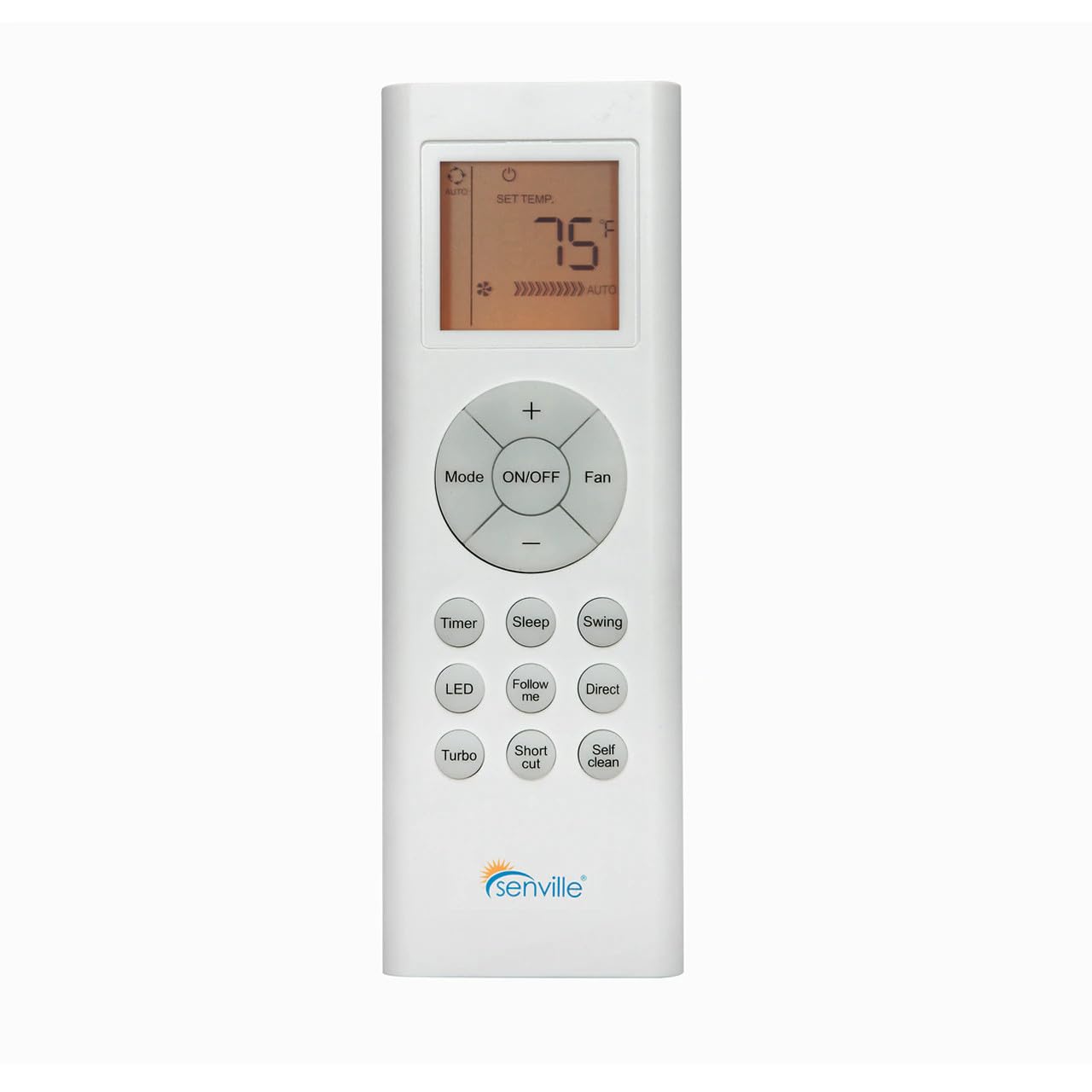
Abbildung 1: Front view of the Senville AR2015-IR Remote Control. It features an LCD screen at the top, a central circular button cluster for power, mode, fan, and temperature adjustment, and additional function buttons below.
Aufstellen
1. Einlegen der Batterie
- Suchen Sie die Batteriefachabdeckung auf der Rückseite der Fernbedienung.
- Schieben Sie den Deckel nach unten oder drücken Sie den Riegel, um ihn zu öffnen.
- Legen Sie zwei AAA-Batterien (nicht im Lieferumfang enthalten) ein und achten Sie dabei auf die richtige Polarität (+ und -), wie im Batteriefach angegeben.
- Bringen Sie die Abdeckung des Batteriefachs wieder an.
Notiz: The remote control does not require programming and should function immediately upon battery installation with compatible Senville AURA and LETO series units.
Bedienungsanleitung
Tastenfunktionen
- EIN/AUS: Press to turn the air conditioning unit on or off.
- Modus: Durchläuft die Betriebsmodi: Auto, Kühlen, Entfeuchten, Heizen, Ventilator.
- Fan: Reguliert die Lüftergeschwindigkeit: Auto, Niedrig, Mittel, Hoch.
- Temperature (+/-): Increases or decreases the set temperature. The display shows the set temperature in Fahrenheit or Celsius.
- Timer: Legt den automatischen Ein- oder Ausschalttimer fest.
- Schlafen: Activates or deactivates the Sleep mode for energy-efficient operation during sleep.
- Schwingen: Steuert die vertikale Lamellenschwenkfunktion.
- LEDs: Turns the indoor unit's display LED light on or off.
- Folgen Sie mir: Activates the Follow Me function, which senses the temperature at the remote's location.
- Direkt: Passt die horizontale Lamellenrichtung an.
- Turbo: Aktiviert eine schnelle Kühlung oder Erwärmung für einen kurzen Zeitraum.
- Abkürzung: Speichert Ihre bevorzugten Einstellungen.
- Selbstreinigung: Initiates the self-cleaning function of the indoor unit.
Auswahl der Temperatureinheit
To switch between Fahrenheit (°F) and Celsius (°C), ensure the unit is off. Press and hold the Temperature (+) and Temperature (-) buttons simultaneously for approximately 3 seconds. The display will change to the alternate unit.
Wartung
Batteriewechsel
Replace batteries when the display becomes dim or the remote's range decreases. Always replace both batteries at the same time with new AAA batteries. Dispose of used batteries according to local regulations.
Reinigen der Fernbedienung
Reinigen Sie die Fernbedienung mit einem weichen, trockenen Tuch. Verwenden Sie keine flüssigen Reinigungsmittel oder Scheuermittel, da diese die Oberfläche oder die internen Bauteile der Fernbedienung beschädigen können.
Fehlerbehebung
- Fernbedienung reagiert nicht:
- Prüfen Sie, ob die Batterien richtig eingesetzt und nicht entladen sind. Tauschen Sie sie gegebenenfalls aus.
- Ensure there are no obstructions between the remote control and the indoor unit's receiver.
- Confirm the remote is pointed directly at the indoor unit.
- Das Display ist dunkel oder leer:
- Ersetzen Sie die Batterien.
- Unit not responding to specific functions:
- Verify that your specific Senville unit model supports the function you are trying to use. Refer to your air conditioner's manual for compatibility.
Technische Daten
| Modellnummer | AR2015-IR |
| Kompatible Geräte | Senville AURA Series, Senville LETO Series mini split air conditioners (HF, HF/Z, CD/X Models) |
| Konnektivitätstechnologie | Infrarot |
| Stromquelle | 2 x AAA-Batterien (nicht enthalten) |
| Abmessungen (L x B x H) | 6.89 x 2.68 x 0.83 Zoll |
| Gewicht | 2.89 Unzen (ohne Batterien) |
Garantie und Support
For warranty information or technical support regarding your Senville Remote Control or compatible air conditioning unit, please refer to the documentation provided with your main Senville product or visit the official Senville website. Contacting Senville customer service directly is recommended for specific inquiries.
Weitere Informationen und Unterstützungsangebote finden Sie auf der Senville Store on Amazon.