1. Produktüberschreitungview
The Orbit B-hyve Smart Hose Tap Timer with Wi-Fi Hub provides intelligent control over your outdoor watering. This system allows you to manage your irrigation from anywhere using the B-hyve app on your smartphone or computer. It features WeatherSense technology for smart watering adjustments based on local conditions and a built-in flow meter to monitor water consumption.

Image: The Orbit B-hyve Smart Hose Tap Timer (left) and its accompanying Wi-Fi Hub (right).

Image: Components of the Orbit B-hyve system, including the hose tap timer, Wi-Fi hub, and power adapter.
2. Hauptmerkmale
- Volle App-Kontrolle: Manage your watering schedules from anywhere using the B-hyve app, available for Android, iOS, and web Browsern.
- WeatherSense-Technologie: Automatically adjusts watering based on real-time weather conditions, soil type, slope, and sun/shade exposure to optimize water usage.
- Built-in Flow Meter: Monitor your water consumption in gallons or by time, providing insights into your water usage.
- Einfache Einrichtung: Simple installation and programming process through the B-hyve app.
- Erweiterbares System: One Wi-Fi hub can control multiple B-hyve hose tap timers (additional timers sold separately), allowing for multiple watering zones.
- Manual Watering Option: Initiate watering directly from the timer unit without needing your smart device.
3. Packungsinhalt
Überprüfen Sie, ob alle Artikel in Ihrem Paket vorhanden sind:
- Orbit B-hyve Smart Hose Tap Timer (Model 94990)
- Orbit B-hyve Wi-Fi Hub
- Power Adapter for Wi-Fi Hub
- Kurzanleitung (nicht in diesem Handbuch enthalten)
Note: 2 AA batteries are required for the hose tap timer and are not included in the package.

Image: The Orbit B-hyve Smart Hose Tap Timer, Wi-Fi Hub, and power adapter as packaged.
4. Einrichtungsanweisungen
4.1. Install Batteries in the Timer
- Locate the battery compartment on the hose tap timer.
- Schieben Sie das Batteriefach auf.
- Legen Sie zwei (2) neue AA-Alkalibatterien ein und achten Sie dabei auf die richtige Polarität (+/-).
- Schließen Sie das Batteriefach sorgfältig.

Image: A user inserting two AA batteries into the battery compartment of the B-hyve timer.
4.2. Connect Timer to Hose Tap
- Thread the hose tap timer onto any standard outdoor hose faucet.
- Hand-tighten the connection until secure. Do not overtighten.
- Connect your garden hose to the outlet of the timer.

Image: The Orbit B-hyve timer securely attached to an outdoor water spigot, with a garden hose connected to its outlet.
4.3. Set Up Wi-Fi Hub
- Plug the Wi-Fi Hub into an indoor electrical outlet within range of your Wi-Fi router and the hose tap timer.
- Ensure the hub's indicator light begins to flash, indicating it is ready for pairing.

Image: The Orbit B-hyve Wi-Fi Hub plugged into an electrical socket, ready for setup.
4.4. Download and Pair with B-hyve App
- Download the free B-hyve app from the Apple App Store or Google Play Store.
- Öffnen Sie die App und erstellen Sie ein Konto oder melden Sie sich an, falls Sie bereits eines haben.
- Follow the in-app instructions to add your new B-hyve device. The app will guide you through connecting the Wi-Fi Hub to your home network and then pairing it with the hose tap timer.

Image: A screenshot showing the B-hyve app interface on a mobile device, illustrating its design and functionality.

Image: The B-hyve app displaying the device pairing screen, prompting the user to select a device to connect.
5. Bedienungsanleitung
5.1. Manuelle Bewässerung
To manually water directly from the timer without using the app:
- Press the 'On/Off' button on the front of the hose tap timer.
- The timer will begin watering for a default duration (e.g., 10 minutes).
- Press the 'On/Off' button again to stop watering manually.
5.2. Smart Watering via B-hyve App
The B-hyve app offers comprehensive control and smart watering features:
- Terminplanung: Create custom watering schedules based on specific days, times, and durations.
- Intelligente Bewässerung: Enable WeatherSense to allow the timer to automatically adjust schedules based on local weather forecasts (rain delays, temperature adjustments) and site conditions.
- Water Budgeting: Adjust watering durations by percentage to conserve water or provide more during dry periods.
- Durchflussüberwachung: View historical water usage data collected by the built-in flow meter.

Image: The B-hyve app displaying options for setting watering schedules, including start times, zones, and days of irrigation.
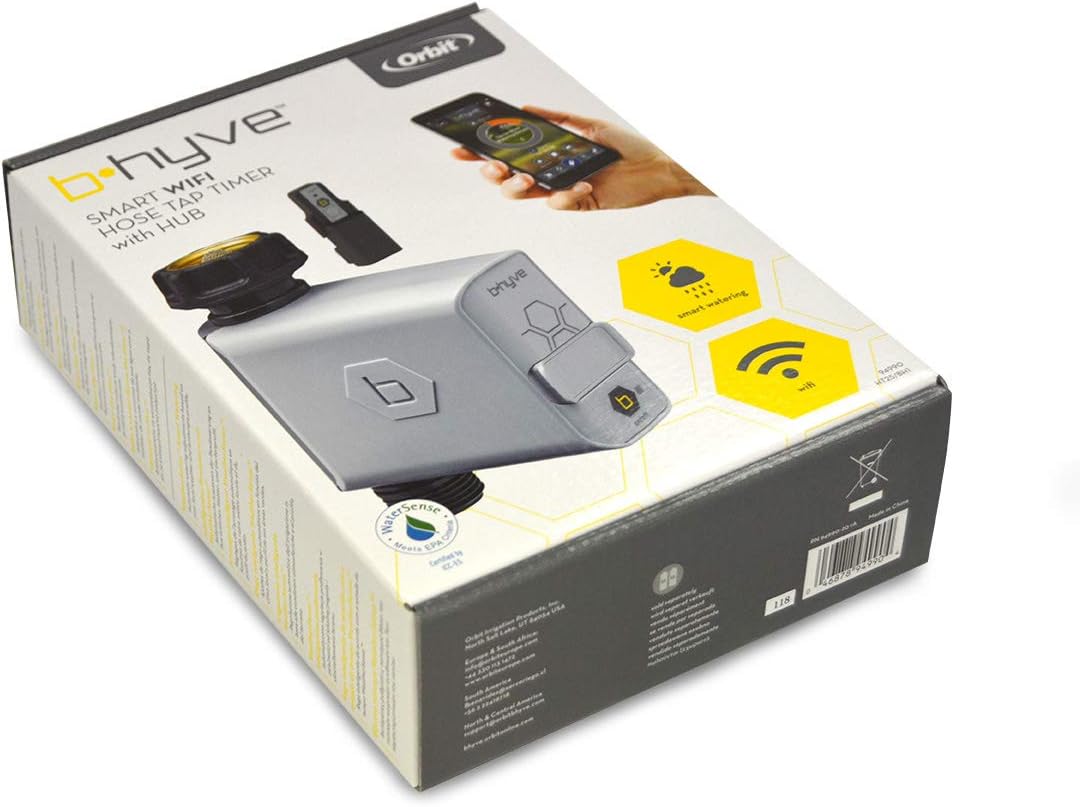
Image: The main screen of the B-hyve app, showing current watering status and controls.
6. Wartung
- Batteriewechsel: The B-hyve app will notify you when the timer's batteries are low. Replace them promptly with two new AA alkaline batteries to ensure continuous operation.
- Reinigung: Periodically inspect the timer's inlet screen for debris and clean it if necessary to maintain proper water flow. Use a soft brush and water.
- Überwinterung: Before the first frost, disconnect the timer from the hose tap. Remove the batteries and store the timer indoors in a dry, protected area to prevent freezing and damage.
7. Fehlerbehebung
| Problem | Mögliche Ursache | Lösung |
|---|---|---|
| Bewässerungstimer funktioniert nicht. | Low batteries, water turned off, timer not paired, or schedule not set. | Check battery level in app, ensure hose tap is fully open, verify timer is paired, and check watering schedule in the B-hyve app. |
| App cannot connect to timer/hub. | Hub out of range, Wi-Fi issues, or hub unplugged. | Ensure hub is plugged in and within range of both router and timer. Check home Wi-Fi connection. Restart hub by unplugging and re-plugging. |
| Inaccurate water usage readings. | Debris in flow meter or incorrect setup. | Clean the inlet screen. Ensure the timer is installed correctly and water flow is unobstructed. |
| Zeitschaltuhr undicht. | Loose connection or damaged washer. | Ensure connections are hand-tight. Check and replace rubber washers if damaged. |
8. Spezifikationen
| Besonderheit | Detail |
|---|---|
| Modellnummer | 94990 |
| Technische Daten | 7.37 x 16.26 x 22.1 cm |
| Artikelgewicht | 310 g |
| Materialtyp | Plastik |
| Stromquelle (Zeitschaltuhr) | 2 AA-Batterien (nicht im Lieferumfang enthalten) |
| Stromquelle (Hub) | AC (via power adapter) |
| Konnektivität | Wi-Fi (via Hub), Bluetooth (for initial pairing) |
| Hersteller | Orbit Irrigation Products Inc. |
9. Garantieinformationen
Orbit products are manufactured to high quality standards. For specific warranty details, please refer to the warranty card included with your product or visit the official Orbit B-hyve webBewahren Sie Ihren Kaufbeleg als Kaufnachweis für eventuelle Garantieansprüche auf.
10. Unterstützung
For further assistance, technical support, or to access additional resources, please contact Orbit customer support:
- WebWebsite: support.orbitbhyve.com
- Email (Europe & South Africa): info@orbiteurope.com
- Phone (Europe & South Africa): +44 330 113 1472
- Email (North & Central America): support@orbitbhyve.com
- Email (South America): fbenavides@sercoriego.cl
- Phone (South America): +56 2 22419718
You can also find helpful tutorials and FAQs on the B-hyve app and the Orbit B-hyve webWebsite.


