Einführung
This manual provides comprehensive instructions for the operation, maintenance, and troubleshooting of your FOREVER KW-300 Smartwatch. Please read this manual carefully before using the device to ensure proper functionality and to maximize its lifespan.

Figure 1: FOREVER KW-300 Smartwatch - Front View
The image displays the pink FOREVER KW-300 Smartwatch, highlighting its square display and the two-tone pink and red strap design. A button is visible on the right side of the watch face.
Packungsinhalt
Prüfen Sie nach dem Öffnen der Verpackung, ob alle Komponenten vorhanden und in einwandfreiem Zustand sind:
- FOREVER KW-300 Smartwatch
- USB-Ladekabel
- Small Screwdriver (for SIM card tray access, if applicable)
- Benutzerhandbuch (dieses Dokument)

Figure 2: Smartwatch and Included Accessories
This image shows the pink FOREVER KW-300 Smartwatch alongside its USB charging cable and a small screwdriver, which are typically included for setup and maintenance.
Aufstellen
1. Aufladen des Geräts
Before initial use, fully charge the smartwatch. Connect the magnetic charging cable to the charging pins on the back of the watch and plug the USB end into a compatible USB power adapter (not included) or a computer's USB port.
- Eine vollständige Aufladung dauert in der Regel etwa 2-3 Stunden.
- Der Ladestatus wird auf dem Bildschirm angezeigt.
2. Ein-/Ausschalten
To power on the smartwatch, press and hold the power button (located on the side) for a few seconds until the screen illuminates. To power off, press and hold the power button until the power-off option appears on the screen, then confirm.
3. Erstkonfiguration und App-Kopplung
The KW-300 Smartwatch requires pairing with a smartphone application for full functionality, including GPS tracking, communication, and settings management. Refer to the quick start guide included in the box for specific app download instructions (e.g., "Seeme" app).
- Download the official companion application from your smartphone's app store.
- Create an account and follow the on-screen prompts to register your device.
- Scan the QR code displayed on the smartwatch screen or enter the device ID manually to pair.
- Configure essential settings such as time zone, emergency contacts, and GPS tracking frequency within the app.
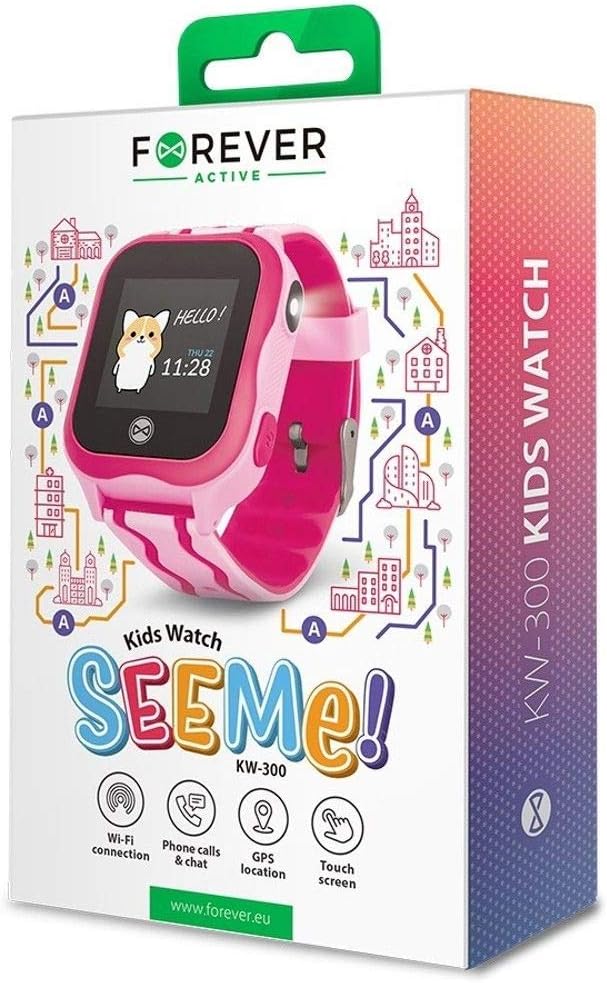
Figure 3: Product Packaging Highlighting Key Features
The product box for the FOREVER KW-300 Kids Watch "SEEMe!" displays icons for Wi-Fi connection, Phone calls & chat, GPS location, and Touch screen, indicating the smartwatch's primary functionalities.
Bedienungsanleitung
Navigieren in der Benutzeroberfläche
The KW-300 features a touch screen display. Swipe left/right or up/down to navigate through menus and applications. Tap to select an option.
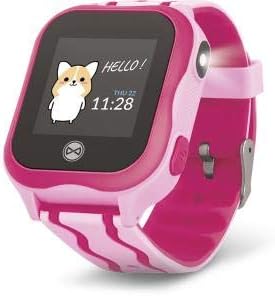
Figure 4: Smartwatch Display Example
This image shows the smartwatch display with a friendly "Hello!" message, a cartoon character, and the current time and date (Thursday, 11:28).
Anrufe tätigen und empfangen
Once a SIM card is properly installed (if applicable) and contacts are synced via the app, the smartwatch can make and receive calls to pre-approved numbers.
- Einen Anruf tätigen: Navigate to the "Contacts" or "Dialer" app on the watch, select a contact, and tap to call.
- Empfangen eines Anrufs: When a call comes in, the watch will ring and display the caller ID. Tap the green icon to answer or the red icon to decline.
GPS-Ortung
The integrated GPS module allows for real-time location tracking. This feature is primarily managed through the companion smartphone application.
- View the watch's current location on a map within the app.
- Set up geofences (safe zones) and receive alerts when the watch enters or exits these areas.
- Review location history.
SOS-Funktion
The smartwatch is equipped with an SOS button for emergencies. When pressed and held, it will automatically dial pre-set emergency contacts and send location alerts.
- Configure SOS contacts in the companion application.
- Ensure the watch has network connectivity for the SOS function to work.
Wartung
Reinigung
Reinigen Sie Ihre Smartwatch regelmäßig, um ihr Aussehen und ihre Funktionalität zu erhalten.
- Wischen Sie Bildschirm und Gehäuse mit einem weichen, fusselfreien Tuch ab.
- Bei hartnäckigen Flecken leicht dampBefeuchten Sie das Tuch mit Wasser. Vermeiden Sie aggressive Chemikalien oder scheuernde Materialien.
- Ensure the charging pins are clean and free of debris.
Lagerung
Bei längerer Nichtbenutzung sollte die Smartwatch an einem kühlen, trockenen Ort, geschützt vor direkter Sonneneinstrahlung und extremen Temperaturen, aufbewahrt werden. Um die Akkuleistung zu erhalten, empfiehlt es sich, das Gerät vor längerer Lagerung auf etwa 50 % aufzuladen.
Fehlerbehebung
| Problem | Mögliche Ursache | Lösung |
|---|---|---|
| Die Uhr lässt sich nicht einschalten. | Niedriger Batteriestand; Gerät eingefroren. | Charge the watch for at least 30 minutes. If still unresponsive, perform a forced restart (refer to specific model instructions or hold power button for 10-15 seconds). |
| Anrufe können nicht getätigt/empfangen werden. | No SIM card; SIM card not active; poor network signal; contacts not synced. | Ensure SIM card is correctly inserted and active. Check network signal strength. Verify contacts are synced via the companion app. |
| Die GPS-Position ist ungenau. | Poor GPS signal (indoors/dense areas); device not connected to network. | Move to an open outdoor area. Ensure the watch has a stable network connection. |
| Kopplung mit der Smartphone-App nicht möglich. | Bluetooth/Wi-Fi off; incorrect pairing code; app issues. | Ensure Bluetooth/Wi-Fi is enabled on both devices. Re-enter pairing code. Restart both devices and try again. Reinstall the app if necessary. |
Technische Daten
| Besonderheit | Detail |
|---|---|
| Modellname | KW-300 |
| Modellnummer | GSM036547 |
| Marke | FÜR IMMER |
| Konnektivitätstechnologie | GPS, Bluetooth |
| Besondere Merkmale | GPS |
| Kompatible Geräte | Smartphone |
| Form | Runden |
| Artikelabmessungen (L x B x H) | 13 x 4 x 8 Zentimeter |
Garantie und Support
Information regarding the specific warranty period and terms for your FOREVER KW-300 Smartwatch is typically provided with the product packaging or available on the manufacturer's official webBitte bewahren Sie Ihren Kaufbeleg für Garantieansprüche auf.
Kundenservice
For technical assistance, troubleshooting beyond this manual, or warranty inquiries, please contact FOREVER customer support through their official channels. Visit the FOREVER webWebsite für Kontaktinformationen und häufig gestellte Fragen.
Note: Specific contact details are not provided in this manual.


