Einführung
This manual provides detailed instructions for the installation, operation, and maintenance of your ECOELER Motion Sensor Light Switch, Model YM2108. This device is designed to provide automatic lighting control in various indoor spaces such as laundry rooms, garages, hallways, and closets, enhancing convenience and energy efficiency.

Image: The ECOELER Motion Sensor Light Switch, Model YM2108, shown installed in a modern bathroom setting, highlighting its compliance with UL, FCC, and California Title 24 standards.
Hauptmerkmale
- Freisprechbetrieb: Detects presence to automatically activate lights, eliminating the need for manual switching.
- Neutralleiter erforderlich: Ensures stable performance; designed for single-pole installations only, not for 3-way circuits.
- Occupancy (OCC) & Vacancy (VAC) Modes:
- OCC Mode: Lights turn on automatically with motion and off when the space is unoccupied.
- VAC Mode: Requires manual activation, then turns off automatically when no motion is detected.
- Anpassbare Einstellungen: Adjustable time delays, sensitivity, and ambient light level sensing for tailored control.
- High Quality & Compliance: UL Certified, FCC Listed, and California Title 24 Compliant.
- Breite Kompatibilität: Works with 300W LED, 300W CFL, and 600W incandescent light bulbs.

Image: Visual representation of the hands-free control feature, showing the motion sensor light switch seamlessly integrated into different living spaces.
Installationshandbuch
WARNING: Installation should only be performed by a qualified electrician to ensure safety and compliance with local electrical codes. Always turn off power at the circuit breaker before installation.
The ECOELER Motion Sensor Light Switch (Model YM2108) requires a neutral wire for proper operation. It is designed for single-pole applications only and is not compatible with 3-way circuits.
Verkabelungsanleitungen:
- Schalten Sie den Strom am Leistungsschalter ab.
- Entfernen Sie die vorhandene Wandplatte und den Schalter.
- Identify the wires in your electrical box: Hot (Black), Load (Red), Neutral (White), and Ground (Green or bare copper).
- Connect the wires from the ECOELER switch to your house wiring according to the diagram below. Use the provided terminal caps to secure connections.
- Den verdrahteten Schalter vorsichtig in die Anschlussdose schieben.
- Bringen Sie die Wandplatte an.
- Stellen Sie die Stromversorgung am Leistungsschalter wieder her.
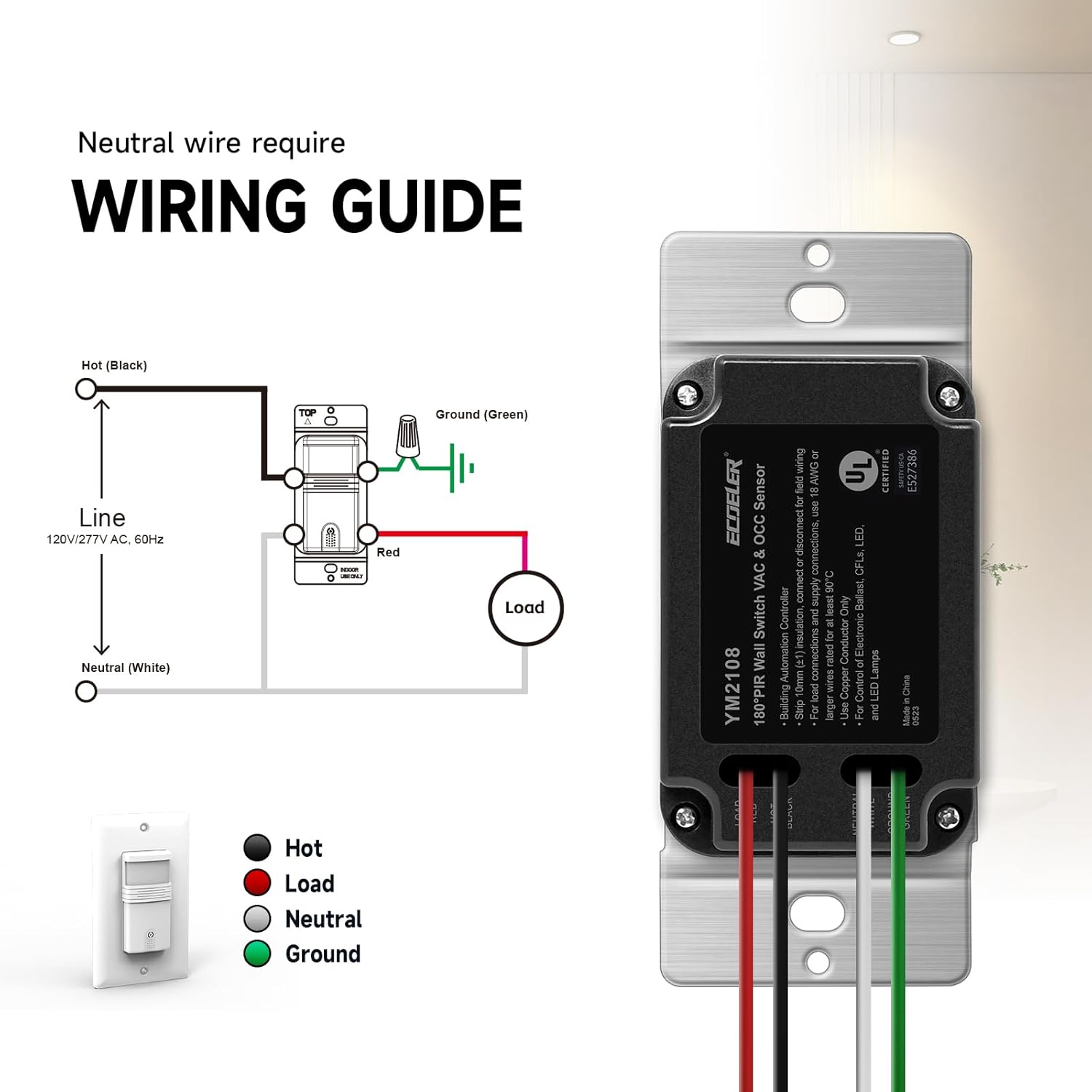
Image: A clear wiring guide illustrating the connections for the Hot (Black), Load (Red), Neutral (White), and Ground (Green) wires for the YM2108 switch.
Betrieb
The ECOELER Motion Sensor Light Switch offers two primary operation modes and several customizable settings to suit your specific needs.
Betriebsarten:
- Occupancy Mode (OCC): In this mode, the lights will automatically turn ON when motion is detected and automatically turn OFF after a set delay when no motion is detected. This is ideal for high-traffic areas where automatic lighting is desired.
- Vacancy Mode (VAC): In this mode, the lights must be turned ON manually. They will then automatically turn OFF after a set delay when no motion is detected. This mode is suitable for areas where manual control for turning on the light is preferred, but automatic turn-off is desired for energy saving.
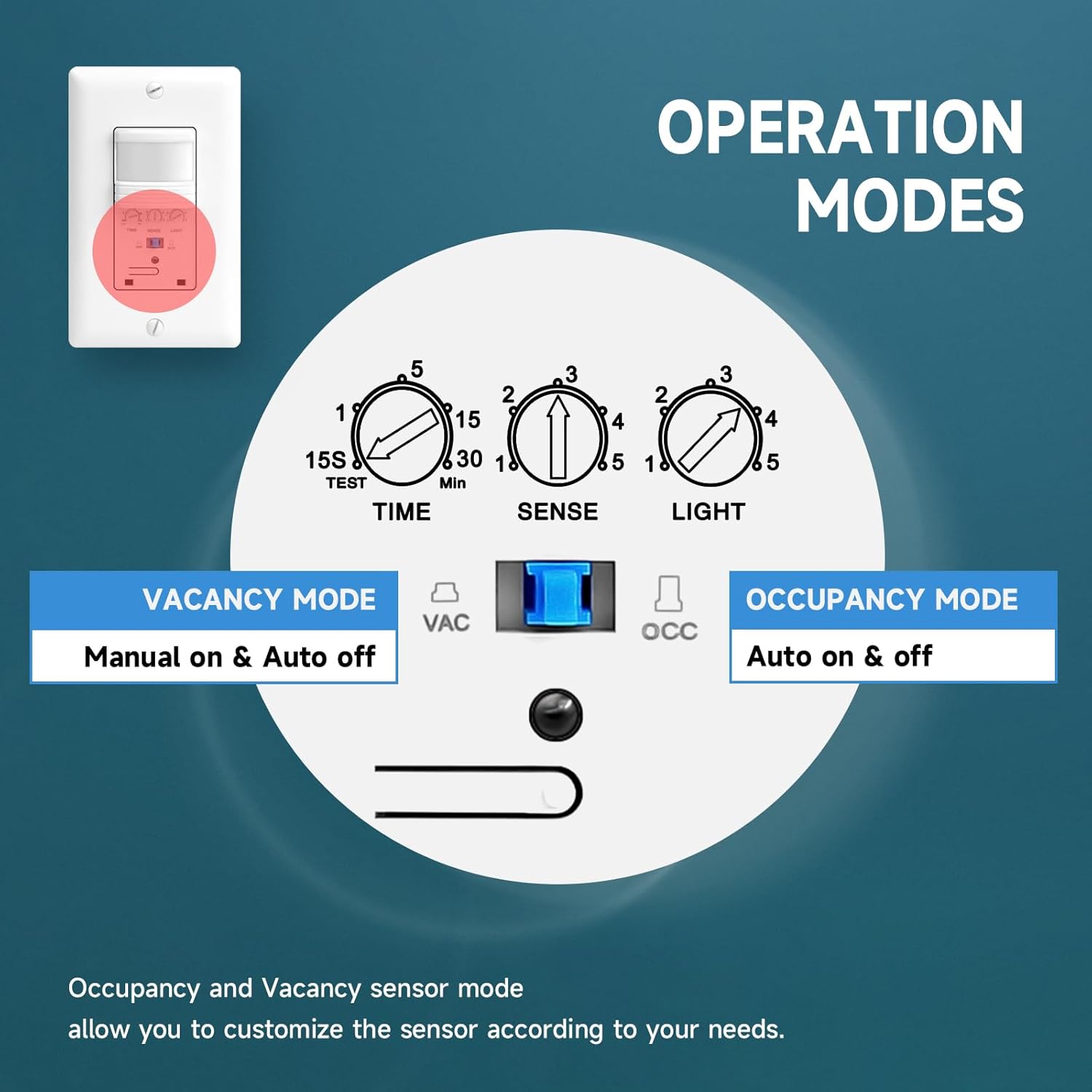
Image: An illustration detailing the Occupancy (Auto on & off) and Vacancy (Manual on & Auto off) modes, with a switch to select between them.
Anpassbare Einstellungen:
The switch features three adjustable dials to fine-tune its performance:
- TIME (Adjustable Delay Time): Sets how long the lights remain ON after the last detected motion. Adjustable from 15 seconds (TEST) to 30 minutes.
- SENSE (Sensor Sensitivity Range): Adjusts the detection range of the motion sensor. Settings range from 1 (approx. 6.56 ft) to 5 (approx. 29.52 ft).
- LIGHT (Ambient Light Level): Determines the ambient light level at which the sensor will activate the lights. Settings range from 1 (5 lux) to 5 (all day, meaning it will activate regardless of ambient light).
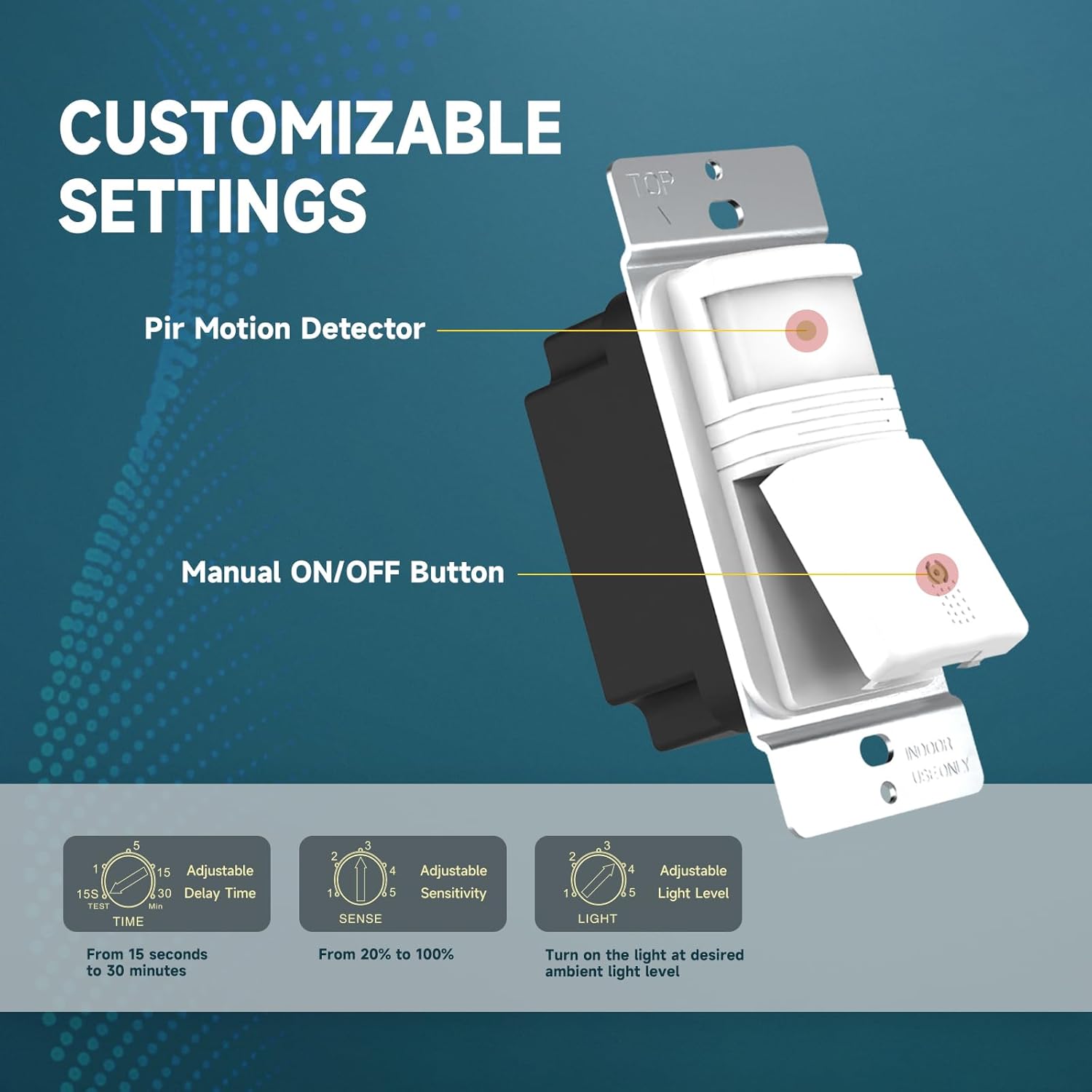
Bild: Eine detaillierte view of the customizable settings on the ECOELER Motion Sensor Light Switch, including dials for Time Delay, Sensitivity, and Ambient Light Level.
Wartung
The ECOELER Motion Sensor Light Switch requires minimal maintenance. Periodically, gently wipe the sensor lens and switch surface with a soft, dry cloth to remove dust or debris that may interfere with sensor performance. Do not use abrasive cleaners or solvents.
Fehlerbehebung
If you experience issues with your ECOELER Motion Sensor Light Switch, consider the following:
- Lights not turning on/off automatically: Verify the selected operation mode (OCC/VAC) and adjust the 'SENSE' (sensitivity) and 'LIGHT' (ambient light level) settings. Ensure there are no obstructions blocking the sensor's field of view.
- Lights turning off too quickly or staying on too long: Adjust the 'TIME' dial to increase or decrease the delay time.
- Lights not turning on at all: Check the circuit breaker to ensure power is supplied to the switch. Confirm that the wiring connections are secure and correct, especially the neutral wire. Test the connected light bulb to ensure it is functional.
Technische Daten
| Besonderheit | Spezifikation |
|---|---|
| Modellnummer | YM2108 |
| Betriebsmodus | OCC / VAC Mode |
| Aktuelle Bewertung | 6 Amps |
| Betriebslautstärketage | 120 Volt (Wechselstrom) |
| Kontakttyp | Normalerweise offen |
| Steckertyp | Clamp |
| Terminal | SPST |
| Artikelabmessungen (L x B x H) | 4.61 x 2.87 x 2.24 Zoll |
| Schaltungsart | Einweg (Einzelpol) |
| Antriebstyp | Relais |
| Kontaktmaterial | Kupfer |
| Internationale Schutzbewertung | IP40 |
| Niedrigere Temperaturbewertung | 32 Grad Fahrenheit (0 °C) |
| Obere Temperaturbewertung | 131 Grad Fahrenheit (55 °C) |
| Controllertyp | Bewegungssensor |
| Farbe | Weiß |
| Wastage | 600 watts (Incandescent), 300 watts (LED/CFL) |
| Artikelgewicht | 4.2 Unzen |
| Stromquelle | Kabelgebundene Elektrik |
| Art der Glühbirne | LED, Kompaktleuchtstofflampe, Glühlampe |
| Im Lieferumfang enthaltene Komponenten | Motion sensor switch with plate, User manual |

Image: A visual summary of the product specifications and a list of included accessories such as the wall plate, screws, and terminal caps.
Garantie und Support
The ECOELER Motion Sensor Light Switch (Model YM2108) comes with a 1 Jahr eingeschränkte Garantie. This warranty covers manufacturing defects under normal use conditions. In the event of a defect, a replacement or refund may be available.
For warranty claims or technical support, please contact the seller (ECOELER ELECTRIC INC) directly via Amazon for assistance.

