1. Einleitung
Thank you for choosing the Hama TH-130 Thermo/Hygrometer. This device provides accurate measurements of indoor temperature and humidity, helping you maintain a comfortable and healthy environment. Please read this instruction manual carefully before using the device to ensure proper operation and to prevent damage.
2. Sicherheitshinweise
- Das Gerät sollte vor Feuchtigkeit, direkter Sonneneinstrahlung und extremen Temperaturen geschützt werden.
- Das Gerät darf nicht geöffnet werden. Reparaturen dürfen nur von qualifiziertem Fachpersonal durchgeführt werden.
- Verpackungsmaterialien dürfen wegen Erstickungsgefahr nicht in die Hände von Kindern gelangen.
- Use only the specified battery type. Incorrect battery usage can lead to leakage or explosion.
- Wenn das Gerät längere Zeit nicht verwendet wird, nehmen Sie die Batterien heraus.
3. Packungsinhalt
- Hama TH-130 Thermo/Hygrometer
- 1 x CR2025 Lithium-Metall-Batterie (im Lieferumfang enthalten)
- Diese Bedienungsanleitung
4. Gerät überview
The Hama TH-130 features a clear digital display for temperature and humidity readings. It is designed for tabletop placement.
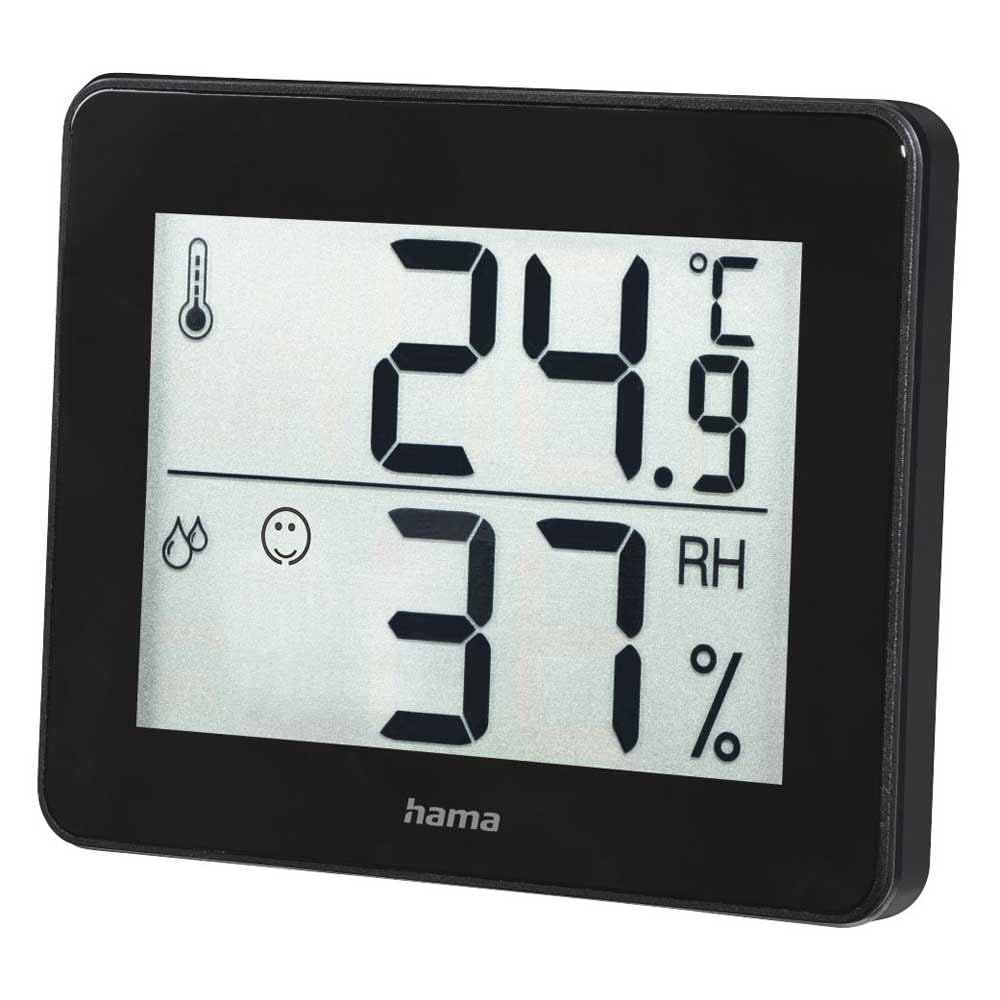
Abbildung 1: Front view of the Hama TH-130 Thermo/Hygrometer. The display shows temperature in Celsius (24.9°C) at the top and relative humidity (37% RH) at the bottom. A thermometer icon indicates temperature, and a droplet icon with a smiley face indicates humidity levels.
4.1 Anzeigeelemente
- Temperaturanzeige: Shows current temperature in degrees Celsius (°C).
- Feuchtigkeitsanzeige: Shows current relative humidity in percentage (relative Luftfeuchtigkeit %).
- Komfortanzeige: A smiley face icon indicates comfort levels based on humidity and temperature.
- Batteriefach: Befindet sich auf der Rückseite des Geräts.
5. Einrichtung
5.1 Einlegen der Batterie
- Suchen Sie das Batteriefach auf der Rückseite des Geräts.
- Öffnen Sie die Abdeckung des Batteriefachs.
- Insert one CR2025 Lithium Metal battery, ensuring correct polarity (+/-). The positive (+) side should face upwards.
- Schließen Sie den Batteriefachdeckel fest.
- The display should now activate, showing current temperature and humidity readings.
5.2 Platzierung
- Place the thermo/hygrometer on a flat, stable surface, such as a tabletop.
- For accurate readings, avoid placing the device near heat sources (e.g., radiators, direct sunlight), air conditioning vents, or in areas with high drafts.
- Ensure the device is placed in the area where you wish to monitor temperature and humidity.
6. Bedienung des Geräts
The Hama TH-130 is designed for straightforward operation. Once batteries are installed, it automatically begins displaying current temperature and humidity.
6.1 Ablesen des Displays
- The upper large digits indicate the current temperature in degrees Celsius (°C).
- The lower large digits indicate the current relative humidity in percentage (relative Luftfeuchtigkeit %).
- The comfort indicator (smiley face) provides a quick visual reference for indoor climate comfort.
6.2 Comfort Level Interpretation
The comfort indicator typically changes based on the humidity level, sometimes also considering temperature. Refer to the following general guidelines:
- Fröhliches Gesicht: Gibt optimalen Komfort an (z. B. 20–25 °C und 40–70 % relative Luftfeuchtigkeit).
- Neutraler Gesichtsausdruck: Weist auf akzeptable, aber nicht optimale Bedingungen hin.
- Trauriges Gesicht: Indicates uncomfortable conditions (e.g., too dry or too humid).
7. Wartung und Pflege
- Reinigen Sie das Gerät nur mit leichtem dampVerwenden Sie ein fusselfreies Tuch. Scheuermittel sind nicht geeignet.
- Achten Sie darauf, dass keine Feuchtigkeit in das Gerät eindringt.
- Replace the battery when the display becomes dim or stops functioning.
8. Fehlerbehebung
| Problem | Mögliche Ursache | Lösung |
|---|---|---|
| Keine oder nur schwache Anzeige | Die Batterie ist leer oder falsch eingesetzt. | Tauschen Sie die Batterie (CR2025) aus und achten Sie auf die richtige Polarität. |
| Ungenaue Messwerte | Device placed near heat/cold sources or in a drafty area. | Relocate the device to a more stable environment. Allow 15-30 minutes for readings to stabilize. |
| Display shows "---" | Temperature or humidity is outside the measurable range. | Move the device to an environment within the specified operating range. |
9. Spezifikationen
- Modell: Hama TH-130 (00186361)
- Produktabmessungen: 11.5 x 10.5 x 2 cm
- Artikelgewicht: 92 g
- Stromversorgung: 1 x CR2025 Lithium-Metall-Batterie (im Lieferumfang enthalten)
- Montageart: Tischplatte
- Optimal Operating Humidity: 30-70% RH (for comfort indication)
- Farbe: Schwarz
10. Hinweise zur Entsorgung
Do not dispose of the device or batteries with household waste. Electronic devices and batteries must be collected separately and recycled in an environmentally sound manner. Contact your local authorities for information on proper disposal facilities.
11. Garantie und Support
Hama GmbH & Co KG assumes no liability and provides no warranty for damage resulting from improper installation/mounting, improper use of the product, or failure to observe the operating instructions and/or safety notes. For technical support or warranty claims, please contact your retailer or Hama customer service. Please retain your proof of purchase.
Hinweis: Die genauen Garantiebedingungen können je nach Region variieren.


