Einführung
This manual provides detailed instructions for the setup, operation, and maintenance of your JENSEN JTA-230R 3-Speed Stereo Turntable with Built-in Speakers. Please read this manual thoroughly before using the product to ensure proper function and longevity.
Hauptmerkmale
- Belt-driven 3-speed stereo turntable: Supports 33-1/3, 45, and 78 RPM records.
- USB port with included cable and software: Enables recording, editing, and converting vinyl records to digital MP3 format.
- Auxiliary input: Allows connection of external audio devices such as iPods, MP3 players, or other digital audio players.
- Stereo headphone output: For private listening.
- RCA line outputs: For connecting the turntable to an external home music system or ampschwerer.
- Built-in stereo speakers: Provides integrated audio playback.
- Front-mounted pitch control: For fine-tuning record speed.
- Tone control: For adjusting sound quality.
Aufstellen
- Auspacken: Carefully remove the turntable from its packaging. Retain all packing materials for future transport or storage.
- Platzierung: Stellen Sie den Plattenspieler auf eine stabile, ebene Fläche, fern von direkter Sonneneinstrahlung, Wärmequellen und übermäßigem Staub oder Vibrationen.
- Staubschutzhülle: The unit includes a clear dust cover to protect the platter and tonearm when not in use. Ensure it is properly hinged.
- Stromanschluss: Connect the AC power adapter to the DC input jack on the rear of the unit, then plug the adapter into a standard wall outlet.
- Stiftschutz: Remove the clear plastic stylus protector from the needle before first use.

Bedienungsanleitung
Abspielen einer Vinyl-Schallplatte
- Einschalten: Turn the POWER/VOLUME knob clockwise to power on the unit. The power indicator light will illuminate.
- Funktion auswählen: Set the FUNCTION switch to 'PHONO'.
- Ortsrekord: Öffnen Sie die Staubschutzhaube und legen Sie vorsichtig eine Schallplatte auf den Plattenteller.
- Geschwindigkeit auswählen: Set the SPEED SELECTOR switch (33/45/78) to match the playback speed of your record. For 45 RPM records, place the included 45 RPM adapter on the center spindle.
- Tonarm anheben: Heben Sie den Tonarm vorsichtig mit dem Cueing-Hebel an.
- Position des Tonarms: Bewegen Sie den Tonarm über die gewünschte Spur der Schallplatte.
- Unterer Tonarm: Slowly lower the tonearm onto the record using the cueing lever. The record will begin to play.
- Lautstärke anpassen: Adjust the volume using the POWER/VOLUME knob.
- Auto-Stopp: The AUTO STOP switch can be set to ON or OFF. When ON, the turntable will automatically stop spinning when the record finishes. When OFF, the turntable will continue to spin.
- Wiedergabe beenden: At the end of the record, lift the tonearm, return it to the tonearm rest, and lower the cueing lever. Turn the POWER/VOLUME knob counter-clockwise to power off the unit.

Verwenden des Radios
- Einschalten: Turn the POWER/VOLUME knob clockwise.
- Funktion auswählen: Set the FUNCTION switch to 'AM' or 'FM' for radio playback.
- Tune-Sender: Drehen Sie den TUNING-Knopf, um den gewünschten Radiosender auszuwählen.
- Lautstärke anpassen: Adjust the volume using the POWER/VOLUME knob.
Connecting External Devices (AUX Input)
- Gerät verbinden: Use an audio cable (not included) to connect your external audio device (e.g., MP3 player, smartphone) to the AUX IN jack on the front of the turntable.
- Funktion auswählen: Set the FUNCTION switch to 'AUX'.
- Audio abspielen: Start playback on your external device. The audio will play through the turntable's built-in speakers.
- Lautstärke anpassen: Adjust the volume using the POWER/VOLUME knob on the turntable and/or the volume control on your external device.
Kopfhörer verwenden
Plug your headphones into the HEADPHONE jack on the front of the unit for private listening. The built-in speakers will be muted when headphones are connected.
Connecting to an External Audio System (RCA Line Out)
Use RCA cables (not included) to connect the RCA LINE OUT jacks on the rear of the turntable to an available audio input on your home stereo system or powered speakers. This allows you to play vinyl records through a larger sound system.
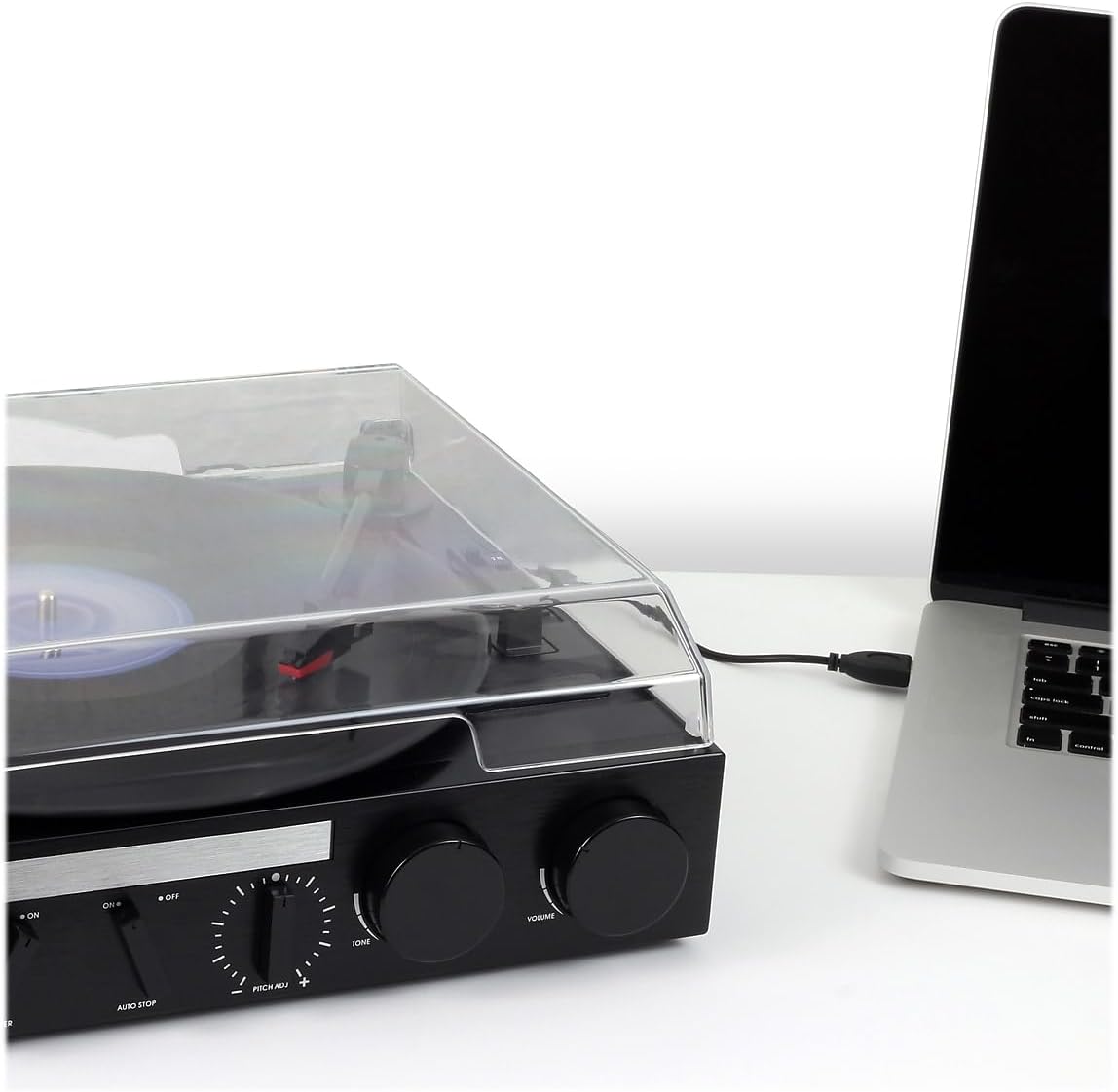
Converting Vinyl to MP3 (USB Recording)
The JTA-230R includes a USB port and software for converting your vinyl records to digital MP3 fileS. Folge diesen Schritten:
- Software installieren: Install the provided software (e.g., Audacity) onto your computer.
- USB anschließen: Verbinden Sie den Plattenspieler mit Ihrem Computer mithilfe des mitgelieferten USB-Kabels.
- Vorbereitung auf die Aufnahme: Open the software on your computer and follow its instructions to prepare for recording.
- Aufnahme abspielen: Start playing your vinyl record on the turntable as described in the 'Playing a Vinyl Record' section.
- Record and Save: Use the software to record the audio. Once recorded, you can edit and save the tracks as MP3 files on your computer for playback on digital devices.
Wartung
Reinigen des Geräts
- Wischen Sie die Außenseite des Geräts mit einem weichen,amp Tuch. Keine Scheuer- oder Lösungsmittel verwenden.
- Um zu verhindern, dass sich Staub auf dem Plattenteller und der Nadel ansammelt, sollte die Staubschutzhaube bei Nichtgebrauch geschlossen bleiben.
Stiftpflege
- Der Stift (die Nadel) ist ein empfindliches Bauteil. Gehen Sie vorsichtig damit um.
- Reinigen Sie den Stift regelmäßig mit einer weichen Bürste, indem Sie vorsichtig von hinten nach vorne bürsten.
- A worn or damaged stylus can harm your records and degrade sound quality. Replace the stylus if it appears bent, chipped, or if sound quality diminishes significantly.
Fehlerbehebung
| Problem | Mögliche Ursache | Lösung |
|---|---|---|
| Kein Strom | Netzkabel nicht angeschlossen; Steckdose nicht aktiv; Gerät nicht eingeschaltet. | Ensure power cord is securely plugged in; Check power outlet; Turn POWER/VOLUME knob clockwise. |
| Kein Ton von den Lautsprechern | Lautstärke zu niedrig; Funktionsschalter defekt; Kopfhörer angeschlossen. | Increase volume; Set FUNCTION switch to 'PHONO', 'AM', 'FM', or 'AUX' as appropriate; Disconnect headphones. |
| Verzerrter Ton | Dirty record; Worn stylus; Incorrect speed; Tone control setting. | Clean record; Replace stylus; Verify correct speed (33/45/78 RPM); Adjust TONE control. |
| Record speed too fast or too slow | Incorrect speed selector setting; Pitch control adjustment. | Set SPEED SELECTOR to match record (33-1/3, 45, or 78 RPM); Adjust PITCH ADJ. knob for fine-tuning. |
| Plattenüberspringen | Dirty or scratched record; Turntable not level; Stylus worn or damaged. | Clean record; Ensure turntable is on a stable, level surface; Replace stylus. |
Technische Daten
- Modellnummer: JTA-230R
- Produktabmessungen: 11.34 x 12 x 4.96 Zoll
- Artikelgewicht: 1 Pfund (454 Gramm)
- Marke: Jensen
- Maximale Drehzahl: 78 U/min
- Material: Plastik
- Farbe: Schwarz
- Besonderheit: Tragbar
- Kompatible Geräte: Headphone, MP3 Player, Speaker, Tablet
- Enthaltene Komponenten: Produkt, Handbuch
Garantie und Support
Information regarding product warranty and customer support is not available in the provided data. Please refer to the product packaging or manufacturer's webWebsite für Details.


