1. Einleitung
The AIWA KSTB6043 Network Video Player is designed to transform your existing television into a smart Android TV. This device allows you to access various network video services and play media content from external storage devices. It operates on Android 8.0 Oreo and supports HDMI 2.0 for high-definition video output.
Included accessories are a Bluetooth remote control, a 1.5m Premium HDMI cable, an instruction manual, and a warranty card.
2. Produktüberschreitungview
2.1. Gerätekomponenten
Familiarize yourself with the various ports and components of your AIWA KSTB6043 Network Video Player.
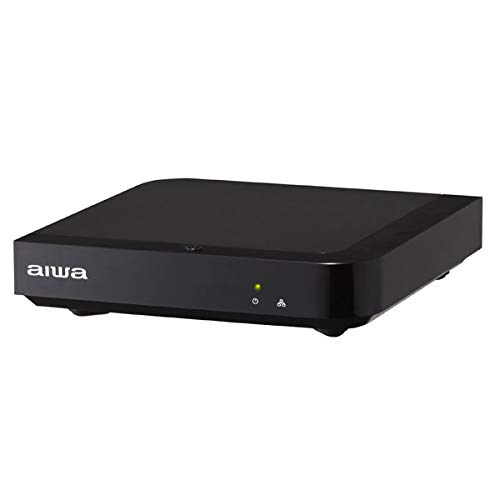
Bild 1: Vorderseite View. This image displays the front of the AIWA KSTB6043 unit, featuring the AIWA logo and indicator lights.

Abbildung 2: Seite View. This image shows the side of the device, highlighting a USB port for connecting external storage.
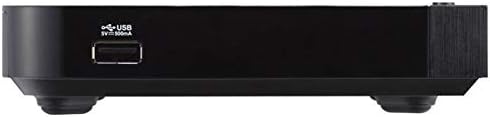
Bild 3: Hinten View. This image illustrates the rear panel of the player, featuring the LAN port, HDMI output, S/PDIF port, power input (12V=1.5A IN), and a reset button.

Image 4: Setup Example. The player is shown connected to a television, with the remote control placed nearby, demonstrating a typical setup.
2.2. Fernbedienung
The included Bluetooth remote control allows for easy navigation and control of the network video player. Refer to the remote control diagram in the included physical manual for specific button functions.
3. Einrichtung
Follow these steps to set up your AIWA KSTB6043 Network Video Player:
- Anschluss an den Fernseher: Use the provided Premium HDMI cable to connect the HDMI OUT port on the network video player to an HDMI input port on your television.
- Strom anschließen: Plug the power adapter into the 12V=1.5A IN port on the back of the player, then plug the adapter into a wall outlet.
- Einschalten: Press the power button on the remote control or the device. The indicator light on the front of the player will illuminate.
- Eingabe auswählen: On your TV, select the corresponding HDMI input source using your TV's remote control.
- Ersteinrichtung: Follow the on-screen prompts for initial Android TV setup, including language selection, network connection (Wi-Fi or Ethernet), and Google account login.
3.1. Connection Demonstration Video
Video 1: Basic Connection and Media Playback. This video demonstrates how to connect a media player to a TV and play content from an SD card or USB drive. Note: The specific product shown in this video may differ from the AIWA KSTB6043, but the connection principles are similar.
Video 2: Detailed Port Overview und Setup. This video provides a closer look at the ports on a media player, including HDMI, USB, and power, and shows the connection process. It also demonstrates basic menu navigation. Note: The specific product shown in this video may differ from the AIWA KSTB6043, but the connection principles and interface navigation are generally applicable.
4. Bedienungsanleitung
4.1. Navigation auf der Android TV-Oberfläche
Once powered on and connected, the Android TV home screen will appear. Use the directional buttons (up, down, left, right) and the OK button on your remote control to navigate through apps, settings, and content.
- Startbildschirm: Access your installed apps, recommended content, and system settings.
- Apps: Select the 'Apps' icon to view and launch all installed applications.
- Einstellungen: Access network settings, display options, audio settings, and device preferences.
4.2. Playing Media from External Storage
The AIWA KSTB6043 supports playback of video, image, and music files von USB-Laufwerken oder SD-Karten.
- Einschubfach: Insert your USB drive into a USB port or your SD card into the SD card slot on the device.
- Zugang Files: Navigieren Sie zu „File Manager' or 'Media Player' app on the Android TV interface.
- Inhalt auswählen: Browse your external storage for the desired video, image, or music files and select them for playback.
4.3. Using Network Services
With an internet connection, you can access various streaming services. The device supports Netflix, among others.
- Mit Netzwerk verbinden: Ensure your device is connected to Wi-Fi or via an Ethernet cable.
- App starten: Select the desired streaming app (e.g., Netflix) from the home screen or app list.
- Login/Subscribe: Log in with your existing account or follow the prompts to subscribe to the service.
5. Wartung
- Reinigung: Reinigen Sie die Außenseite des Geräts mit einem weichen, trockenen Tuch. Verwenden Sie keine flüssigen Reinigungsmittel oder Scheuermittel.
- Software-Updates: Um eine optimale Leistung und den Zugriff auf die neuesten Funktionen zu gewährleisten, sollten Sie regelmäßig im Einstellungsmenü nach Systemaktualisierungen suchen.
- Belüftung: Stellen Sie sicher, dass das Gerät an einem gut belüfteten Ort aufgestellt wird, um eine Überhitzung zu vermeiden. Blockieren Sie die Lüftungsöffnungen nicht.
6. Fehlerbehebung
| Problem | Mögliche Ursache | Lösung |
|---|---|---|
| Kein Strom | Stromkabel nicht angeschlossen; Steckdose defekt | Überprüfen Sie den Netzanschluss; versuchen Sie es mit einer anderen Steckdose. |
| Kein Fernsehsignal | Incorrect HDMI input selected; HDMI cable loose or faulty | Select correct HDMI input on TV; Reconnect or replace HDMI cable |
| Fernbedienung funktioniert nicht | Batteries depleted; Obstruction between remote and device | Replace batteries; Ensure clear line of sight to the device |
| Keine Verbindung zum WLAN möglich | Incorrect password; Router issue; Device too far from router | Verify Wi-Fi password; Restart router; Move device closer to router |
7. Spezifikationen
| Besonderheit | Detail |
|---|---|
| Modellnummer | KSTB6043 |
| Betriebssystem | Android 8.0 Oreo |
| HDMI-Version | 2.0 |
| HDMI Port Count | 1 |
| Konnektivitätstechnologie | Bluetooth, HDMI |
| Unterstützte Audioformate | Dolby Digital, DTS, PCM |
| Internetdienste | Netflix (and others via Android apps) |
| Auflösung | 1920 x 1080 Pixel (Full-HD) |
| Technische Daten | 12.5 cm (L) x 12.5 cm (B) x 3 cm (H) |
| Gewicht | Approx. 760 g (packaged) |
| Merkmale | High-definition video output, Android TV compatible |
8. Garantie und Support
The AIWA KSTB6043 Network Video Player comes with a warranty. Please refer to the warranty card included in the product packaging for detailed terms and conditions, including the warranty period and coverage.
For technical support or inquiries, please contact AIWA customer service through the contact information provided in your warranty documentation or on the official AIWA webWebsite.


