1. Einleitung
The Godox X2T-C TTL Wireless Flash Trigger is designed for Canon EOS cameras, offering stable and reliable wireless control over Godox camera flashes, outdoor flashes, and studio flashes equipped with the Godox X wireless radio system. This manual provides comprehensive instructions for setting up, operating, and maintaining your X2T-C trigger, ensuring optimal performance and creative flexibility in your photography.
2. Hauptmerkmale
- TTL-Autoflash-Unterstützung: Fully supports E-TTL II autoflash for Canon.
- Hochgeschwindigkeitssynchronisierung (HSS): Supports 1/8000s high-speed sync.
- Mehrere Blitzmodi: Includes Multi-flash mode and Manual mode.
- Blitzbelichtungskorrektur (FEC): Adjust flash output with ±3 stops in 1/3 stop increments.
- Spezielle Gruppenschaltflächen: 5 dedicated group buttons (A, B, C, D, E) for quick group management.
- Funktionstasten: 3 function buttons for quick settings.
- Bluetooth-Konnektivität: Connects to iPhone/Android devices via the "GodoxPhoto" APP for remote control of flash mode, power output, modeling light, and beep.
- Großes LCD-Display: Clear display effect with backlight option.
- AF-Hilfslicht: New AF assist light for easier autofocus in low-light conditions.
- Precise Power Output: Pro 1/10th of a stop manual precision (1/256 to 1/1).
- Relocated Dial Wheel: Bottom dial wheel for convenient operation, avoiding obstruction of the camera's LCD.
- Schnellverschluss-Blitzschuh: Slide quick lock hot-shoe for fast and secure mounting.
- Kanalsuchfunktion: Automatically detects the channel with the least interference.
- Wireless-ID-Einstellungen: 99 wireless ID settings (01-99) to prevent interference.
- Firmware-Aktualisierung: Supports firmware upgrades via Type-C USB cable.
- 3.5-mm-Synchronisationskabelbuchse: Für kabelgebundene Triggerung.
3. Packungsinhalt
- 1 x Godox X2T-C TTL Wireless Flash Trigger
- 1 x Benutzerhandbuch
4. Produktüberschreitungview
Familiarize yourself with the components and controls of your Godox X2T-C trigger.

Abbildung 1: Vorderseite view of the Godox X2T-C trigger, showing the LCD screen and control buttons.

Abbildung 2: Ausführlich view of the Godox X2T-C's dedicated group buttons (A, B, C, D, E), function buttons, and the relocated bottom dial for quick settings.

Abbildung 3: Seite view of the Godox X2T-C, highlighting the Type-C USB port for firmware upgrades, the 3.5mm sync cord jack, and the AA battery compartment.

Figure 4: An annotated image of the Godox X2T-C, illustrating the user-friendly design with dedicated group buttons and function buttons for quick settings.
5. Einrichtung
5.1 Einlegen der Batterie
- Öffnen Sie die Batteriefachabdeckung an der Seite des Abzugs.
- Legen Sie zwei AA-Batterien ein und achten Sie dabei auf die richtige Polarität (+/-).
- Schließen Sie den Batteriefachdeckel fest.
5.2 Montage an der Kamera
- Slide the X2T-C trigger onto your Canon EOS camera's hot shoe.
- Push the quick lock hot-shoe mechanism forward to secure the trigger firmly in place.

Figure 5: The Godox X2T-C wireless flash trigger mounted on a camera hot shoe, ready for use.
5.3 Ein-/Ausschalten
Locate the power switch on the side of the trigger. Slide it to the "ON" position to power on the device. Slide it to the "OFF" position to power off.
6. Bedienungsanleitung
6.1 Grundlegende Bedienelemente
- MODE-Taste: Schaltet die Blitzmodi durch (TTL, Manuell, Multi).
- MENU-Taste: Öffnet das Hauptmenü für erweiterte Einstellungen.
- Set-Taste: Bestätigt die Auswahl oder ruft Untermenüs auf.
- ALLE-Schaltfläche: Adjusts settings for all groups simultaneously.
- Gruppenschaltflächen (AE): Selects individual groups for adjustment.
- Zifferblatt: Dient zur Navigation in Menüs und zur Anpassung von Werten.
6.2 Kanal- und Gruppeneinstellungen
The X2T-C supports 32 channels and 5 groups (A-E) to manage multiple flashes. To avoid interference, ensure your trigger and flashes are set to the same channel and a unique Wireless ID.
- Drücken Sie die SPEISEKARTE button to access channel and ID settings.
- Use the dial wheel to select the desired channel (CH 01-32) and Wireless ID (ID 01-99).
- Drücken SATZ zur Bestätigung.
6.3 Blitzmodi
Drücken Sie die MODUS Taste zum Durchschalten der verfügbaren Blitzmodi:
- TTL (Durch-die-Linse): Automatische Blitzbelichtung basierend auf der Belichtungsmessung der Kamera.
- Manuell (M): Blitzleistung manuell einstellen.
- Multi (Stroboskopisch): Feuert eine Reihe schneller Blitze ab, um kreative Effekte zu erzielen.
6.4 Hochgeschwindigkeitssynchronisation (HSS)
The X2T-C supports HSS up to 1/8000s, allowing you to use flash with fast shutter speeds, ideal for overpowering ambient light or using wide apertures in bright conditions. HSS is typically activated automatically when the shutter speed exceeds the camera's native sync speed, or can be manually enabled in the trigger's settings.
6.5 Blitzbelichtungskorrektur (FEC)
Adjust the flash output in TTL mode using FEC. This allows you to fine-tune the exposure without changing the camera's settings. Use the dial wheel to adjust FEC values after selecting a group or all groups.
6.6 Modellierung von Lamp Kontrolle
Steuern Sie die Modellierung lamp on compatible Godox flashes directly from the X2T-C. Press the SPEISEKARTE button and navigate to the modeling lamp settings to turn it on/off or adjust its brightness.
6.7 Bluetooth and App Control
The X2T-C features built-in Bluetooth for smartphone control.
- Laden Sie die App „GodoxPhoto“ aus dem App Store Ihres Smartphones herunter.
- Enable Bluetooth on your smartphone and the X2T-C.
- Open the "GodoxPhoto" APP and connect to your X2T-C.
- You can now control flash mode, power output, modeling light mode, and the beep function of your Godox flashes directly from your phone.
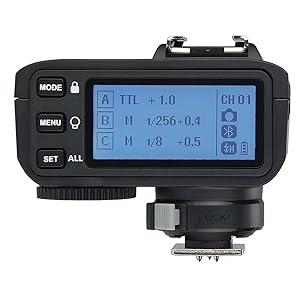
Figure 6: Illustration of the Godox X2T-C's Bluetooth connectivity, allowing control of flash settings via a smartphone application.
6.8 Channel Scan Function
Use the channel scan function to automatically detect the channel with the least interference in your shooting environment, ensuring stable signal transmission.
- Access the scan setting through the SPEISEKARTE.
- Initiate the scan, and the trigger will suggest an optimal channel.
6.9 AF Assist Light
The built-in AF assist light helps your camera achieve focus in challenging low-light conditions. It activates automatically when needed or can be controlled via the trigger's settings.

Figure 7: The AF assist beam of the Godox X2T-C, designed to aid camera autofocus in low-light conditions.
6.10 Firmware-Aktualisierung
Keep your X2T-C up-to-date by regularly checking for firmware updates on the Godox official website. Use a Type-C USB cable to connect the trigger to your computer for the upgrade process.
6.11 Using the 3.5mm Sync Cord Jack
The 3.5mm sync cord jack allows for wired triggering of flashes that do not have the Godox X wireless system built-in. Connect one end of a 3.5mm sync cord to the X2T-C and the other end to your flash's sync port.
Video 1: Official quick view video demonstrating the key features and operation of the Godox X2T Flash Trigger, including its user interface and physical design.
7. Kompatibilität
7.1 Compatible Canon EOS Camera Models
- 1Dx Mark II, 1Dx
- 5DS / 5Dsr, 5D Mark IV, 5D Mark III, 5D Mark II, 5D
- 7D Mark II, 7D
- 80D, 70D, 60D, 50D
- 500D, 450D, 400D Digital, 350D Digital
- 100D, 1200D, 1000D, 1100D
- M5, M3
Note: Cameras released before 2012 may not have TTL mode in their D and E groups.
7.2 Kompatible Godox-Blitzgeräte
The X2T-C is compatible with Godox camera flashes, outdoor flashes, and studio flashes that have the Godox X wireless radio system built-in.
8. Wartung
- Trocken halten: This device is not waterproof. Do not expose it to rain or high humidity.
- Demontage vermeiden: Do not attempt to disassemble or repair the unit yourself. Unauthorized servicing will void the warranty.
- Vorsichtig handhaben: Avoid sudden impacts or dropping the device.
- Kontakte reinigen: Regularly clean the hot shoe contacts with a dry, soft cloth to ensure proper connection.
- Batteriespeicher: Wenn das Gerät längere Zeit nicht verwendet wird, entfernen Sie die Batterien, um ein Auslaufen zu verhindern.
9. Fehlerbehebung
- Auslöser löst Blitz nicht aus:
- Stellen Sie sicher, dass die Batterien richtig eingelegt und geladen sind.
- Vergewissern Sie sich, dass der Auslöser fest auf dem Blitzschuh der Kamera montiert ist.
- Check that the trigger and flash units are set to the same channel and group.
- Confirm the Wireless ID settings match between the trigger and flash.
- Vergewissern Sie sich, dass das Blitzgerät eingeschaltet und einsatzbereit ist.
- Unregelmäßige Blitzausgabe:
- Check the flash mode (TTL/Manual) and Flash Exposure Compensation (FEC) settings.
- Ensure High-Speed Sync (HSS) is correctly enabled if using fast shutter speeds.
- Verify that the flash unit's power settings are appropriate for the scene.
- Bluetooth-Verbindungsprobleme:
- Make sure the "GodoxPhoto" APP is installed on your smartphone.
- Ensure Bluetooth is enabled on both your smartphone and the X2T-C.
- Restart both the trigger and your smartphone, then try connecting again.
- Check for any firmware updates for the X2T-C.
- AF assist light not working:
- Ensure the AF assist light function is enabled in the trigger's settings.
- The AF assist light typically works best in low-light conditions; in bright environments, it may not activate.
10. Spezifikationen
| Besonderheit | Spezifikation |
|---|---|
| Technische Daten | 2.28 x 2.76 x 2.83 Zoll |
| Artikelgewicht | 11.5 Unzen |
| Batterien erforderlich | 2 AA-Batterien |
| Akkulaufzeit | Ungefähr 6 Stunden |
| Kompatible Halterungen | Canon EOS |
| Blitzsynchronisationsgeschwindigkeit | 1/8000 s |
| Übertragungsreichweite (ca.) | 0–100 m |
| Modulationsmodus | MSK |
| Kanäle | 32 |
| Drahtlose ID | 01-99 |
| Gruppen | 5 |
| Anzeige | Großes LCD-Panel, Hintergrundbeleuchtung EIN oder AUS |
11. Garantie und Support
For detailed warranty information, product registration, and technical support, please refer to the official Godox webBesuchen Sie unsere Website oder wenden Sie sich an Ihren Händler vor Ort. Bewahren Sie Ihren Kaufbeleg als Kaufnachweis für Garantieansprüche auf.


