Wichtige Sicherheitshinweise
Please read this manual carefully before operating the fan and retain it for future reference. Failure to follow these instructions may result in electric shock, fire, or serious injury.
- Stellen Sie sicher, dass die Stromversorgungslautstärketage entspricht dem Bewertungsetikett auf dem Ventilator.
- Den Ventilator, den Stecker oder das Kabel dürfen nicht in Wasser oder andere Flüssigkeiten getaucht werden.
- Ziehen Sie den Stecker des Ventilators aus der Steckdose, wenn er nicht benutzt wird, wenn Sie ihn von einem Ort zum anderen transportieren und bevor Sie ihn reinigen.
- Bewahren Sie den Ventilator außerhalb der Reichweite von Kindern und Haustieren auf.
- Betreiben Sie den Ventilator nicht mit einem beschädigten Kabel oder Stecker.
- Führen Sie bei laufendem Ventilator keine Finger oder andere Gegenstände durch das Gitter ein.
- Stellen Sie den Ventilator auf eine stabile, ebene Fläche, damit er nicht umkippt.
Produktkomponenten
Familiarize yourself with the parts of your Midea FS40-15AR Pedestal Fan.

Bild: The Midea FS40-15AR Pedestal Fan, showing its main body, fan head, base, and the included remote control.
- Fankopf: Includes front and rear grilles, fan blades, and motor housing.
- Bedienfeld: Located on the fan body, with LED display and control buttons.
- Verstellbarer Ständer: Allows for height adjustment.
- Base: Sorgt für Stabilität des Lüfters.
- Fernbedienung: Für die komfortable Bedienung aus der Ferne.
Einrichtung und Montage
Follow these steps to assemble your Midea FS40-15AR Pedestal Fan.
- Basismontage: Attach the fan stand to the base. Ensure it is securely fastened.
- Höhenverstellung: The fan features an adjustable stand. Loosen the height adjustment knob, extend or retract the stand to the desired height, and then tighten the knob securely.

Bild: Illustration of the fan's adjustable height mechanism, showing arrows indicating upward and downward movement.
- Lüfterkopfmontage: Secure the rear grille, fan blades, and front grille to the motor housing according to the diagrams in the full manual (not provided here). Ensure all components are correctly aligned and locked into place.
- Platzierung: Place the assembled fan on a firm, level surface. Ensure there is adequate space around the fan for optimal airflow and oscillation.
- Stromanschluss: Stecken Sie das Netzkabel in eine geeignete Steckdose (220-240 V).
Bedienungsanleitung
Your Midea FS40-15AR fan can be operated using the control panel on the unit or the included remote control.
Bedienfeld


Bild: Icons illustrating key features: 3 modes, 26 speeds, and a low noise level of 30 dB.
- Netzschalter: Drücken Sie diese Taste, um den Ventilator EIN- oder AUSzuschalten.
- Geschwindigkeitsanpassung: Use the speed control buttons to select from 26 available speed settings. The current speed will be displayed on the LED screen.
- Modus-Taste: Cycle through the available modes:
- Normalmodus: Sorgt für einen kontinuierlichen Luftstrom mit der gewählten Geschwindigkeit.
- Natürlicher Modus: Simuliert eine natürliche Brise durch Variation der Lüftergeschwindigkeit.
- Schlafmodus: Operates at a very low speed and noise level (as low as 27 dB) for quiet operation, ideal for sleeping.
- Energiesparmodus: Adjusts fan speed automatically based on room temperature to optimize energy consumption.
- Oszillationstaste: Press to activate or deactivate the 80-degree oscillation function, which distributes air across a wider area.
- Timer-Taste: Set the fan to automatically turn off after a specified period, up to 12 hours. Each press typically increases the timer by 1 hour.
Fernbedienung
The remote control allows for convenient operation of all fan functions from a distance.

Bild: The remote control for the Midea FS40-15AR fan, highlighting the power button and the 12-hour timer function.

Bild: A hand holding the remote control, pointing towards the Midea FS40-15AR fan, demonstrating wireless operation.
- Insert batteries into the remote control (type and orientation usually indicated inside the battery compartment).
- Point the remote control towards the fan's receiver for optimal response.
- Alle Funktionen des Bedienfelds sind auch über die Fernbedienung zugänglich.
Wartung
Regelmäßige Reinigung und Wartung gewährleisten optimale Leistung und Langlebigkeit Ihres Ventilators.
- Reinigung der Außenseite:
- Ziehen Sie vor der Reinigung immer den Stecker aus der Steckdose.
- Wischen Sie die Außenflächen mit einem weichen, damp Tuch. Keine Scheuer- oder Lösungsmittel verwenden.
- Es ist darauf zu achten, dass kein Wasser in das Motorgehäuse oder die elektrischen Bauteile eindringt.
- Reinigung der Gitter und Klingen:
- Periodically remove the front grille (refer to assembly instructions for removal) to clean dust from the fan blades.
- Use a soft cloth or a vacuum cleaner with a brush attachment to remove dust.
- Stellen Sie sicher, dass alle Teile vollständig trocken sind, bevor Sie den Ventilator wieder zusammenbauen und in Betrieb nehmen.
- Lagerung:
- Wenn der Ventilator längere Zeit gelagert wird, muss er gründlich gereinigt werden.
- Store it in its original packaging or cover it to protect it from dust.
- Kühl und trocken aufbewahren.
Fehlerbehebung
If you encounter any issues with your Midea FS40-15AR fan, refer to the following common problems and solutions.
| Problem | Mögliche Ursache | Lösung |
|---|---|---|
| Der Ventilator schaltet sich nicht ein. | Keine Stromversorgung. Netzkabel nicht richtig eingesteckt. | Überprüfen Sie, ob die Steckdose funktioniert. Ensure the power cord is securely plugged into the outlet and the fan. |
| Schwacher Luftstrom. | Die Lüfterdrehzahl ist zu niedrig eingestellt. Grilles or blades are dusty. | Erhöhen Sie die Lüftergeschwindigkeit. Unplug the fan and clean the grilles and blades as per maintenance instructions. |
| Der Ventilator macht ungewöhnliche Geräusche. | Lose Teile. Verstopfung in den Lüfterflügeln. | Unplug the fan and check for any loose components or foreign objects. Ensure the fan is on a stable surface. |
| Fernbedienung funktioniert nicht. | Leere Batterien. Hindernis zwischen Fernbedienung und Ventilator. | Ersetzen Sie die Batterien in der Fernbedienung. Stellen Sie sicher, dass eine freie Sichtverbindung zwischen der Fernbedienung und dem Empfänger des Ventilators besteht. |
| Oszillation funktioniert nicht. | Die Oszillationsfunktion ist deaktiviert. Mechanische Blockade. | Drücken Sie die Oszillationstaste, um sie zu aktivieren. Check for any obstructions preventing the fan head from rotating. |
Wenn das Problem nach dem Ausprobieren dieser Lösungen weiterhin besteht, wenden Sie sich bitte an den Kundensupport.
Technische Daten
Technical details for the Midea FS40-15AR DC Pedestal Fan.
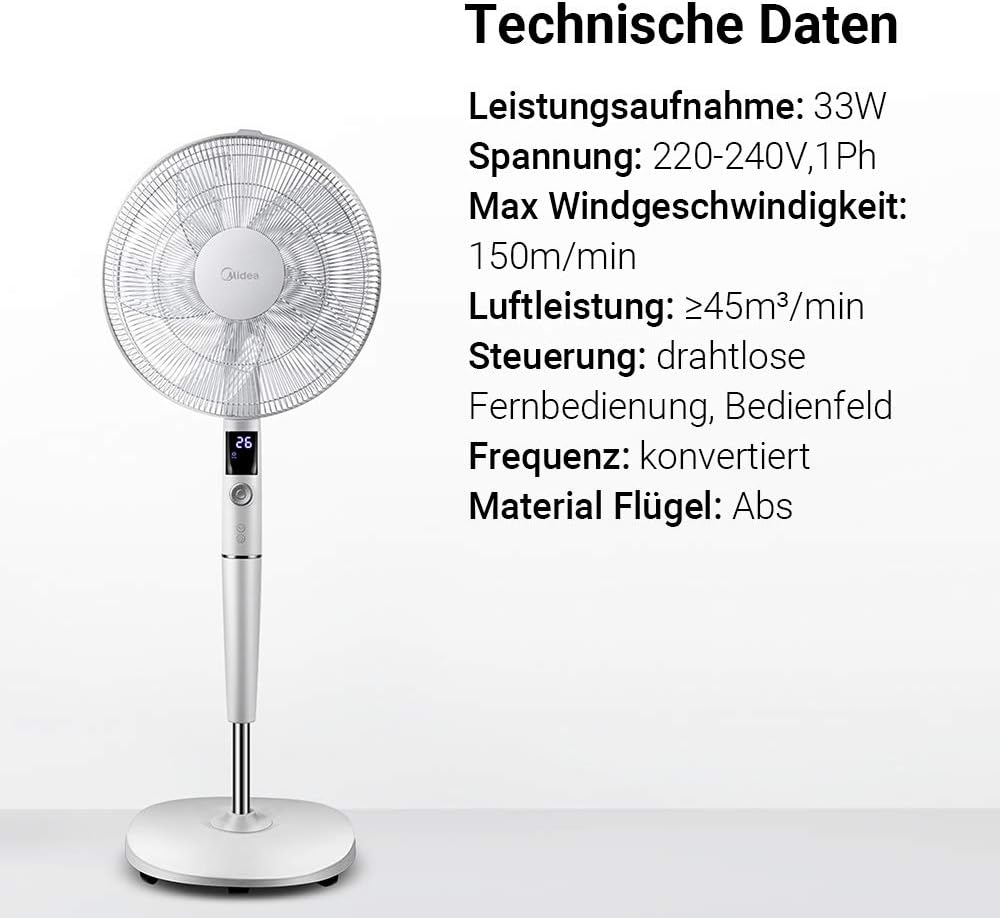
Bild: A visual representation of the Midea FS40-15AR fan alongside its technical data, including power consumption, voltage, and control methods.
| Besonderheit | Detail |
|---|---|
| Modellnummer | FS40-15AR |
| Marke | Midea |
| Typ | DC-Standlüfter |
| Energieaufnahme | 30 Watt |
| Bandtage | 220 bis 240 V |
| Maximale Windgeschwindigkeit | 150 m/min |
| Luftstrom | ≥45 m³/min |
| Anzahl der Geschwindigkeiten | 26 |
| Geräuschpegel | 27 Decibels (min) |
| Schwingungswinkel | 80 Grad |
| Timerfunktion | Bis zu 12 Stunden |
| Kontrollmethode | Wireless Remote Control, On-unit Control Panel |
| Material (Klingen) | ABS-Kunststoff |
| Produktabmessungen (L x B x H) | 45.3 x 40 x 137 cm |
| Gewicht | 7.8 kg |
| Besondere Merkmale | Adjustable Height, Tiltable Head, ECO Mode, Sleep Mode |
Garantie und Support
Informationen zur Garantie und zum Kundendienst finden Sie auf der Ihrem Produkt beiliegenden Garantiekarte oder auf der offiziellen Midea-Website. webBewahren Sie Ihren Kaufbeleg als Kaufnachweis auf.
For technical assistance or service inquiries, please contact Midea customer service through their official channels.
- Online-Hilfe: www.midea.com/global/support
- Kontaktinformationen: Refer to your regional Midea webWebsite für lokale Kontaktdaten.


