Einführung
The Globe Electric Wi-Fi Smart Plug (Model 50000) allows you to control your plugged-in devices from anywhere using your smartphone or voice commands. This smart plug connects directly to your home Wi-Fi network, eliminating the need for a separate hub. It is designed for indoor use and offers convenient features such as scheduling and remote access.

Image: The Globe Electric Wi-Fi Smart Plug, a compact white device, shown alongside its retail packaging. The packaging highlights features like "easy setup" and "Wi-Fi" connectivity, along with icons for app stores.
Sicherheitshinweise
- Nur zur Verwendung im Innenbereich: This smart plug is designed exclusively for indoor environments. Do not use it outdoors or in damp/ nasse Bedingungen.
- Elektrische Sicherheit: Ensure the plug is fully inserted into the outlet. Do not overload the outlet. Refer to the specifications for maximum wattage und Stromstärken.
- Reinigung: Disconnect the smart plug from the power outlet before cleaning. Use a dry, soft cloth for cleaning. Do not use liquid cleaners.
- Demontage: Do not attempt to disassemble or modify the smart plug. This may void the warranty and pose safety risks.
- Kinder und Haustiere: Um versehentlichen Missbrauch oder Beschädigung zu vermeiden, bewahren Sie das Gerät außerhalb der Reichweite von Kindern und Haustieren auf.
Packungsinhalt
Your Globe Electric Wi-Fi Smart Plug package should contain the following:
- 1 x Globe Electric Wi-Fi Smart Plug (Model 50000)
- 1 x Benutzerhandbuch (dieses Dokument)
Aufstellen
Follow these steps to set up your Globe Electric Wi-Fi Smart Plug:
- Download the Globe Suite App: Suchen nach "Globe Suite" in your smartphone's app store (available on iOS and Android) and download the application.
- Ein Konto erstellen: Open the Globe Suite app and follow the on-screen instructions to create a new user account or log in if you already have one.
- Intelligente Steckdose anschließen: Insert the Globe Electric Wi-Fi Smart Plug into a standard grounded electrical outlet. The indicator light on the plug should begin to blink, indicating it's in pairing mode.
- Gerät in der App hinzufügen: In the Globe Suite app, tap the "+" icon (usually in the top right corner) to add a new device. Select "Electrical Outlet" or "Smart Plug" from the device list.
- Mit WLAN verbinden: Follow the app's prompts to connect the smart plug to your 2.4 GHz Wi-Fi network. Ensure your phone is also connected to the same 2.4 GHz network during setup. Enter your Wi-Fi password when prompted.
- Kopplungsbestätigung: Once successfully paired, the indicator light on the smart plug will stop blinking and remain solid. You can then rename your smart plug within the app for easier identification (e.g., "Living Room Lamp").
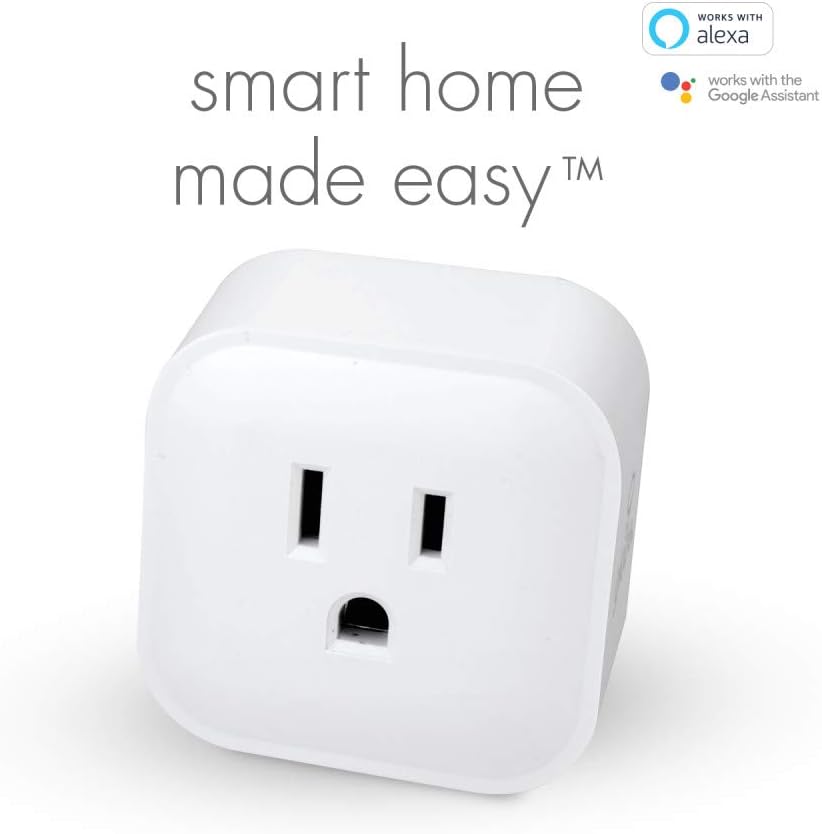
Image: A close-up of the Globe Electric Smart Plug, emphasizing its compatibility with Amazon Alexa and Google Assistant, indicating ease of integration into a smart home system.

Image: A smartphone displaying the Globe Suite app interface, showing a green power button for controlling a smart plug and options for scheduling and timers. This illustrates the app's control capabilities.
Bedienungsanleitung
Controlling via Globe Suite App:
- Manuell Ein/Aus: Open the Globe Suite app, select your smart plug from the device list, and tap the power icon to turn it on or off.
- Fernbedienung: As long as your smart plug is connected to Wi-Fi and your smartphone has internet access, you can control your devices from anywhere in the world.
- Terminplanung: Use the scheduling feature within the app to set specific times for your smart plug to turn on or off automatically. This is useful for lights, coffee makers, or other appliances.
- Timer: Set countdown timers for your smart plug to turn off after a specified duration.
- Szenen: Create custom scenes to control multiple Globe smart products simultaneously with a single tap or voice command.

Image: A person sitting and looking at a smartphone, which displays the Globe Suite app with a list of smart devices like "Bedroom Lights" and "TV," illustrating the ability to control outlets remotely.

Image: A hand opening a door into a room with a lamp, visually representing the convenience of scheduling the smart plug to turn devices on or off automatically, such as lights when arriving home.
Sprachsteuerung:
The Globe Electric Wi-Fi Smart Plug is compatible with Amazon Alexa and Google Assistant. To enable voice control:
- Ensure your smart plug is successfully set up in the Globe Suite app.
- Öffnen Sie die Amazon Alexa App oder die Google Home App.
- Link the "Globe Suite" skill/service within your voice assistant app.
- Discover devices. Once linked, you can use voice commands such as:
- "Alexa, turn on [Smart Plug Name]"
- "Hey Google, turn off [Smart Plug Name]"
Wartung
The Globe Electric Wi-Fi Smart Plug requires minimal maintenance. Follow these guidelines to ensure its longevity:
- Reinigung: Disconnect the smart plug from the power outlet before cleaning. Use a dry, soft cloth to wipe the surface. Do not use abrasive cleaners, solvents, or harsh chemicals.
- Umfeld: Keep the smart plug in a dry environment, away from excessive heat, humidity, and direct sunlight.
- Lagerung: Wenn Sie das Gerät über einen längeren Zeitraum lagern, ziehen Sie den Netzstecker und bewahren Sie es an einem kühlen, trockenen Ort auf.
Fehlerbehebung
If you encounter issues with your Globe Electric Wi-Fi Smart Plug, refer to the following common problems and solutions:
| Problem | Mögliche Ursache | Lösung |
|---|---|---|
| Smart-Steckdose verbindet sich nicht mit dem WLAN. | Incorrect Wi-Fi password; Plug too far from router; Only 5 GHz Wi-Fi network available; Router firewall settings. | Double-check Wi-Fi password. Move the plug closer to your Wi-Fi router. Ensure you are connecting to a 2.4 GHz Wi-Fi network. Temporarily disable firewall or consult router manual. |
| Device not responding in app. | No internet connection; Smart plug is offline; App issue. | Check your home internet connection. Unplug the smart plug for 10 seconds and plug it back in. Restart the Globe Suite app. |
| Sprachsteuerung funktioniert nicht. | Skill/service not linked; Device name not recognized; Voice assistant device offline. | Ensure the "Globe Suite" skill/service is correctly linked in your Alexa/Google Home app. Try renaming the smart plug to something simpler. Check if your voice assistant device (e.g., Echo, Google Home) is online. |
| Plug is warm to the touch. | Normal operation; Overloaded circuit. | A slight warmth is normal. If it's excessively hot, unplug immediately and ensure the connected appliance does not exceed the plug's maximum wattage/aktuelle Bewertung. |
Technische Daten
| Attribut | Detail |
|---|---|
| Modellnummer | 50000 |
| Marke | Globus Elektro |
| Farbe | Weiß |
| Material | Plastik |
| Produktabmessungen (L x B x H) | 4.98 x 4.98 x 4.98 cm (approx. 50 x 50 x 50 millimeters) |
| Artikelgewicht | 49.9 g |
| Stromquelle | Wechselstrom/Gleichstrom |
| Bandtage | 125 Volt |
| Wastage | 1875.0 Watt |
| Aktuelle Bewertung | 15 Amps |
| Stil wechseln | Elektronischer Schalter |
| Verwendung | Nur für den Innenbereich geeignet. |
| Konnektivität | Wi-Fi (2.4 GHz) |
| Kompatibilität | Amazon Alexa, Google Assistant |
Garantie und Support
Garantie: The Globe Electric Wi-Fi Smart Plug (Model 50000) comes with a 2-year manufacturer's limited warranty. Please retain your proof of purchase for warranty claims. The warranty covers defects in materials and workmanship under normal use.
Kundendienst: For technical assistance, troubleshooting beyond this manual, or warranty inquiries, please contact Globe Electric customer support. Refer to the product packaging or the Globe Electric webDie aktuellsten Kontaktinformationen finden Sie auf dieser Webseite.
You can often find support resources, FAQs, and contact details on the official Globe Electric webWebsite: www.globe-electric.com


