1. Einleitung
The Alpine X308U Mech-Less Navigation Receiver is designed to provide advanced smartphone integration and a reliable built-in navigation system for your vehicle. This manual provides essential information for the proper installation, operation, and maintenance of your device.
Hauptmerkmale:
- 8-inch WVGA High-Resolution Capacitive Touch Display
- Compatibility with Apple CarPlay and Android Auto
- Embedded Navigation with 3D & 2D mapping and Pinch-to-Zoom interface
- Bluetooth hands-free calling and audio streaming
- Built-In HD Radio Tuner and SiriusXM Satellite Radio readiness
- Multiple connectivity options including HDMI input/output and USB
- Advanced audio tuning features: 9-band parametric EQ and 6-channel time correction
- Support for FLAC, AAC, MP3, WMA, HE-AC Playback
- Accessory Control Ready (KAC-001 Required) and iDatalink Maestro Module compatibility
2. Produktüberschreitungview

Abbildung 2.1: Vorderseite View mit Navigationsdisplay. This image shows the Alpine X308U unit with its 8-inch high-resolution capacitive touch display active, presenting a detailed 3D navigation map. The screen displays street names, distances, and navigation icons, demonstrating the unit's integrated GPS capabilities. Control buttons are visible along the bottom edge of the screen.

Abbildung 2.2: Vorderseite View with Media Interface. This image illustrates the Alpine X308U's user interface for media playback and radio tuning. The display shows current FM radio frequency (105.8 MHz), preset stations, and options for HDMI, Music, Pandora, and Bluetooth Audio. Album art and song information are also visible, highlighting the unit's multimedia capabilities.

Figure 2.3: Audio Settings Interface. This image displays the "BASS ENGINE SQ" audio adjustment screen on the Alpine X308U. Users can select from various sound presets like Standard, Punch, Rich, Mid Bass, and Low Bass, and adjust levels for Bass Engine, Navi Audio, and Back Audio. This interface demonstrates the unit's comprehensive audio customization options.

Abbildung 2.4: Anschlüsse auf der Rückseite. Dieses Bild liefert eine detaillierte Ansicht. view of the rear panel of the Alpine X308U, highlighting its various input and output ports. Visible connections include GPS antenna input, USB ports, HDMI In, HDMI Out, and the main wiring harness connector. A cooling fan is also visible on the left side, indicating thermal management features.
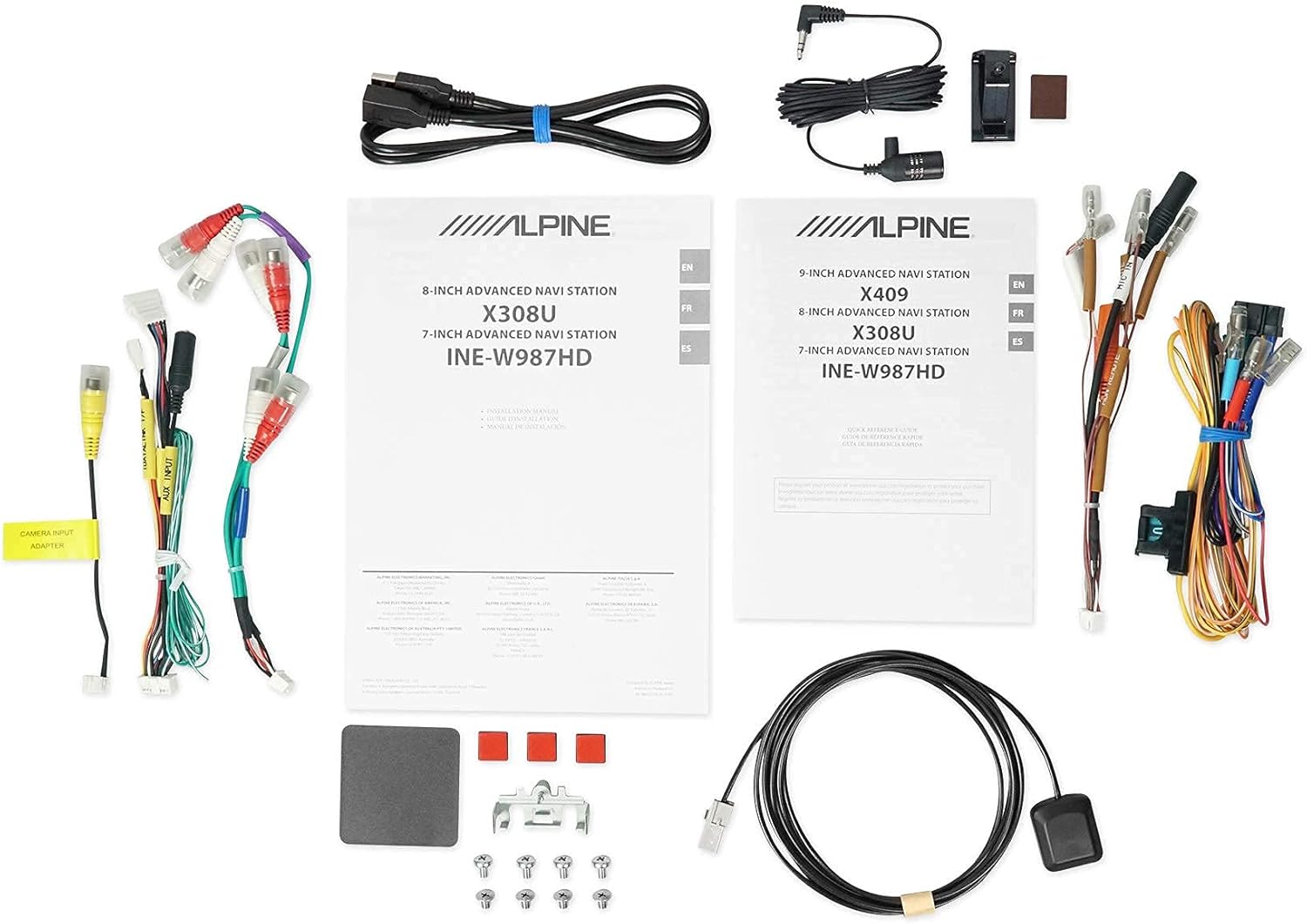
Abbildung 2.5: Enthaltene Komponenten. This image displays a selection of cables and accessories that come with the Alpine X308U unit. These include various wiring harnesses, RCA cables for audio/video connections, a USB extension cable, and a GPS antenna. These components are essential for the proper installation and functionality of the receiver.
3. Einrichtung und Installation
Proper installation is crucial for the optimal performance of your Alpine X308U. It is highly recommended that installation be performed by a qualified professional car audio installer.
3.1. Checkliste vor der Installation:
- Stellen Sie sicher, dass alle im Abschnitt „Lieferumfang“ aufgeführten Komponenten vorhanden sind.
- Vor Beginn jeglicher elektrischer Arbeiten muss der Minuspol der Fahrzeugbatterie abgeklemmt werden.
- Review your vehicle's specific wiring diagrams and dash disassembly instructions.
3.2. Kabelverbindungen:
Connect the main wiring harness to the vehicle's power, ground, and speaker wires. Utilize the provided connectors for a secure fit. Refer to the wiring diagram included with your unit for specific color codes and pin assignments.
- Stromanschlüsse: Connect the yellow wire (constant 12V), red wire (switched 12V), and black wire (ground).
- Lautsprecherausgänge: Connect the speaker wires to the corresponding vehicle speakers. Ensure correct polarity.
- HDMI-Eingang/Ausgang: Use the HDMI ports for connecting external video sources or outputting video to a rear entertainment system. Note that HDMI output functionality may be limited to specific Alpine accessories.
- USB Eingang: Connect USB devices for media playback or smartphone integration (CarPlay/Android Auto).
- Kameraeingang: Schließen Sie eine Rückseite anview camera to the dedicated input for enhanced safety. The unit supports up to 3 cameras with the optional KCX-C250MC Multi-camera selector.
- Vor-amp Ausgaben: Utilize the 6-channel pre-amp Ausgänge zum Anschluss externer amplifizierer.
- GPS-Antenne: Montieren Sie die GPS-Antenne an einem Ort mit freiem Blick view of the sky for optimal navigation performance.
3.3. Montage des Geräts:
Securely mount the X308U in your vehicle's dashboard using the provided mounting hardware. Ensure adequate ventilation around the unit to prevent overheating.
4. Bedienungsanleitung
4.1. Grundlegende Bedienung:
- Ein-/Ausschalten: Zum Ein- oder Ausschalten des Geräts den Netzschalter (normalerweise auf der Vorderseite) gedrückt halten.
- Lautstärkeregelung: Adjust volume using the dedicated volume buttons or on-screen controls.
- Touchscreen-Schnittstelle: Navigate through menus and select functions by tapping icons on the capacitive touch display. The unit supports 4-Way Swipe Action Control.
- Menü-Schaltfläche: Access the main menu to switch between different sources and settings.
4.2. Navigationssystem:
- Zugriff auf die Navigation: Tap the "Navigation" icon on the main menu.
- Entering Destinations: Use the on-screen keyboard to input addresses, points of interest, or select from recent destinations.
- Karte View: Zwischen 2D- und 3D-Karte wechseln views. Use pinch-to-zoom gestures to adjust the map scale.
- Sprachführung: Follow spoken turn-by-turn directions for guidance.
4.3. Smartphone Integration (CarPlay & Android Auto):
- Verbinden Ihres Smartphones: Connect your compatible iPhone or Android phone to the unit's USB port using a certified USB cable.
- Aktivierung von CarPlay/Android Auto: Once connected, the respective interface will automatically launch or prompt you to activate it on the screen.
- Verwendung von Apps: Access supported navigation, music, messaging, and communication apps directly from the unit's display.
4.4. Bluetooth-Funktionen:
- Koppeln eines Geräts: Go to the Bluetooth settings menu, enable pairing mode on the X308U, and search for the unit on your smartphone. Select "Alpine X308U" and confirm the pairing code.
- Freisprechen: Make and receive calls directly through the unit's microphone and vehicle speakers.
- Audio-Streaming: Streamen Sie Musik kabellos von Ihrem gekoppelten Smartphone.
4.5. Audioeinstellungen:
- Equalizer: Access the 9-band parametric EQ to fine-tune audio frequencies.
- Zeitkorrektur: Passen Sie die Lautstärke an.tage for optimal listening position using the 6-channel time correction feature.
- TuneIt App: For advanced audio tuning and sharing settings, download and use the Alpine TuneIt App on your smartphone.
5. Wartung
Regular maintenance ensures the longevity and optimal performance of your Alpine X308U.
- Bildschirmreinigung: Use a soft, lint-free cloth specifically designed for electronic screens to gently wipe the display. Do not use abrasive cleaners or solvents.
- Allgemeine Reinigung: Halten Sie das Gerät frei von Staub und Schmutz. Wischen Sie die Außenseite mit einem weichen, trockenen Tuch ab.
- Software-Updates: Überprüfen Sie regelmäßig das Alpine-System. website for firmware updates to ensure your unit has the latest features and bug fixes. Follow the instructions provided with the update carefully.
- Umgebungsbedingungen: Vermeiden Sie es, das Gerät extremen Temperaturen, direkter Sonneneinstrahlung über längere Zeiträume oder übermäßiger Feuchtigkeit auszusetzen.
6. Fehlerbehebung
If you encounter issues with your Alpine X308U, refer to the following common troubleshooting steps before contacting support.
| Problem | Mögliche Ursache | Lösung |
|---|---|---|
| Kein Strom/Gerät lässt sich nicht einschalten. | Lose Stromverbindung, durchgebrannte Sicherung, Problem mit der Fahrzeugbatterie. | Check all power wiring connections. Inspect and replace any blown fuses. Ensure vehicle battery is charged. |
| Kein Ton aus den Lautsprechern. | Speaker wires disconnected, incorrect audio settings, unit in mute mode. | Verify speaker wire connections. Check audio settings (e.g., fader/balance, EQ). Ensure unit is not muted. |
| Navigation funktioniert nicht oder ist ungenau. | GPS-Antenne nicht richtig angeschlossen oder blockiert, veraltete Kartendaten. | Stellen Sie sicher, dass die GPS-Antenne fest angeschlossen ist und eine freie Sicht hat. view of the sky. Check for available map updates. |
| Das Bluetooth-Gerät lässt sich nicht koppeln. | Gerät nicht im Kopplungsmodus, fehlerhaftes Kopplungsverfahren, Störungen. | Stellen Sie sicher, dass sich beide Geräte im Kopplungsmodus befinden. Löschen Sie vorherige Kopplungen und versuchen Sie es erneut. Gehen Sie näher an das Gerät heran. |
| Touchscreen reagiert nicht. | Vorübergehender Softwarefehler, Bildschirmkalibrierung erforderlich. | Perform a soft reset (refer to manual for specific method). If issue persists, contact support. |
7. Spezifikationen
| Besonderheit | Detail |
|---|---|
| Modellnummer | X308U |
| Bildschirmgröße | 8 Zoll (21 cm Diagonale) |
| Anzeigetyp | WVGA High-Resolution Capacitive Touch Display |
| Maximale Leistungsabgabe | 50 Watts x 4 channels |
| CTA-2006 Power Rating | 18 Watts x 4 channels |
| Vor-amp Ausgaben | 3 (4 Volt) |
| Konnektivitätstechnologie | Bluetooth,USB,HDMI |
| Kartentyp | Satellite, North America (Built-in 3D & 2D Navigation) |
| Technische Daten | 12 x 12 x 12 Zoll |
| Artikelgewicht | 6.4 Pfund |
| Im Lieferumfang enthaltene Komponenten | HDMI input, USB input, composite A/V input, rear-view camera input, HDMI output, 6-channel preamp outputs, USB source |
8. Garantie und Support
This product is covered by a manufacturer's warranty. Please refer to the warranty card included with your purchase for specific terms and conditions, including warranty period and coverage details.
Kundendienst:
For technical assistance, troubleshooting beyond this manual, or warranty claims, please contact Alpine customer support. Visit the official Alpine webWebsite mit den aktuellsten Kontaktinformationen und Support-Ressourcen.
Hinweis: Bewahren Sie Ihren Kaufbeleg zur Überprüfung der Garantie auf.


