1. Einleitung
This manual provides detailed instructions for the installation, operation, and maintenance of your Antec NX210 Mid-Tower ATX Computer Cabinet. Please read this manual thoroughly before beginning assembly or use to ensure proper functionality and safety.
The Antec NX210 is designed to accommodate ATX, Micro-ATX, and ITX motherboards, offering ample space for components and efficient cooling with pre-installed ARGB fans.
2. Sicherheitshinweise
Beachten Sie bei der Installation und dem Betrieb die folgenden Sicherheitsvorkehrungen:
- Um einen Stromschlag zu vermeiden, trennen Sie vor dem Einbau oder Ausbau von Bauteilen immer die Stromversorgung von der Steckdose.
- Handle components with care to avoid damage from static electricity. Consider using an anti-static wrist strap.
- Keep the cabinet away from direct sunlight, heat sources, and moisture.
- Ensure proper ventilation to prevent overheating. Do not block air vents.
- Kleinteile und Werkzeuge sollten für Kinder unzugänglich aufbewahrt werden.
3. Packungsinhalt
Überprüfen Sie, ob alle Artikel im Paket vorhanden sind:
- Antec NX210 Mid-Tower ATX Computer Cabinet
- 4 x 120mm ARGB Fans (3 pre-installed in front, 1 pre-installed in rear)
- Accessory Box (screws, cable ties, etc.)
- Benutzerhandbuch (dieses Dokument)
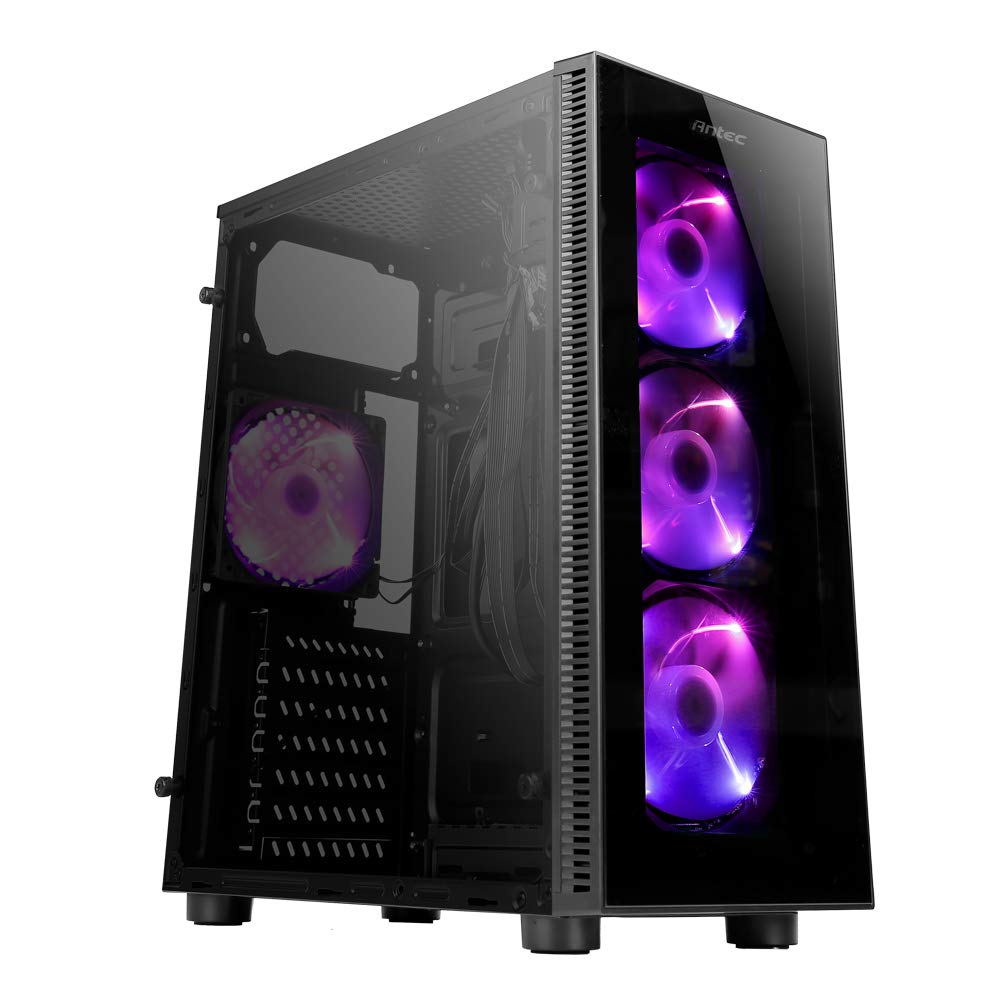
Image: Antec NX210 Mid-Tower ATX Computer Cabinet, showcasing its tempered glass side panel and front ARGB fans.
4. Product Features and Layout
4.1 Extern Views

Abbildung: Vorder- und Rückseite views of the Antec NX210 cabinet, highlighting the tempered glass front panel with ARGB fans and the rear I/O panel layout.

Image: Left side (tempered glass) and right side (solid panel) views of the Antec NX210 cabinet.
4.2 Oberes I/O-Panel
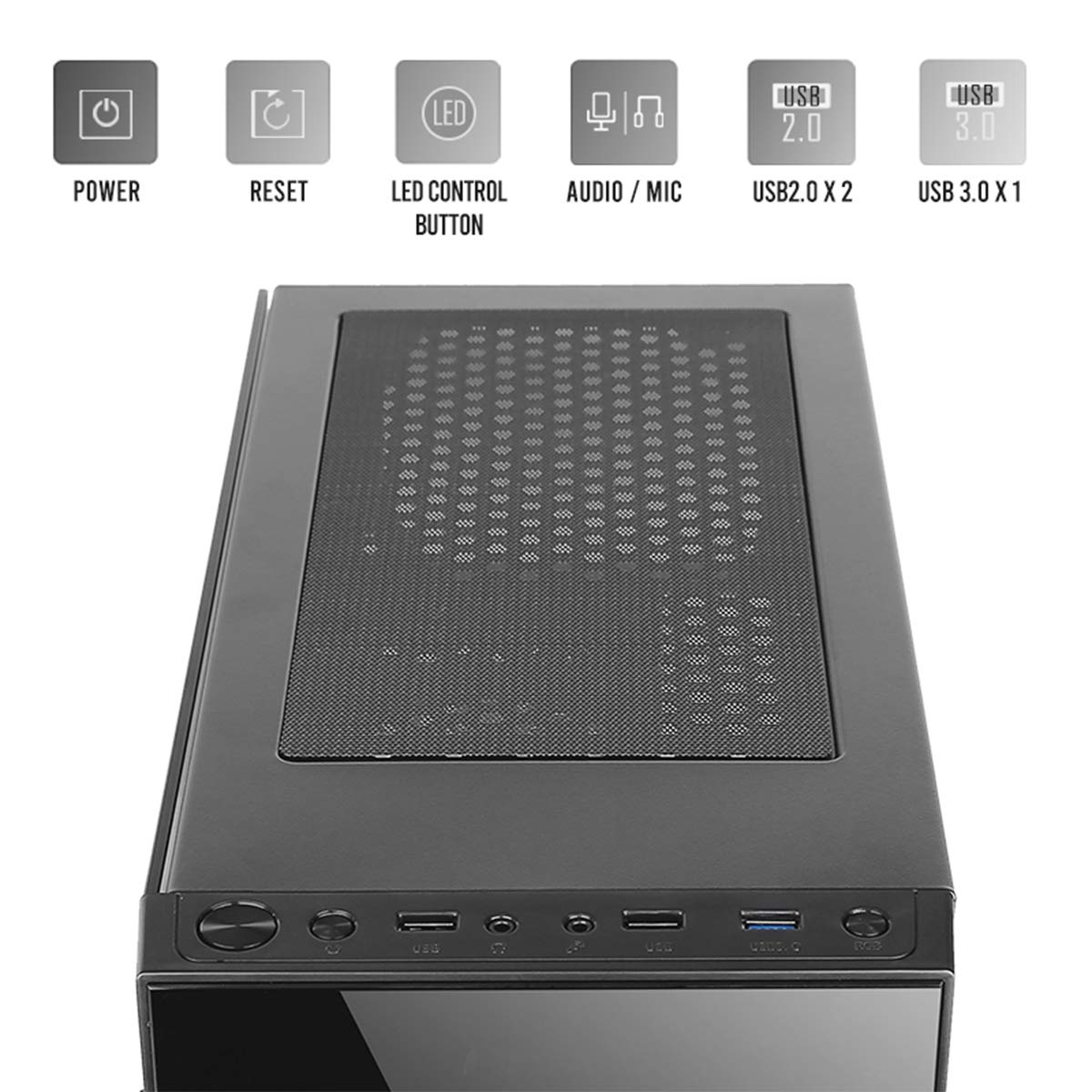
Image: Close-up of the top I/O panel, showing the Power button, Reset button, LED Control button, Audio/Mic jacks, 2x USB 2.0 ports, and 1x USB 3.0 port.
- Netzschalter: Zum Ein- oder Ausschalten des Systems.
- Reset-Taste: Um das System neu zu starten.
- LED-Steuertaste: To cycle through ARGB lighting effects for the pre-installed fans.
- Audio / Mic Jacks: Zum Anschließen von Kopfhörern und Mikrofonen.
- USB 2.0-Anschlüsse (x2): Zum Anschließen von USB 2.0-Geräten.
- USB 3.0-Anschluss (x1): For connecting USB 3.0 devices, offering faster data transfer speeds.
4.3 Internal Layout and Component Support

Image: Diagram illustrating the internal layout of the Antec NX210, indicating locations for motherboard, SSDs, HDDs, GPU, CPU cooler, and PSU.
- Motherboard-Unterstützung: Up to ATX (also supports Micro-ATX, ITX).
- 2.5" SSD Support: 3 drive bays.
- 3.5" HDD Support: 1 drive bay.
- Grafikkartenunterstützung: Up to 310mm in length.
- CPU Cooler Support: Up to 155mm in height.
- Netzteilunterstützung: Up to 220mm in length (top-mounted).
4.4-Kühlsystem

Image: Diagram showing fan and radiator mounting options for the Antec NX210, including pre-installed fans.
- Vorinstallierte Lüfter: 4 x 120mm ARGB fans (3 in front, 1 in rear).
- Front Fan Support: 3 x 120mm.
- Rear Fan Support: 1 x 120mm.
- Kühlerhalterung: Front up to 240mm, Rear up to 120mm.
5. Einrichtung und Installation
Follow these general steps for installing components into your Antec NX210 cabinet. Specific component manuals should be consulted for detailed installation instructions.
5.1 Vorbereitung des Schrankes
- Place the cabinet on a stable, flat surface.
- Remove the tempered glass side panel by unscrewing the thumbscrews at the rear and carefully pulling the panel away.
- Remove the right-side metal panel by unscrewing the thumbscrews at the rear.
5.2 Motherboard-Installation
- Install the I/O shield into the rear opening of the cabinet.
- Align your motherboard with the standoffs inside the cabinet. Ensure the standoffs match your motherboard's form factor (ATX, Micro-ATX, ITX).
- Befestigen Sie das Motherboard mit den mitgelieferten Schrauben.
5.3 Installation des Netzteils (PSU)
- The Antec NX210 supports a top-mounted ATX PS2 power supply.
- Slide the PSU into the designated top compartment from the rear of the cabinet.
- Secure the PSU with screws from the rear of the cabinet.
5.4 Installation des Speichermediums (HDD/SSD)
- 3.5"-Festplatte: Suchen Sie den 3.5"-Laufwerksschacht. Schieben Sie die Festplatte in den Schacht und befestigen Sie sie mit Schrauben.
- 2.5"-SSD: Locate the 2.5" SSD mounting points behind the motherboard tray. Secure the SSDs with screws.
5.5 Installation der Grafikkarte (GPU)
- Remove the necessary PCIe slot covers from the rear of the cabinet.
- Insert the graphics card into the appropriate PCIe slot on the motherboard.
- Befestigen Sie die Grafikkarte mit Schrauben.
5.6 Kabelmanagement
Nutzen Sie die Kabeldurchführungen und Befestigungspunkte hinter dem Mainboard-Tray, um die Kabel ordentlich zu verlegen. Dies verbessert die Luftzirkulation und die Optik.
5.7 Connecting Front Panel Cables
Connect the front panel cables (Power SW, Reset SW, HDD LED, Power LED, USB 2.0, USB 3.0, HD Audio) to the corresponding headers on your motherboard. Refer to your motherboard manual for exact pin layouts.
6. Bedienungsanleitung
6.1 Einschalten
After all components are installed and cables connected, close both side panels. Connect the power cable to the PSU and a wall outlet. Press the Power button on the top I/O panel to turn on your system.
6.2 ARGB-Lüftersteuerung
The pre-installed ARGB fans are connected to an internal controller. Use the LED-Steuertaste on the top I/O panel to cycle through various lighting modes and effects. The fans will display a default lighting effect upon initial power-up.
7. Wartung
Regular maintenance helps ensure optimal performance and longevity of your computer cabinet.
- Staubfilter: The Antec NX210 features a dust filter on the top panel. Regularly remove and clean this filter to prevent dust buildup and maintain good airflow.
- Innenreinigung: Periodically open the side panels and use compressed air to remove dust from internal components and fan blades. Ensure the system is powered off and unplugged before cleaning.
- Außenreinigung: Wischen Sie die Außenflächen mit einem weichen, damp Mit einem Tuch abwischen. Vermeiden Sie scheuernde Reiniger oder Lösungsmittel.
8. Fehlerbehebung
Sollten Probleme auftreten, beachten Sie bitte die folgenden grundlegenden Schritte zur Fehlerbehebung:
- Kein Strom:
- Stellen Sie sicher, dass das Netzteil ordnungsgemäß an die Wandsteckdose angeschlossen ist und sich der Netzschalter am Netzteil in der Position „EIN“ befindet.
- Verify that the front panel Power button cable is correctly connected to the motherboard header.
- Check all internal power connections (24-pin ATX, 8-pin CPU, PCIe power for GPU).
- Fans Not Spinning / ARGB Not Working:
- Ensure all fan power cables are securely connected to the motherboard or fan controller.
- Verify ARGB cables are correctly connected to the internal controller and the controller is powered.
- Try pressing the LED Control Button on the top I/O panel to cycle effects.
- USB-Anschlüsse funktionieren nicht:
- Check that the USB 2.0 and USB 3.0 front panel cables are correctly connected to the corresponding headers on your motherboard.
For more complex issues, consult the manuals for your individual components or seek professional assistance.
9. Spezifikationen

Image: Diagram showing the physical dimensions of the Antec NX210 cabinet.
| Besonderheit | Detail |
|---|---|
| Modell | NX210 |
| Gehäusetyp | Mittlerer Turm |
| Abmessungen (L x B x H) | 43.99 x 38.99 x 21.01 cm (ca. 395 x 210 x 445 mm) |
| Material | SPCC, gehärtetes Glas |
| Motherboard-Unterstützung | ATX, Micro-ATX, ITX |
| Erweiterungssteckplätze | 7 |
| Laufwerksschächte | 1 x 3.5"-HDD, 3 x 2.5"-SSD |
| Front I / O Ports | Power, Reset, LED Control Button, MIC/Audio, 2 x USB 2.0, 1 x USB 3.0 |
| Vorinstallierte Lüfter | 4 x 120mm ARGB fans (3 front, 1 rear) |
| Lüfterhalterung (Vorderseite) | 3 x 120 mm |
| Lüfterhalterung (hinten) | 1 x 120 mm |
| Kühlerhalterung (vorne) | Bis zu 240 mm |
| Kühlerhalterung (hinten) | Bis zu 120 mm |
| Maximale GPU-Länge | 310 mm |
| Maximale Höhe des CPU-Kühlers | 155 mm |
| Netzteilunterstützung | ATX PS2 (Top Mounted), Max length 220mm |
| Staubfilter | Spitze |
| Artikelgewicht | 4.8 kg |
10. Garantie und Support
The Antec NX210 Computer Cabinet comes with a 1 Jahr Garantie ab Kaufdatum. Bitte bewahren Sie Ihren Kaufbeleg für Garantieansprüche auf.
For technical support or warranty inquiries, please contact Antec customer service or your local distributor.
Hersteller: Antec Inc. 8F, No 107, Jhouzih St, Neihu District, Taipei City 114, Taiwan
Importeur (Indien): Acro Engineering Company, Khasra No 522/1, Village Jonapur, Delhi - 110 030
Weitere Informationen und Unterstützungsressourcen finden Sie auf der offiziellen Website. Antec Store auf Amazon.


