1. Sicherheitshinweise
Please read these instructions carefully before using your Behringer HC 2000 Studio Monitoring Headphones. Keep this manual for future reference.
- Gehörschutz: Prolonged exposure to high volume levels can cause permanent hearing damage. Always set the volume to a comfortable level before putting on the headphones.
- Reinigung: Verwenden Sie zum Reinigen ein weiches, trockenes Tuch. Verwenden Sie keine flüssigen Reinigungsmittel oder Sprays.
- Wassereinwirkung: These headphones are not water resistant. Avoid exposure to water or moisture.
- Demontage: Versuchen Sie nicht, die Kopfhörer zu zerlegen oder zu verändern. Dadurch erlischt die Garantie und es können Schäden entstehen.
- Lagerung: Bewahren Sie die Kopfhörer an einem kühlen, trockenen Ort auf, wenn Sie sie nicht verwenden.
2. Produktüberschreitungview
The Behringer HC 2000 Studio Monitoring Headphones are designed for critical listening and monitoring applications. They feature a closed-back design for excellent sound isolation and 40 mm dynamic drivers for a wide frequency response.
2.1 Hauptmerkmale
- Compact studio monitoring headphones.
- 40 mm dynamic drivers provide wide frequency response (20 Hz - 20 kHz) delivering full bass and detailed highs.
- Exceptional sound quality combined with portability.
- Das geschlossene Design sorgt für eine einheitliche Hörumgebung mit außergewöhnlicher Schallisolierung.
- Compact foldable design with comfortable padded ear cups and adjustable headband.
2.2 Packungsinhalt
The Behringer HC 2000 package includes:
- Behringer HC 2000 Studio Monitoring Headphones
- 3.5mm audio cable (permanently attached or included, as it's wired)
- 6.3mm (1/4") adapter (commonly included with studio headphones)
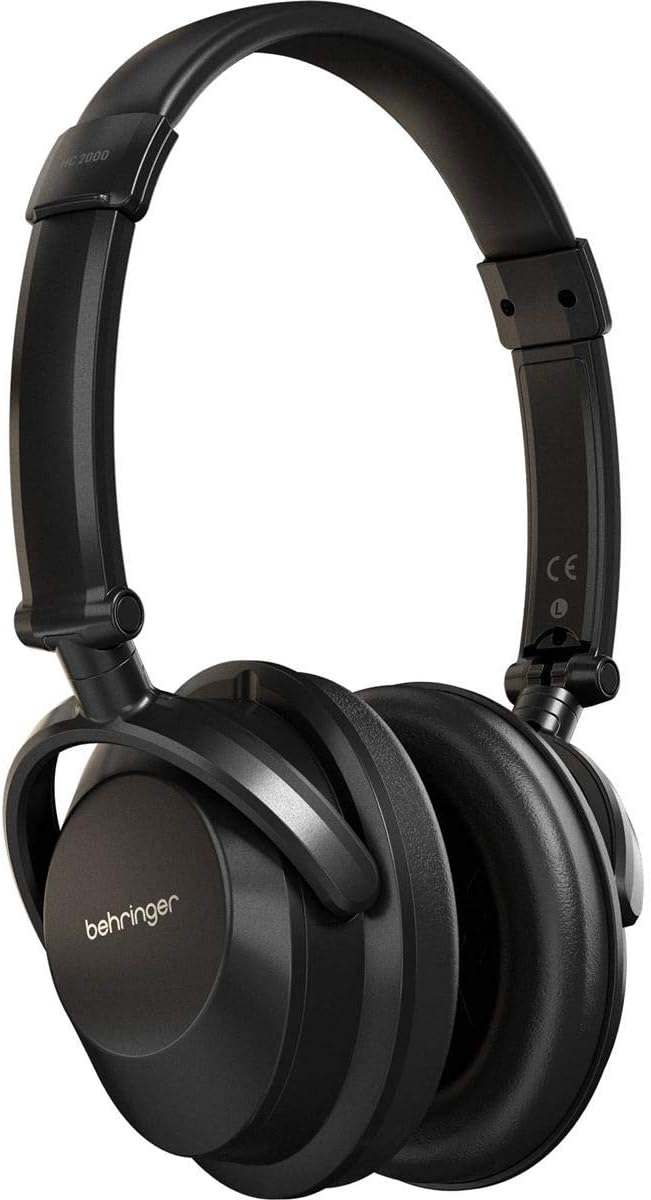
Abbildung 2.2.1: Vorderseite view of the Behringer HC 2000 Studio Monitoring Headphones. The headphones are black with the Behringer logo on the earcups and an adjustable headband.

Abbildung 2.2.2: Seite view of the Behringer HC 2000 headphones, highlighting the comfortable, padded over-ear earcups.
3. Einrichtung
3.1 Unfolding the Headphones
The HC 2000 headphones feature a compact foldable design for portability. To unfold them for use:
- Gently extend the headband until it reaches a comfortable length.
- Rotate the earcups outwards until they are in the standard listening position.

Abbildung 3.1.1: Oben view of the Behringer HC 2000 headphones in a folded position, demonstrating their compact design for storage or transport.
3.2 Anschluss an eine Audioquelle
The HC 2000 headphones connect via a standard 3.5mm audio jack.
- Locate the audio input jack on your device (e.g., audio interface, mixer, computer, smartphone).
- Insert the 3.5mm connector of the headphone cable firmly into the device's audio output jack.
- If your device requires a 6.3mm (1/4") connection, attach the appropriate adapter (if included) to the 3.5mm plug before inserting.

Abbildung 3.2.1: Schräg view of the Behringer HC 2000 headphones, highlighting the comfortable padded earcups and the connection point for the audio cable.
4. Bedienung
4.1 Tragen der Kopfhörer
- Passen Sie das Kopfband so an, dass es bequem über Ihren Kopf passt. Das Kopfband ist verstellbar und passt sich so verschiedenen Kopfgrößen an.
- Ensure the earcups fully enclose your ears for optimal sound isolation and audio performance. The "L" and "R" markings inside the earcups indicate the left and right channels, respectively.
4.2 Lautstärke anpassen
Volume control is managed directly from your connected audio source. The HC 2000 headphones do not feature inline volume controls.
- Before playing audio, set the volume on your audio source to its lowest setting.
- Begin playing audio and gradually increase the volume on your audio source to a comfortable listening level.
- Avoid excessively high volume levels to prevent hearing damage.
5. Wartung
5.1 Reinigung
- Use a soft, dry, lint-free cloth to wipe down the exterior of the headphones.
- Die Ohrmuscheln vorsichtig mit einem leicht feucht gehaltenen Tuch abwischen.amp cloth if necessary, then immediately dry with a soft, dry cloth. Do not saturate.
- Do not use harsh chemicals, abrasive cleaners, or solvents as they may damage the finish or materials.
5.2 Speicherung
When not in use, fold the headphones into their compact form and store them in a protective case or bag (not included) to prevent dust accumulation and physical damage.

Abbildung 5.2.1: Schräg view of the Behringer HC 2000 headphones in their folded configuration, ready for compact storage or transport.
6. Fehlerbehebung
If you encounter issues with your Behringer HC 2000 headphones, please refer to the following common problems and solutions:
| Problem | Mögliche Ursache | Lösung |
|---|---|---|
| Kein Ton |
|
|
| Verzerrter Klang |
|
|
| Sound Only in One Earcup |
|
|
7. Spezifikationen
Technical specifications for the Behringer HC 2000 Studio Monitoring Headphones:
| Besonderheit | Detail |
|---|---|
| Modellname | HC 2000 |
| Form der Hörmuschel | Über dem Ohr |
| Konnektivitätstechnologie | Verdrahtet |
| Kopfhöreranschluss | 3.5 mm Klinke |
| Audiotreibertyp | Dynamischer Treiber |
| Größe des Audiotreibers | 40 Millimeter |
| Frequenzgang | 20 Hz – 20,000 Hz |
| Lärmschutz | Schallisolierung (geschlossene Bauweise) |
| Besonderheit | Faltbar |
| Material | Plastik |
| Artikelgewicht | 0.42 Pfund (ca. 6.7 Unzen) |
| Technische Daten | 5.71 x 3.15 x 7.68 Zoll |
| Hersteller | Music Tribe US |
| Im Lieferumfang enthaltene Komponenten | Studio-Monitoring-Kopfhörer |
| Wasserbeständigkeit | Nicht wasserfest |
| Kompatible Geräte | Music Production Equipment, Laptops, Desktops, Tablets, Telephones, Smart Speakers, Televisions, Car Audio Systems, Cellphones |
8. Garantie und Support
8.1 Garantieinformationen
Behringer products are covered by a limited warranty. For detailed warranty terms and conditions, please refer to the official Behringer webDie Website oder die Ihrem Produkt beiliegende Garantiekarte finden Sie hier. Bewahren Sie Ihren Kaufbeleg für Garantieansprüche auf.
8.2 Kundendienst
For technical support, service, or spare parts, please contact Behringer customer support. You can find contact information and frequently asked questions on the official Behringer webWebsite:
When contacting support, please have your product model (HC 2000) and serial number (if applicable) ready.


