Einführung
This manual provides detailed instructions for the installation, operation, and maintenance of your RYDEEN JB01 Jeep Spare Tire Backup Camera Bracket. The JB01 is designed to securely mount compatible RYDEEN MINy backup cameras to the spare tire carrier of Jeep Wrangler vehicles, offering a stable and integrated solution for rear-view Sichtweite.
Hauptmerkmale
- Designed specifically for RYDEEN MINy backup cameras.
- Constructed from sturdy metal for durability.
- Rigid design ensures stable camera mounting.
- Integrates seamlessly with Jeep spare tire carriers.
Setup und Installation
Proper installation of the RYDEEN JB01 bracket is crucial for optimal performance of your backup camera. Please follow these steps carefully.

Figure 1: The RYDEEN JB01 Jeep Spare Tire Backup Camera Bracket. This sturdy metal bracket is designed to securely hold a backup camera behind the spare tire of a Jeep.

Abbildung 2: Eine Nahaufnahme view of the JB01 bracket with a compatible RYDEEN MINy backup camera attached. The camera is secured to the upper portion of the bracket using screws.

Figure 3: The backup camera, mounted on the JB01 bracket, positioned within the spokes of a Jeep spare tire wheel. This placement allows for a clear view hinter dem Fahrzeug.

Abbildung 4: Eine Außenansicht view of a Jeep spare tire, showing the discreet placement of the backup camera through the wheel spokes. The camera is positioned to provide an unobstructed rear view.
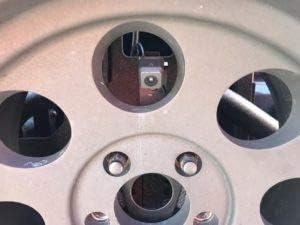
Abbildung 5:A view from inside the spare tire wheel, illustrating how the backup camera is securely mounted to the JB01 bracket and positioned to look out through a wheel spoke.

Figure 6: A detailed perspective of the camera and bracket assembly, showing its integration within the wheel structure. The bracket's design allows for precise camera positioning.

Figure 7: Another close-up of the JB01 bracket with a RYDEEN MINy backup camera attached, highlighting the secure fastening points and the camera's orientation.
Betrieb
The RYDEEN JB01 is a mounting bracket and does not require active operation. Once installed, it provides a stable platform for your RYDEEN MINy backup camera. The camera's operation will be governed by its own instruction manual and your vehicle's electrical system.
Wartung
- Regelmäßige Inspektion: Periodically check the bracket and camera for any signs of looseness, damage, or corrosion. Ensure all mounting screws are tight.
- Reinigung: Clean the bracket and camera housing with a soft, damp cloth. Avoid abrasive cleaners or solvents that could damage the finish or camera lens.
- Umweltfaktoren: While designed for outdoor use, extreme weather conditions (e.g., heavy snow, ice, prolonged direct sunlight) may require more frequent inspection.
Fehlerbehebung
Camera Not Stable
If the camera appears loose or vibrates excessively, check all mounting points on the JB01 bracket and ensure they are securely fastened. Also, verify that the bracket itself is tightly secured to the vehicle's spare tire carrier.
Versperrt View
Ensure that the camera lens is clean and free from dirt, mud, or snow. Verify that no part of the spare tire or wheel is obstructing the camera's field of view. Adjust the camera angle if necessary, following the instructions provided with your RYDEEN MINy camera.
Technische Daten
| Besonderheit | Detail |
|---|---|
| Technische Daten | 4.5 x 0.2 x 12 Zoll |
| Artikelgewicht | 5 Pfund |
| Modellnummer | JB01 |
| Hersteller | Rydeen |
| Farbe | Schwarz |
| Besondere Merkmale | Einstellbar |
| Kompatible Geräte | RYDEEN MINy Backup Cameras |
| Montagetyp | Vehicle Mount (Spare Tire) |
Garantie und Support
Garantieinformationen
The RYDEEN JB01 bracket is covered by a manufacturer's warranty against defects in materials and workmanship. Please refer to the warranty documentation included with your purchase or visit the official Rydeen webDie spezifischen Bedingungen und Konditionen finden Sie auf der Website.
Kundenservice
For technical assistance, installation questions, or warranty claims, please contact Rydeen customer support. Contact information can typically be found on the Rydeen webvor Ort oder in den Verpackungsmaterialien.
Rydeen WebWebsite: www.rydeenmobile.com


