1. Produktüberschreitungview
The Benss Portable Digital Radio (Model BRBD05) is a compact and versatile multi-band receiver designed for clear reception and ease of use. It supports AM, FM, and SW bands, features a digital LCD display with backlight, an alarm clock, and a sleep timer. Its portable design makes it ideal for both indoor and outdoor use.

Abbildung 1.1: Vorderseite view of the Benss Portable Digital Radio.
This radio is equipped with a built-in loudspeaker for clear audio and a 3.5mm earphone jack for private listening. The telescopic antenna ensures optimal signal reception, and the device is powered by two AA batteries, making it highly portable.
2. Sicherheitshinweise
- Setzen Sie das Radio keinen extremen Temperaturen, direkter Sonneneinstrahlung oder hoher Luftfeuchtigkeit aus.
- Vermeiden Sie es, das Funkgerät fallen zu lassen oder starken Stößen auszusetzen.
- Versuchen Sie nicht, das Radio zu zerlegen oder zu verändern. Dadurch erlischt die Garantie und es können Schäden entstehen.
- Verwenden Sie ausschließlich die angegebenen Batterien (2 x AA-Batterien). Achten Sie beim Einlegen der Batterien auf die richtige Polarität.
- Um ein Auslaufen zu verhindern, entfernen Sie die Batterien, wenn das Radio längere Zeit nicht benutzt wird.
- Halten Sie das Radio von Wasser und anderen Flüssigkeiten fern.
- Reinigen Sie das Radio mit einem weichen, trockenen Tuch. Verwenden Sie keine Scheuermittel oder Lösungsmittel.
3. Packungsinhalt
Bitte prüfen Sie das Paket auf folgende Artikel:
- 1 x Benss Pocket Radio
- 1 x Benutzerhandbuch
- Hinweis: Batterien sind nicht im Lieferumfang enthalten und müssen separat erworben werden.
4. Einrichtung
4.1 Einlegen der Batterie
- Suchen Sie die Abdeckung des Batteriefachs auf der Rückseite des Radios.
- Schieben Sie den Deckel nach unten, um das Fach zu öffnen.
- Insert two AA size batteries, ensuring the correct positive (+) and negative (-) polarity as indicated inside the compartment.
- Schließen Sie den Batteriefachdeckel, indem Sie ihn nach oben schieben, bis er einrastet.

Figure 4.1: Battery installation process for the Benss radio.
4.2 Antenneneinstellung
For optimal reception, especially for FM and SW bands, extend the telescopic antenna fully. The antenna can be rotated 360 degrees to find the best signal direction.

Figure 4.2: The radio's telescopic antenna can be rotated for optimal signal.
5. Bedienungsanleitung
5.1 Ein-/Ausschalten
Drücken Sie die EIN/AUS button located on the front panel to turn the radio on or off. The LCD display will illuminate when the radio is powered on.
5.2 Zeit und Alarm einstellen
- Abbindezeit: Drücken Sie die ZEITEINSTELLUNG Klicken Sie auf die Schaltfläche P- Und P+ Tasten zum Einstellen von Stunde und Minute. Drücken ZEITEINSTELLUNG again to confirm. You can switch between 12-hour and 24-hour display formats.
- Alarm einstellen: Drücken Sie die AL.SET Klicken Sie auf die Schaltfläche P- Und P+ Tasten zum Einstellen der gewünschten Alarmzeit. Drücken AL.SET again to confirm. The alarm sound will gradually increase in volume.

Figure 5.1: The radio supports both 12-hour and 24-hour time display.
5.3 Tuning Radio Stations (AM/FM/SW)
- Band Auswahl: Use the slide switch on the front panel to select between FM, AM, or SW (Shortwave) bands.
- Automatischer Scan: Drücken Sie die SCAN Schaltfläche zum automatischen Suchen und Speichern verfügbarer Sender.
- Manuelle Abstimmung: Verwenden Sie die P- Und P+ Tasten zur manuellen Einstellung einer bestimmten Frequenz.
- Shortwave (SW) Reception: The radio supports multiple shortwave bands (SW1-SW7), allowing reception of international broadcasts.
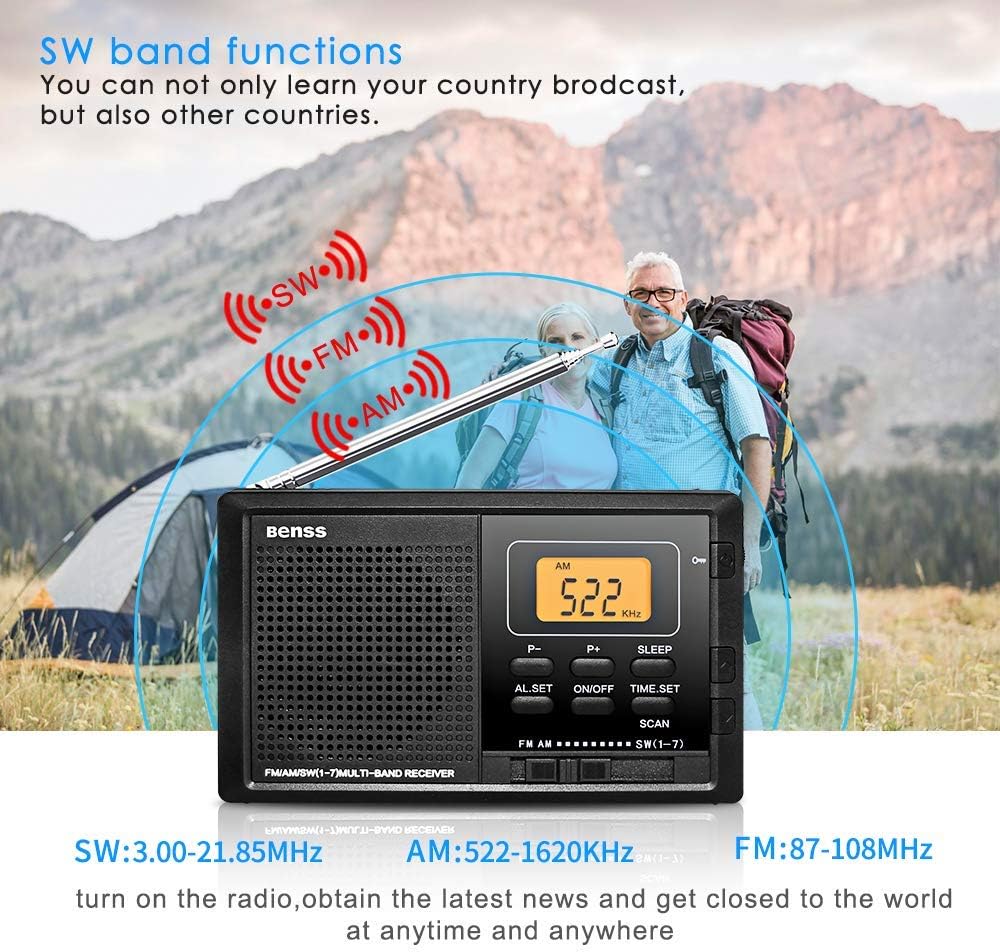
Figure 5.2: The radio supports AM, FM, and SW bands for diverse listening options.
5.4 Lautstärkeregelung
Adjust the volume using the rotary knob located on the right side of the radio. Rotate upwards to increase volume and downwards to decrease.
5.5 Sleep-Timer-Funktion
Drücken Sie die SCHLAFEN button to activate the sleep timer. You can set the radio to automatically turn off after a specified duration (e.g., 10-90 minutes), allowing you to fall asleep to your favorite station without wasting battery power.

Figure 5.3: The sleep timer allows the radio to turn off automatically.
5.6 Sperrtaste
The lock button prevents accidental button presses. Slide the SPERREN switch (usually on the side or top) to the locked position to disable all buttons. Slide it back to unlock.
5.7 Kopfhöreranschluss
Connect standard 3.5mm earphones to the earphone jack on the side of the radio for private listening. The built-in speaker will automatically mute when earphones are connected.
6. Wartung
- Reinigung: Wipe the radio's surface with a soft, dry cloth. Do not use liquid cleaners or aerosols.
- Batteriewechsel: Replace batteries when the display dims or audio quality deteriorates. Always replace both batteries at the same time.
- Lagerung: If storing the radio for an extended period, remove the batteries to prevent corrosion. Store in a cool, dry place.
7. Fehlerbehebung
| Problem | Mögliche Ursache | Lösung |
|---|---|---|
| Das Radio lässt sich nicht einschalten. | Die Batterien sind leer oder falsch eingelegt. | Ersetzen Sie die Batterien durch neue und achten Sie dabei auf die richtige Polarität. |
| Poor reception/Static. | Antenne nicht ausgefahren oder richtig positioniert; schwaches Signal. | Fully extend and rotate the telescopic antenna. Try moving to a different location. |
| Der Alarm ertönt nicht. | Wecker nicht eingestellt oder Lautstärke zu niedrig. | Ensure alarm time is set correctly. Increase the volume. |
| Tasten reagieren nicht. | Sperrfunktion ist aktiviert. | Schieben Sie den LOCK-Schalter in die entriegelte Position. |
8. Spezifikationen
| Besonderheit | Detail |
|---|---|
| Modellnummer | BRBD05 |
| Frequenzbereich FM | 87–108 MHz |
| Frequenzbereich AM | 522-1620 KHz |
| Frequenzbereich SW | 3.00–21.85 MHz |
| Stromversorgung | DC 3V (2 x AA Batteries) |
| Abmessungen (L x B x H) | 122 x 69 x 22 mm (4.7 x 2.7 x 0.8 Zoll) |
| Gewicht (ohne Batterie) | 142 g |
| Konnektivitätstechnologie | W-lan (Note: This seems to be an error in the source data, as typical portable radios do not have Wi-Fi. The radio functions via radio waves.) |
| Besonderheit | Tragbar |
| Im Lieferumfang enthaltene Komponenten | Bedienungsanleitung |
9. Garantie und Support
This Benss product is manufactured with high-quality standards. For any issues or support inquiries, please refer to the contact information provided at the point of purchase or visit the official Benss webWebsite.
Bitte bewahren Sie Ihren Kaufbeleg für Garantieansprüche auf. Die genauen Garantiebedingungen können je nach Region und Händler variieren.
