1. Einleitung
Thank you for choosing the HOBBYWING XR10 PRO-1S (1S HD) Electronic Speed Controller (ESC). This high-performance ESC is designed for 1/12 brushless sensored system stock and modified racing applications. Please read this manual thoroughly before use to ensure proper operation and maximize the lifespan of your product.
2. Sicherheitsvorkehrungen
Operating high-power systems for RC models can be dangerous. Always exercise extreme caution and adhere to the following safety guidelines:
- Trennen Sie den Akku immer vom Regler, wenn dieser nicht benutzt wird.
- Stellen Sie sicher, dass alle Verbindungen sicher und ordnungsgemäß isoliert sind, um Kurzschlüsse zu vermeiden.
- Never operate the ESC in wet conditions or allow it to come into contact with water.
- Keep the ESC away from heat sources and direct sunlight.
- Always use appropriate battery types and voltages as specified for this ESC.
- Kinder sollten dieses Produkt nur unter direkter Aufsicht von Erwachsenen bedienen.
- Do not modify the ESC or its components. Unauthorized modifications can lead to malfunction and void the warranty.
- Sorgen Sie während des Betriebs für eine ausreichende Belüftung des ESC, um eine Überhitzung zu vermeiden.
3. Produktmerkmale
The HOBBYWING XR10 PRO-1S (1S HD) ESC incorporates advanced technology for superior performance:
- Redesigned Architecture: Features a new architecture platform, resulting in a 40% smaller volume and 24% lighter weight compared to the previous generation.
- Premium MOSFETs: Equipped with high-quality Toshiba MOSFETs for enhanced efficiency and reliability.
- Super BEC: Internal BEC with booster circuitry provides up to 6A/6V output, capable of powering various servos without an additional receiver battery.
- Built-in Electronic Switch: Offers a lifespan of over 50,000 on/off cycles, with a dust-proof and shock-resistant design.
- Integrated Capacitor Module: Saves space and weight, simplifying wiring for a neat setup.
- PWM Frequency Tuning: Allows for precise throttle and brake control, crucial for competitive racing, especially in the Stock class.
- Separate Programming/Fan Port: A dedicated PRG/FAN port enables connection of an external cooling fan for maximum performance or an LCD program box/WiFi module for ESC programming.
4. Einrichtung und Installation
Proper installation is critical for optimal performance and safety. Follow these steps carefully:
4.1 Komponentenidentifikation
Familiarize yourself with the ESC components:

Abbildung 1: HOBBYWING XR10 PRO-1S (1S HD) ESC. This image displays the top view of the electronic speed controller, highlighting its compact design and heat sink. The main power terminals and sensor port are visible.
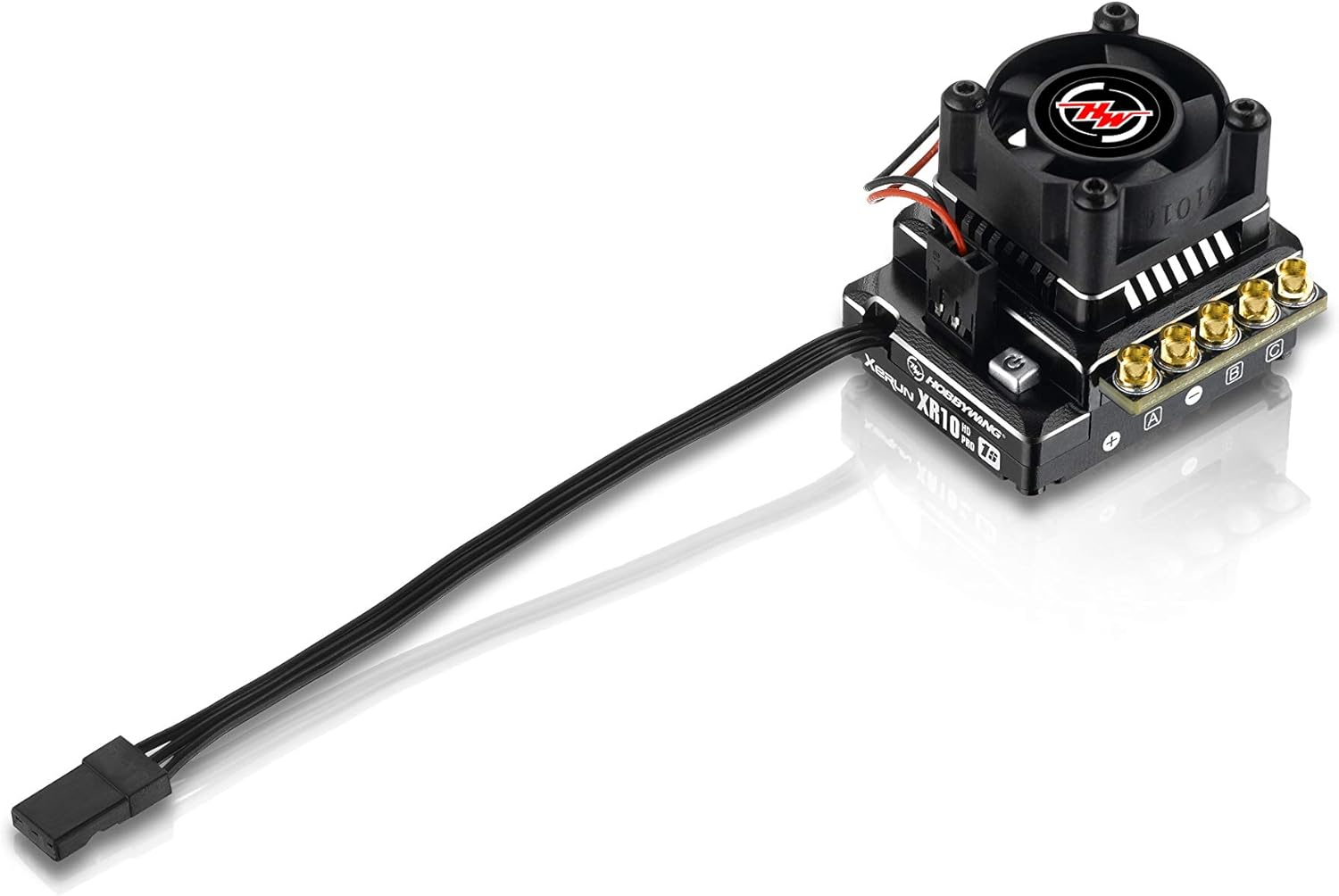
Abbildung 2: HOBBYWING XR10 PRO-1S (1S HD) ESC with cooling fan installed. This image shows the ESC with an optional cooling fan attached to the heat sink, demonstrating how to enhance thermal management for demanding applications.
4.2 Kabelverbindungen
- Motoranschluss: Connect the three motor wires (A, B, C) from the ESC to the corresponding motor phases. For sensored motors, ensure the sensor cable is also connected between the ESC and the motor.
- Batterieanschluss: Connect the battery's positive (+) and negative (-) terminals to the corresponding terminals on the ESC. Ensure correct polarity to prevent damage.
- Empfängeranschluss: Stecken Sie das Gaszugkabel des Reglers in den Gaskanal (normalerweise Kanal 2) Ihres Empfängers.
- Cooling Fan (Optional): If using an external cooling fan, connect it to the dedicated PRG/FAN port on the ESC.
4.3 Montage des Reglers
Securely mount the ESC in your vehicle using double-sided tape or screws. Ensure it is positioned to allow adequate airflow for cooling and is protected from impacts.
5. Bedienungsanleitung
Before operating your vehicle, perform the following steps:
5.1 Drosselklappenbereichskalibrierung
Calibrating the throttle range ensures proper communication between your transmitter and the ESC:
- Schalten Sie Ihren Sender ein und stellen Sie die Gastrimmung auf Neutral.
- Connect the battery to the ESC while holding the SET button on the ESC. Release the SET button when the LED starts flashing.
- Push the throttle stick to the full throttle position and press the SET button.
- Push the throttle stick to the full brake/reverse position and press the SET button.
- Release the throttle stick to the neutral position and press the SET button. The ESC is now calibrated.
5.2 Programming the ESC
The ESC can be programmed using an LCD program box or a WiFi module connected to the PRG/FAN port. Refer to the specific programming device's manual for detailed instructions on adjusting parameters such as running mode, drag brake, initial brake force, punch, and PWM frequency.
6. Wartung
Regular maintenance helps prolong the life and performance of your ESC:
- Reinigung: Periodically clean the ESC and its cooling fan (if installed) to remove dirt, dust, and debris. Use a soft brush or compressed air.
- Inspektion: Regularly inspect all wires and connectors for signs of wear, damage, or loose connections.
- Lagerung: Lagern Sie den ESC an einem trockenen, kühlen Ort, geschützt vor direkter Sonneneinstrahlung und extremen Temperaturen.
- Firmware-Updates: Überprüfen Sie das HOBBYWING website for any available firmware updates for your ESC model.
7. Fehlerbehebung
If you encounter issues with your ESC, refer to the following common problems and solutions:
- Kein Strom: Check battery connection, ensure battery is charged, and verify the electronic switch is engaged.
- Motor reagiert nicht: Re-calibrate the throttle range. Check motor and sensor wire connections. Ensure the motor is not seized.
- Überhitzung: Ensure adequate ventilation. Check for proper gear ratio. Consider installing an external cooling fan if not already in use. Reduce load or adjust ESC settings.
- Unberechenbares Verhalten: Check for radio interference. Ensure all connections are secure. Re-calibrate the throttle.
- LED-Fehlercodes: Consult the detailed HOBBYWING manual (usually available online) for specific LED flash patterns and their corresponding error meanings.
8. Spezifikationen
| Parameter | Wert |
|---|---|
| Modell | XR10 PRO-1S (1S HD) |
| Artikelnummer | 30112609 |
| Dauerstrom | 120 A |
| Spitzenstrom | 830 A |
| Eingangslautstärketage | 1S LiPo / 3-4 Cells NiMH |
| BEC-Ausgang | 6A / 6V |
| Maße | 6 x 4 x 3 Zoll (Produkt) |
| Artikelgewicht | 7 Unzen |
| Empfohlenes Alter | Ab 18 Jahren |
9. Garantie und Support
This product is covered by the official HOBBYWING manufacturer warranty. Please note that stores outside of North America (e.g., Hong Kong, Chinese stores) are not authorized HOBBYWING dealers in North America, and items purchased from them may not be covered under warranty.
HOBBYWING North America assumes no liability for damages, losses, or costs resulting from the incorrect use, installation, application, or maintenance of our products. Any claims arising from operating failures or malfunctions will be denied if not related to manufacturing defects.
For further information or support, please contact HOBBYWING North America directly through their official online store, HOBBYWINGDirect.com.


