1. Wichtige Sicherheitshinweise
Bitte lesen Sie vor der Benutzung dieses Fernsehers alle Sicherheits- und Bedienungshinweise sorgfältig durch. Bewahren Sie diese Hinweise zum späteren Nachschlagen auf.
- Energiequelle: Connect the TV only to the power supply indicated on the label.
- Belüftung: Sorgen Sie für ausreichende Belüftung. Blockieren Sie keine Belüftungsöffnungen.
- Reinigung: Ziehen Sie vor der Reinigung den Netzstecker des Fernsehers. Verwenden Sie ein weiches, trockenes Tuch. Verwenden Sie keine flüssigen oder Aerosol-Reinigungsmittel.
- Wasser und Feuchtigkeit: Do not use this TV near water, such as a bathtub, washbowl, kitchen sink, laundry tub, swimming pool, or in a wet basement.
- Hitze: Position the TV away from heat sources such as radiators, heat registers, stoves, or other products (including ampKonverter (Lüfter), die Wärme erzeugen.
- Kabel: Schützen Sie das Netzkabel vor Beschädigungen durch Betreten oder Einklemmen, insbesondere an Steckern, Steckdosen und der Stelle, an der es aus dem Fernseher austritt.
- Blitz: Trennen Sie den Fernseher bei Gewitter oder längerer Nichtbenutzung vom Stromnetz.
- Wartung: Do not attempt to service this TV yourself. Refer all servicing to qualified service personnel.
2. Produktüberschreitungview
The CHIQ L40H7N is a 40-inch Full HD Smart TV designed to provide an immersive viewing experience with integrated smart features. It offers a resolution of 1080p and includes connectivity options such as Wi-Fi and Bluetooth.
Hauptmerkmale:
- Full HD (1080p) Resolution: Liefert klare und detailreiche Bilder.
- Smart-TV-Funktionalität: Access popular streaming services like Netflix, YouTube, and Prime Video.
- Integrated Wi-Fi and Bluetooth: For wireless connectivity and device pairing.
- Mehrere Anschlussmöglichkeiten: Includes 3 HDMI and 2 USB ports for various external devices.
- Triple-Tuner: Supports DVB-T/T2/C/S/S2 for versatile broadcast reception.
- Dolby-Audio: Verbessertes Klangerlebnis.
- HDR10-Unterstützung: Provides improved contrast and color reproduction.
- Quad Core CPU: Ensures smooth performance for smart features and applications.

Bild: Vorderseite view of the CHIQ L40H7N Smart TV, showcasing mit seinem schmalen Rahmen und Display.
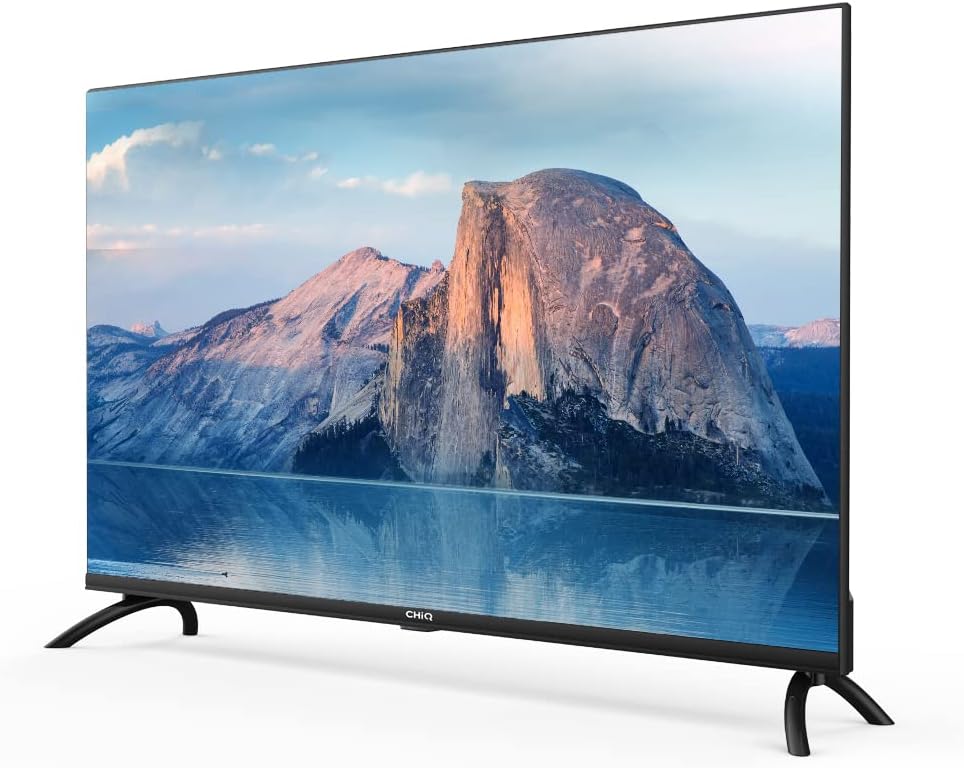
Abbildung: Seite view of the CHIQ L40H7N Smart TV, highlighting its thin profile.
3. Einrichtung
3.1 Auspacken
- Carefully open the packaging and remove the TV and all accessories.
- Ensure all components are present: TV unit, remote control, batteries, power cord, stand components, and user manual.
- Retain the packaging materials for future transport or servicing.
3.2 Standinstallation
So montieren Sie den TV-Ständer:
- Um Beschädigungen des Bildschirms zu vermeiden, legen Sie den Fernseher mit dem Bildschirm nach unten auf eine weiche, ebene Unterlage (z. B. eine Decke oder Schaumstoff).
- Richten Sie die Standfüße an den entsprechenden Schlitzen an der Unterseite des Fernsehers aus.
- Befestigen Sie die Standbeine mit den mitgelieferten Schrauben. Achten Sie darauf, dass diese fest angezogen sind.

Image: Diagram showing the dimensions of the CHIQ L40H7N TV, including height with stand (568.9mm), width (900.3mm), and depth with stand (178.9mm).
3.3 Wandmontage (optional)
If you choose to wall mount your TV, please consult a professional installer and refer to the specific instructions provided with your wall mount bracket. Ensure the wall mount is compatible with the TV's VESA mounting pattern.
3.4 Anschließen von Peripheriegeräten
Schließen Sie Ihre externen Geräte an die Anschlüsse des Fernsehers an:
- HDMI: Connect Blu-ray players, game consoles, or set-top boxes to the HDMI ports (HDMI1, HDMI2, HDMI3).
- USB: Insert USB drives for media playback into the USB ports (USB1, USB2).
- Antenne/Kabel: Schließen Sie Ihr Antennen- oder Kabelfernsehsignal an den entsprechenden Eingang an.
- Ethernet: Für eine stabile kabelgebundene Internetverbindung schließen Sie ein Ethernet-Kabel an den LAN-Anschluss an.
3.5 Stromanschluss
After connecting all necessary cables, plug the power cord into the TV's power input, then into a wall outlet.
3.6 Erstes Einschalten
Press the power button on the remote control or on the TV. Follow the on-screen instructions to complete the initial setup, including language selection, network connection, and channel scanning.
4. Bedienung des Fernsehers
4.1 Fernbedienungsfunktionen
Mit der Fernbedienung können Sie durch die Funktionen des Fernsehers navigieren:
- Netzschalter: Schaltet den Fernseher ein oder aus.
- Lautstärke +/-: Regelt die Lautstärke.
- Kanal +/-: Wechselt die Fernsehkanäle.
- Eingabequelle: Wählt die Eingangsquelle aus (HDMI, USB, TV).
- Navigationstasten (Hoch/Runter/Links/Rechts/OK): Navigiert durch Menüs und bestätigt Auswahlen.
- Smart-Home-Zentrale: Greift auf die Smart-TV-Oberfläche zu.
- App-Schaltflächen: Dedicated buttons for Netflix, YouTube, Prime Video, etc.
4.2 Smart-TV-Funktionen
Your CHIQ L40H7N TV provides access to a range of smart features and applications:
- Auf Apps zugreifen: Press the Home button or dedicated app buttons to launch applications like Netflix, YouTube, and Prime Video.
- App Store: Download and install additional applications from the integrated app store.
- Bildschirmspiegelung: Übertragen Sie Inhalte von kompatiblen Smartphones oder Tablets auf Ihren Fernseher.

Image: The CHIQ Smart TV displaying the Netflix application interface, along with other streaming apps like YouTube and Prime Video.

Image: A CHIQ Smart TV screen showing a variety of content from streaming services, indicating a rich media experience.
4.3 Netzwerkverbindung
To use Smart TV features, connect your TV to the internet:
- W-lan: Gehen Sie zu Einstellungen > Netzwerk > WLAN, wählen Sie Ihr Netzwerk aus und geben Sie das Passwort ein.
- Ethernet: Connect an Ethernet cable from your router to the TV's LAN port. The TV will automatically detect the wired connection.
4.4 Bluetooth-Konnektivität
Pair Bluetooth devices like headphones or speakers:
- Enable Bluetooth on your external device and set it to pairing mode.
- On the TV, go to Settings > Remotes & Accessories > Bluetooth.
- Wählen Sie Ihr Gerät aus der Liste aus und folgen Sie den Anweisungen auf dem Bildschirm, um es zu koppeln.
4.5 Eingangsauswahl
Press the 'Input' or 'Source' button on your remote to switch between connected devices (HDMI1, HDMI2, HDMI3, USB, TV Tuner).
4.6 Bild- und Toneinstellungen
Adjust display and audio preferences via the Settings menu:
- Bildmodus: Choose from standard, dynamic, movie, or custom settings.
- Helligkeit/Kontrast/Farbe: Bildqualität feinabstimmen.
- Klangmodus: Select audio presets like standard, music, movie, or custom.
- Dolby-Audio: The TV supports Dolby Audio for enhanced sound.
- HDR10: Experience improved contrast and color with HDR10 content.

Image: The CHIQ L40H7N TV displaying a scene with the Dolby Audio logo, indicating support for enhanced sound.

Image: A split-screen comparison on the CHIQ L40H7N TV, demonstrating the visual improvement with HDR10 technology, showing richer colors and contrast.

Image: An illustration of a Quad Core CPU, representing the processing power within the CHIQ L40H7N TV for smooth operation.

Image: The CHIQ L40H7N TV positioned on a media console in a living room, showcasing seine ästhetische Integration in ein häusliches Umfeld.
5. Wartung
5.1 Reinigung des Fernsehers
Um das Aussehen und die Leistung des Fernsehers zu erhalten:
- Bildschirm: Wischen Sie den Bildschirm vorsichtig mit einem weichen, fusselfreien Tuch ab. Bei hartnäckigen Flecken leicht andrücken.ampBefeuchten Sie das Tuch mit Wasser oder einem speziellen Bildschirmreiniger (sprühen Sie nicht direkt auf den Bildschirm).
- Kabinett: Wischen Sie den Fernsehschrank mit einem weichen, trockenen Tuch ab. Vermeiden Sie die Verwendung von Scheuermitteln oder Lösungsmitteln.
- Vor der Reinigung immer den Netzstecker des Fernsehers ziehen.
5.2 Softwareaktualisierungen
Regular software updates can improve performance and add new features:
- Automatische Updates: Ensure your TV is connected to the internet for automatic updates.
- Manuelle Prüfung: You can manually check for updates in the Settings menu (e.g., Settings > About > System Update).
6. Fehlerbehebung
Sollten Sie Probleme mit Ihrem Fernseher haben, beachten Sie bitte die folgenden häufigen Probleme und Lösungen:
- Kein Strom:
- Check if the power cord is securely plugged into the TV and the wall outlet.
- Ensure the wall outlet is functioning by testing it with another device.
- Versuchen Sie, den Ein-/Ausschalter am Fernseher selbst zu drücken, nicht nur auf der Fernbedienung. - Kein Bild, aber Ton ist vorhanden:
- Check the input source. Ensure it matches the device you are trying to view (e.g., HDMI1 for a Blu-ray player).
- Verify that the external device is powered on and functioning correctly.
- Try a different HDMI cable or port. - Kein Ton, aber ein Bild ist vorhanden:
- Check the volume level and ensure the TV is not muted.
- Verify audio output settings in the TV menu (e.g., internal speakers, external audio system).
- If using an external device, check its volume and audio settings. - Fernbedienung funktioniert nicht:
- Tauschen Sie die Batterien in der Fernbedienung aus.
- Stellen Sie sicher, dass sich keine Hindernisse zwischen der Fernbedienung und dem Infrarotsensor des Fernsehers befinden.
- Richten Sie die Fernbedienung direkt auf den Fernseher. - Netzwerkverbindungsprobleme:
- Starten Sie Ihren Router und Ihr Modem neu.
- Check Wi-Fi password if connecting wirelessly.
- If using a wired connection, ensure the Ethernet cable is properly connected.
If the problem persists, consult the CHiQ customer support or a qualified technician.
7. Spezifikationen
Below are the technical specifications for the CHIQ L40H7N Smart TV:
| Besonderheit | Spezifikation |
|---|---|
| Marke | CHiQ |
| Modellname | L40H7N |
| Bildschirmgröße | 40 Zoll |
| Display-Technologie | LCD |
| Auflösung | 1080p (Full HD) |
| Bildwiederholrate | 60 Hz |
| Besonderheit | Full HD, Smart TV, HDR10, Dolby Audio |
| Konnektivitätstechnologie | Bluetooth, Ethernet, HDMI (3 Anschlüsse), USB (2 Anschlüsse), WLAN |
| Unterstützte Internetdienste | Amazon Instant Video, Netflix, YouTube |
| Kompatible Geräte | Laptop, Smart Speaker, Smart Watch, Tablet, Car Audio System, Cellphone |
| Stromverbrauch (SDR) | 47.0 Watt |
| Energieeffizienzklasse (SDR) | G |
| Screen Diagonal (cm) | 100.3 cm |
| Screen Resolution (pixels) | 1920 x 1080 |
| Mindestens garantierte Software-Updates bis | 20-01-2030 |
| Minimum Guaranteed Spare Parts Until | 20-01-2029 |
Detaillierte Energieinformationen finden Sie in der EPREL-Datenbank: https://eprel.ec.europa.eu/qr/454406

Image: The EU Energy Label for the CHIQ L40H7N TV, showing an energy efficiency class G and consumption of 47 kWh/1000h.
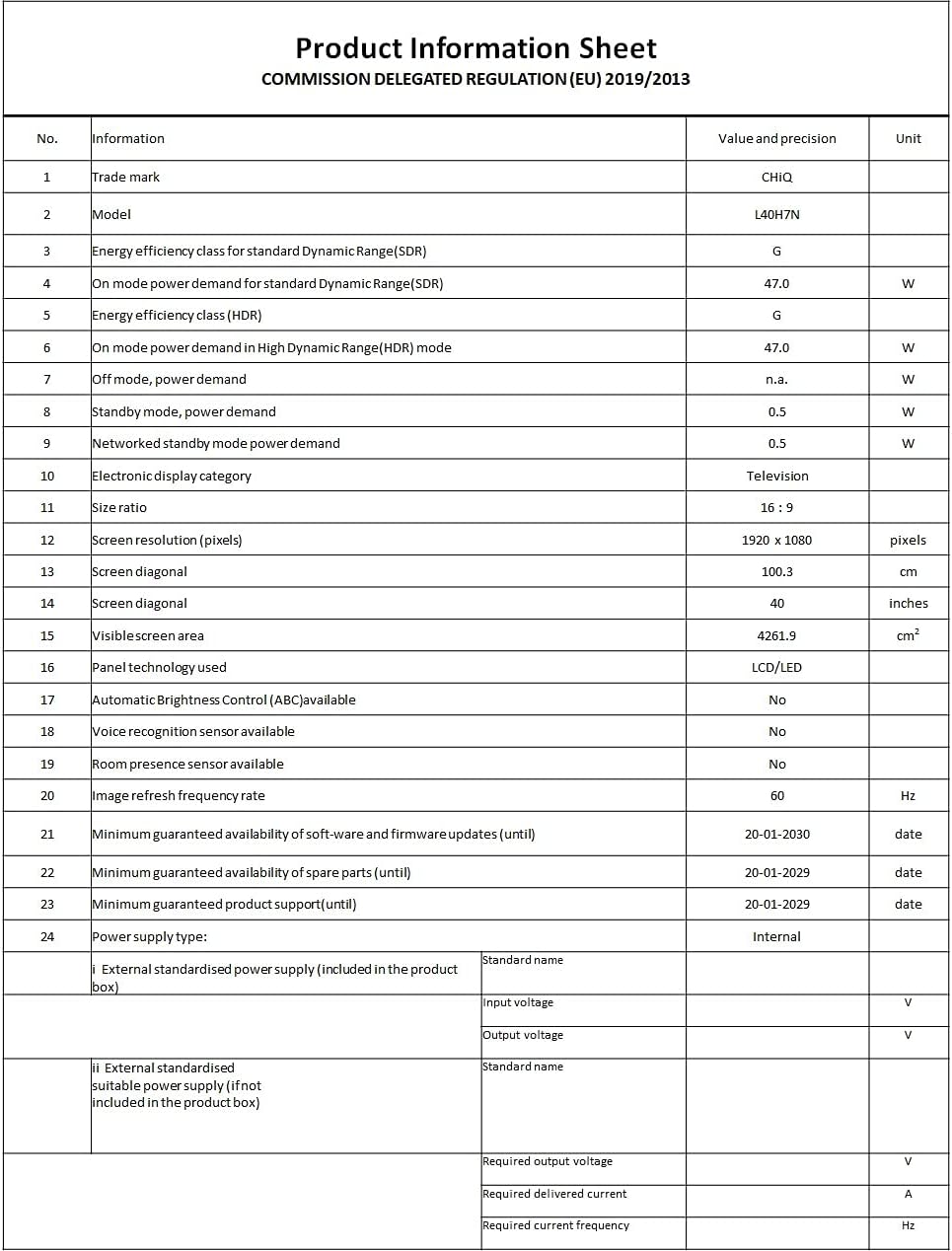
Image: A Product Information Sheet for the CHIQ L40H7N, detailing various specifications and compliance with COMMISSION DELEGATED REGULATION (EU) 2019/2013.
8. Garantie und Support
Your CHIQ L40H7N Smart TV comes with a manufacturer's warranty. Please refer to the warranty card included in your product packaging for specific terms and conditions, including warranty period and coverage details.
Kundendienst:
For technical assistance, troubleshooting, or warranty claims, please contact CHiQ customer support. Contact information can typically be found on the CHiQ official webauf der Website oder in Ihrer Produktdokumentation.


