1. Produktüberschreitungview
The EARISE M37 is a portable 100W PA system designed for various audio applications, including home parties, small events, and karaoke. It features a wooden cabinet for enhanced acoustics, built-in Bluetooth connectivity, and comes with two wireless microphones for immediate use. The system supports multiple audio inputs including AUX and USB, offering versatile playback options.

Image: The EARISE M37 PA system, showcasing its wooden box design and two included wireless microphones.
2. Sicherheitshinweise
- Um Brände oder Stromschläge zu vermeiden, setzen Sie das Gerät weder Regen noch Feuchtigkeit aus.
- Do not open the cabinet. There are no user-serviceable parts inside. Refer all servicing to qualified personnel.
- Sorgen Sie für ausreichende Belüftung rund um das Gerät. Blockieren Sie keine Belüftungsöffnungen.
- Vermeiden Sie es, das Gerät in der Nähe von Wärmequellen wie Heizkörpern, Heizlüftern, Öfen oder anderen Geräten (einschließlich) aufzustellen. ampKonverter (Lüfter), die Wärme erzeugen.
- Schützen Sie das Netzkabel vor Beschädigungen oder Beschädigungen durch Fußgänger, insbesondere an den Steckern, Steckdosen und an der Stelle, an der es aus dem Gerät austritt.
- Trennen Sie das Gerät bei Gewitter oder längerer Nichtbenutzung vom Stromnetz.
3. Packungsinhalt
Bitte prüfen Sie das Paket auf folgende Artikel:
- EARISE M37 PA System Unit
- 2 x drahtlose Mikrofone
- Fernbedienung
- Netzteil
- Benutzerhandbuch (dieses Dokument)

Image: A visual representation of key features and included accessories: wireless microphone, Bluetooth 4.2, USB auto-play, and remote controller.
4. Produktmerkmale und Komponenten
Familiarize yourself with the main components and controls of your EARISE M37 PA System.

Image: The control panel of the EARISE M37, showing various inputs and adjustment knobs. Key controls include: Mode, Previous/Next Track, Play/Pause, Record, EQ, Light, Mic 1/2 inputs, AUX In/Out, USB, TF card slot, DC Power In, ON/OFF switch, Charging indicator, ECHO, DELAY, MIC VOL, MASTER VOL, TREBLE, EXTRA BASS, and BASS.
Funktionen des Bedienfelds:
- MODUS: Schaltet zwischen den Eingangsmodi um (Bluetooth, AUX, USB, TF-Karte).
- Vorheriger/Nächster Titel: Navigates tracks during media playback.
- Abspielen/Pause: Steuert die Medienwiedergabe.
- Aufzeichnen: Initiates or stops recording (requires USB/TF storage).
- EQ: Passt die Equalizer-Einstellungen an.
- Licht: Steuert die integrierte LED-Beleuchtung.
- MIKROFON 1 / MIKROFON 2: Inputs for wired microphones (if used).
- AUX IN / AUX OUT: Audio input and output jacks for external devices.
- USB: USB port for media playback or recording.
- TF: TF (MicroSD) card slot for media playback or recording.
- DC Power IN: Stromzufuhr zum Laden und für den Betrieb.
- AN AUS: Netzschalter für das Gerät.
- Ladeanzeige: Leuchte zeigt den Ladestatus an.
- ECHO: Passt den Echoeffekt für Mikrofone an.
- VERZÖGERUNG: Passt den Verzögerungseffekt für Mikrofone an.
- MIKROFONLAUTSTÄRKE: Regelt die Lautstärke der Mikrofone.
- MASTER-LAUTSTÄRKE: Controls the overall master volume of the system.
- VERDREIFACHEN: Passt die Hochfrequenz-Audioausgabe an.
- EXTRA BASS: Verbessert die Niederfrequenz-Audioausgabe.
- BASS: Passt die Audioausgabe im Tieftonbereich an.
5. Einrichtung
5.1 Aufladen der PA-Anlage
Before first use, fully charge the PA system. Connect the provided power adapter to the "DC Power IN" port on the unit and plug it into a standard wall outlet. The charging indicator light will show the charging status. A full charge provides up to 7 hours of play time.

Image: Illustration highlighting the 3600mAh battery capacity, providing up to 7 hours of continuous play time.
5.2 Einrichtung des drahtlosen Mikrofons
The two wireless microphones are pre-paired with the PA system. Insert AA batteries (not included) into each microphone. Turn on the microphones using their respective power switches. They should automatically connect to the PA system.
5.3 Anschließen von Audioquellen
Bluetooth Verbindung:
- Turn on the EARISE M37 PA system.
- Drücken Sie die MODUS button until the display shows "Bluetooth" or a Bluetooth icon.
- Aktivieren Sie auf Ihrem Mobilgerät (Smartphone, Tablet usw.) Bluetooth und suchen Sie nach verfügbaren Geräten.
- Select "EARISE M37" from the list. Once connected, you will hear a confirmation sound.

Image: A hand holding a smartphone displaying a Bluetooth connection screen, indicating the ease of pairing with the EARISE M37 PA system.
USB/TF-Kartenwiedergabe:
Stecken Sie einen USB-Stick oder eine TF-Karte (MicroSD-Karte) mit MP3-Audiodateien ein. files into the respective port. The system will automatically detect and begin playing music. Use the Previous/Next Track and Play/Pause buttons to control playback.
AUX-Eingang:
Schließen Sie ein externes Audiogerät (z. B. MP3-Player, Computer) an den/die/das an. AUX IN port using a 3.5mm audio cable (not included). Press the MODUS button until AUX input is selected.
6. Bedienungsanleitung
6.1 Ein-/Ausschalten
To turn the unit on or off, use the EIN/AUS Schalter auf dem Bedienfeld.
6.2 Lautstärke und Effekte anpassen
- MASTER-LAUTSTÄRKE: Rotate this knob to adjust the overall volume of the PA system.
- MIKROFONLAUTSTÄRKE: Regelt die Lautstärke der angeschlossenen Mikrofone.
- ECHO / DELAY: Use these knobs to add or reduce echo and delay effects to the microphone sound.
- TREBLE / BASS / EXTRA BASS: Adjust these knobs to fine-tune the high and low frequencies of the audio output.
6.3 Verwendung von Mikrofonen
Once the wireless microphones are powered on and connected, speak into them. Adjust the MIKROFONLAUTSTÄRKE, ECHO, Und VERZÖGERUNG knobs on the PA system to achieve the desired sound. For optimal performance, hold the microphone a few inches from your mouth.

Image: Two individuals enjoying karaoke with the EARISE M37 PA system and its wireless microphones, demonstrating typical usage.
6.4 Aufnahmefunktion
To record audio (e.g., microphone input or music playback), ensure a USB flash drive or TF card is inserted into the corresponding slot. Press the AUFZEICHNEN button to start recording. Press it again to stop. Recorded fileDie Daten werden auf dem eingelegten Speichermedium gespeichert.
7. Wartung
- Reinigen Sie das Gerät mit einem weichen, trockenen Tuch. Verwenden Sie keine Scheuermittel oder Lösungsmittel.
- Store the PA system in a cool, dry place away from direct sunlight and extreme temperatures.
- If the unit will not be used for an extended period, fully charge the battery before storage and recharge it every few months to maintain battery health.
8. Fehlerbehebung
| Problem | Mögliche Ursache | Lösung |
|---|---|---|
| Kein Strom | Batterie leer; Stromkabel nicht angeschlossen. | Laden Sie das Gerät auf; Stellen Sie sicher, dass das Netzkabel fest angeschlossen ist. |
| Kein Ton von Mikrofonen | Microphones off; Batteries low/dead; MIC VOL too low. | Turn on microphones; Replace batteries; Increase MIC VOL. |
| Bluetooth stellt keine Verbindung her | PA system not in Bluetooth mode; Device too far; Interference. | Press MODE button to select Bluetooth; Move device closer; Restart both devices. |
| USB-/TF-Karte wird nicht abgespielt | Falsch file Formatierung; Karte/Laufwerk nicht korrekt eingelegt; Beschädigt files. | Sicherstellen files are MP3; Reinsert card/drive; Try different files/device. |
9. Spezifikationen
| Besonderheit | Detail |
|---|---|
| Marke | EARISE |
| Modell | M37 |
| Ausgang Wattage | 100 Watt |
| Stromquelle | Batteriebetrieben |
| Konnektivitätstechnologie | Bluetooth, USB, AUX |
| Bluetooth-Version | 4.2 (from image) |
| Audioeingang | Drahtloses Mikrofon, AUX-Anschluss |
| Anzahl der Kanäle | 2 |
| Artikelgewicht | 11.62 Pfund |
| Verpackungsabmessungen | 18.7 x 12 x 11.9 Zoll |
| Produktabmessungen (ca.) | 32.5 cm (12.8 in) H x 25.5 cm (10 in) W x 23.8 cm (9.4 in) D |
| Farbe | Schwarz |
| Montagetyp | Tischplatte |
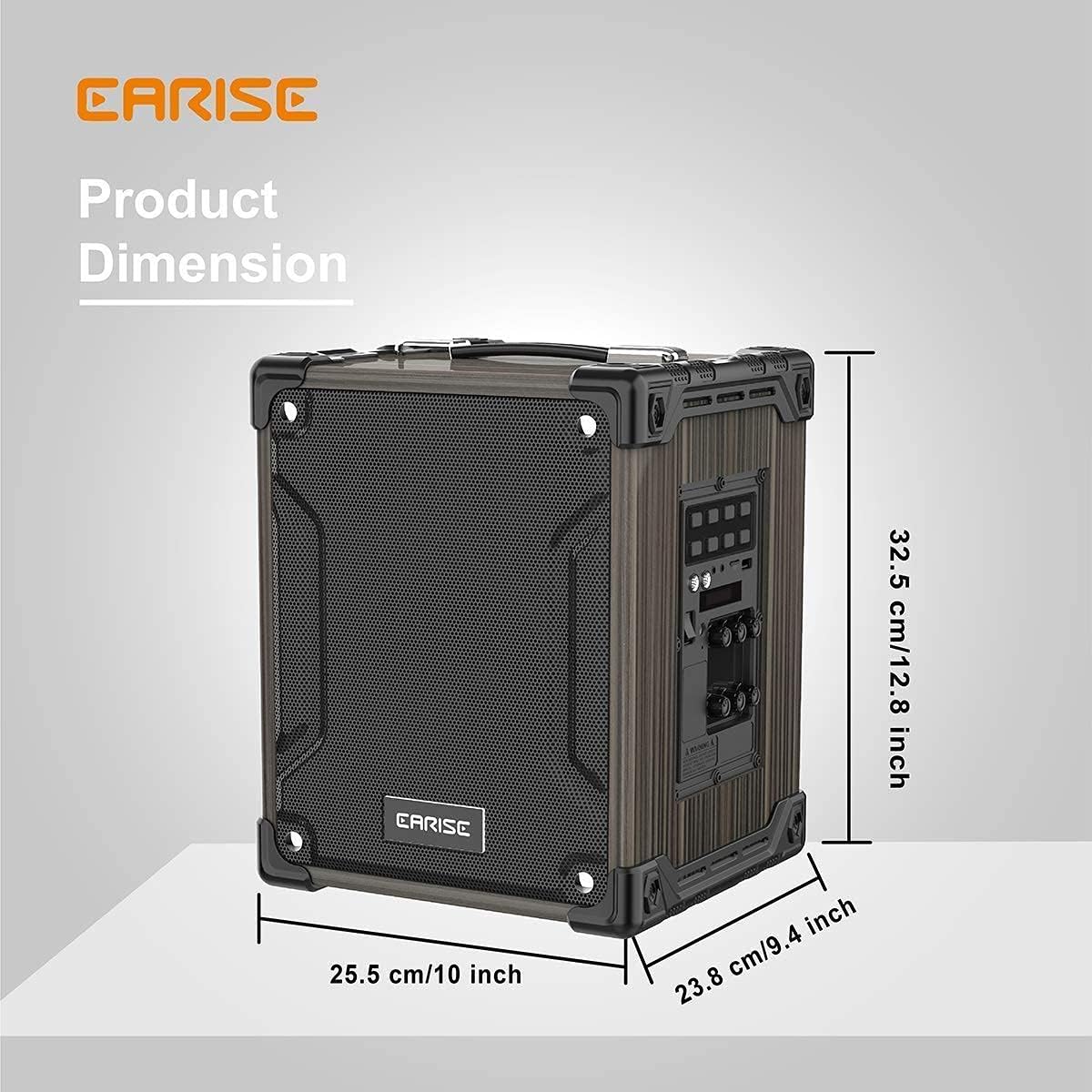
Image: Product dimensions of the EARISE M37, measuring approximately 32.5 cm (12.8 inches) in height, 25.5 cm (10 inches) in width, and 23.8 cm (9.4 inches) in depth.
10. Garantie und Support
For warranty information or technical support, please refer to the contact details provided with your purchase or visit the official EARISE webBewahren Sie Ihren Kaufbeleg für Garantieansprüche auf.


