1. Einleitung
Thank you for choosing the DOGNESS F06WH 2L Automatic Pet Feeder. This device is designed to provide scheduled and portion-controlled meals for your pet, ensuring a consistent feeding routine. Please read this manual thoroughly before use to ensure proper operation and maintenance.

Image 1.1: The DOGNESS F06WH Automatic Pet Feeder in operation, dispensing dry food.
2. Produktüberschreitungview und Funktionen
The DOGNESS F06WH is a 2-liter capacity automatic pet feeder suitable for small to medium-sized cats and dogs. It features programmable meal times, adjustable portion control, and a voice recording function to call your pet for meals.
Hauptmerkmale:
- 2 Liter Fassungsvermögen: Ideal for small pets, ensuring sufficient food supply.
- Timed Dispense: Schedule up to 4 meals per day.
- Portionskontrolle: Customize food amounts for each meal to manage your pet's diet.
- Stimmaufnahme: Record a 10-second message to play at meal times.
- Duale Stromversorgung: Operates with an AC adapter and includes a battery backup (batteries not included) for uninterrupted feeding during power outages.
- Abnehmbare Edelstahlschüssel: Easy to clean and promotes hygiene.
- Verstopfungsfreies Design: Engineered to prevent food jams and ensure smooth dispensing.

Bild 2.1: Überview of the feeder's main features, including scheduling, control panel, voice recording, detachable bowl, dual power, and double fresh lock system.
3. Einrichtungsanweisungen
3.1 Auspacken und Komponentenidentifizierung
Carefully remove all components from the packaging. Ensure the following parts are present:
- Hauptverteilereinheit
- Futternapf aus Edelstahl
- Netzteil
- Bedienungsanleitung

Image 3.1: Key components of the feeder, including the moisture absorbing box, control panel, food outlet, and stainless steel bowl.
3.2 Netzteil
- Connect the power adapter to the feeder's power input port and then plug it into a standard wall outlet.
- For battery backup, open the battery compartment (usually on the bottom) and insert 3 D-size batteries (not included). This ensures the feeder continues to operate during power outages.
3.3 Befüllen des Futterbehälters
- Öffnen Sie den oberen Deckel des Futterhäuschens.
- Pour dry pet food into the hopper. Ensure the food kibble size is appropriate for the feeder (typically less than 15mm).
- Close the lid securely to maintain food freshness and prevent pets from accessing the food prematurely.
3.4 Placing the Feeding Bowl
Place the stainless steel feeding bowl directly beneath the food outlet of the main feeder unit.
4. Bedienungsanleitung
4.1 Bedienfeld vorbeiview

Image 4.1: Labeled control panel showing buttons for meal settings, time, portion size, voice recording, and battery indicator.
The control panel features an LCD display and several buttons for programming:
- Meal Buttons (Breakfast, Lunch, Dinner, 4th Meal): Select which meal to program.
- On/Off (Feed): Activates or deactivates a programmed meal.
- Mahlzeitgröße: Adjusts the portion size for the selected meal.
- Hour/Minute: Sets the time for meals and the current time.
- Manual: Dispenses a single portion manually.
- Zeit: Wechselt in den Zeiteinstellungsmodus.
- MIKROFON: Initiates voice recording.
- Spielen: Plays the recorded voice message.
- Anzeige für niedrigen Batteriestand: Meldet, wenn die Batterien ausgetauscht werden müssen.
4.2 Einstellen der aktuellen Uhrzeit
- Drücken Sie die Taste „Zeit“. Die Stundenanzeige blinkt.
- Use the 'Hour' button to adjust the hour (24-hour format).
- Press the 'Time' button again. The minute display will flash.
- Use the 'Minute' button to adjust the minutes.
- Press the 'Time' button once more to save the current time.
4.3 Programming Feeding Schedules
The feeder allows for up to four meals per day (Breakfast, Lunch, Dinner, 4th Meal).
- Select the desired meal (e.g., 'Breakfast' button). The meal time will flash.
- Use the 'Hour' and 'Minute' buttons to set the feeding time for that meal.
- Press the 'Meal Size' button. The portion number will flash.
- Use the 'Meal Size' button to adjust the portion size (e.g., 1-39 units). Each unit typically dispenses approximately 5g of dry food. Test to confirm desired portion.
- Press the 'On/Off' button to activate the meal schedule. A checkmark will appear on the display.
- Repeat for other meals as needed.
4.4 Sprachaufzeichnung
Record a 10-second message to play before each scheduled meal.
- Press and hold the 'MIC' button.
- Sprechen Sie Ihre Botschaft deutlich ins Mikrofon.
- Release the 'MIC' button to save the recording.
- Press the 'Play' button to listen to your recorded message.

Image 4.2: A cat responding to the feeder, demonstrating the voice recording feature that calls pets for meals.
4.5 Manuelle Fütterung
To dispense a single portion instantly, press the 'Manual' button. This will dispense one unit of food.
5. Wartung
5.1 Cleaning the Feeding Bowl
The stainless steel feeding bowl is detachable and can be hand washed with mild soap and water. Rinse thoroughly and dry completely before reattaching.
5.2 Cleaning the Food Hopper and Dispenser
To maintain hygiene and prevent food residue buildup:
- Ensure the feeder is unplugged and batteries are removed before cleaning.
- Wischen Sie das Innere des Futterbehälters mit einem sauberen, trockenen Tuch aus.amp Tuch. Vermeiden Sie die Verwendung von übermäßigem Wasser.
- The internal dispensing mechanism (soft film, separate baffle, ABS impeller) is designed to be clog-free. If cleaning is required, use a dry brush or cloth to remove any food particles. Do not immerse the main unit in water.
- Ensure all parts are completely dry before refilling with food and reassembling.
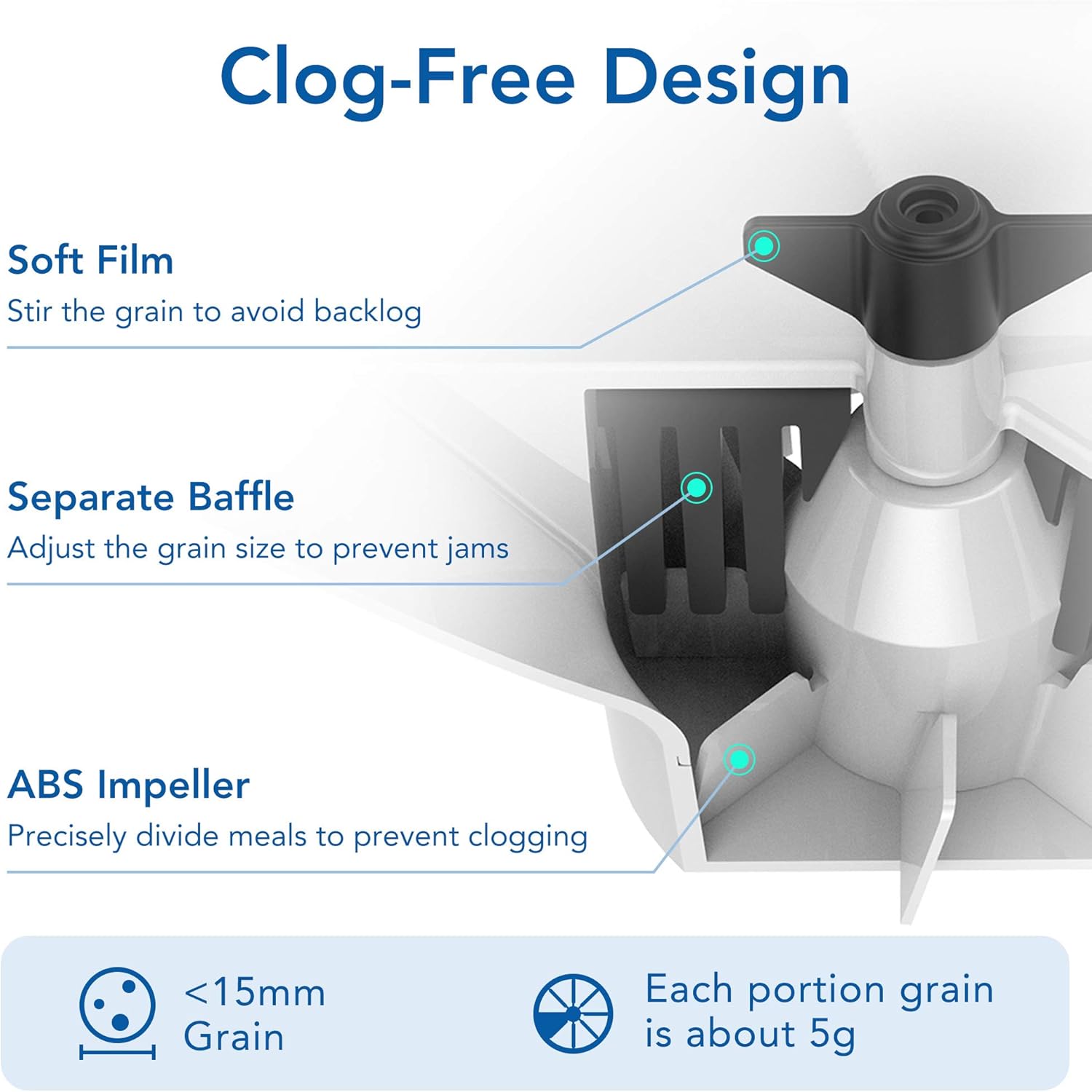
Image 5.1: Internal components designed for clog-free operation, including soft film, separate baffle, and ABS impeller.
6. Fehlerbehebung
If you encounter issues with your DOGNESS F06WH Automatic Pet Feeder, refer to the following common problems and solutions:
| Problem | Mögliche Ursache | Lösung |
|---|---|---|
| Futterausgabe funktioniert nicht | Hopper empty; food jammed; low battery; feeder not powered on. | Refill hopper; check for obstructions in the dispenser; replace batteries or ensure AC power; verify feeder is powered on. |
| Incorrect portion size | Portion setting is too low/high; kibble size is inconsistent. | Adjust portion setting using the 'Meal Size' button; ensure consistent kibble size (less than 15mm). |
| Voice recording unclear or not playing | Microphone obstruction; recording error. | Ensure microphone is clear; re-record the message, speaking clearly and closely to the MIC. |
| Feeder not turning on | No power; dead batteries. | Check AC adapter connection; replace D-size batteries. |
7. Spezifikationen
| Besonderheit | Spezifikation |
|---|---|
| Modellnummer | F06WH |
| Kapazität | 2 Liter |
| Abmessungen (LxBxH) | 10 x 5 x 5 Zoll |
| Artikelgewicht | 3.85 Pfund |
| Material | Edelstahl (Schüssel) |
| Stromversorgung | AC Adapter; 3 x D-size batteries (not included) |
| Mahlzeiten pro Tag | Bis zu 4 |
| Portionskontrolle | Adjustable (1-39 units, approx. 5g per unit) |
| Sprachaufzeichnung | 10 Sekunden |
| Zielspezies | Cats, Small Dogs, Small Animals |
| Pflegehinweise | Hand Wash Only (bowl) |
8. Garantie und Support
For warranty information or technical support, please refer to the contact details provided with your product packaging or visit the official DOGNESS webBewahren Sie Ihren Kaufbeleg als Kaufnachweis für eventuelle Garantieansprüche auf.


