1. Einleitung
Thank you for choosing the FeinTech LED Desk Lamp LTL00600. This high-quality desk lamp is designed to provide optimal lighting for your workspace while offering convenient features such as a USB charging port, adjustable brightness, and customizable color temperature. Please read this manual thoroughly before use to ensure proper operation and to maximize the lifespan of your product.
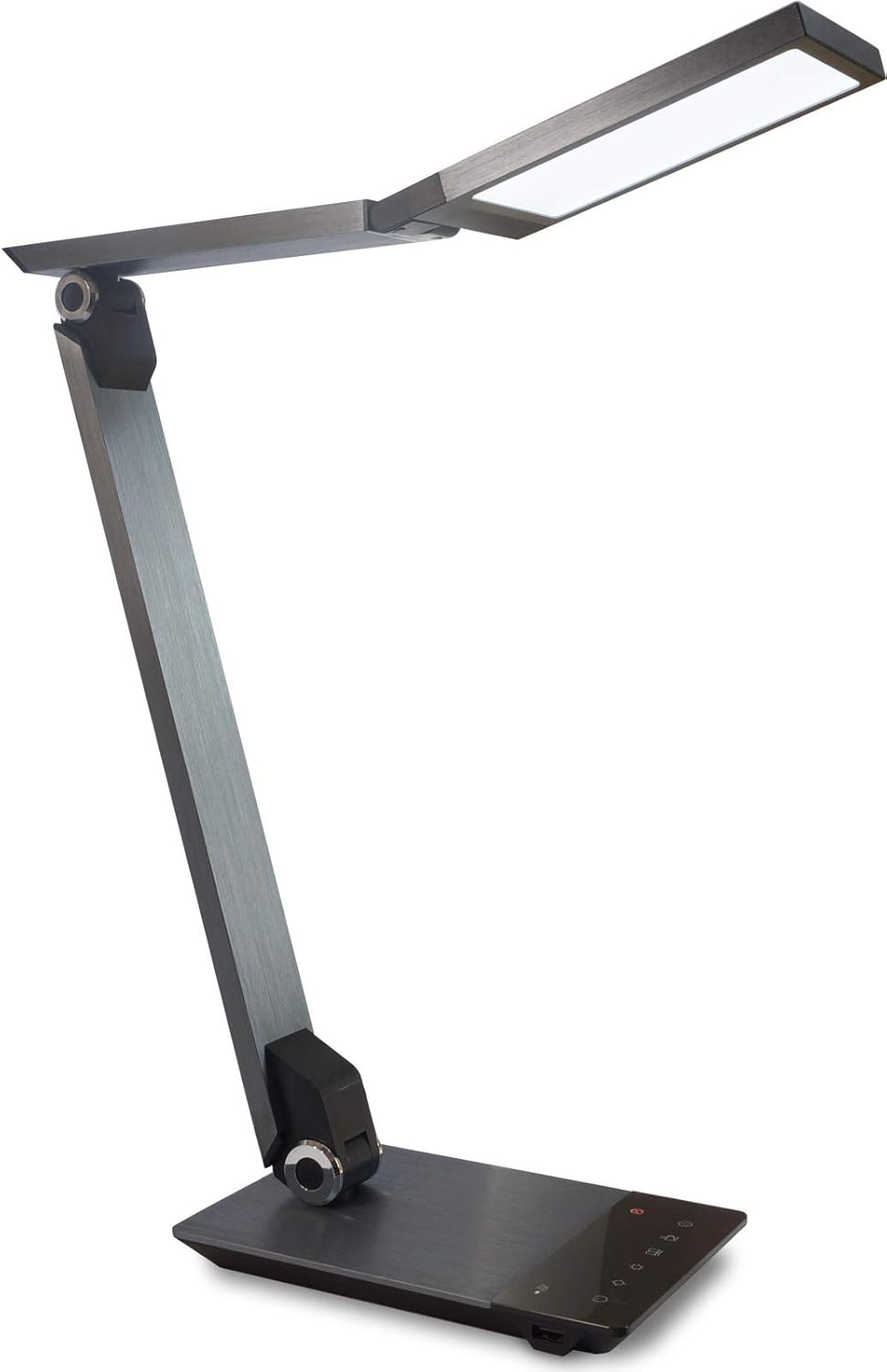
Image 1.1: FeinTech LED Desk Lamp LTL00600. This image displays the lamp in seiner aufrechten Position, zeigenasing its brushed aluminum finish and sleek design.
2. Sicherheitshinweise
Um Schäden oder Verletzungen zu vermeiden, beachten Sie bitte die folgenden Sicherheitsvorkehrungen:
- Stellen Sie sicher, dass das Netzteil an eine geeignete Steckdose angeschlossen ist.
- Setzen Sie das l nicht ausamp auf Wasser oder übermäßige Luftfeuchtigkeit.
- Vermeiden Sie es, das l zu zerlegen oder zu verändern.ampReparaturen sollten nur von qualifiziertem Personal durchgeführt werden.
- Behalte das lamp von Wärmequellen und direkter Sonneneinstrahlung fernhalten.
- Reinigen Sie das lamp Nur mit einem weichen, trockenen Tuch reinigen. Keine Scheuermittel oder Lösungsmittel verwenden.
- Schauen Sie nicht über längere Zeiträume direkt in die LED-Lichtquelle.
3. Packungsinhalt
Bitte überprüfen Sie, ob alle Artikel im Paket vorhanden sind:
- FeinTech LED-Schreibtisch Lamp (Model: LTL00600)
- Netzteil (12 V/2 A)
4. Produktüberschreitungview
Familiarize yourself with the components of your FeinTech LED Desk Lamp:
- Lamp Kopf: Enthält die LED-Lichtquelle.
- Verstellbare Arme: Multiple joints for flexible positioning.
- Base: Provides stability and houses the control panel and USB port.
- Bedienfeld: Touch-sensitive buttons for power, brightness, color temperature, and timer.
- USB Ladeanschluss: Located on the side of the base for device charging.

Bild 4.1: Draufsicht view des lamp's base and control panel. This image highlights the touch-sensitive buttons for various functions.

Abbildung 4.2: Seite view des lamp's base, showing the integrated USB charging port. This port allows for convenient charging of compatible devices.
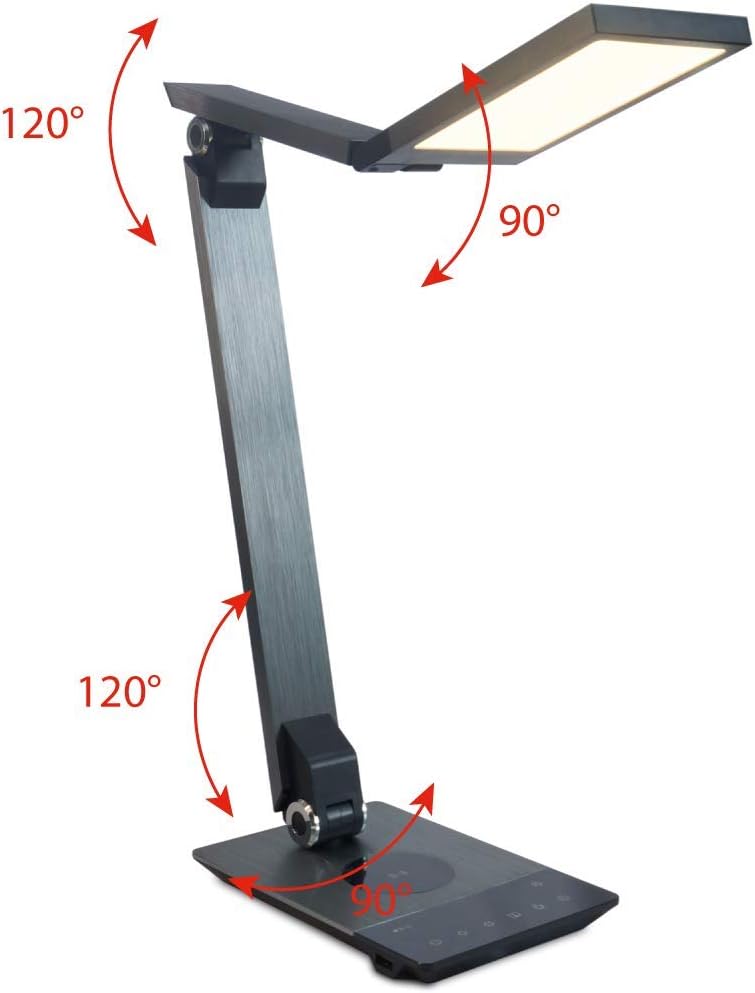
Image 4.3: Diagram illustrating the articulation angles of the lamp's joints. The lamp head can rotate 90 degrees, the upper arm 120 degrees, and the lower arm 120 degrees, allowing for flexible positioning.
5. Einrichtung
Befolgen Sie diese Schritte für die Ersteinrichtung:
- Auspacken: Entnehmen Sie vorsichtig alle Komponenten aus der Verpackung.
- Platzierung: Platzieren Sie das lamp base on a stable, flat surface. Ensure there is enough space for the lamp to be adjusted without obstruction.
- Strom anschließen: Insert the power adapter cable into the DC input port on the back of the lamp Basis. Stecken Sie den Netzadapter in eine normale Steckdose.
6. Bedienungsanleitung
The FeinTech LED Desk Lamp features intuitive touch controls on its base.
6.1 Ein-/Ausschalten
- Berühren Sie die Netztaste on the control panel (refer to Image 4.1) to turn the lamp ein oder aus.
6.2 Brightness Adjustment (Dimming)
- Mit dem lamp on, touch and hold the Helligkeit erhöhen or Helligkeit runter buttons (refer to Image 4.1) to steplessly adjust the light intensity.
- Die lamp base will vibrate slightly when the minimum or maximum brightness level is reached.
6.3 Einstellung der Farbtemperatur
- Mit dem lamp on, touch and hold the Color Temperature Up or Color Temperature Down buttons (refer to Image 4.1) to steplessly adjust the light color from warm white (2700K) to cool white (6500K).
- Die lamp base will vibrate slightly when the minimum or maximum color temperature is reached.
6.4 Favorite Settings
- Die lamp allows you to store and recall 3 favorite light settings (brightness and color temperature).
- To save a setting: Adjust the brightness and color temperature to your desired level. Then, touch and hold one of the Favoriten-Schaltflächen (refer to Image 4.1) until the lamp flashes briefly, indicating the setting is saved.
- To recall a setting: Simply touch the corresponding Favoriten-Schaltfläche.
- The last used brightness and color temperature settings are automatically saved even after the lamp ist ausgeschaltet.
6.5 USB-Ladefunktion
- Connect your smartphone or other compatible device to the USB charging port on the side of the lamp base (refer to Image 4.2) using a suitable USB cable.
- The intelligent USB port delivers up to 2.4A for fast charging.
- An LED indicator will signal ongoing and completed charging status.
6.6 Timer-Funktion
- Berühren Sie die Timer-Taste (refer to Image 4.1) to activate the timer function.
- The first touch activates a 3-minute timer.
- A second touch activates a 1-hour timer.
- Die lamp will automatically turn off after the selected time period.
7. Wartung
Um Ihr l zu erhaltenamp's appearance and functionality:
- Trennen Sie immer die lamp vor der Reinigung von der Stromversorgung trennen.
- Wischen Sie das lamp mit einem weichen, trockenen und fusselfreien Tuch.
- Verwenden Sie keine flüssigen oder Aerosolreiniger, da diese die Oberfläche oder interne Bauteile beschädigen können.
- Avoid scratching the brushed aluminum surface.
8. Fehlerbehebung
Sollten Sie Probleme mit Ihrem l habenampBeachten Sie die folgenden häufigen Probleme und Lösungen:
| Problem | Mögliche Ursache | Lösung |
|---|---|---|
| Lamp geht nicht an. | Keine Stromversorgung. | Check if the power adapter is securely connected to the lamp und die Steckdose. Testen Sie die Steckdose mit einem anderen Gerät. |
| Das Laden über USB funktioniert nicht. | Gerät nicht kompatibel oder Kabel defekt. | Ensure your device is compatible with USB charging. Try a different USB cable. Verify the lamp ist eingeschaltet. |
| Die Touch-Bedienelemente reagieren nicht. | Vorübergehender Softwarefehler oder Stromproblem. | Disconnect the power adapter for 30 seconds, then reconnect it. Ensure your fingers are clean and dry when operating the touch controls. |
9. Spezifikationen
| Modellnummer | LTL00600 |
| Abmessungen (L x B x H) | 36 x 13.5 x 44 cm (ca. 14.2 x 5.3 x 17.3 Zoll) |
| Gewicht | 1.84 kg (ca. 4.06 Pfund) |
| Material | Aluminium gebürstet |
| Lichtquelle | LED |
| Max. Light Output | 500 lumens (1000 lux at 40 cm distance) |
| Farbtemperatur (CCT) | 2700 K (Warm White) to 6500 K (Cool White) |
| Power Consumption (Lamp nur) | Max. 10 W |
| Power Consumption (Lamp & Charging) | Max. 22 W |
| USB-Ausgang | Bis zu 2.4 A |
| Eingangslautstärketage (Adapter) | 12 V / 2 A |
| Schaltertyp | Berühren |

Image 9.1: Diagram showing the dimensions of the FeinTech LED Desk Lamp. Die lamp measures approximately 36 cm in length, 13.5 cm in width, and 44 cm in height.
10. Garantie und Support
FeinTech products are designed for reliability and performance. For warranty information or technical support, please refer to the warranty card included with your purchase or visit the official FeinTech webBitte bewahren Sie Ihren Kaufbeleg für Garantieansprüche auf.


