1. Produktüberschreitungview
The TESmart HKS202-E23 is an HDMI KVM switch designed to manage two computers with two monitors and a single set of keyboard and mouse. It supports high-resolution video up to 4K@60Hz and includes features for enhanced compatibility and user convenience.

Figure 1: TESmart HDMI KVM Switch HKS202-E23 and included accessories.
2. Hauptmerkmale
- Unterstützung für zwei Monitore: Connects 2 computers to 2 monitors, supporting extended, mirrored, or respective display modes.
- Hohe Auflösung: Supports up to 3840x2160 (4K) @60Hz, 3440x1440@100Hz, and 1920x1080@240Hz. Compatible with 3D, HDR10, HDCP2.2, and Dolby Vision.
- EDID-Emulatoren: Ensures correct display information is always sent to computers, preventing display setting changes during input switching.
- Flexibles Schalten: Offers three methods for switching between computers: IR remote control, front panel button, and keyboard hotkeys.
- Breite Kompatibilität: Works with Unix, Windows, Debian, Ubuntu, Fedora, Mac OS X, Raspbian, and other Linux-based systems.
- USB Peripheral Sharing: Includes a USB 2.0 port for sharing USB hubs, drives, printers, or scanners across connected devices. Dedicated keyboard and mouse ports support wired, wireless (2.4G receiver), mechanical, multimedia, and gaming keyboards/mice (Bluetooth not supported).
- Audioausgang: Features a 3.5mm audio jack with a built-in DAC chip for stereo audio output.
- Hot Plug Support: Allows adding or removing devices without powering off the KVM switch or connected devices.
3. Packungsinhalt
The TESmart HDMI KVM Switch HKS202-E23 package includes:
- 1x 2x2 HDMI KVM Switch
- 2x 5ft (HDMI+USB-B) cables
- 2x 5ft HDMI cables
- 1x IR remote control (AAA batteries not included)
- 1x DC 12V Netzteil
- 1x Benutzerhandbuch
4. Einrichtungsanweisungen
Follow these steps to connect your TESmart HDMI KVM Switch:
- Stromanschluss: Connect the DC 12V power adapter to the KVM switch's DC 12V port.
- Monitorverbindungen: Connect your two monitors to the 'Display 1' and 'Display 2' HDMI output ports on the KVM switch.
- Computer 1 Connection:
- Connect one end of an (HDMI+USB-B) cable to the 'Input A PC 1' HDMI port and the USB-B port on the KVM switch.
- Connect the other end of the HDMI cable to an HDMI output on PC 1.
- Connect the other end of the USB-B cable to a USB port on PC 1.
- If PC 1 has a second HDMI output, connect it to the 'Input B PC 1' HDMI port on the KVM switch using a standard HDMI cable.
- Computer 2 Connection:
- Connect one end of an (HDMI+USB-B) cable to the 'Input A PC 2' HDMI port and the USB-B port on the KVM switch.
- Connect the other end of the HDMI cable to an HDMI output on PC 2.
- Connect the other end of the USB-B cable to a USB port on PC 2.
- If PC 2 has a second HDMI output, connect it to the 'Input B PC 2' HDMI port on the KVM switch using a standard HDMI cable.
- Tastatur und Maus: Connect your keyboard and mouse to the dedicated USB ports on the KVM switch. For wireless keyboards/mice, plug the 2.4G receiver into one of these dedicated ports.
- Zusätzliche USB-Geräte: Connect other USB peripherals (e.g., USB hub, printer, scanner) to the USB 2.0 port on the KVM switch.
- Audiogeräte: Connect headphones or speakers to the 3.5mm L/R audio output port.
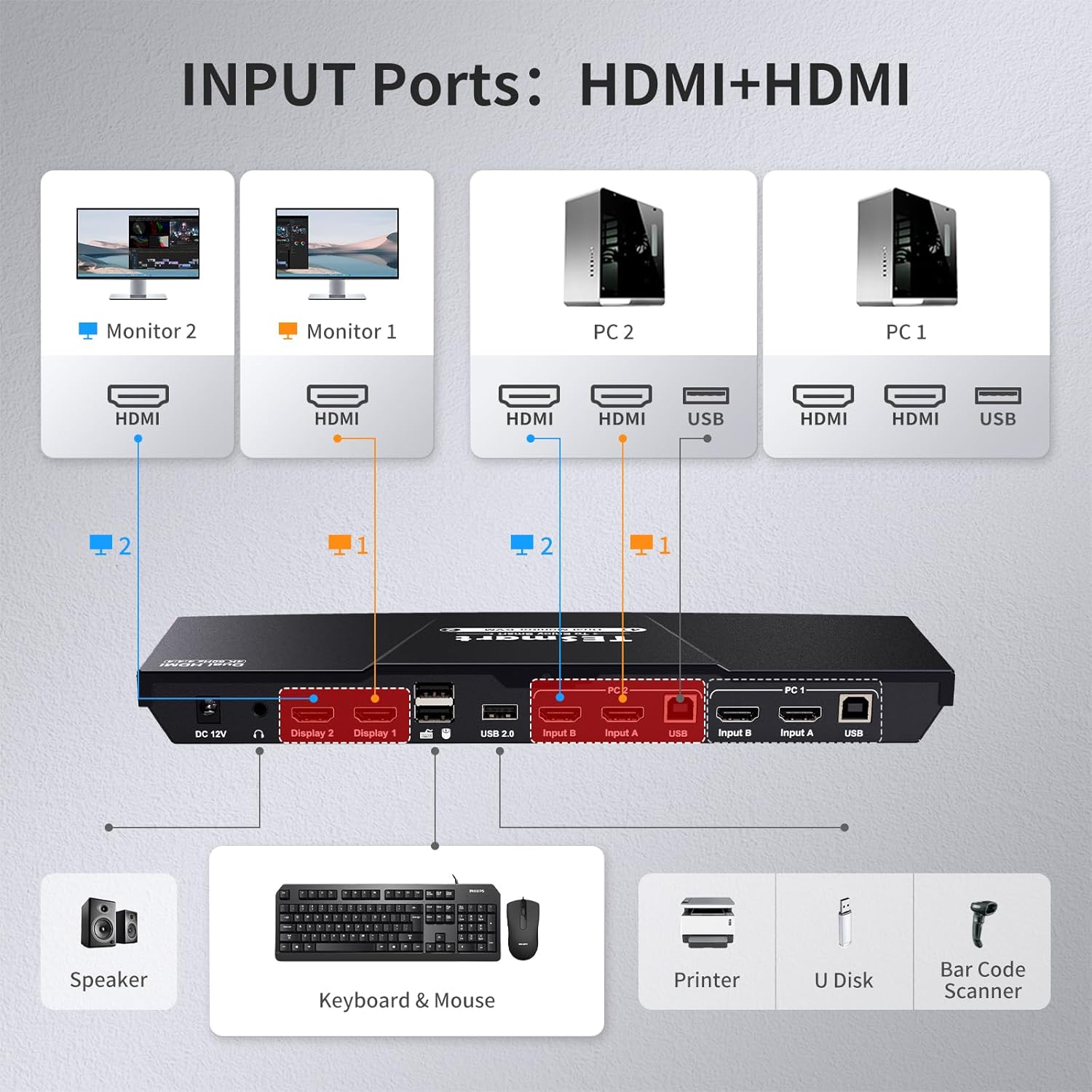
Figure 2: Detailed diagram of KVM switch input ports and connections.
Video 1: TESmart Dual HDMI 4x2 Dual Monitor KVM Switch 2 Port 4K@60Hz setup guide.
5. Bedienungsanleitung
The TESmart KVM switch offers multiple ways to control your connected devices.
5.1 Wechseln zwischen Computern
Sie können zwischen PC1 und PC2 mit einer der folgenden Methoden umschalten:
- Taste auf der Vorderseite: Press the 'Selection' button on the front panel of the KVM switch.
- IR-Fernbedienung: Use the provided IR remote control to select the desired PC input.
- Tastatur-Hotkeys: Use predefined keyboard combinations to switch inputs. Refer to the user manual for specific hotkey combinations.

Abbildung 3: Überview of available switching methods.
5.2 Anzeigemodi
The KVM switch supports two primary display modes:
- Mode 1: One PC Across Two Monitors (Extended or Mirrored): Both monitors display content from a single PC, either extending the desktop or mirroring the display.
- Mode 2: Two PCs on Two Monitors (Respective Display): Each monitor displays content from a different PC.

Figure 4: Illustration of the two display modes.
5.3 Audio Output Selection
To select the correct audio output device:
- Right-click on the 'Sound settings' icon in the lower right corner of your desktop and open the sound settings.
- Select the correct audio output device. The audio will then be routed through the L/R port on the KVM switch.
6. Fehlerbehebung
- Kein Bild/Flackern: Ensure all HDMI and USB cables are securely connected. Verify that your laptop is capable of dual monitor output. If using adapters (e.g., DisplayPort to HDMI), ensure they are compatible and configured correctly (e.g., NVIDIA control panel dynamic range from limited to full). Try powering the KVM unit off and back on.
- Probleme mit Tastatur/Maus: Ensure wired or 2.4G wireless (with receiver) keyboards/mice are plugged into the dedicated K&M ports for seamless switching. Bluetooth devices are not supported. If using a mouse with extra buttons and experiencing input issues, try plugging the mouse into a generic USB 2.0 port instead of the dedicated mouse port.
- Display Settings Change: The built-in EDID emulators should prevent display setting changes when switching inputs in extended display mode. If this occurs, verify connections and KVM settings.
- Hotkey-Umschaltung funktioniert nicht: If your keyboard is connected to the USB 2.0 port, hotkey switching may not be supported. Connect the keyboard to a dedicated K&M port.
- Purple Screen/Inconsistent Signal: This can indicate a cable issue, an incompatible adapter, or a problem with the KVM unit itself. Try different HDMI cables, ensure adapters are high-quality and compatible, and power cycle the KVM.
7. Spezifikationen
- Modellnummer: HKS202-E23
- Produktabmessungen: 11.81 x 4.33 x 1.18 Zoll
- Gewicht: 1 Pfund
- Material: Metall
- Betriebsmodus: EIN-AUS
- Aktuelle Bewertung: 2 Amps
- Betriebslautstärketage: 12 Volt (DC)
- Schaltertyp: Druckknopf
- Als Erstes verfügbar: 8. Januar 2020
8. Garantie und Support
The TESmart HDMI KVM Switch HKS202-E23 comes with a 1-year warranty. For any questions or concerns, please contact the TESmart customer experience design team.


