1. Einleitung
The V7 KW550ESBT Bluetooth Keyboard is designed to enhance your productivity with versatile connectivity options. This compact, ultra-slim keyboard offers a comfortable and quiet typing experience, featuring laser-etched keys for long-lasting durability. It supports connection to multiple devices via Bluetooth or a 2.4 GHz USB dongle.
Zu den Hauptmerkmalen gehören:
- Seamless switching between up to 2 Bluetooth devices or connection via the included 2.4 GHz USB dongle.
- Scissor-switch keys for comfortable and quiet typing.
- Laser-etched keys for enhanced durability.
- Ultra-slim and compact design.
- Includes two AAA batteries for immediate use.
2. Packungsinhalt
Bitte prüfen Sie das Paket auf folgende Artikel:
- V7 KW550ESBT Bluetooth Keyboard
- 2.4 GHz USB Receiver (dongle)
- 2 x AAA-Batterien
- Benutzerhandbuch (dieses Dokument)

Image: The V7 KW550ESBT keyboard shown with its accompanying 2.4 GHz USB receiver, ready for connection.
3. Einrichtung
3.1. Einlegen der Batterie
- Suchen Sie das Batteriefach an der Unterseite der Tastatur.
- Öffnen Sie die Abdeckung des Batteriefachs.
- Legen Sie die beiden AAA-Batterien ein und achten Sie dabei auf die richtige Polarität (+/-).
- Schließen Sie den Batteriefachdeckel fest.
3.2. Connecting via 2.4 GHz USB Dongle
- Remove the 2.4 GHz USB receiver from its storage slot (usually within the battery compartment or a dedicated slot).
- Stecken Sie den USB-Empfänger in einen freien USB-Anschluss Ihres Computers oder Geräts.
- The keyboard should automatically connect. If not, ensure the keyboard is powered on and the connection indicator light (if present) is active.
3.3. Verbindung über Bluetooth
The V7 KW550ESBT keyboard supports connecting to up to two Bluetooth devices.
- Stellen Sie sicher, dass die Tastatur eingeschaltet ist.
- Press and hold the Bluetooth pairing key (refer to keyboard layout for specific key, often indicated by a Bluetooth symbol or 'BT1'/'BT2') for a few seconds until the Bluetooth indicator light starts blinking, indicating it's in pairing mode.
- Gehen Sie auf Ihrem Gerät (Computer, Tablet, Smartphone) zu den Bluetooth-Einstellungen.
- Suchen nach available devices and select "V7 KW550ESBT" (or similar name) from the list.
- Folgen Sie den Anweisungen auf dem Bildschirm, um den Kopplungsvorgang abzuschließen. Möglicherweise werden Sie aufgefordert, einen auf dem Bildschirm angezeigten Code über die Tastatur einzugeben.
- Repeat for a second Bluetooth device if desired, using the other Bluetooth pairing key.
3.4. Wechseln zwischen verbundenen Geräten
To switch between connected devices (Bluetooth 1, Bluetooth 2, or 2.4 GHz USB), press the corresponding function key (e.g., Fn + BT1, Fn + BT2, or Fn + 2.4G if available). Refer to your keyboard's specific layout for these keys.
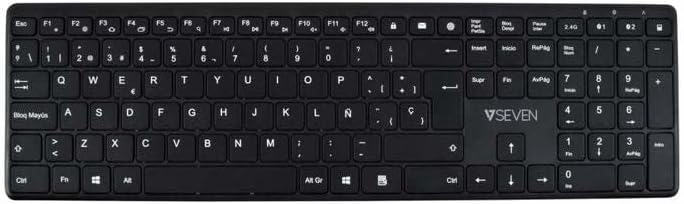
Bild: Draufsicht view of the V7 KW550ESBT keyboard, showing the full QWERTY layout and function keys.
4. Bedienung der Tastatur
4.1. Standard Key Functions
The keyboard features a standard QWERTY layout with all essential alphanumeric keys, punctuation, and modifier keys (Shift, Ctrl, Alt, Windows/Command).
4.2. Multimedia- und Funktionstasten
The top row of keys (F1-F12) often doubles as multimedia or special function keys. These functions are typically accessed by pressing the Fn key simultaneously with the desired F-key. Common functions include:
- Lautstärkeregelung (stumm, verringern, erhöhen)
- Media playback (play/pause, previous, next)
- Einstellung der Bildschirmhelligkeit
- Suchfunktion
- Bildschirm sperren
Refer to the icons printed on your specific keyboard's F-keys for exact functionality.
4.3. Leises Tipperlebnis
The scissor-switch key design minimizes typing noise, making it suitable for quiet environments.

Bild: Seitenansichtfile of the V7 KW550ESBT keyboard, highlighting its ultra-slim design.
5. Wartung
5.1. Reinigung
So reinigen Sie Ihre Tastatur:
- Turn off the keyboard and disconnect it from your device.
- Mit einem weichen, fusselfreien Tuch leichtampMit Wasser oder einer milden Reinigungslösung reinigen.
- Wischen Sie die Tastenkappen und die Oberfläche vorsichtig ab. Vermeiden Sie übermäßige Feuchtigkeit.
- Für Staub und Schmutz zwischen den Tasten verwenden Sie Druckluft.
5.2. Batteriewechsel
When the keyboard's performance degrades or the battery indicator (if present) signals low power, replace the AAA batteries as described in Section 3.1.
6. Fehlerbehebung
If you encounter issues with your V7 KW550ESBT keyboard, try the following solutions:
| Problem | Mögliche Lösung |
|---|---|
| Tastatur reagiert nicht |
|
| Die Tasten klemmen oder reagieren nicht. |
|
| Die Bluetooth-Kopplung schlägt fehl |
|
7. Spezifikationen
| Besonderheit | Detail |
|---|---|
| Marke | V7 |
| Modellnummer | KW550ESBT |
| Konnektivitätstechnologie | Bluetooth, 2.4 GHz Wireless (USB Dongle) |
| Tastaturbeschreibung | Multimedia |
| Empfohlene Verwendung | Büro |
| Besonderheit | Bluetooth |
| Farbe | Schwarz |
| Stil | Klassiker |
| Technische Daten | 16.1L x 4.7B x 0.8H Zentimeter |
| Material | Plastik |
| Stromquelle | 2 x AAA-Batterien (im Lieferumfang enthalten) |
8. Garantie und Support
For warranty information and technical support, please refer to the documentation provided with your purchase or visit the official V7 webBewahren Sie Ihren Kaufbeleg für Garantieansprüche auf.