1. Einleitung
Vielen Dank für Ihren Einkauf.asing the ICON 12-inch Bluetooth Speaker. This manual provides detailed instructions for the safe and efficient operation of your new speaker. Please read this manual thoroughly before use and retain it for future reference.
2. Packungsinhalt
- ICON 12-inch Bluetooth Speaker
- Stromkabel
- Drahtloses Mikrofon
- Fernbedienung
- Bedienungsanleitung

Image: The ICON Bluetooth speaker shown with its included wireless microphone and remote control, highlighting the complete package contents.
3. Produktüberschreitungview
The ICON 12-inch Bluetooth Speaker is a versatile audio system designed for various applications, offering powerful sound output and multiple connectivity options. It features a built-in rechargeable battery for portability and integrated wheels and a retractable handle for easy transport.

Bild: Vorderseite view of the ICON 12-inch Bluetooth Speaker, showcasing its robust design and blue illuminated woofer.

Bild: Rückseite view of the ICON 12-inch Bluetooth Speaker, displaying the main control panel and retractable handle.
Hauptmerkmale:
- Powerful 6000W PMPO Output
- Bluetooth Connectivity for Wireless Streaming
- USB and SD Card Playback
- 3.5-mm-AUX-Eingang
- Integriertes FM-Radio
- Mikrofon- und Gitarreneingänge
- Rechargeable Battery for Extended Playtime
- Integrated Equalizer for Sound Customization
- TWS (True Wireless Stereo) Functionality for connecting multiple speakers
- LED-Lichteffekte

Image: Visual representation of the ICON Bluetooth Speaker's key features, including excellent sound quality, Bluetooth compatibility, AUX input, rechargeable battery, FM radio, and equalizer.
4. Einrichtung
4.1 Erstaufladung
Before first use, fully charge the speaker's internal battery. Connect the power cable to the AC INPUT port on the rear panel and plug it into a standard wall outlet. The charging indicator will illuminate. Charging time may vary.
4.2 Bedienfeld vorbeiview
Familiarize yourself with the control panel located on the rear of the speaker.
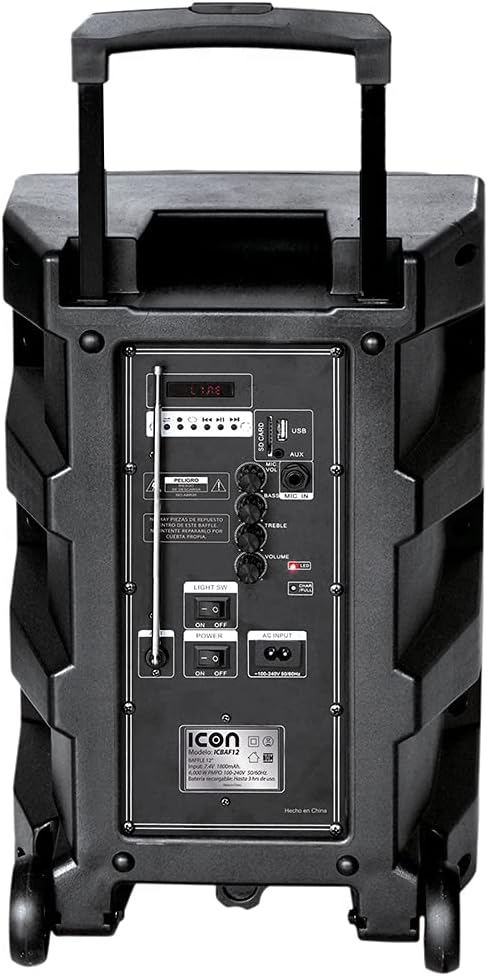
Bild: Detailliert view of the ICON speaker's rear control panel, showing various inputs, volume, treble, and bass controls.
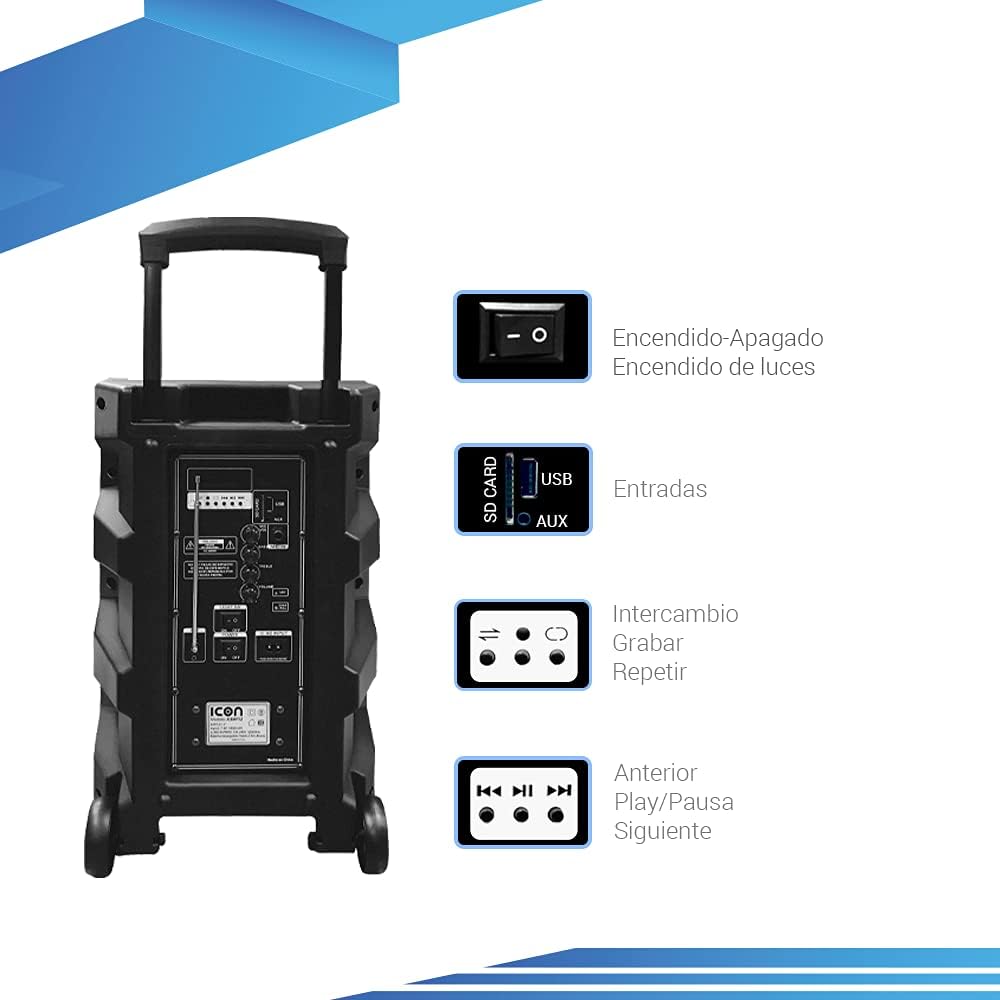
Image: Diagram illustrating key controls on the ICON speaker, including the power switch, light switch, input ports (SD Card, USB, AUX), and playback control buttons (Mode Switch, Record, Repeat, Previous, Play/Pause, Next).
- Stromschalter: Turns the speaker On or Off.
- LICHT SW: Toggles the LED light effects On or Off.
- SD CARD / USB / AUX Inputs: For connecting external media or devices.
- MODE-Schalter: Schaltet die Eingangsmodi durch (Bluetooth, USB, SD, AUX, FM).
- Aufnahmetaste: Initiates recording (e.g., microphone input to USB/SD).
- REPEAT-Taste: Wiederholt den aktuellen Titel oder die aktuelle Playlist.
- PREVIOUS / PLAY/PAUSE / NEXT Buttons: Standard-Medienwiedergabesteuerung.
- Lautstärkeregler: Stellt die Master-Lautstärke ein.
- TREBLE / BASS Knobs: Adjusts high and low frequencies.
- MIC INPUT / GUITAR INPUT: For connecting microphones and guitars.
5. Bedienungsanleitung
5.1 Ein-/Ausschalten
To turn the speaker ON, flip the LEISTUNG switch to the 'ON' position. To turn it OFF, flip the switch to 'OFF'.
5.2 Bluetooth-Kopplung
- Schalten Sie den Lautsprecher ein. Er wechselt automatisch in den Bluetooth-Kopplungsmodus, was durch ein blinkendes Bluetooth-Symbol auf dem Display angezeigt wird.
- Aktivieren Sie auf Ihrem Mobilgerät (Smartphone, Tablet, Laptop) Bluetooth und suchen Sie nach verfügbaren Geräten.
- Select "ICON Speaker" (or similar name) from the list of devices.
- Once paired, the speaker will emit a confirmation sound, and the Bluetooth icon will stop flashing. You can now play audio wirelessly from your device.
5.3 USB/SD-Karten-Wiedergabe
- Stecken Sie einen USB-Stick oder eine SD-Karte (mit MP3-Audiodateien) ein. files) in den jeweiligen Anschluss.
- The speaker will automatically switch to USB/SD mode and begin playing the first compatible track. If not, press the MODUS button to select USB/SD mode.
- Verwenden Sie die VORHERIGE, WIEDERGABE/PAUSE, Und NÄCHSTE Tasten zur Steuerung der Wiedergabe.
5.4 AUX-Eingang
Schließen Sie ein externes Audiogerät (z. B. MP3-Player, Computer) an den/die/das an. AUX input using a 3.5mm audio cable. Press the MODUS Drücken Sie die Taste, bis der AUX-Modus ausgewählt ist.
5.5 FM-Radiobetrieb
- Drücken Sie die MODUS Taste zum Umschalten in den FM-Radiomodus.
- Halten Sie die WIEDERGABE/PAUSE Taste zum automatischen Scannen und Speichern verfügbarer FM-Sender.
- Verwenden Sie die VORHERIGE Und NÄCHSTE Tasten zur Navigation zwischen gespeicherten Sendern.
5.6 Microphone and Guitar Usage
Plug your microphone or guitar into the respective MIC INPUT or GITARREN-EINGANG jacks. Adjust the volume using the main VOLUMEN knob and any dedicated microphone/guitar volume controls if present.
5.7 TWS (True Wireless Stereo) Funktion
The TWS function allows you to connect two ICON speakers wirelessly for a true stereo sound experience.
- Stellen Sie sicher, dass beide Lautsprecher eingeschaltet und nicht mit einem Bluetooth-Gerät verbunden sind.
- On one speaker (this will be the master), press and hold the TWS button (if available, or a combination of buttons as per specific model instructions, often the 'Mode' button or a dedicated TWS button).
- The speaker will search for another TWS-compatible speaker. Once connected, you will hear a confirmation sound.
- Now, connect your mobile device to the master speaker via Bluetooth as described in section 5.2. Audio will play through both speakers in stereo.
6. Wartung
6.1 Reinigung
Wipe the speaker's exterior with a soft, dry cloth. Do not use abrasive cleaners, waxes, or solvents. Ensure no liquids enter the speaker's openings.
6.2 Batteriepflege
- Um die Lebensdauer des Akkus zu verlängern, vermeiden Sie häufiges vollständiges Entladen des Akkus.
- Recharge the battery regularly, even if the speaker is not in use for extended periods (e.g., every 3 months).
- Bewahren Sie den Lautsprecher bei Nichtgebrauch an einem kühlen, trockenen Ort auf.
6.3 Speicherung
When storing the speaker for a long time, ensure it is turned off and disconnected from the power source. Store it in a clean, dry environment away from extreme temperatures and direct sunlight.
7. Fehlerbehebung
| Problem | Mögliche Ursache | Lösung |
|---|---|---|
| Der Lautsprecher lässt sich nicht einschalten. | Battery is depleted; Power cable not connected; Power switch is OFF. | Charge the speaker; Ensure power cable is securely connected; Flip POWER switch to ON. |
| Kein Ton. | Volume is too low; Incorrect input mode selected; Device not connected properly. | Increase volume; Press MODE button to select correct input; Reconnect device/re-pair Bluetooth. |
| Die Bluetooth-Verbindung schlägt fehl. | Lautsprecher nicht im Kopplungsmodus; Gerät zu weit entfernt; Störungen. | Stellen Sie sicher, dass sich der Lautsprecher im Kopplungsmodus befindet; Bringen Sie das Gerät näher heran; Schalten Sie andere Bluetooth-Geräte aus. |
| Verzerrter Ton. | Volume too high; Audio source quality is poor. | Reduce volume; Try a different audio source. |
| Mikrofon funktioniert nicht. | Microphone not plugged in correctly; Microphone volume too low; Microphone batteries dead (if wireless). | Ensure microphone is fully inserted; Adjust microphone volume; Replace microphone batteries. |
8. Spezifikationen
| Besonderheit | Spezifikation |
|---|---|
| Modellnummer | US-ICBAF12 |
| Ausgangsleistung | 6000 Watt PMPO |
| Lautsprechergröße | 12 Zoll |
| Konnektivitätstechnologie | Bluetooth, USB, AUX, SD Card |
| Kompatible Geräte | Laptops, Smartphones |
| Stromquelle | Rechargeable Battery, AC Input |
| Produktabmessungen (L x B x H) | 38 x 36.5 x 54 cm |
| Produktgewicht | 7.62 kg |
| Besondere Merkmale | Bluetooth, FM Radio, Microphone Input, Guitar Input, TWS Function, LED Lights |

Image: Packaging of the ICON Bluetooth Speaker, displaying key features and product dimensions (37.5 cm x 36 cm x 54 cm).
9. Garantie und Support
This product is covered by a limited warranty. Please refer to the warranty card included in your package for specific terms and conditions. For technical support, troubleshooting assistance, or warranty claims, please contact your retailer or the manufacturer's customer service department. Keep your purchase receipt as proof of purchase.
For more information, visit the official ICON store on Amazon: ICON Store


