1. Einführung und Endeview
The iCharger X6 is a compact and powerful DC smart battery balance charger and discharger designed for various battery types. Featuring a 2.4-inch IPS LCD screen, it provides detailed information and control over charging processes. This manual provides essential information for safe and efficient operation of your iCharger X6.
Wichtige Spezifikationen:
- Anzeige: 2.4" IPS-LCD (320x240)
- Unterstützte Batterietypen: 6s LiPo, LiLo, LiFe, LiHv, LTO, NiZn, Pb Battery, 1-20s NiMH/NiCd
- Eingangslautstärketage: 7-32 V DC
- Max Limited Current: <35 A
- Max Charging/Discharging Current: 30 A
- Digital Power Max Output Voltage/Aktuell: 26.5 V/30 A
- Maximale Ladeleistung: 800 W
- Maximale Entladeleistung: 30 W
- Max Regenerative Discharging Power: 800 W
- Max Extra Discharging Power: 900W@30V/30A
- Max Balance Current: >2.0 A
- Gewicht: Ca. 170g
- Größe: Ungefähr 83 * 64.5 * 36.5 mm
2. Sicherheitshinweise
WARNUNG: Never use the charger unsupervised! Always read the entire operating manual before using this charger. Operate the charger in a well-cooled and ventilated place. Failure to observe safety procedures outlined in the manual may cause serious injury or property damage.
Lithium Polymer (LiPo) batteries pose a severe risk of fire or explosion if not properly handled. Always follow manufacturer guidelines for charging, discharging, and storage. Keep batteries away from flammable materials and surfaces.
Ensure correct battery type and cell count settings before initiating any process. Incorrect settings can lead to overcharging, overheating, and potential hazards.
Keep the charger away from moisture, dust, and extreme temperatures. Do not operate the charger if it appears damaged.

Abbildung: Rückseite view of the iCharger X6, showing the warning label and cooling fins.
3. Produktmerkmale
- Kompaktes Design: Small and lightweight, ideal for portability.
- Hohe Ausgangsleistung: Up to 800W charging power and 30A current.
- Vielseitige Akkuunterstützung: Compatible with a wide range of battery chemistries and cell counts.
- Intuitiver LCD-Bildschirm: 2.4-inch IPS display for clear data visualization and easy navigation.
- Digital Power Function: Can act as a digital power supply with adjustable output.
- Regenerative Discharge: Efficiently discharges batteries by feeding energy back into the power source.
- Erweiterte Sicherheitsfunktionen: Includes capacity cut-off, safety timer, and temperature cut-off.
4. Einrichtung
Before operating the iCharger X6, ensure you have a stable DC power source (7-32VDC) capable of supplying the required current for your charging needs. The charger does not include an AC power supply and requires an external DC source.
4.1 Connecting the Power Source
- Connect your DC power supply to the input port on the iCharger X6. Ensure correct polarity (positive to positive, negative to negative).
- Überprüfen Sie die Eingabelautstärketage is within the 7-32VDC range.
4.2 Anschließen der Batterie
- Identify the main discharge lead of your battery and connect it to the main output port (e.g., XT60) on the charger.
- Connect the battery's balance lead to the corresponding balance port on the side of the charger. Ensure the correct pin configuration for your battery's cell count.

Abbildung: Seite view of the iCharger X6, highlighting the main output port and the balance port for battery connection.
5. Bedienungsanleitung
The iCharger X6 features a rocker switch for navigation and selection. Press the switch to enter/confirm, and rock it left/right to navigate menus and adjust values.
5.1 Hauptmenünavigation
Upon startup, the charger displays the main screen. Use the rocker switch to scroll through different program selections such as LiPo BATT, Li Batt Meter, User Set Program, Pb BATT, NiCd BATT, etc.
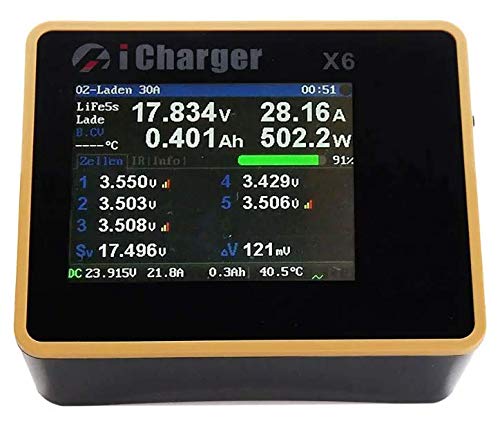
Image: The iCharger X6 LCD screen showing real-time charging data including voltage, current, and cell balance.
5.2 Laden einer Batterie
- From the main menu, select the appropriate battery type (e.g., LiPo BATT).
- Navigate to the desired charging mode (e.g., LiPo BALANCE for balanced charging, LiPo CHARGE for regular charging, or LiPo FAST CHG for faster charging without full balancing). Balanced charging is recommended for optimal battery health and longevity.
- Adjust the charging current (Amps) and confirm the correct cell count (e.g., 6S for a 6-cell battery). The charger may automatically detect the cell count when the balance lead is connected.
- Press and hold the rocker switch to start the charging process. The screen will display real-time charging data.
- To stop charging, press the rocker switch once and confirm the stop action.
5.3 Discharging a Battery
- Select the battery type and then choose LiPo DISCHARGE.
- Set the desired discharge current and the target discharge voltage pro Zelle.
- Press and hold the rocker switch to begin discharging.
5.4 Storage Charging
Storage charging brings the battery to an optimal voltage level for long-term storage, preserving battery health.
- Select the battery type and choose LiPo STORAGE.
- The charger will automatically set the recommended storage voltage. Adjust the current if necessary.
- Press and hold the rocker switch to start the storage process.
6. Wartung
Regular maintenance ensures the longevity and safe operation of your iCharger X6.
- Reinigung: Halten Sie das Ladegerät sauber und frei von Staub und Schmutz. Verwenden Sie zum Reinigen ein weiches, trockenes Tuch. Verwenden Sie keine flüssigen Reinigungsmittel.
- Belüftung: Ensure the cooling vents are unobstructed to prevent overheating. Operate in a well-ventilated area.
- Kabelinspektion: Überprüfen Sie regelmäßig alle Kabel und Steckverbinder auf Anzeichen von Verschleiß, Beschädigung oder Korrosion. Beschädigte Kabel müssen umgehend ausgetauscht werden.
- Firmware-Updates: Überprüfen Sie die Angaben des Herstellers webWebsite für alle verfügbaren Firmware-Updates, um optimale Leistung und Zugriff auf neue Funktionen zu gewährleisten.
7. Fehlerbehebung
If you encounter issues with your iCharger X6, refer to the following common troubleshooting steps:
- Ladegerät schaltet sich nicht ein: Verify the DC input voltage is within the specified range (7-32VDC) and that the power supply is functioning correctly. Check all power connections for secure contact.
- Charging Error/Warning Message: Check the battery type and cell count settings. Ensure the balance lead is correctly connected and all cells are within a healthy voltage range. Refer to the specific error code on the screen for more details.
- Langsamer Ladevorgang: Confirm the charging current setting is appropriate for your battery's capacity. Ensure your power supply can deliver sufficient wattage und aktuell.
- Unausgewogene Zellen: If cells remain unbalanced after a balance charge, the battery may be damaged or nearing the end of its life cycle. Consider replacing the battery.
- Bildschirmprobleme: If the screen is unresponsive or blank, try restarting the charger. If the issue persists, contact customer support.
8. Spezifikationen
| Besonderheit | Spezifikation |
|---|---|
| Anzeige | 2.4" IPS-LCD (320x240) |
| Unterstützte Batterietypen | 6s LiPo, LiLo, LiFe, LiHv, LTO, NiZn, Pb Battery, 1-20s NiMH/NiCd |
| Eingangslautstärketage | 7-32 V DC |
| Max Limited Current | <35 A |
| Max Charging/Discharging Current | 30 A |
| Digital Power Max Output Voltage/Aktuell | 26.5 V/30 A |
| Maximale Ladeleistung | 800 W |
| Maximale Entladeleistung | 30 W |
| Max Regenerative Discharging Power | 800 W |
| Max Extra Discharging Power | 900W@30V/30A |
| Max. Ausgleichsstrom | >2.0 A |
| Gewicht | Ca. 170 g (6 Unzen) |
| Größe (Abmessungen) | 83 x 64.5 x 36.5mm (1.44"D x 2.54"W x 1.44"H) |
| Hersteller | Junsi |
9. Garantie und Support
Spezifische Garantieinformationen sind in der Produktinformation nicht enthalten. Bitte wenden Sie sich an den offiziellen Hersteller. website or contact your retailer for warranty terms and conditions. For technical support, troubleshooting assistance, or service inquiries, please contact iCharger customer service or the authorized distributor from whom you purchased the product.


